

If you’re looking for a reliable way to streamline your small business packaging, a thermal label printer is a game-changer.
Spoiler Alert: It was this one: The SUPVAN T50M Pro Bluetooth Label Maker
To learn why - plus some ideas for how to use it - keep reading ;)
As an Amazon Associate, I earn from qualifying purchases. This is at no additional cost to you.
Whether you’re shipping products, adding a personal touch to your packages, or upgrading your branding, the right thermal label printer makes it easy to create high-quality labels without the mess of ink or toner.
Here’s the thing: I already have a thermal printer I love — that was equally game-changing, when I bought it a year or so into my business. It’s a Rollo printer, like this one. It’s great for 4x6" shipping labels — but trying to print more decorative labels, like 2" x 2" round labels, wasn’t working well: it would skip around (so much waste, omg), print off-center, and the quality was just ok. It made me nervous every time I tried to print them that they’d ruin my printer.
Since it was Black Friday weekend, I decided to look at what else was available. I didn’t want to spend a lot — but needed something that was sturdy and simple to use.
Why Use a Thermal Printer?
Thermal printing doesn’t use ink or toner, so you save money and avoid the hassle of replacements. It’s also fast, efficient, and ideal for creating high-quality labels with minimal effort.
Investing in a thermal label printer is a smart move for small businesses looking to elevate their packaging and improve efficiency. Whether you’re sealing envelopes, decorating packages, or building your brand, creating decorative labels are a simple way to stand out and leave a lasting impression.
One drawback, of course, is that a thermal printer only prints in black - because there's no ink. But, aside from this, it's a great, simple, cost-effective printing solution.
What Can You Use Decorative Labels For?
Decorative labels (like these 2" round labels or these silver holo ones) are super versatile and can be used for a variety of purposes, including:
- Package Sealing: Secure your packages with custom branded labels.
- Envelope Decorating: Add a personal touch to your outgoing mail with themed stickers or custom designs.
- Thank You Labels: Show appreciation to your customers by including a “thank you” label on the outside or inside of your package.
- QR Codes: Direct customers to your website, social media, or exclusive offers with scannable QR code stickers.
- Social Sharing: Use branded labels with your social handles or hashtags to encourage customers to share their unboxing experience.
- Branding: Create consistent, professional branding with custom logos and designs on every package.
And, when you DIY them, you have the option to print one or many; in any design you’d like; and have unlimited customization options.
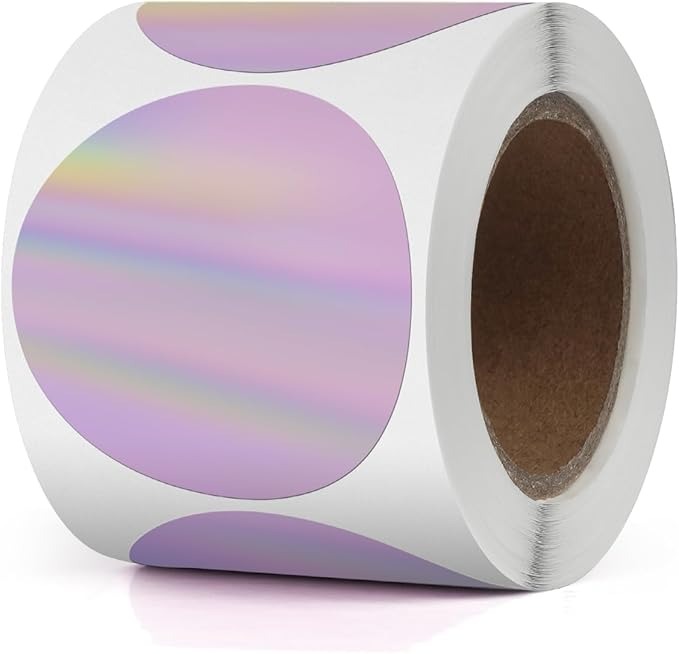
2" x 2" Round Labels for Thermal Printers
Features to Look for in a Thermal Label Printer
When choosing a thermal label printer for 2" round labels (or other decorative/non-shipping labels), here are a few features you’ll want to keep in mind:
- Label Size Compatibility: Not all printers handle 2" round labels, so double-check that the printer supports this size.
- Wireless Connectivity: Bluetooth or Wi-Fi options make printing from your phone or computer quick and easy.
- Custom Design Software: Many printers come with software or app compatibility that lets you design your labels in minutes.
- Durability: Look for a printer with high-resolution printing and reliable performance to avoid blurry or misaligned labels.
- Price Point: There is a HUGE range of thermal printer prices. You can find some on sale for as little as about $20, all of the way up to a few hundred dollars.
So Which One Did I End Up With?
When I ordered this one, I wasn’t sure what to expect. I was actually prepared to return it: I tried another lower-priced printer several years ago and hated it. The print quality was terrible and the app was difficult to use. Instead, I was surprised by how easy set up was: I had my first label printed within about 5 minutes.
The SUPVAN T50M Pro Bluetooth Label Maker
Here's what I loved:
- Easy to Use: From setup to printing, this printer is incredibly user-friendly, even if you’re not tech-savvy.
- High-Quality Prints: The labels come out crisp and dark, making your designs pop and look professional.
- Adjustable Print Density: You can easily tweak the print density for the perfect balance of clarity and boldness.
- Wireless Capability: Connect seamlessly via Bluetooth or Wi-Fi, making it effortless to print from your phone or computer.
- Design Flexibility: The printer makes it simple to create new designs or import your existing logos, saving you time.
- Smooth Performance: It works without hiccups, giving you reliable prints every time.
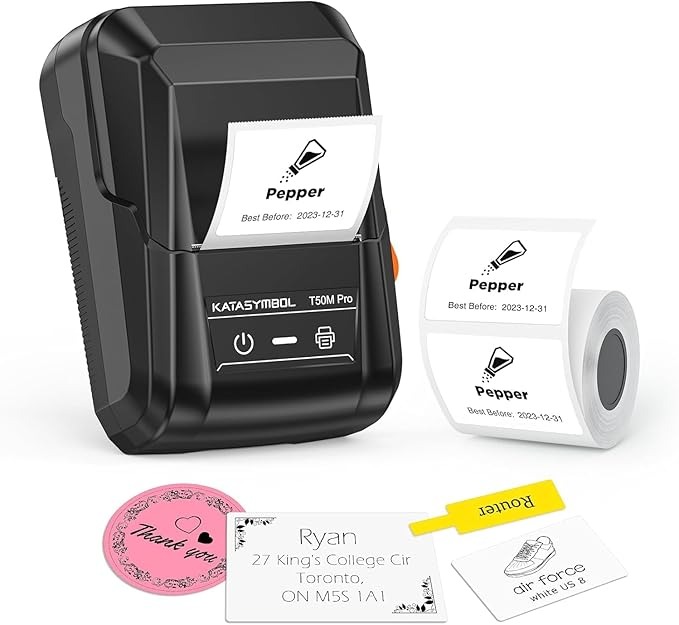
The SUPVAN T50M Pro Bluetooth Label Maker
I've only used it for a few labels so far, so I'll let you know if anything changes. In the meantime, if you're looking for a solid, easy to use, inexpensive label maker - I'd definitely recommend this one.
Comments ()