

Summary
Real estate photographers should begin treating digital alteration as part of the client-compliance workflow.
California already requires real estate licensees, and people acting on their behalf, to disclose certain digitally altered images used to market property for sale. The law specifically covers alterations made with traditional photo-editing software as well as artificial intelligence. When an image is altered by adding, removing, or changing property elements, the advertisement must include a reasonably conspicuous disclosure and provide access to the original image. Common corrections such as exposure, white balance, sharpening, straightening, cropping, and color correction are excluded when they do not change the representation of the property.
Wisconsin has enacted a related advertising rule that becomes effective January 1, 2027. New York currently has active legislation addressing materially altered photographs, videos, virtual staging, and virtual tours, while California is considering an extension of its disclosure framework to rental advertising.
At the same time, California’s broader AI Transparency Act became operative on August 2, 2026. That law places provenance and disclosure requirements on covered generative-AI providers and will add obligations for large online platforms beginning in 2027. Those provisions are separate from California’s real estate advertising rule, although the direction is useful for photographers to understand: image origin and modification history are becoming more visible parts of digital media.
My recommendation is straightforward: keep original files, document material edits, separate ordinary photographic correction from representational changes, and deliver altered versions in a way that lets the client comply with local law and MLS policy.
This article is an industry workflow analysis and does not replace legal advice. Advertising requirements vary by state, brokerage, MLS, and property type.
Table of Contents
- Why This Matters Now
- California Has Already Drawn a Clear Line
- What California Treats as a Digitally Altered Image
- Ordinary Photography Edits Still Have Room
- Virtual Staging Needs a New Delivery Workflow
- Object Removal Deserves More Attention
- Landscaping, Views, and Exterior Alterations
- What Wisconsin Is Doing
- New York Is Considering Broader Rules
- California May Extend the Rules to Rentals
- Why Zillow Is Talking About AI Transparency
- The New AI Provenance Layer
- What Photographers Should Change in Their Workflow
- How to Structure Client Approval
- How to Deliver Altered and Original Files
- Update Your Service Descriptions and Policies
- What Editing Services Still Make Sense
- What Photographers Should Avoid
- Frequently Asked Questions
- Recommended REPT Course Lessons
Why This Matters Now
Real estate photographers have been digitally changing photographs for years.
We brighten dark rooms, correct white balance, blend windows, remove sensor dust, straighten verticals, recover highlights, and control mixed lighting. Photoshop made more substantial edits possible long before generative AI arrived.
What has changed is the speed and accessibility of those larger alterations.
Removing a neighboring building, replacing a dead lawn, changing kitchen cabinets, adding furniture, rebuilding a damaged wall, or inventing a sunset can now take minutes. A person with very little editing experience can produce a convincing result.
That capability has started attracting regulatory attention.
Zillow published an industry statement on July 22, 2026 describing misleading AI-generated listing imagery as a growing problem and arguing for disclosure and transparency. The company pointed specifically to laws in California and Wisconsin and pending legislation elsewhere.
For photographers, this deserves attention because agents frequently assume the person editing the photograph understands what is permissible.
A client may send a simple request:
Can you make the grass green?
or:
Can you remove that utility pole?
or:
Can you stage this room with AI?
The editing task may take two minutes. The marketing consequences can last through the entire listing campaign.
The photographer should know when the request crosses from normal photographic finishing into representational alteration.
Professional Tip
Add one question to your workflow whenever a requested edit changes an object, material, landscape feature, view, furnishing, fixture, or structural condition: Does the client need the original version and a disclosure with this image?
You do not need to make the legal decision for the agent. You should give them enough information and files to make that decision properly.
California Has Already Drawn a Clear Line
California Assembly Bill 723 was signed in October 2025 and became effective January 1, 2026.
The resulting Business and Professions Code Section 10140.8 applies to real estate brokers, salespeople, and people acting on their behalf when digitally altered images are used in advertising or promotional material for the sale of real property.
When the rule applies, the advertisement must include a reasonably conspicuous statement telling the viewer that the image has been altered.
The viewer must also be given access to the original, unaltered image.
For advertising placed on a website controlled by the broker, salesperson, or person acting on their behalf, the original image must be included or made available through a publicly accessible link.
This changes the workflow around virtual staging and major retouching.
A photographer serving California clients should no longer think only about delivering the final JPEG. The original image can become part of the required marketing record.
The California Department of Real Estate reinforced this point in a March 17, 2026 advisory. DRE told licensees that AI-generated advertising still must be truthful and accurate and specifically reminded them that digitally altered images are subject to the disclosure requirements in Section 10140.8.
What California Treats as a Digitally Altered Image
California’s definition is broad.
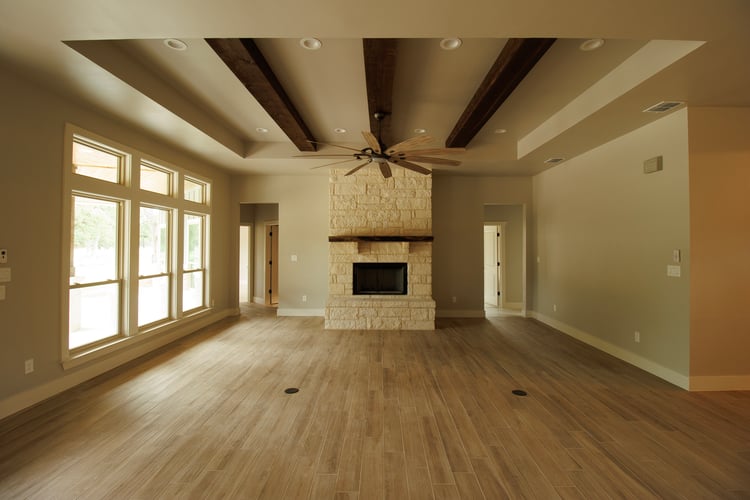
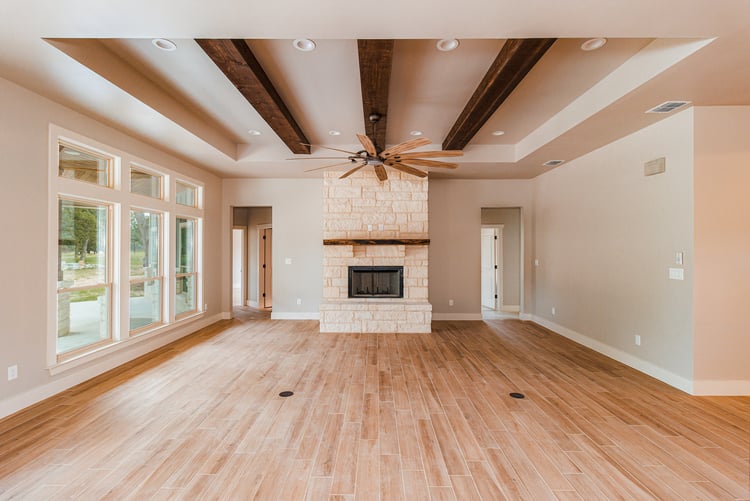
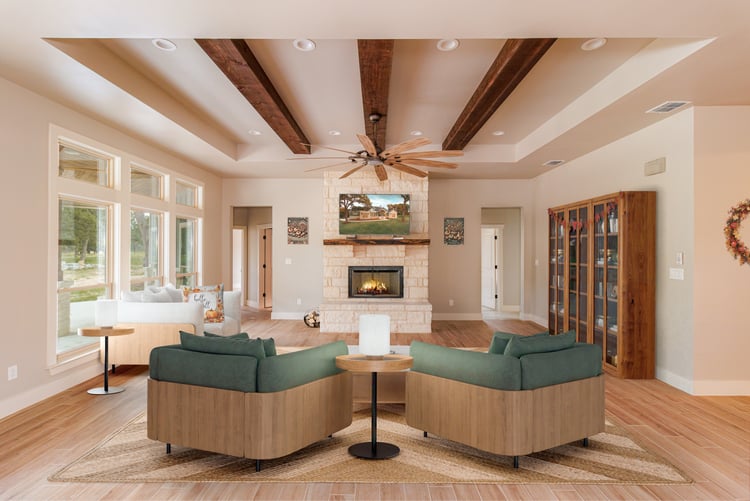
The statute covers images altered through photo-editing software or artificial intelligence when elements have been added, removed, or changed.
Examples listed directly in the law include:
- Fixtures
- Furniture
- Appliances
- Flooring
- Walls
- Paint color
- Hardscape
- Landscaping
- Facade
- Floor-plan elements
- Streetlights
- Utility poles
- Views through windows
- Neighboring properties
The phrase “including, but not limited to” matters here. The list provides examples rather than a complete catalog of every possible alteration.
From a photography-business perspective, this means the software used to make the change is secondary.
A manually cloned utility pole in Photoshop and an AI-generated removal may produce the same representational issue.
A traditional virtual-staging service and a generative-AI staging tool both add furniture that did not exist during capture.
California’s statute is written broadly enough to address the change itself.
Ordinary Photography Edits Still Have Room
The California law specifically excludes several common photographic adjustments when they do not change the representation of the property.
Those include:
- Lighting
- Sharpening
- White balance
- Color correction
- Angle correction
- Straightening
- Cropping
- Exposure adjustments
- Similar common photographic corrections
That distinction is important for professional photographers.
Exposure blending does not suddenly become prohibited because software is involved.
Correcting an orange color cast from tungsten lighting remains normal photographic work.
Straightening converging verticals remains normal.
Recovering window highlights remains normal when the resulting view accurately represents what was visible from the property.
The practical line is whether the edit changes what the property appears to contain, look like, or offer.
A Useful Working Classification
EditPractical TreatmentExposure correctionNormal photographic editWhite-balance correctionNormal photographic editVertical correctionNormal photographic editCroppingNormal photographic editSharpeningNormal photographic editColor correctionNormal photographic edit when property representation remains accurateVirtual furnitureMaterial alteration; retain original and plan for disclosureChanging wall paint colorMaterial alterationReplacing flooringMaterial alterationRemoving a utility poleMaterial alterationRemoving neighboring structuresMaterial alterationChanging landscapingMaterial alterationAdding appliances or fixturesMaterial alterationAltering the view through a windowMaterial alteration
Photographers outside California should still pay attention to this framework. It provides a useful operational distinction even where local law has not yet adopted the same language.
Common Mistake
Treating every Photoshop edit as equivalent creates unnecessary confusion.
Keep routine photographic corrections in one category and edits that change the represented property in another. Your delivery system and client approval process can then handle them differently.
Virtual Staging Needs a New Delivery Workflow
Virtual staging remains useful.
A vacant room can be difficult for buyers to understand. Furniture gives scale, suggests room function, and helps people imagine how an empty space might be used.
The operational problem occurs when the staged image replaces the record of what actually exists.
For California sales advertising, adding furniture falls directly within the statutory definition of a digitally altered image.
A good virtual-staging workflow should therefore preserve two files.
Original
The photographed room as it actually appeared.
Virtually Staged
The marketing version containing digitally added furniture or finishes.
I would deliver the pair together.
For example:
Living-Room-01-ORIGINAL.jpg
Living-Room-01-VIRTUALLY-STAGED.jpg
The filename will not satisfy a legal disclosure requirement by itself, but it makes the files difficult to confuse.
The delivery message should also identify which images contain virtual staging.
That approach helps the agent upload both versions where required and prevents a future marketing assistant from treating the staged photograph as the original file.
Do Not Delete the Unstaged Photograph
This is one of the biggest workflow changes I would make immediately.
A photographer may previously have delivered only the virtually staged version because the agent had no use for the empty photograph.
That practice creates problems when the original later becomes necessary for compliance.
Keep:
- RAW capture files
- Finished unaltered JPEGs
- Altered JPEGs
- Client approval
- Editing notes
Your exact retention period should follow your company policy and client agreement.
The REPT article Real Estate Photography File Management and Backup Systems should be linked from this section once its live Payhip URL is available.
Browse the current Knowledge Base here:
Explore the REPT Knowledge Base
Object Removal Deserves More Attention
Object removal is where photographers can easily drift into a gray area.
Removing a camera bag from a room is different in practical effect from removing a permanent utility pole outside the front elevation.
Removing your tripod reflection from a shower door is different from removing damaged tile.
Removing a parked agent vehicle is different from changing a cracked driveway into clean concrete.
The editing tool may perform each task with the same brush or prompt.
The representation changes very differently.
California’s law specifically names utility poles and elements outside or visible from the property, which should make photographers cautious about environmental cleanup that changes a buyer’s understanding of the location.
For uncertain edits, I would use a simple internal rule:
Flag the edit for client approval and keep the original.
The agent, broker, MLS, or legal adviser can determine the disclosure treatment.
That is safer than quietly making the change and leaving everyone downstream to guess what happened.
Landscaping, Views, and Exterior Alterations
Exterior images deserve particular attention because generative editing makes substantial changes look easy.
A client may ask for:
- Green grass
- Fuller landscaping
- Removed power lines
- Removed neighboring vehicles
- A cleaner driveway
- Added flowers
- Replacement sky
- Added pool furniture
- A more dramatic sunset
- Removed construction
- Improved neighboring property appearance
Some of these requests affect temporary conditions. Others change permanent features or the apparent condition of the property.
California specifically includes landscape, hardscape, facade, utility poles, views through windows, and neighboring properties in its examples of potentially covered digital alterations.
Green Grass
Correcting a slight yellow color cast in grass can fall within ordinary color correction.
Turning dead or missing grass into a healthy lawn changes the apparent landscape.
That distinction should be documented.
Window Views
Window pulls and exposure blending should show the actual exterior view.
Replacing the real view with a prettier scene introduces a different representation of the property.
Virtual Twilight
Virtual twilight can involve several changes at once:
- Replaced sky
- Added interior illumination
- Added landscape lighting
- Changed exterior exposure
- Enhanced reflections
I would deliver the original alongside the virtual version and clearly identify the altered image.
Sky Replacement
California does not specifically list sky replacement among its exempt common corrections.
A modest sky treatment and a fabricated dramatic sunset may carry very different marketing implications.
Photographers working under California rules should avoid assuming every sky replacement qualifies as an ordinary enhancement. When the treatment materially changes the impression of the property, flag it for the client and preserve the original.
Professional Tip
If an AI tool makes several changes in one pass, inspect the entire frame before delivery. Generative editing sometimes changes windows, trim, landscaping, furniture, textures, or neighboring objects that were never part of the original request.
What Wisconsin Is Doing
Wisconsin enacted 2025 Wisconsin Act 69 in December 2025.
Its new rule on advertising enhanced by technology becomes effective January 1, 2027.
The law requires a real estate licensee to disclose when advertising has been altered or modified using technology, including artificial intelligence, to add, remove, or change elements of a property in a way that creates a false or misleading impression.
The wording differs from California.
California provides a more detailed definition and requires access to the unaltered version in covered situations.
Wisconsin focuses on advertising changes that create a false or misleading impression.
For photographers, both systems point toward the same useful operational habit:
Keep a record of substantial alterations.
Wisconsin’s Real Estate Examining Board has also begun considering administrative-code updates connected with Act 69, another reason photographers working there should continue watching for implementation guidance before the January 2027 effective date.
New York Is Considering Broader Rules
New York Senate Bill S9584 is currently active in the Senate Judiciary Committee.
The proposal covers images, videos, interactive media, and virtual tours used to advertise real property.
The bill would require clear disclosure of material alterations and specifically requires disclosure when virtual staging digitally adds furnishings or finishes.
It also addresses immersive media.
Under the proposal, virtual tours could not materially misrepresent layout, dimensions, or spatial relationships. Conceptual or AI-generated elements that do not depict the property as it exists would need clear labeling.
That matters for photographers because AI-generated real estate media is moving beyond still photographs.
Automated tools are increasingly capable of creating:
- Virtual staging
- Generated walkthroughs
- Reconstructed rooms
- Simulated camera movements
- Synthetic property video
- AI-generated exterior visualizations
A future disclosure workflow may therefore need to cover the entire media package.
California May Extend the Rules to Rentals
California Assembly Bill 2025 would extend digitally altered image disclosure requirements into rental advertising.
As of August 7, 2026, the bill is active and has advanced to the California Senate Appropriations Committee. It was last amended on June 10, and the Senate committee process continued on June 23.
The proposed rental rule uses similar concepts to the existing sales law.
It would require disclosure of digitally altered images and access to the original version.
This is still pending legislation, so photographers should not present it to clients as current rental law.
It is worth monitoring because rental photographers, apartment media companies, short-term-rental photographers, and property-management providers could eventually face similar client requirements.
Why Zillow Is Talking About AI Transparency
Zillow entered the discussion publicly on July 22, 2026.
The company described misleading AI-generated listing imagery as a growing problem and said transparency and disclosure should become a broader industry standard.
Zillow’s position is important because listing portals determine how millions of consumers experience property media.
The company already uses artificial intelligence and computer vision in products including interactive floor plans, Zillow 3D Home, virtual staging in certain Showcase experiences, and SkyTour exterior visualization.
The issue therefore is not whether artificial intelligence belongs in real estate marketing.
The important question is whether the finished media gives consumers an accurate understanding of the property and clearly identifies material synthetic changes.
Photographers should expect portals and MLS systems to become more involved in that distinction.
The New AI Provenance Layer
Another development became relevant this week.
California’s AI Transparency Act became operative on August 2, 2026.
The law applies to large covered generative-AI providers and requires, among other things, AI-detection tools and provenance-related disclosures for generated or altered image, video, and audio content. Covered providers must offer users an option for a visible disclosure and must include latent disclosure data when technically feasible and reasonable.
Beginning January 1, 2027, California also requires covered large online platforms to detect compliant provenance data and provide users access to information about a file’s origin or modification history. Those platforms are also generally prohibited from knowingly stripping compliant provenance data when technically feasible.
These rules do not replace California’s specific real estate advertising law.
They operate at a different layer of the technology ecosystem.
Photographers should still pay attention because image provenance is likely to become more common.
Metadata may increasingly tell platforms:
- Which system created an image
- Whether generative AI altered it
- When alteration occurred
- Whether provenance information is available
- Which device originally captured a file
That could eventually affect delivery platforms, MLS systems, social networks, and image verification.
What Photographers Should Change in Their Workflow
I would make seven changes now.
1. Preserve the Original Finished Photograph
Keep a usable unaltered version of any photograph that will receive virtual staging or other material editing.
This should be more than the RAW file.
The client may need a normal finished JPEG that represents the actual property.
2. Separate Corrections From Alterations
Create two editing categories.
Standard Finish
Exposure, color, white balance, perspective, sharpening, blending, cropping, and normal photographic corrections.
Representational Alteration
Adding, removing, or materially changing objects, finishes, structures, landscape, furnishings, views, or physical property features.
That distinction should exist in your order form and editing notes.
3. Keep an Edit Log
The log can be simple.
FileRequested ChangeRequested ByOriginal SavedAltered VersionKitchen-04Add virtual furnitureAgentYesYesExterior-02Remove utility poleAgentYesYesBedroom-01Exposure correctionPhotographerYesStandard edit
You do not need sophisticated software.
You need enough information to remember what happened six months later.
4. Get Written Approval for Material Changes
A text message, order form, or email can confirm the client’s request.
For example:
Please confirm that you would like the lawn digitally replaced with healthy green grass. I will retain and deliver the original version as well.
This helps prevent a situation where the photographer is later blamed for an alteration the client requested verbally.
5. Deliver Both Files
Provide original and altered versions together.
Use consistent filenames.
6. Identify Altered Images Clearly
Include a delivery note identifying which files contain:
- Virtual staging
- Generative object removal
- Landscape changes
- Structural visualization
- Virtual twilight
- Other representational edits
7. Keep the Client Responsible for Publication Compliance
Your agreement should make clear that the brokerage, agent, property manager, or publisher remains responsible for deciding how its advertising complies with applicable law, MLS rules, and disclosure requirements.
Have a qualified attorney review contract language used in your jurisdiction.
Professional Tip
Build these controls into the workflow before the volume increases. Tracking ten altered images manually is easy. Tracking alterations across hundreds of listings becomes difficult very quickly.
How to Structure Client Approval
Clients should understand what type of editing they are ordering.
A service menu can separate:
Standard Real Estate Editing
Normal color, exposure, blending, perspective, and cleanup.
Virtual Staging
Digitally added furnishings or decor.
Digital Property Modification
Requested changes to landscape, finishes, fixtures, structures, or other property elements.
Conceptual Visualization
Proposed renovations, additions, construction, or design changes that do not currently exist.
This vocabulary creates a better conversation than placing every service under “Photoshop.”
Example Approval Language
Requested digital property modifications may require disclosure under applicable real estate advertising laws, MLS rules, or brokerage policies. Original images will be retained and may be delivered alongside altered versions. The client is responsible for determining and applying required disclosures when publishing marketing materials.
This is sample operational language rather than legal advice. Have an attorney adapt it to your company and jurisdiction.
How to Deliver Altered and Original Files
Create an easy folder structure.
For example:
01 — Listing Photos
Normal finished photographs.
02 — Digitally Altered
Virtually staged, modified, or conceptual photographs.
03 — Original Versions of Altered Images
Matching finished originals.
04 — Disclosure Notes
A short document identifying altered files and the changes made.
For a virtually staged living room:
Living-Room-02.jpg
Living-Room-02-VIRTUAL-STAGING.jpg
For a conceptual renovation:
Kitchen-04.jpg
Kitchen-04-CONCEPTUAL-REMODEL.jpg
The folder structure cannot substitute for whatever disclosure language the applicable law requires.
It does reduce the chance of accidental misuse.

Update Your Service Descriptions and Policies
If you offer virtual staging, virtual twilight, item removal, lawn replacement, or AI editing, review the service descriptions on your website.
Clients should know:
- What the service changes
- Whether an original image is provided
- Whether the result is conceptual
- Who approves the edit
- Whether disclosure may be required
- How long originals are retained
This also gives you an opportunity to price major retouching properly.
Generative editing makes some tasks faster, but the professional service still includes:
- Judgment
- Review
- Revision
- File organization
- Client communication
- Compliance support
- Archiving
The REPT article Real Estate Photography Client Communication Guide should be linked from this section.
For the broader business workflow:
Explore the REPT Knowledge Base
What Editing Services Still Make Sense
The new regulatory environment does not remove the usefulness of advanced editing.
It makes accurate labeling and controlled use more important.
Virtual Staging
Still useful for vacant rooms when the altered image is clearly identified and the original remains available.
Conceptual Renovation
Useful for builders, developers, remodelers, and properties sold with renovation potential when the result is clearly presented as proposed or conceptual.
Virtual Twilight
Useful as a lower-cost marketing product when the client understands that the scene is digitally created and the appropriate disclosure process is followed.
Object Cleanup
Still useful for temporary distractions when allowed by the client’s MLS, brokerage policy, and local advertising law.
Builder Visualization
Can be extremely useful when the purpose is presentation of proposed work rather than documentation of existing conditions.
Normal Retouching
Exposure blending, color correction, white balance, perspective correction, sharpening, and careful finishing remain core professional skills.
Learn the complete capture and editing foundation through:
Real Estate Photography Training Course
What Photographers Should Avoid
Several practices create unnecessary risk.
Quietly Making Major Changes
Do not remove permanent property features without telling the client.
Delivering Only the Altered Version
Keep and deliver the matching original when substantial alterations are involved.
Assuming the Agent Will Remember
Files move between agents, assistants, transaction coordinators, marketing staff, brokerage offices, and portals.
Label them.
Hiding Defects
Removing known property damage can create a serious misrepresentation issue.
Altering Neighboring Property
Do not remove buildings, utility infrastructure, roads, or environmental context simply because they weaken the photograph.
Letting AI Make Unreviewed Changes
Inspect the entire image.
A tool asked to replace grass can also modify curbs, landscaping, driveways, shadows, fencing, or architecture.
Promising That an Edit Is Legally Compliant
Photographers should understand the operational requirements and help clients comply.
Legal interpretation belongs with the appropriate professional.
Common Mistake
Generative Fill can make a request feel like a routine retouch because the technical work takes thirty seconds. The amount of editing time has no relationship to how much the resulting image changes a buyer’s understanding of the property.
A Practical REPT Editing Standard
I would use the following internal standard for real estate media work.
Category 1 — Photographic Correction
The image represents what existed at capture.
Examples:
- Exposure blending
- Window recovery
- White balance
- Color correction
- Vertical correction
- Cropping
- Sharpening
- Noise reduction
- Lens correction
Proceed through the normal workflow.
Category 2 — Temporary Cleanup
A temporary non-property element is removed or corrected.
Examples:
- Photographer reflection
- Camera bag
- Small temporary sign
- Agent vehicle
Keep the original and document the change when local rules or client requirements make disclosure relevant.
Category 3 — Representational Alteration
The physical property or surrounding environment appears different.
Examples:
- Green lawn replacement
- Changed wall color
- Removed utility infrastructure
- New flooring
- Removed damage
- Altered neighboring property
- Added fixtures
Require client approval, retain the original, and treat the result as potentially disclosure-sensitive.
Category 4 — Conceptual Media
The image intentionally shows something that does not exist.
Examples:
- Virtual staging
- Proposed remodel
- New landscaping design
- Planned pool
- Future addition
- Conceptual construction
Label the file clearly and deliver the real version alongside it.
Frequently Asked Questions
Does California ban AI editing in real estate photography?
No. California’s law requires disclosure and access to the original image in covered situations involving digitally altered real estate advertising. Standard photographic corrections that do not change the representation of the property are specifically excluded.
Does the law apply only to generative AI?
No. California’s definition covers traditional photo-editing software and artificial intelligence.
Does virtual staging require disclosure in California?
Adding furniture falls within California’s definition of a digitally altered image. Covered advertising therefore needs the required disclosure and access to the original image.
Does exposure blending require disclosure?
Ordinary exposure adjustments are specifically excluded when they do not change the representation of the property.
What about white balance and color correction?
Those are also expressly listed among the excluded common photographic corrections when they do not change property representation.
Can I make dead grass green?
That goes beyond normal color correction when the finished image depicts landscaping condition that did not exist. California specifically includes landscape changes within its digitally altered image definition. Retain the original and coordinate disclosure with the client.
Can I remove a utility pole?
California specifically lists utility poles among elements covered by the digitally altered image definition. Treat that request as a material alteration.
What about sky replacement?
Sky replacement is not specifically identified in the statute’s list of exempt common corrections. Photographers should treat dramatic replacements conservatively, retain the original, and follow brokerage, MLS, and legal guidance.
Is Wisconsin’s rule already in effect?
The relevant provision of Wisconsin Act 69 is scheduled to become effective January 1, 2027.
Has New York passed its law?
No. Senate Bill S9584 remains active in the Senate Judiciary Committee as of August 7, 2026.
Does New York’s proposal cover virtual tours?
Yes. The bill specifically defines digital representations to include images, video, interactive media, immersive media, and virtual tours.
Is California’s rental rule already law?
The proposed extension, AB 2025, remains an active bill as of August 7, 2026 and is currently in the Senate Appropriations Committee.
What does California’s AI Transparency Act change for photographers?
The law primarily creates obligations for covered generative-AI providers and related platforms rather than creating the real-estate-specific advertising disclosure rule. It increases the use of machine-readable provenance, detection tools, and AI-content disclosures within the broader digital-media ecosystem.
Should photographers keep RAW files?
A RAW archive is valuable, although a client may need a normal finished original JPEG that can be published alongside an altered image. Keep both according to your retention policy.
Who is responsible for the legal disclosure?
Real estate advertising obligations generally attach to the licensee or advertiser under the laws discussed here. Photographers should structure their workflow so clients have the original files and edit information they need. Obtain local legal advice for your own contractual responsibilities.
Recommended REPT Course Lessons
Episode 2 — Equipment and Software
Understand the capture and software environment before adding automated or generative tools to the production workflow.
Episode 3 — Exterior Photography Workflow
Strong capture reduces pressure to reconstruct exterior conditions later. Good timing, sun planning, preparation, and camera position remain the strongest solutions for most exterior problems.
Episode 4 — Interior Photography Workflow
Consistent composition and property preparation reduce the amount of corrective editing required after the appointment.
Episodes 5–8 — Editing Workflow
The REPT editing series teaches the Camera Raw, HDR, Photoshop, blending, color, and finishing skills that form the foundation beneath any responsible AI-assisted workflow.
Explore the Complete Real Estate Photography Training Course
Continue Your Training
Read the complete collection of real estate photography, editing, drone, video, business, and client-workflow tutorials:
Explore current training resources:
Real Estate Photography Training
Access the complete course and available products:
Real Estate Photography Training Course and Products
Follow current photography, editing examples, training updates, and field observations:
Instagram — @malachikg_rephoto
Related Articles
- Real Estate Photography Editing Checklist
- Real Estate Photography Client Communication Guide
- How to Deliver Real Estate Photos Professionally
- Real Estate Photography File Management and Backup Systems
- Marketing Strategies for Real Estate Photographers
- Real Estate Photography Pricing Guide
- Twilight and Dusk Real Estate Photography
- Architectural Composition for Real Estate Photography
- How to Create a Real Estate Photography Website That Converts
- Real Estate Video Tours and Short-Form Content Creation