
Once a podcast has a few dozen episodes behind it, the bottleneck usually stops being the recording. It becomes everything around the recording. Who are we pitching for sponsorship, and what do we charge? Which guests said yes, and do they know when to show up? What happens to the episode after it goes live, besides one post on the day it drops?
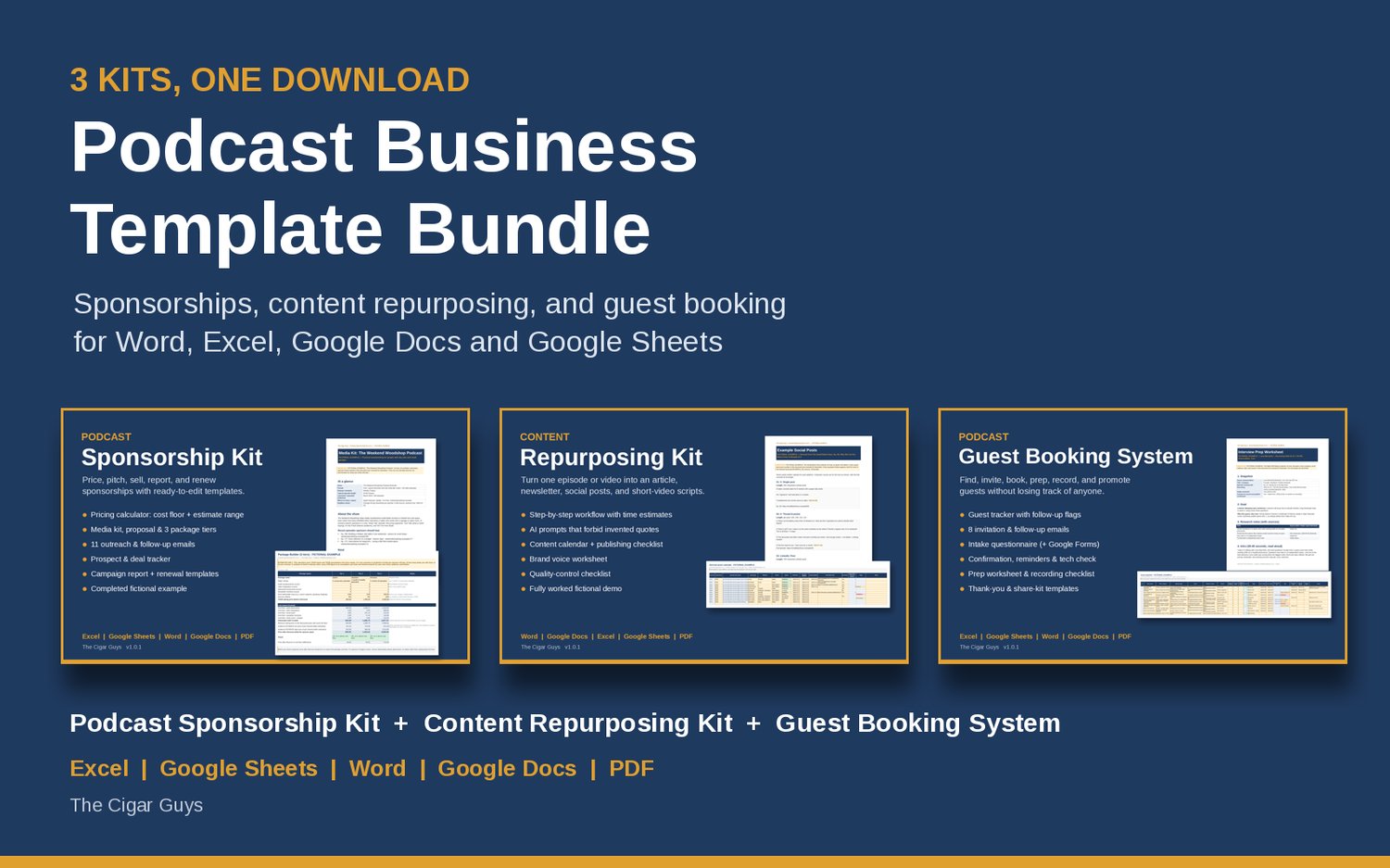
Those three jobs (selling sponsorships, booking guests and repurposing episodes) are where a lot of independent shows lose hours every week. This post walks through a simple way to run each one, and shows how the Podcast Business Template Bundle (3 Kits) from The Cigar Guys Podcast team covers all three in one download.
System 1: Price and pitch sponsors from your real numbers
The most common sponsorship mistake is quoting a price before you know what an episode actually costs you. If your hosting, tools, editing and hours add up to more than the sponsor is paying, the deal loses money no matter how good it looks.
A better order of operations:
- Know your cost floor. Add up monthly costs (hosting, tools, editing) and the hours you put into each episode. That's the lowest price that makes sense.
- Build an audience-based estimate separately. Use your own downloads, views and impressions with a low and high CPM assumption you've researched yourself. Keep it as a range, not a promise.
- Turn that into packages. Three tiers (Starter, Standard, Premium) priced at or above your cost floor make it easier for a sponsor to say yes to something.
- Pitch a short list and follow up on a schedule. Ten brands your audience already buys from is a solid first list.
The Podcast Sponsorship Kit in the bundle is built around that order. Its pricing calculator works out your cost floor, gives an audience-based estimate range from the CPM assumptions you enter, shows both side by side, and includes a three-tier package builder. You also get a media kit template, a proposal you tailor to one sponsor, outreach and follow-up emails (cold, warm intro, follow-ups, a breakup email, negotiation replies and a confirmation), a prospect and deal tracker that sets your next follow-up date automatically, and a post-campaign report with a renewal proposal. The Start Here guide includes a 30-minute quick start that takes you from gathering your numbers to a draft media kit and a pitch list.
System 2: Book and prep guests without the back-and-forth
Guest booking falls apart in the gaps: an invite that never got a follow-up, a guest who wasn't sent the recording link, a host who walks into the interview without notes. A simple pipeline fixes most of it:
- Research and rank. Keep guest ideas in one list with where you found them and a quick fit score.
- Invite and follow up. Use a consistent invite, then follow up on set dates rather than when you happen to remember.
- Confirm, remind and collect intake. Once someone says yes, send a confirmation, calendar text and reminders, plus a short questionnaire so you can prep.
- Prep, record, thank and promote. One prep page per guest, a recording-day checklist, then a thank-you and an episode-live note with assets they can share.
The Podcast Guest Booking System follows that pipeline. Its tracker has a stage dropdown, a fit score, automatic follow-up dates and flags, plus summary and conversion rates. Around it sit 8 invitation and follow-up emails (cold, warm or referral, publicist, follow-ups, a polite close and a template for declining a pitch), a guest intake questionnaire with steps to rebuild it in Google Forms, confirmation and reminder templates for one week, one day and one hour out, an interview prep worksheet, a recording-day checklist and thank-you and promotion templates. The weekly routine is simple: open the tracker, filter by the flag column, and send whatever is overdue, due today, or ready for its promo kit.
System 3: Turn one episode into a week of content
You already did the hard part when you recorded the episode. Repurposing gets more out of it, but only if the process is repeatable and the output stays accurate to what was actually said.
A workable repurposing routine looks like this:
- Export a transcript with timestamps.
- Write down your brand voice once: tone, words to use or avoid, platform rules and disclosure wording.
- Plan the assets for that episode (for example, a newsletter, three social posts and two short-video scripts).
- Draft each one from the transcript only.
- Check every quote against the transcript and its timestamp before anything is scheduled.
The Podcast Content Repurposing Kit is built on that process. It includes an 11-step repurposing workflow, 9 AI prompts with accuracy guardrails (they work from your transcript only and ask for verbatim, timestamped quotes), manual fill-in templates for every asset, a content calendar with status dropdowns and a publishing checklist, a brand voice worksheet and a quality-control checklist covering accuracy, quotes, platform fit, links, accessibility and disclosures. The Start Here guide lays out a 45-minute first run with one episode.
Why these three belong together
These systems feed each other. Guests bring new audiences, repurposed clips and posts give sponsors more places to appear, and a campaign report built from real delivery numbers makes renewals easier to ask for. Running them from one set of matching templates means one way of working instead of three different ones.
Each kit in the bundle comes with:
- A Start Here guide with the reading order and a short first session.
- A completed fictional example so you can see what a finished version looks like before filling in your own. The example shows and numbers are made up to show how the files work. They aren't typical results.
- Files in .docx, .xlsx and .pdf that work in Word, Excel, Google Docs and Google Sheets, with instructions for making Google copies.
To be clear about what they don't do: the kits don't connect to your podcast host or inbox, and they don't send emails for you. You enter your own numbers and stay in charge. No template can guarantee sponsor rates, guests or results.
What it costs
- Bought separately: $97 (Sponsorship Kit $49, Content Repurposing Kit $29, Guest Booking System $19).
- Podcast Business Template Bundle (3 Kits): $69, one-time payment, delivered as three ZIP files.
Starting a brand-new show? The bundle doesn't include launch planning. The Podcast Launch Kit covers the 30 days before launch and is sold separately. And if you also handle income tracking, brand deals or client work, the Creator Business Template Library (All 10 Kits) includes these three kits plus seven more.
Where to start
Pick whichever of the three jobs is costing you the most time right now and set up that kit first. The other two will be there when you're ready.
Get all three here: Podcast Business Template Bundle (3 Kits).
Questions or a file that won't open? Email info@thecigarguys.com. These are instant digital downloads, so all sales are final, but if a file is broken or missing we'll fix it.