
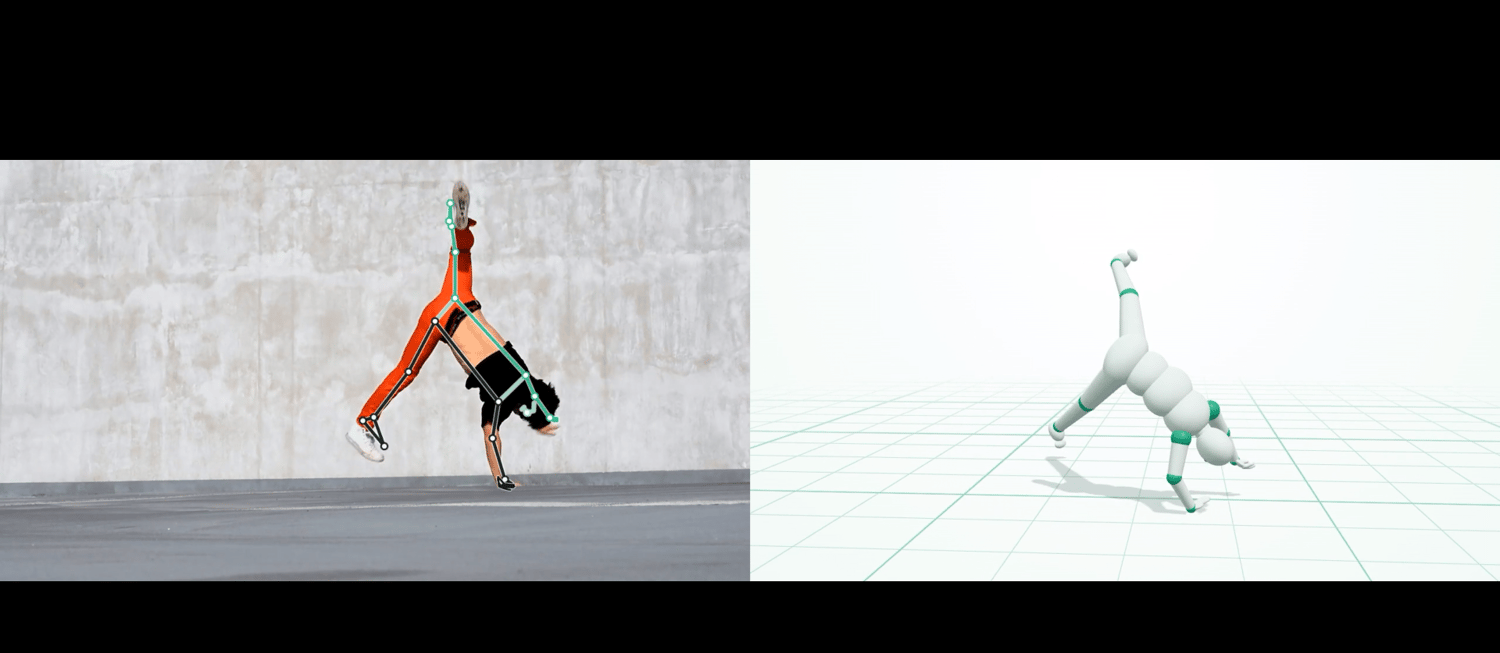



Motix Video to Movement
Motix turns ordinary video into 3D character animation, entirely on your own PC. Film yourself with your phone or webcam, drop the clip in, and watch Motix track your body frame by frame and bring a 3D character to life. No uploads, no cloud servers, no account and no internet needed, so your videos stay private. The animation is yours to take straight into Blender, a game engine or your next project. No suit, no markers, no extra hardware. Just you, a camera and a finished animation.
Good for indie game developers, animators, content creators, students and anyone who wants their characters to move like real people.
Tracking is automatic, and results depend on your video. It works best with the whole body in frame, a steady camera and good light. Personal license; see the included license for terms.
MOTIX 1.0.0
Turn video into 3D animation.
GETTING STARTED
1. Unzip the whole Motix folder to a place you like, for example your Documents folder or C:\Program Files.
2. Open the folder and double click Motix.exe.
3. Read and accept the license agreement the first time Motix opens.
Keep every file in the folder together. Motix.exe will not run on its own.
Windows may show a "Windows protected your PC" message the first time. Click "More info" and then "Run anyway".
WHAT YOU NEED
Windows 10 or Windows 11, 64 bit
8 GB of memory or more recommended
A graphics card with up to date drivers
A webcam, only if you want to record or use live mode
These are guidelines only. Motix is not guaranteed to run on every computer.
HOW TO USE IT
Video: drop a video on the home screen or click Choose video. Motix reads it, tracks the body (and the fingers if you want), and opens the studio.
Record: record a take with your camera. Motix processes it like any other video when you stop.
Live: a quick live demo of the tracking. It is not the final quality. For the real result, record a take and let Motix finish processing it.
Studio: play and trim the take on the timeline, compare the video and the character side by side, adjust smoothing, foot lock and fingers, and pick the mannequin or load your own character (GLB, GLTF, FBX, OBJ or VRM). Motix tries to use the skeleton a character already has, and tries to rig characters that do not have one.
Export: BVH and GLB for Blender and other 3D tools, glTF, MP4 video (side by side or character only), CSV joint positions and JSON bone rotations.
Tracking is an automatic estimate and results vary from video to video. Check every result before you use it.
TIPS FOR THE BEST RESULTS
Keep the whole body in frame.
Use a steady camera and good light.
Wear clothes that stand out from the background.
For finger tracking, keep the hands large, sharp and well lit.
YOUR FILES
Motix processes your videos, recordings and characters on your own computer. You are responsible for your files, for having the right to use them, and for how you use what you make.
UNINSTALL
Delete the Motix folder. To also remove your settings, delete the folder %APPDATA%\Motix.
LEGAL
Motix is provided as is, with no warranty, no support and no promises of any kind. Motix is licensed, not sold. See LICENSE.txt for the license agreement. You may not sell, share or distribute Motix. Open source components and their licenses are listed in THIRD_PARTY_NOTICES.txt and the licenses folder.
Copyright 2026 Motix. All rights reserved.