
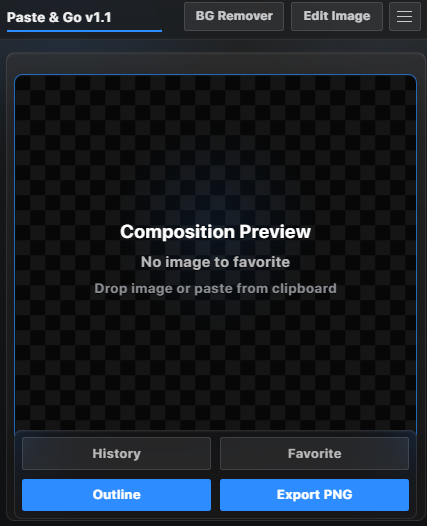
Paste and Go v1.1
Paste & Go v1.1 is a premium Adobe After Effects CEP extension built to make image importing, background removing, and quick cleanup faster than ever.
Paste any image directly from your browser, Pinterest, clipboard, or local files into After Effects with Ctrl+V. The extension automatically imports the image into your current project, while also giving you powerful extra tools like background removal, image cleanup, edit tools, paste history, favorites, clean PNG export, auto outline, and smart layer naming.
Designed with a modern After Effects inspired interface, glass-style panels, smooth iOS-like animations, and a clean professional workflow, Paste & Go helps motion designers save time and stay focused inside After Effects.
Main Features
- Paste images directly into After Effects with Ctrl+V
- Drag and drop images into the extension
- One-click background remover
- Edit Image mode with brush, restore, and Magic Eraser Lite
- Paste history for recently used images
- Favorites library for saving useful assets
- Auto outline / sticker effect
- Export clean PNG to Downloads
- Auto name imported layers
- Custom accent color
- Zoom and pan inside image editor
- Works offline after installation
- No Python setup needed for the packaged Windows version
Perfect For
- Motion designers
- Short-form editors
- Thumbnail creators
- Meme/video editors
- After Effects template creators
- Anyone who constantly imports PNGs, cutouts, stickers, characters, logos, or web images into AE
Windows Installation Guide
- Download the Paste and Go folder.
- Close Adobe After Effects completely.
- Copy the full folder named:
Paste and Go
- Paste it into this folder:
C:\Program Files (x86)\Common Files\Adobe\CEP\extensions
Final path should look like this:
C:\Program Files (x86)\Common Files\Adobe\CEP\extensions\Paste and Go
- Open Adobe After Effects.
- Go to:
Window > Extensions > Paste and Go
- Open the panel and start using it.
How To Use
To paste an image:
- Copy any image from your browser or computer.
- Open After Effects and select or create a composition.
- Click inside the Paste & Go panel.
- Press Ctrl+V.
- The image will be automatically added to your After Effects project.
To remove background:
- Drag an image into the Paste & Go panel.
- Click BG Remover.
- Confirm background removal.
- Wait for the result.
- Choose Add to Project, Retry, or Edit Image.
To edit image:
- Click Edit Image.
- Drag in an image, or use the image after background removal.
- Use Brush, Restore, or Magic Eraser Lite.
- Export PNG or add the cleaned result to your project.
System Requirements
- Windows 10 or Windows 11
- Adobe After Effects with CEP extension support
- Recommended: After Effects 2022 or newer
- Internet is not required after installation
- macOS is not supported in this version