





Synthra 2.0
SYNTHRA 2.0
Virtual Analog + Wavetable Synthesizer
CREATE WITHOUT LIMITS. SHAPE YOUR SOUND.
260 Factory Presets • 256 Wavetables • Advanced Modulation • Built-In Effects • Arpeggiator • Step Sequencer
Meet Synthra 2.0, a modern virtual analog and wavetable synthesizer designed for music producers, composers, and sound designers who demand creative flexibility, expressive sound, and an intuitive production workflow.
From deep, powerful basses and cutting leads to lush atmospheric pads, expressive keys, rhythmic sequences, and evolving soundscapes, Synthra 2.0 gives you the tools to create sounds that bring your productions to life.
Whether you're starting with one of the 260 factory presets or designing a completely original patch from scratch, Synthra 2.0 combines accessible controls with advanced synthesis capabilities.
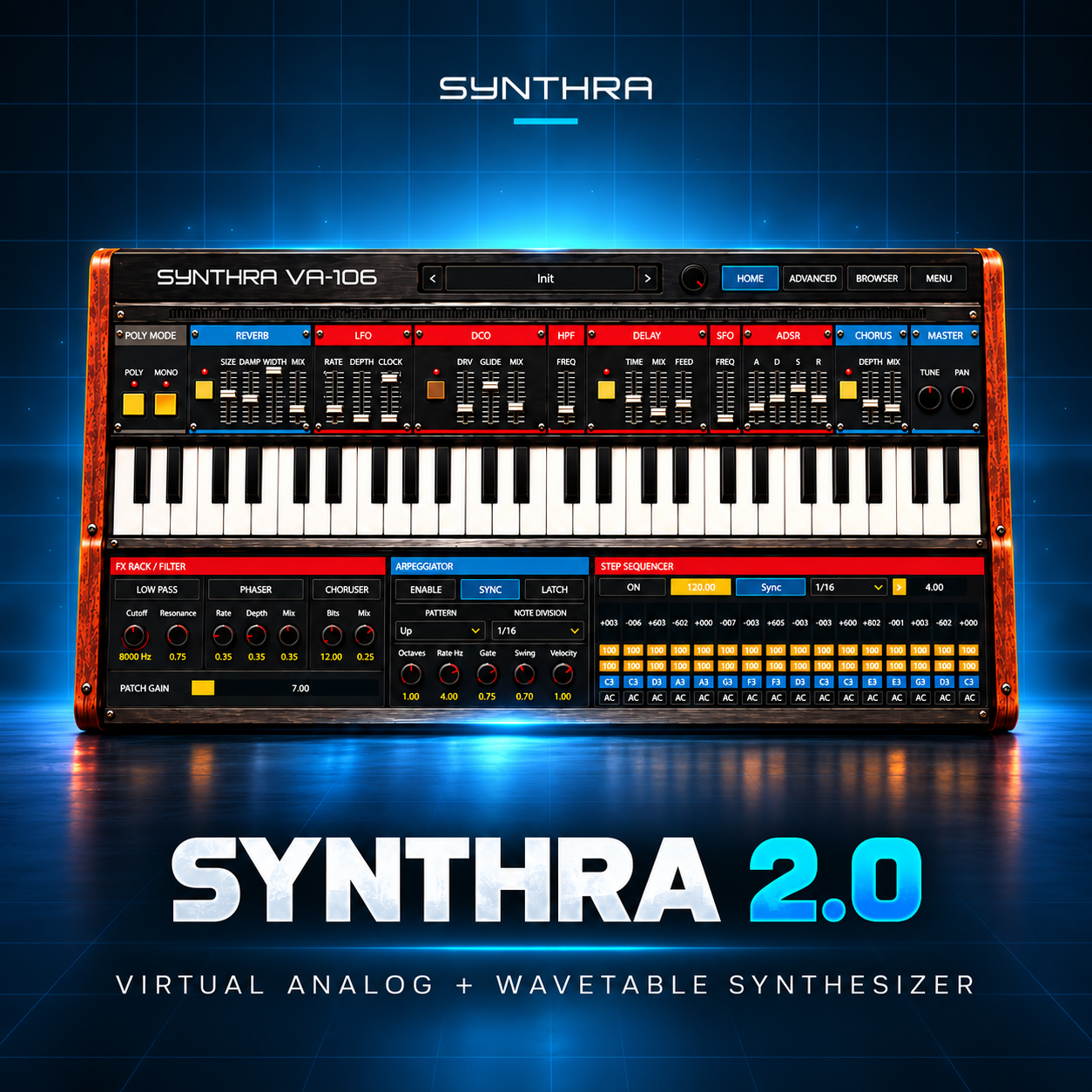
Built around a hardware-inspired interface, Synthra 2.0 brings the character of a classic synthesizer into a modern digital production environment.
Find your sound. Shape your sound. Make it yours.
KEY FEATURES AT A GLANCE
- Hybrid Virtual Analog + Wavetable Synthesis — Combine traditional synthesis character with expressive wavetable sound shaping.
- 256 Wavetables — Explore a collection of wavetable sources for diverse tonal possibilities.
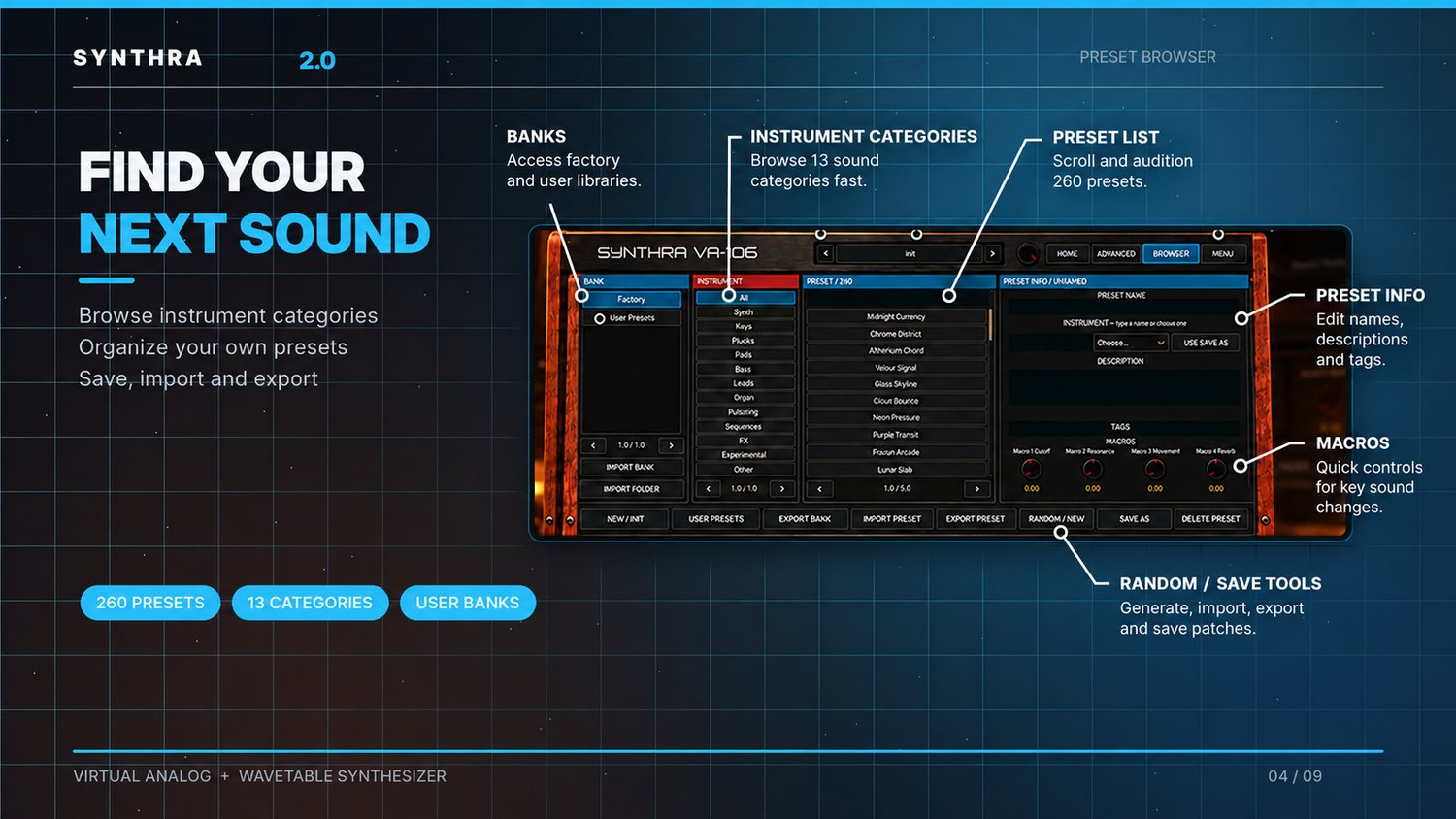
- 260 Factory Presets — Start creating with professionally organized sounds across 13 instrument categories.
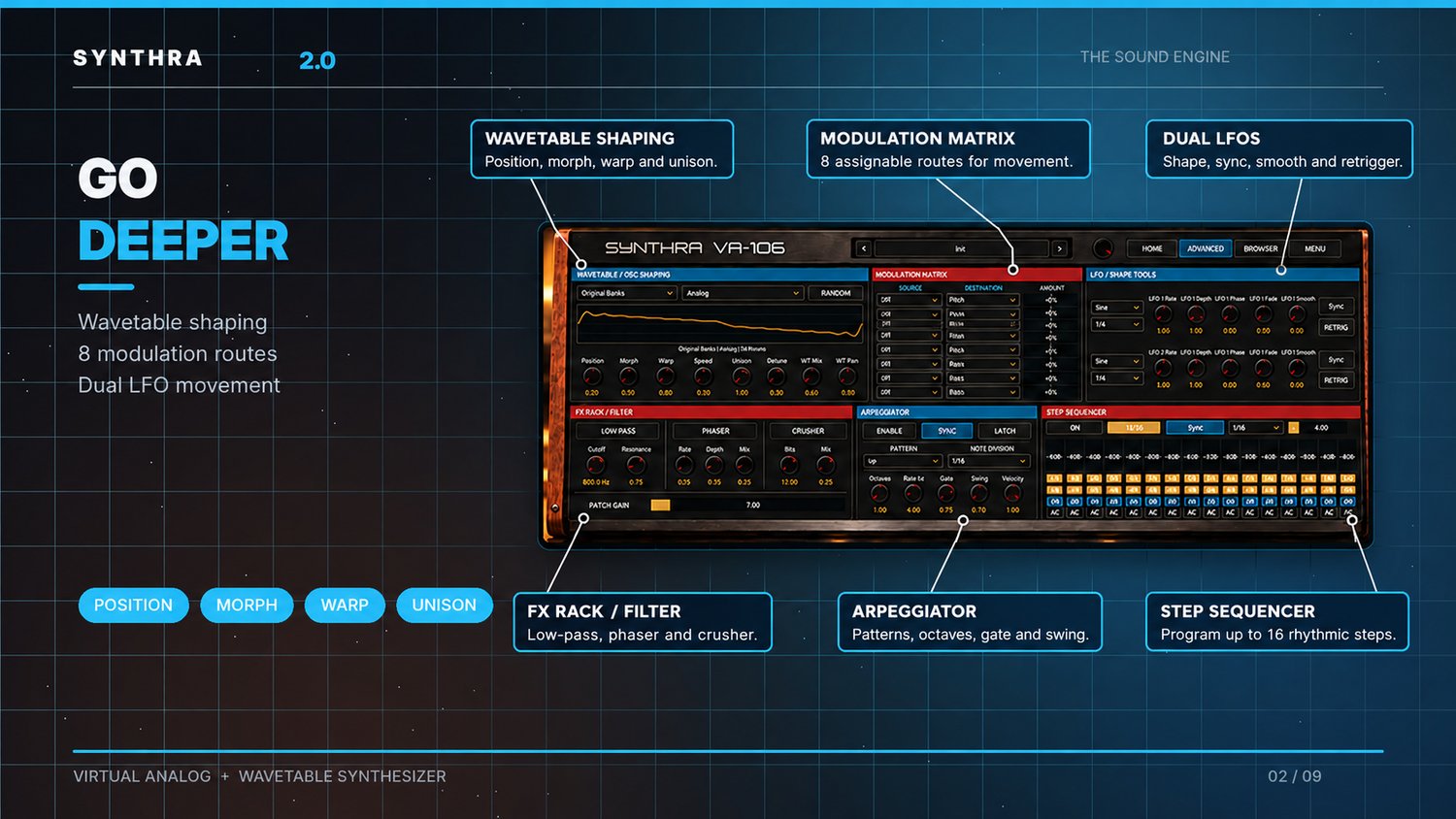
- Advanced Wavetable Controls — Shape your tone with Position, Morph, Warp, Spread, Unison, Detune, Mix, and Pan.
- 8-Route Modulation Matrix — Create evolving sounds with assignable modulation sources and destinations.
- Dual LFOs — Add rhythmic movement, evolving modulation, and tempo-synchronized motion.
- ADSR Envelope Shaping — Fine-tune the attack, decay, sustain, and release of your sounds.
- High-Pass and Low-Pass Filters — Shape frequency content and resonance.
- Built-In Effects Suite — Reverb, Chorus, Distortion, Delay, Phaser, and Bit Crusher.
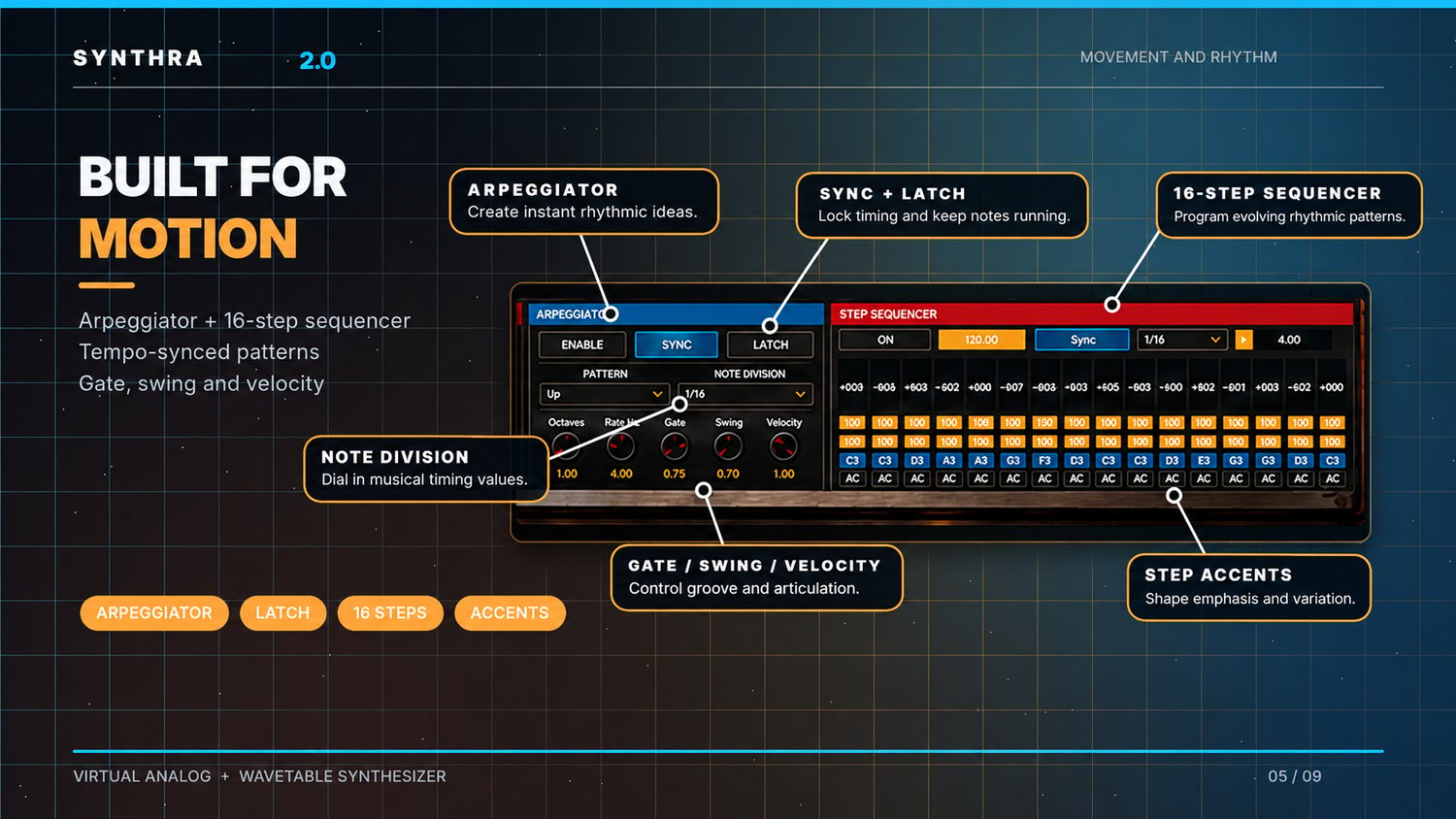
- Advanced Arpeggiator — Create rhythmic patterns using musical divisions, octaves, gate, swing, and velocity controls.
- 16-Step Sequencer — Program rhythmic phrases and evolving sequences.
- Polyphonic and Monophonic Modes — Choose expressive chords or monophonic lines with glide.
- Four Performance Macros — Quickly adjust cutoff, resonance, movement, and reverb.
- Preset Browser and Management — Search, organize, edit, import, export, and save your sounds.
- Random Patch Generation — Generate new starting points for creative sound design.
- MIDI Performance Support — Play using external MIDI devices, pitch bend, modulation wheel, and aftertouch.
- Configurable Polyphony — Choose between 6 and 32 maximum voices.
- Adjustable Distortion Oversampling — Select 1× Eco or 2× processing.
- Standalone Operation — Play the instrument outside a DAW with configurable audio settings.
1. VIRTUAL ANALOG + WAVETABLE SOUND ENGINE
At the heart of Synthra 2.0 is a flexible synthesis engine that combines virtual analog sound generation with wavetable-based tone shaping.
Explore rich harmonic textures, aggressive electronic sounds, smooth evolving timbres, and distinctive digital movement.
Wavetable shaping controls
Position — Travel through a wavetable to explore different harmonic characteristics.
Morph — Transform the sound between different wavetable shapes.
Warp — Introduce additional waveform shaping and harmonic character.
Spread — Adjust the width and distribution of the sound.
Unison — Build thicker, richer tones using multiple voices.
Detune — Create movement and depth by offsetting the tuning of layered voices.
WT Mix — Control the wavetable contribution to the final sound.
WT Pan — Position the wavetable sound within the stereo field.
Wavetable Selection — Browse and select from 32 wavetable sources.
From subtle tonal adjustments to dramatic transformations, the engine gives you hands-on control over your instrument's character.
2. ADVANCED MODULATION SYSTEM
Turn static patches into expressive, evolving instruments.
Synthra 2.0 features an eight-route modulation matrix and two dedicated low-frequency oscillators for adding movement, variation, and depth.
8-route modulation matrix
The modulation matrix allows you to connect modulation sources to synthesis parameters and control how strongly each source influences its destination.
Explore pitch movement, tonal changes, and evolving textures using assignable modulation routes.
Each route provides source, destination, and modulation amount controls.
Dual LFOs
Two independent LFO sections provide controls for:
- Waveform or shape selection
- Rate
- Depth
- Phase
- Fade
- Smooth
- Tempo synchronization
- Retrigger behavior
- Musical note divisions
Use subtle LFO movement for expressive pads, tempo-synchronized modulation for rhythmic electronic music, or more pronounced movement for experimental effects.
3. ENVELOPES AND FILTERS
Take control of how every note develops over time.
ADSR envelope
Shape the amplitude of your sound using four essential stages:
Attack — Control how quickly a note reaches its initial level.
Decay — Adjust how the sound transitions from its peak.
Sustain — Determine the held level of a note.
Release — Shape how the sound fades when a note ends.
Create sharp plucks, smooth atmospheric pads, punchy basses, and evolving sustained sounds.
Frequency filtering
Low-Pass Filter
- Cutoff frequency
- Resonance
Reduce upper frequencies, add warmth, or emphasize selected frequencies.
High-Pass Filter
- Frequency control
Remove unwanted low-frequency energy and shape lighter, cleaner tones.
4. BUILT-IN EFFECTS SUITE
Synthra 2.0 includes a collection of sound-processing effects designed to add dimension, warmth, movement, and character without requiring a separate effects chain.
Reverb
Create atmospheric spaces, wide ambient textures, and spacious synth tones.
Controls:
- Size
- Damping
- Width
- Wet/Dry Mix
Chorus
Add stereo dimension, thickness, and movement to synth sounds.
Controls:
- Depth
- Mix
Distortion
Introduce saturation, edge, and aggressive harmonic content.
Controls:
- Drive
- Gain
- Mix
Delay
Build rhythmic echoes, spacious repeats, and tempo-matched effects.
Controls:
- Time
- Feedback
- Mix
- Host tempo synchronization
Phaser
Introduce sweeping phase movement and animated textures.
Controls:
- Rate
- Depth
- Mix
Bit Crusher
Add digital grit, reduced-resolution textures, and lo-fi character.
Controls:
- Bit depth
- Mix
These effects can help transform simple patches into distinctive, production-ready sounds.
5. ADVANCED ARPEGGIATOR
Create melodic movement and rhythmic patterns directly inside Synthra 2.0.
The built-in arpeggiator transforms held notes into repeating musical patterns, making it useful for electronic leads, rhythmic basses, evolving textures, and melodic sequences.
Arpeggiator features
- Enable and disable
- Host tempo sync
- Latch mode
- Pattern selection
- Musical note divisions
- Octave range
- Rate control
- Gate length
- Swing
- Velocity
Use the arpeggiator to turn simple chords into rhythmic musical ideas and bring motion to your productions.
6. 16-STEP SEQUENCER
Build repeating phrases and rhythmic movement using the integrated step sequencer.
Sequencer features
- Up to 16 programmable steps
- Step enable and disable
- Accent controls
- Step-level adjustment
- Tempo synchronization
- Musical note divisions
- Sequence rate settings
Create rhythmic patterns, repeating synth parts, and evolving sequences without relying entirely on your DAW's piano roll.
Combined with the arpeggiator and modulation engine, the sequencer provides additional possibilities for movement and experimentation.
7. 260 FACTORY PRESETS
Spend less time searching for inspiration and more time creating music.
Synthra 2.0 includes a factory preset library organized into 13 instrument categories:
- Synth
- Keys
- Plucks
- Pads
- Bass
- Leads
- Strings
- Brass
- Pulsating
- Sequences
- FX
- Experimental
- Other
Explore sounds for multiple music production styles, including electronic music, hip-hop, trap, pop, ambient, cinematic music, and experimental sound design.
Preset browser features
- Factory preset library
- User preset banks
- Instrument category filtering
- Preset searching
- Preset name editing
- Instrument classification
- Custom descriptions
- Preset tags
- Save As
- Delete Preset
- New / Initialize Patch
- Import Preset
- Export Preset
- Import Bank
- Export Bank
- Import Folder
Build your personal sound library, keep your patches organized, and share presets through supported import and export functions.
8. RANDOM PATCH GENERATION
Discover unexpected sounds using the built-in Random / New function.
Generate a new patch as a starting point for sound design, explore fresh combinations of settings, and save results you want to revisit.
This feature encourages experimentation and can help break creative blocks when you're searching for a new musical direction.
9. FOUR PERFORMANCE MACROS
Control important sound characteristics quickly using the four dedicated macro controls.
Macro 1 — Cutoff
Adjust tonal brightness and filter character.
Macro 2 — Resonance
Emphasize filter character and tonal peaks.
Macro 3 — Movement
Shape the motion and modulation character of a patch.
Macro 4 — Reverb
Adjust the spatial character of your sound.
The macro section provides quick access to expressive changes without requiring extensive parameter editing.
10. POLYPHONIC AND MONOPHONIC PERFORMANCE
Synthra 2.0 supports different performance styles.
Polyphonic Mode — Play chords, layered harmonies, and sustained textures using multiple simultaneous voices.
Monophonic Mode — Focus on single-note basslines, lead melodies, and expressive solo performances.
Glide — Create smooth pitch transitions between notes.
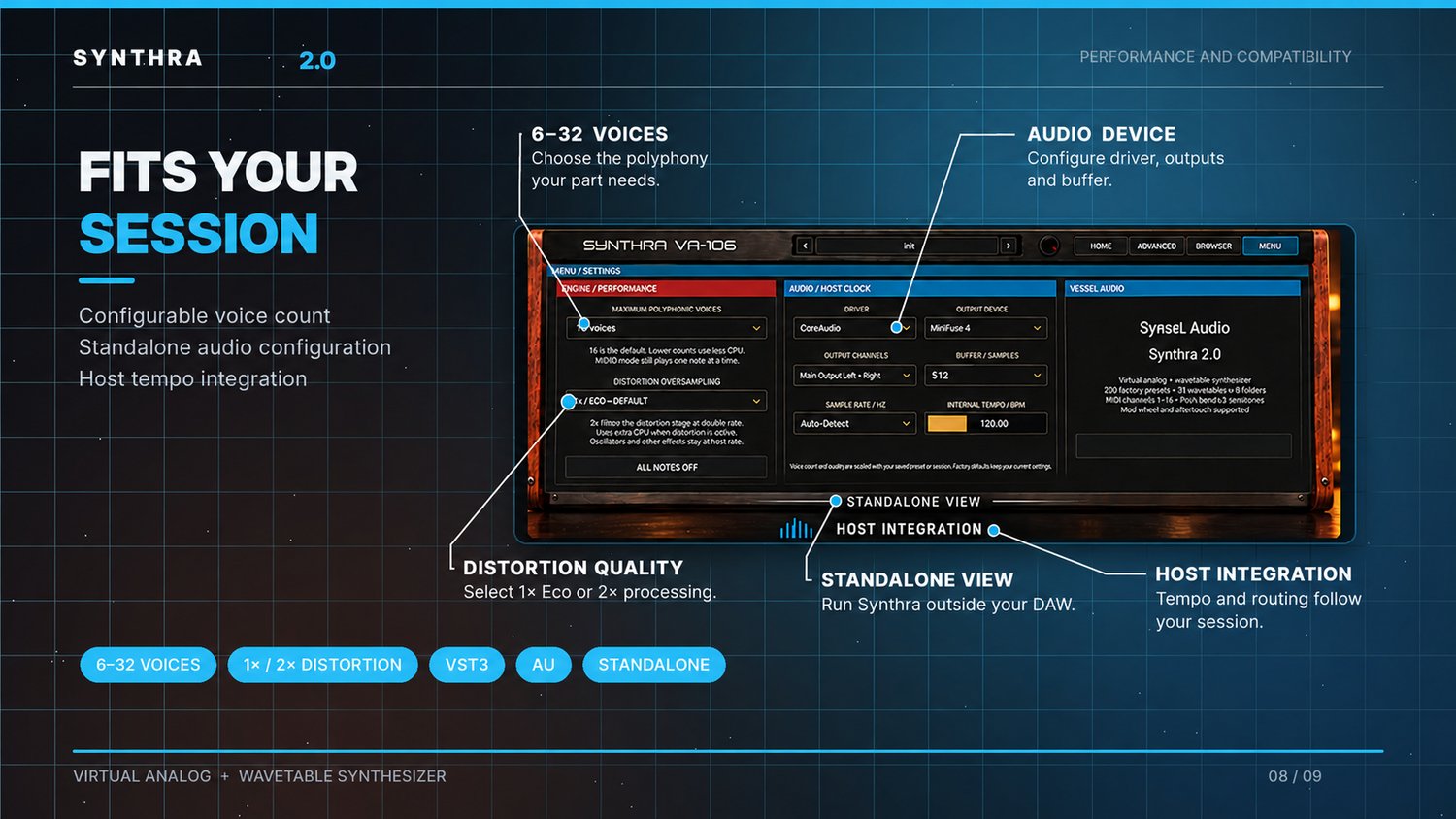
Voice Configuration — Select a maximum voice count from 6 to 32, with 16 voices as the default setting.
Use lower polyphony settings to reduce processor demand when needed.
11. MIDI AND EXPRESSIVE CONTROL
Play Synthra 2.0 from your preferred MIDI keyboard, controller, or DAW.
MIDI capabilities
- MIDI channels 1–16
- Pitch bend support (±2 semitones)
- Modulation wheel support
- Aftertouch support
- External MIDI keyboard input
- DAW MIDI sequencing
- On-screen piano keyboard
Use performance controls to add variation, movement, and expression to your sounds.
12. MASTER SOUND CONTROLS
Fine-tune your instrument's overall output using dedicated master controls.
Master Tune — Adjust overall tuning.
Master Pan — Position your sound in the stereo field.
Patch Gain — Adjust patch output level.
These controls help balance your sounds as part of a larger production.
13. AUDIO ENGINE AND PERFORMANCE SETTINGS
Synthra 2.0 provides adjustable performance settings to help balance sound quality and processing requirements.
Configurable voice count
Choose between 6 and 32 maximum voices depending on the demands of your project.
Distortion oversampling
1× Eco Mode — Default processing mode with lower CPU demand.
2× Oversampling Mode — Runs the distortion stage at a higher processing rate for improved high-frequency distortion behavior, using additional CPU.
Oversampling applies to the distortion processing stage rather than the entire synthesis engine.
Additional settings
- All Notes Off control
- Internal tempo control
- 120 BPM default internal tempo
- Host tempo integration
- Preset and session recall of supported engine settings
14. STANDALONE AUDIO CONFIGURATION
In addition to DAW plugin operation, Synthra 2.0 supports standalone use.
Standalone audio settings include:
- Audio driver selection
- Output device selection
- Stereo output channel routing
- Adjustable audio buffer size
- Sample rate selection
- Internal tempo adjustment
- CoreAudio support on macOS
When used as a plugin, your DAW manages the host audio routing and tempo.
15. FOUR-PAGE SYNTHESIZER INTERFACE
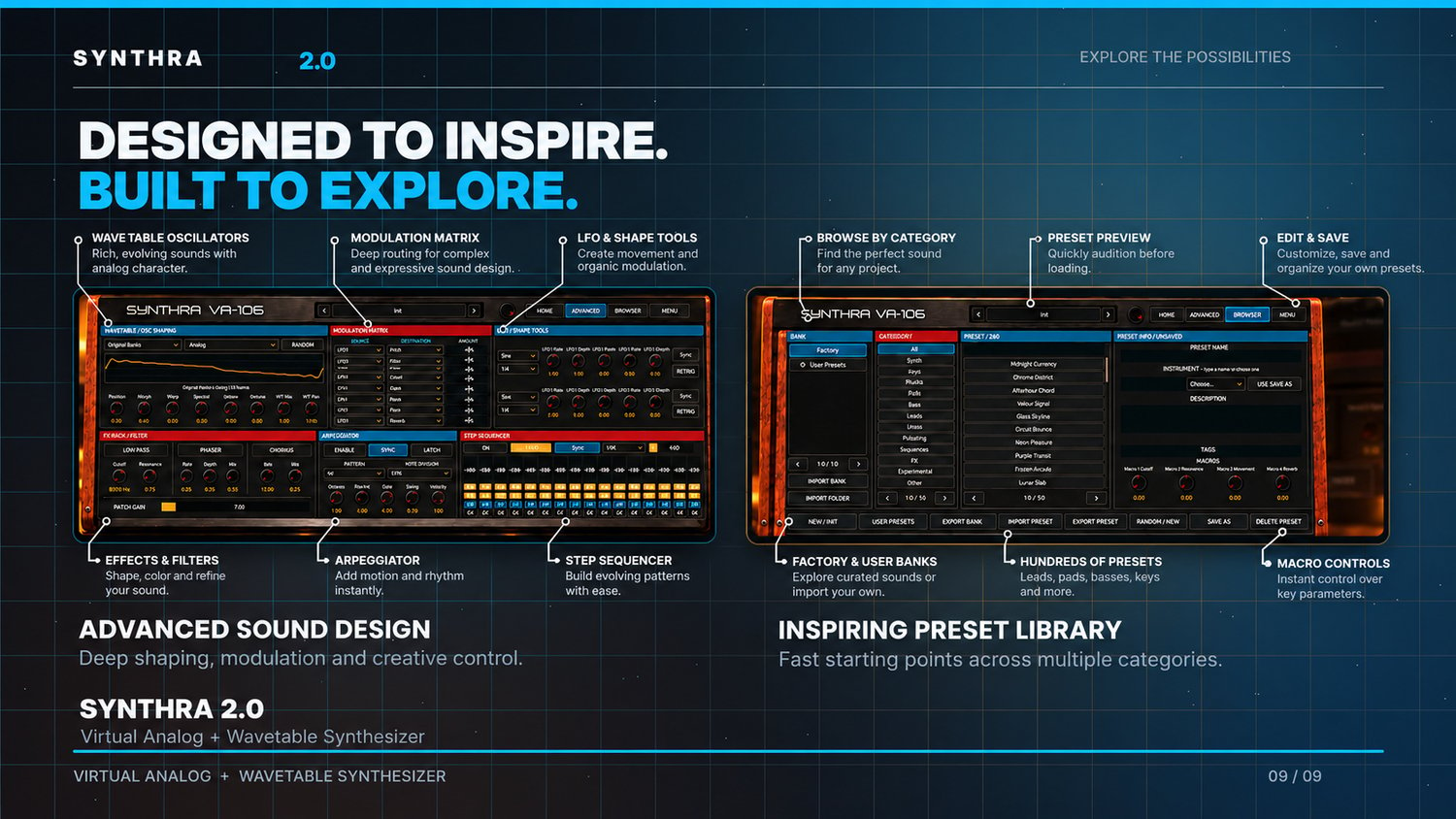
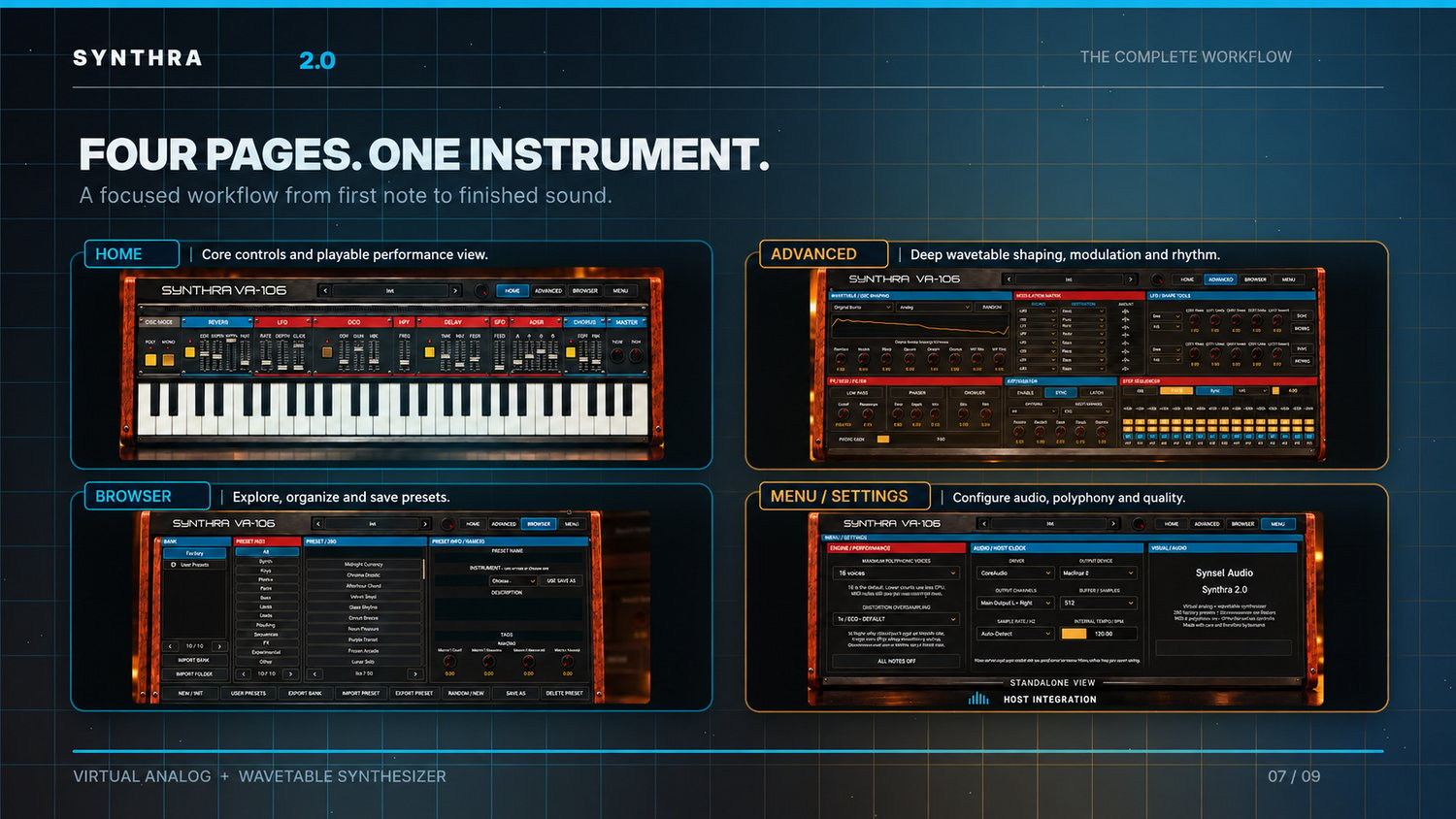
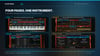
Synthra 2.0 features a hardware-inspired graphical interface with four dedicated sections.
HOME
Access the main synthesis controls, voice mode, essential effects, ADSR, master controls, and playable keyboard.
ADVANCED
Explore wavetable shaping, the modulation matrix, dual LFOs, filters, arpeggiator, and step sequencer.
BROWSER
Search, organize, edit, save, import, export, and manage your sound library.
MENU / SETTINGS
Configure polyphony, processing quality, audio settings, host clock behavior, and additional instrument preferences.
The interface combines a classic synthesizer aesthetic with an organized modern workflow.
16. PLUGIN FORMATS
macOS
- VST3
- Audio Units (AU)
- Standalone Application
Synthra 2.0 is designed for use in compatible music production environments supporting these formats.
WHO IS SYNTHRA 2.0 FOR?
Electronic Music Producers
Design basses, leads, plucks, arpeggios, and rhythmic sequences for EDM and other electronic genres.
Hip-Hop & Trap Producers
Build deep basslines, atmospheric melodies, expressive keys, and distinctive synth textures.
Pop Producers
Create polished leads, wide pads, synth layers, and modern keyboard tones.
Sound Designers
Explore advanced wavetable shaping, modulation, effects, and evolving sound textures.
Composers
Build atmospheric sounds, evolving pads, dramatic textures, and rhythmic layers for cinematic productions.
Beginners and Experienced Producers
Start quickly using factory presets or dive into the advanced controls to create personal signature sounds.
WHAT'S INCLUDED
- Synthra 2.0 virtual synthesizer
- Factory preset library with 260 sounds
- 32 wavetable sources
- Integrated effects and sound-design tools
- Advanced modulation capabilities
- Built-in arpeggiator and step sequencer
- User preset creation and management
- Compatible plugin and standalone formats included in your purchase package
MAKE EVERY SOUND YOUR OWN
Great music starts with inspiration.
Synthra 2.0 brings synthesis, modulation, effects, preset exploration, and rhythmic creativity into one focused instrument.
Start with a preset. Transform it with wavetable shaping. Add movement through modulation. Give it character with effects. Build rhythm using the arpeggiator and sequencer.
Or start completely from scratch.
Your next signature sound starts with Synthra 2.0.
SYNTHRA 2.0 — CREATE WITHOUT LIMITS. SHAPE YOUR SOUND.


