
Vertico VVE Plugin for Premiere and Davinci
Cropper VVE Plugin is the vertical reframing panel for DaVinci Resolve Studio and Adobe Premiere Pro (macOS & Windows).
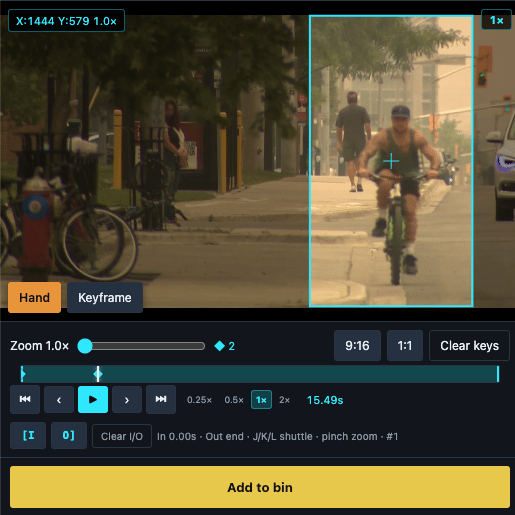
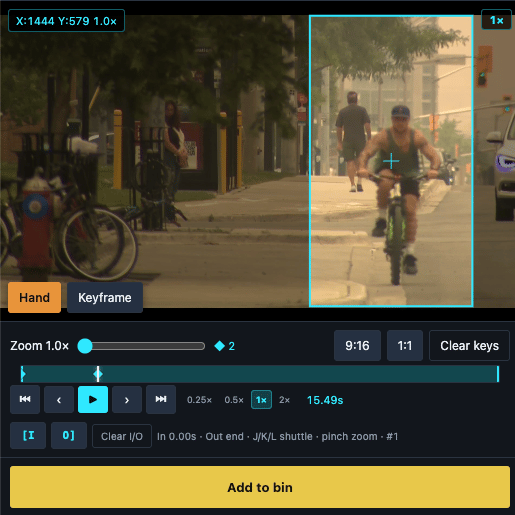
Shoot wide. Deliver tall. Load a horizontal clip, place a cyan 9:16 or 1:1 crop over the action, and paint the reframe while the picture plays. Hand mode follows smoothly with a natural handheld feel. Keyframe mode jumps cleanly between poses. Pinch or scroll to zoom — pan and zoom both lay down keyframes at 5 per second so the motion you see is the motion you get.
What you get
• Live Source-style preview — cyan crop over the full horizontal frame
• Hand + Keyframe tools, In/Out marks, shuttle (J/K/L)
• DaVinci Resolve: Add to bin as a real vertical clip
• Adobe Premiere Pro: Apply Motion keyframes on the selected timeline clip
• Same features on both hosts — macOS and Windows
• Runs on your machine — media never leaves your computer
Licence
Free to use with a “Cropper VVE Plugin” watermark. $19.99/month on Payhip removes the watermark. One licence key activates both Premiere and Resolve.
Requirements
• DaVinci Resolve Studio — Workspace → Workflow Integrations → Cropper VVE Plugin
• Adobe Premiere Pro 25+ — Cropper VVE Plugin panel (UXP)
Cropper VVE Plugin is part of Cropper: Vertical Video Editor, which is protected by copyright.
A product by After Video Inc. Designed by Rocco Contini.
© After Video Inc. All rights reserved.
Not affiliated with Blackmagic Design or Adobe.