

SPROCKET PROFILE MILLING CYCLE

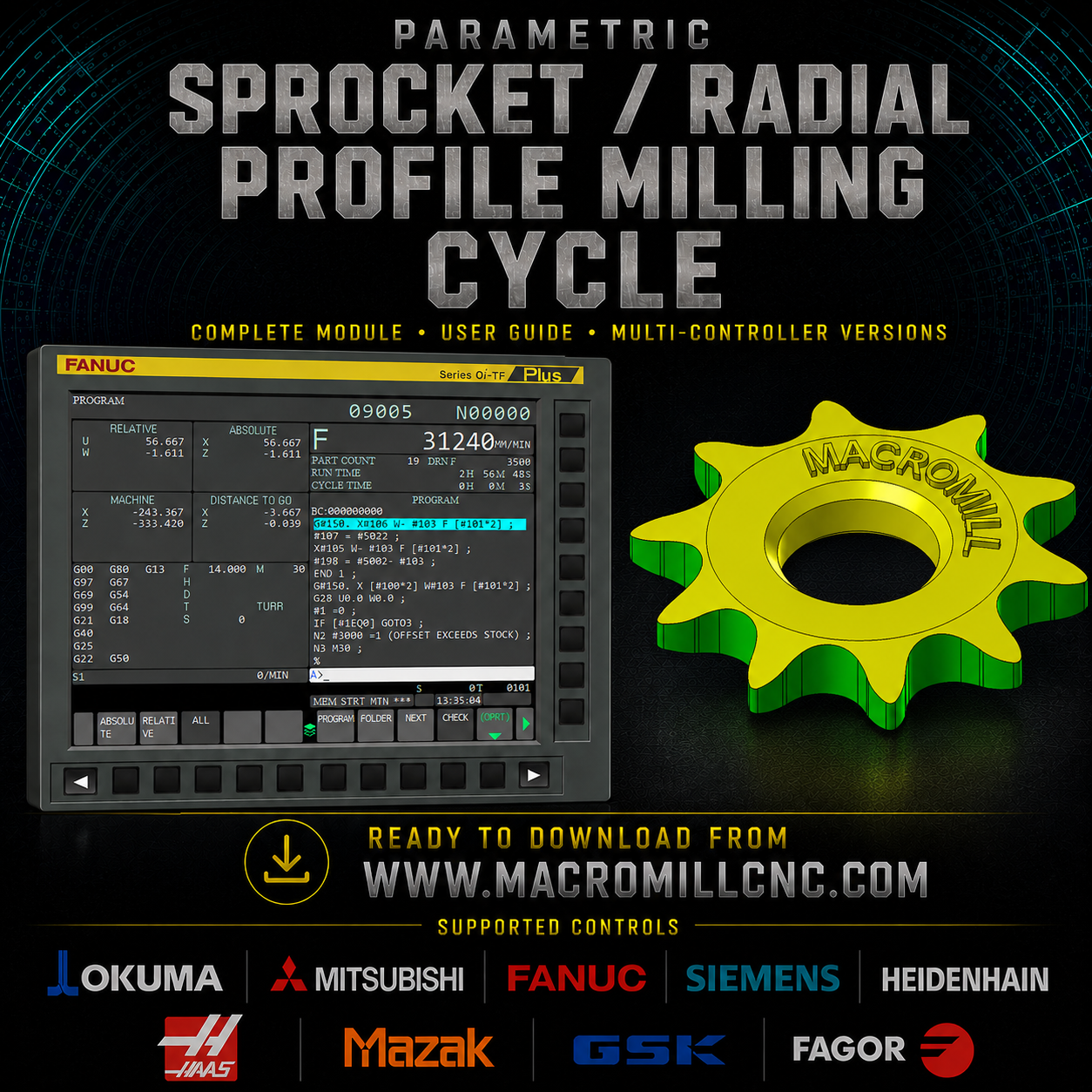
PARAMETRIC SPROCKET PROFILE MILLING CYCLE
Complete Sprocket Tooth Profile Machining From One Reusable Parametric CNC Cycle
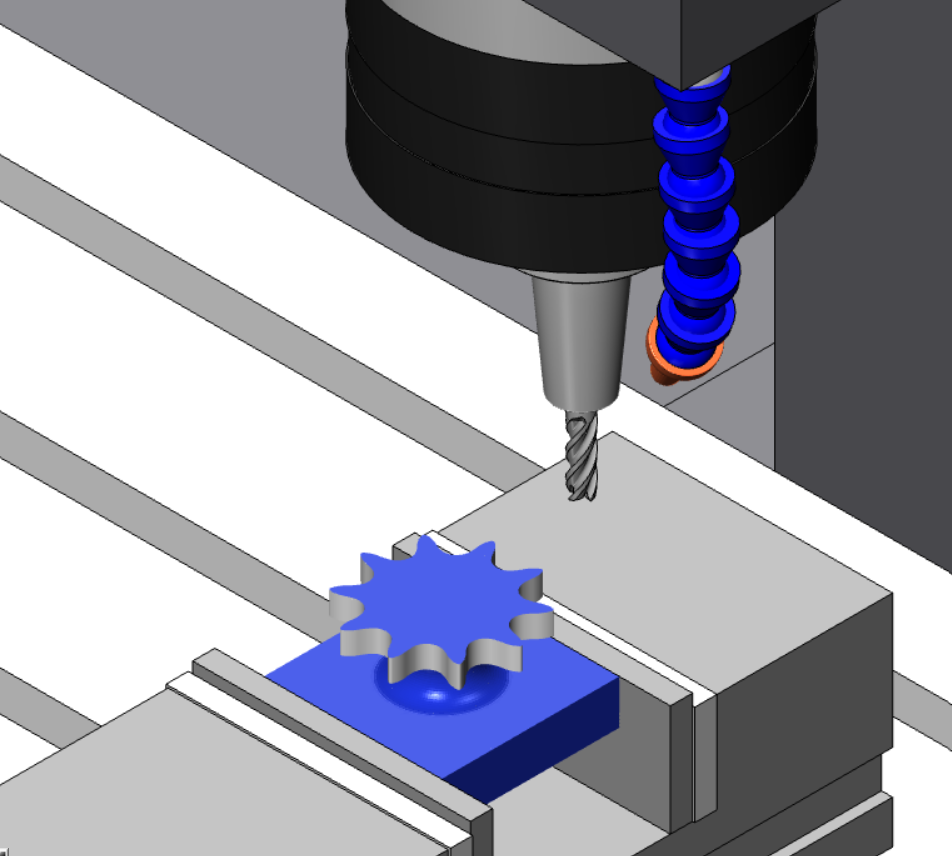
Machining sprockets normally requires a dedicated CAM-generated profile, repeated tooth geometry, indexing calculations, multiple depth passes and separate lead-in / lead-out movements.
The Parametric Sprocket Profile Milling Cycle converts the complete machining strategy into one compact reusable CNC macro.
Enter the required number of teeth, finished sprocket OD, stock OD, cutter diameter, total machining depth and maximum depth per pass — the cycle automatically controls the complete sprocket machining sequence.
Machine the tooth. Index the sprocket. Repeat the profile. Complete the depth.
Define the sprocket. Run the cycle. Reuse it.
━━━━━━━━━━━━━━━━━━━━━━━━━━━━━━━━━━
⚙️ CYCLE CAPABILITIES
✅ 3-axis X/Y/Z CNC milling
✅ Parametric sprocket profile machining
✅ Automatic multi-tooth indexing
✅ Editable number of sprocket teeth
✅ Editable finished sprocket outside diameter
✅ Editable starting stock outside diameter
✅ Editable cutter diameter
✅ Editable total machining depth
✅ Editable maximum depth per pass
✅ Automatic depth-pass calculation
✅ Equalized Z-depth progression
✅ Automatic tooth pitch calculation
✅ Automatic angular indexing
✅ Complete sprocket circumference machining
✅ Integrated outside-stock lead-in
✅ Integrated lead-out movement
✅ Automatic cutter-center profile calculation
✅ Continuous tooth-to-tooth machining strategy
✅ Reusable fitted tooth-profile geometry
✅ Compact G65 custom canned-cycle version
✅ Only six operator inputs required
✅ Reusable for different sprocket diameters
✅ Reusable for different tooth quantities
✅ Reusable with different cutter diameters
✅ Multi-controller packages available
━━━━━━━━━━━━━━━━━━━━━━━━━━━━━━━━━━
🔵 COMPLETE SPROCKET MACHINING STRATEGY
The cycle automatically generates the complete sprocket machining sequence.
Instead of programming every tooth individually, the macro stores the machining strategy once and mathematically positions the same tooth profile around the complete sprocket.
At every programmed depth the cycle automatically performs:
✅ Safe outside lead-in
✅ Tooth-profile machining
✅ Angular tooth indexing
✅ Continuous progression to the next tooth
✅ Complete circumference machining
✅ Automatic lead-out
✅ Automatic progression to the next Z depth
The sequence continues automatically until the programmed total sprocket depth has been completed.
You define the sprocket dimensions — the macro controls the complete repetitive machining sequence.
━━━━━━━━━━━━━━━━━━━━━━━━━━━━━━━━━━
🦷 PARAMETRIC SPROCKET TOOTH INDEXING
The operator only enters the required number of sprocket teeth.
The cycle automatically calculates the angular pitch:
Tooth Pitch Angle = 360° ÷ Number Of Teeth
Example:
10 teeth
360 ÷ 10 = 36°
The cycle therefore machines one tooth profile every 36° around the sprocket.
Change the number of teeth and the indexing automatically recalculates.
There is no need to manually calculate every tooth location.
━━━━━━━━━━━━━━━━━━━━━━━━━━━━━━━━━━
📐 FINISHED SPROCKET OD CONTROL
The finished sprocket outside diameter is entered directly into the cycle.
This value forms part of the profile-positioning calculation and allows the same stored machining strategy to be reused for different sprocket sizes.
Different finished OD?
Change one G65 value.
The macro recalculates the required geometry automatically.
━━━━━━━━━━━━━━━━━━━━━━━━━━━━━━━━━━
🟢 STOCK OD CONTROL
The starting stock outside diameter is programmed independently from the finished sprocket OD.
This allows the cycle to determine a suitable outside approach position before the cutter enters the tooth profile.
Example:
Finished sprocket OD = 72.222 mm
Stock OD = 80 mm
The cutter begins outside the actual material before entering the sprocket profile.
This creates a controlled lead-in rather than starting directly inside the stock.
━━━━━━━━━━━━━━━━━━━━━━━━━━━━━━━━━━
🚀 AUTOMATIC LEAD-IN / LEAD-OUT
The cycle includes integrated lead-in and lead-out logic.
The stock OD is used to create an approach position safely outside the component before the profile begins.
The machining sequence becomes:
Outside stock → Lead into tooth profile → Machine tooth → Index next tooth → Continue around sprocket → Lead out after completion
The lead movement remains part of the reusable cycle rather than requiring separate manually programmed approach blocks for every job.
━━━━━━━━━━━━━━━━━━━━━━━━━━━━━━━━━━
🔄 CONTINUOUS TOOTH-TO-TOOTH MACHINING
Once machining begins at the programmed Z level, the cycle progresses continuously around the sprocket.
The cutter does not require a complete retract and restart for every individual tooth.
The stored tooth geometry is repeated automatically around the component using calculated angular positioning.
This creates a compact and efficient machining strategy for repetitive sprocket profiles.
━━━━━━━━━━━━━━━━━━━━━━━━━━━━━━━━━━
📉 AUTOMATIC MULTIPLE DEPTH PASSES
The operator enters:
✅ Total machining depth
✅ Maximum depth per pass
The cycle automatically calculates the required number of Z passes.
Example:
Total depth = 10 mm
Maximum depth/pass = 2 mm
The macro automatically creates:
Z-2
Z-4
Z-6
Z-8
Z-10
If the programmed total depth cannot be divided exactly by the maximum depth/pass, the macro automatically equalizes the cutting depth so the final pass lands exactly on the required finished depth.
No manual Z-pass programming is required.
━━━━━━━━━━━━━━━━━━━━━━━━━━━━━━━━━━
⚖️ EQUALIZED DEPTH CALCULATION
The programmed depth-per-pass value is treated as the maximum allowable cutting depth.
The macro calculates:
Required Passes = Total Depth ÷ Maximum Depth Per Pass
The pass quantity is adjusted to a whole number.
The actual cutting increment is then recalculated:
Actual Depth Increment = Total Depth ÷ Number Of Passes
This prevents an unwanted small final cleanup pass and keeps the machining depth progression consistent.
━━━━━━━━━━━━━━━━━━━━━━━━━━━━━━━━━━
🛠️ EDITABLE CUTTER DIAMETER
The cutter diameter is entered directly in the G65 call.
This allows the same sprocket cycle to be reused with different suitable cutter sizes without rebuilding the complete program.
Different tool?
Change the cutter-diameter value.
The cycle uses the programmed cutter size when calculating the required cutter-center profile.
━━━━━━━━━━━━━━━━━━━━━━━━━━━━━━━━━━
🧮 STORED TOOTH-PROFILE GEOMETRY
The complete tooth shape is stored inside the reusable macro.
The profile is represented by a high-resolution fitted tooth path containing multiple calculated profile positions.
The operator does not need to program these points.
The cycle automatically transforms the stored tooth geometry around the sprocket according to the calculated tooth angle.
This converts a large repeated CAM-style program into one reusable parametric machining strategy.
━━━━━━━━━━━━━━━━━━━━━━━━━━━━━━━━━━
🔁 AUTOMATIC ANGULAR TRANSFORMATION
For FANUC controls, the sprocket cycle uses rotational coordinate logic to repeat the stored tooth profile around the sprocket.
Instead of storing the complete coordinates for:
Tooth 1
Tooth 2
Tooth 3
Tooth 4
...
the cycle stores one profile and automatically rotates it to the next tooth position.
This dramatically reduces repeated programming.
━━━━━━━━━━━━━━━━━━━━━━━━━━━━━━━━━━
🚀 FANUC G65 CUSTOM CANNED CYCLE
The FANUC version is supplied as a reusable G65 custom macro.
Only six job parameters are required:
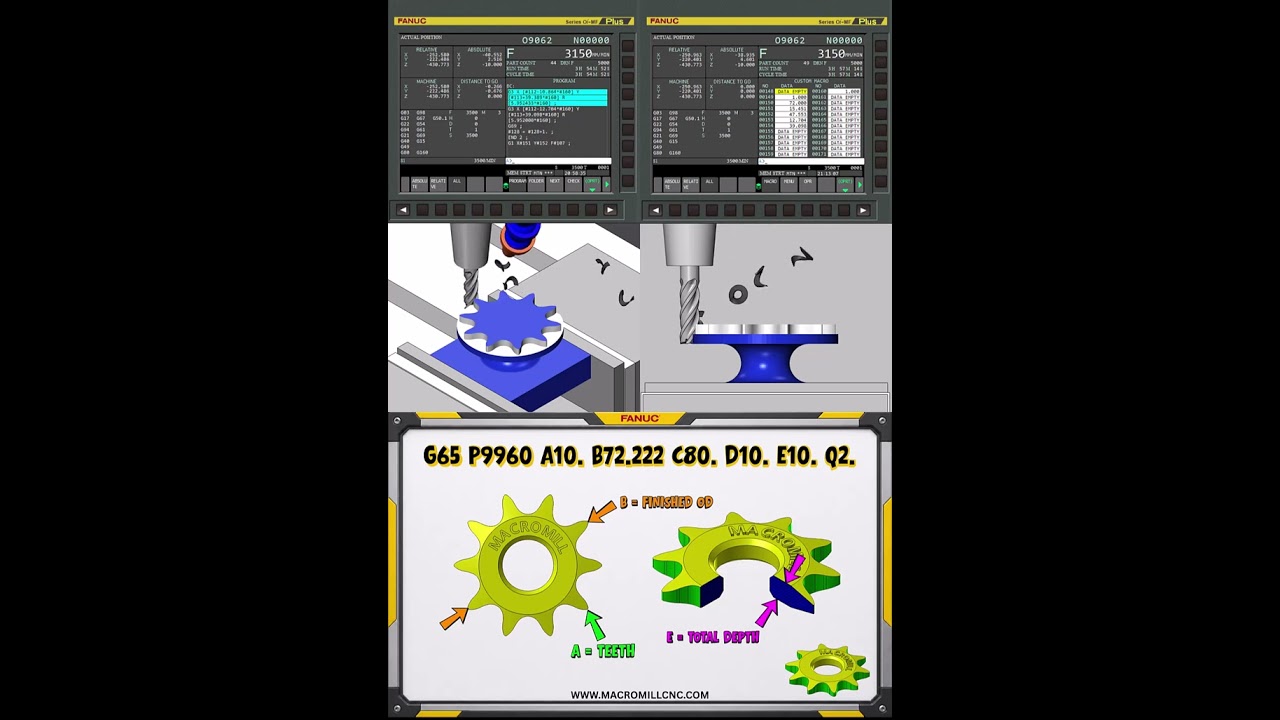
G65 P9960 A10. B72.222 C80. D10. E10. Q2.
Parameter mapping:
A = Number of teeth
B = Finished sprocket OD
C = Starting stock OD
D = Cutter diameter
E = Total machining depth
Q = Maximum depth per pass
That is all the operator needs to change for the main sprocket geometry.
The remaining machining strategy stays stored inside O9960.
━━━━━━━━━━━━━━━━━━━━━━━━━━━━━━━━━━
⚙️ ONLY SIX REQUIRED G65 INPUTS
Instead of entering a long list of macro parameters, the G65 version keeps the calling line intentionally simple.
✅ A — Teeth
✅ B — Finished OD
✅ C — Stock OD
✅ D — Cutter diameter
✅ E — Total depth
✅ Q — Maximum depth/pass
The sprocket machining logic remains inside the macro.
Define the job with one line.
Call the cycle.
Machine the sprocket.
━━━━━━━━━━━━━━━━━━━━━━━━━━━━━━━━━━
🔢 EXAMPLE G65 CALL
G65 P9960 A10. B72.222 C80. D10. E10. Q2.
This represents:
10 sprocket teeth
72.222 mm finished OD
80 mm starting stock OD
10 mm cutter diameter
10 mm total machining depth
2 mm maximum depth/pass
The cycle automatically controls the complete repeated sprocket-profile machining process.
━━━━━━━━━━━━━━━━━━━━━━━━━━━━━━━━━━
🧠 AUTOMATIC CALCULATIONS
From the six programmed values, the cycle controls or calculates:
✅ Tooth pitch angle
✅ Tooth indexing positions
✅ Cutter-center tooth profile
✅ Stock-based outside approach
✅ Tooth-profile transformation
✅ Total number of teeth
✅ Required depth-pass quantity
✅ Equalized Z increment
✅ Current machining depth
✅ Continuous tooth progression
✅ Final sprocket depth
✅ Lead-out position
The operator does not need to calculate each tooth or each depth manually.
━━━━━━━━━━━━━━━━━━━━━━━━━━━━━━━━━━
🌐 MULTI-CONTROLLER PACKAGE
The complete Parametric Sprocket Profile Milling Cycle is available for:
✅ FANUC
✅ SIEMENS
✅ HAAS
✅ MAZAK
✅ MITSUBISHI
✅ OKUMA
✅ HEIDENHAIN
✅ FAGOR
✅ GSK
Controller-specific variable formats and programming structures are supplied where required.
The FANUC package includes the simplified G65 callable version.
━━━━━━━━━━━━━━━━━━━━━━━━━━━━━━━━━━
📦 COMPLETE DOWNLOAD PACKAGE
Included:
✅ Parametric Sprocket Profile Milling Cycle
✅ FANUC G65 macro
✅ O9960 reusable custom cycle
✅ Example calling program
✅ Six-input G65 parameter mapping
✅ Complete user guide
✅ Complete module
✅ Full code breakdown
✅ Tooth-indexing explanation
✅ Finished-OD explanation
✅ Stock-OD explanation
✅ Cutter-diameter explanation
✅ Depth calculation explanation
✅ Equalized Z-pass explanation
✅ Lead-in / lead-out explanation
✅ Profile transformation explanation
✅ First-run setup guidance
✅ Prove-out procedure
✅ Controller-specific versions
✅ Siemens package
✅ Haas package
✅ Mazak package
✅ Mitsubishi package
✅ Okuma package
✅ Heidenhain package
✅ Fagor package
✅ GSK package
✅ Reusable production-cycle structure
━━━━━━━━━━━━━━━━━━━━━━━━━━━━━━━━━━
💡 WHY USE A PARAMETRIC SPROCKET CYCLE?
Different number of teeth?
Change A.
Different finished sprocket diameter?
Change B.
Different starting stock?
Change C.
Different cutter?
Change D.
Different sprocket thickness or machining depth?
Change E.
Want lighter depth passes?
Change Q.
The underlying tooth-profile machining strategy remains stored inside the cycle.
There is no need to regenerate the entire repeated sprocket toolpath every time the component changes.
One macro.
Six job inputs.
Complete sprocket machining.
━━━━━━━━━━━━━━━━━━━━━━━━━━━━━━━━━━
🏭 BUILT FOR REUSABLE CNC PRODUCTION
The Parametric Sprocket Profile Milling Cycle is designed as a reusable machining tool rather than a one-job CNC program.
Once configured and proven on the machine, the same cycle can be called repeatedly for different sprocket configurations by changing the required parameters.
Ideal for:
✅ Sprocket machining
✅ Repetitive radial profiles
✅ Indexed tooth components
✅ Repeated external profiles
✅ Production sprockets
✅ Prototype sprockets
✅ Maintenance components
✅ Replacement components
✅ Parametric CNC programming
✅ Custom canned-cycle applications
✅ CAM toolpath replacement
✅ Repetitive production environments
━━━━━━━━━━━━━━━━━━━━━━━━━━━━━━━━━━
⚙️ ONE COMPACT MACRO — COMPLETE SPROCKET TOOLPATH
The cycle automatically performs:
- Read the six G65 job parameters
- Calculate the tooth pitch angle
- Calculate the required Z-pass quantity
- Equalize the actual cutting depth
- Position outside the stock
- Lead into the tooth profile
- Machine the complete stored tooth profile
- Index to the next tooth
- Repeat around the complete sprocket
- Lead out after the final tooth
- Progress automatically to the next Z depth
- Repeat until final depth is reached
- Complete the cycle and return control to the main program
- Load the macro. Enter six values. Run the cycle. Reuse it.
- ━━━━━━━━━━━━━━━━━━━━━━━━━━━━━━━━━━
🧩 OPERATOR-EDITABLE G65 PARAMETERS
✅ A — Number of teeth
✅ B — Finished sprocket OD
✅ C — Starting stock OD
✅ D — Cutter diameter
✅ E — Total machining depth
✅ Q — Maximum depth per pass
The remaining sprocket machining logic is automatically controlled by the stored cycle.
━━━━━━━━━━━━━━━━━━━━━━━━━━━━━━━━━━
🛒 AVAILABLE AS A STANDALONE CYCLE OR INSIDE CNC AUTOMATION PRO
Purchase the Parametric Sprocket Profile Milling Cycle as a standalone downloadable package, or access it through CNC Automation Pro together with custom canned cycles, CNC macros, programming modules, software and CNC training resources.
CNC Automation Pro:
MacroMill CNC:
━━━━━━━━━━━━━━━━━━━━━━━━━━━━━━━━━━
PARAMETRIC SPROCKET PROFILE MILLING CYCLE
Set the teeth. Set the diameter. Set the depth. Run the cycle.
From repeated sprocket CAM programming to one reusable G65 custom canned cycle.
MacroMill CNC