
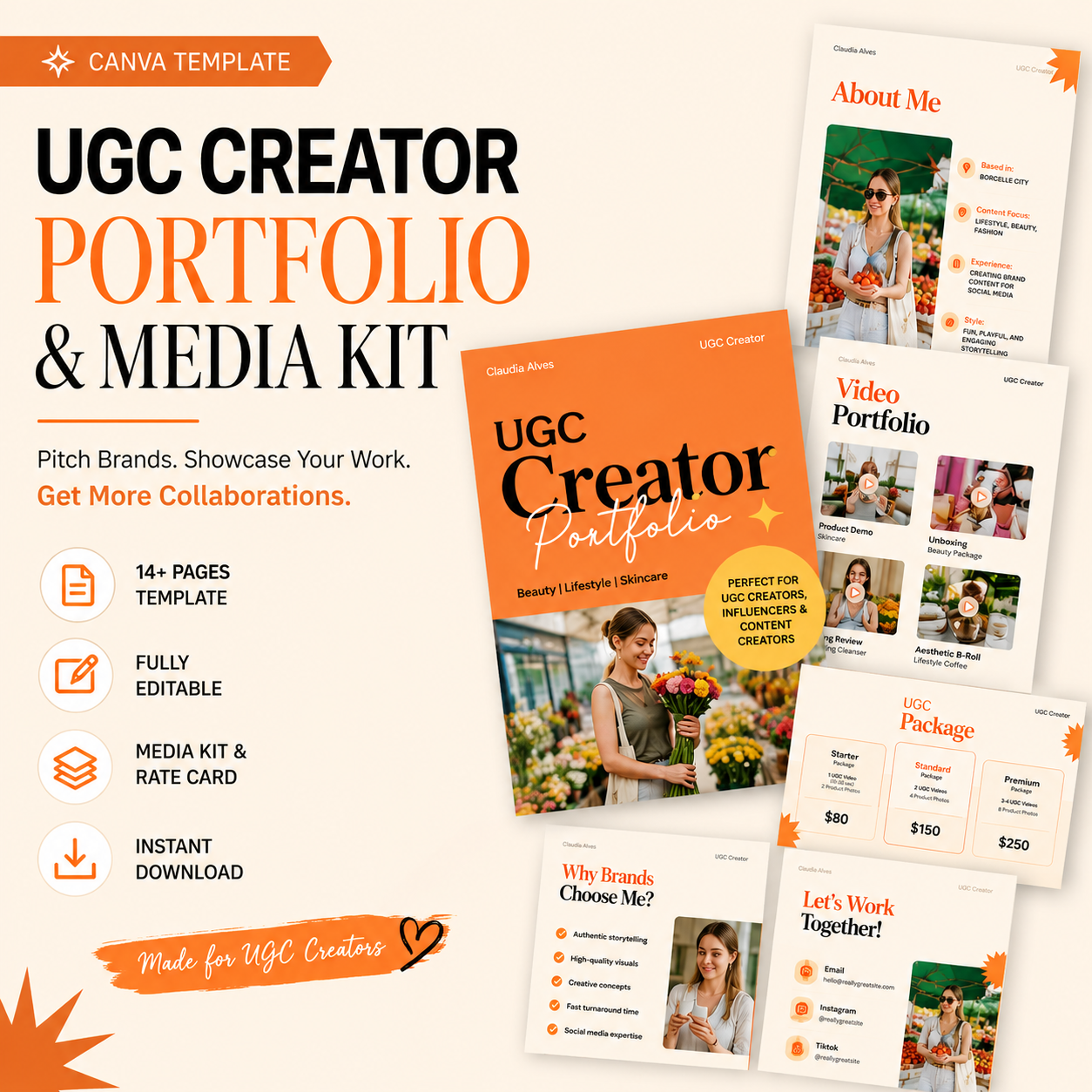
In the booming creator economy, a polished UGC (user-generated content) portfolio and media kit are essential for content creators, influencers, TikTokers, Instagrammers, and freelancers to land brand deals. Our UGC Creator Portfolio Canva Template is an all-in-one bundle including a customizable portfolio website, media kit PDF, rate card, and brand-pitch materials.
With this Canva template, you can quickly showcase your best work and pricing, so brands see your value at a glance. Optimized for performance, this template helps you stand out: it’s easy to edit, mobile-friendly, and built with attention-getting design.
According to industry reports, the creator economy is on track to reach $528 billion by 2030 with a 22.5% annual growth rate. User-generated content is a huge part of that growth.
In fact, UGC creators have surged 93% year-over-year as brands seek authentic content. Consumers trust UGC more than traditional ads: roughly 92% trust peer recommendations, and 79% say UGC strongly influences their purchases. A well-crafted portfolio is no longer optional—it’s the primary way brands evaluate creators.
Our UGC portfolio bundle gives you everything to impress: it includes a cover page, About Me, Services, Video & Photo Portfolio, Brand Collaborations, Process, Results, Testimonials, Rate Card, and Contact page. Customize it in minutes using Canva (free account!), so you can focus on creating content, not fighting layouts. Ready to pitch your talents? Let’s dive into why this template is perfect for you, what’s inside it, and how to use it to win more brand partnerships.
Why UGC Creators Need a Professional Portfolio Template
As a content creator or influencer, you know that authentic content sells. Brands today don’t just hire people by follower count — they hire creators who can produce on-brand, engaging content. A recent guide notes that “a UGC portfolio is the primary way brands evaluate creators, focusing on content quality, clarity, and brand alignment rather than follower count”. In other words, they want proof of skill, not vanity metrics.
- Builds Trust & Credibility. Showing your work builds confidence. Research from Google shows that creator-made content drives 1.3× more consumer advocacy than highly-produced studio ads. When brands see real examples of your style and quality, they’re more likely to trust you. In fact, 90% of customers say authenticity is a key factor in choosing brands, and about 90% of consumers find UGC to be more authentic than brand content. A professional portfolio makes you look trustworthy and serious.
- Speeds Up Brand Decisions. Busy marketing teams want information up front. A clear portfolio (especially with pricing) answers their questions immediately: Can this creator match our brand? Can they produce content for TikTok or Instagram? Do they offer fair rates? When everything they need is in one place, it speeds up hiring. Embedding your media kit and rate card together means brands don’t have to chase you for details.
- No Audience Required. Even if you’re a new creator without millions of followers, you can land UGC gigs. As Indie Media Club points out, UGC offers a way for smaller creators to monetize skills without a huge audience. If your portfolio is strong, brands care more about your creativity than how many followers you have. This democratizes the creator economy: you can compete on quality, not just reach.
Overall, a branded portfolio template is your “audition package” to companies. It signals professionalism and saves you countless hours. With the right design, you’ll stand out on Payhip, Gumroad, Pinterest and in brand inboxes.
Key Features of Our UGC Portfolio & Media Kit Template
Our Canva template bundle is built for convenience and impact. You get fully editable pages designed specifically for UGC creators, including:
- About Me & Services Pages. Introduce yourself and your niche. Share a photo, short bio, location, and list your content services (e.g. UGC videos, product reviews, Instagram Reels). This helps brands understand your style and specialties.
- UGC Portfolio Pages. Showcase your best work! The template includes layouts for video and photo samples – just drag in your screenshots or film stills. Highlight real UGC content you’ve created for brands or personal projects. Remember, quality beats quantity: only include your strongest, relevant pieces.
- Brand Collaboration & Testimonials. Prove you get results. Use sections to feature logos or names of past brands you’ve worked with, plus any testimonials or case study data (e.g. “Product X video got 10k views”). Showing concrete examples (even just before/after images) lets brands see the value you deliver.
- Media Kit & Rate Card. Set clear expectations. A concise media kit page outlines your unique selling point (USP), audience (if any), and content approach. The rate card page (or package page) lists your pricing (e.g. $X per video, package deals). Transparency about price and availability instantly filters in serious inquiries. (Pro tip: Research finds including a clear rate card greatly speeds up booking decisions.)
- Contact & Thank You. Make it easy to reach you. The final slide includes your contact info, social links (Instagram, TikTok, email), and a friendly “Let’s work together” message. Keep it simple so brands can find you.
All pages are designed in Canva with an eye-catching, professional style. The color scheme is clean and modern (we used beige-orange for warmth), but you can swap in your brand colors and logo. With free Canva, you can edit text, replace images, and rearrange elements — no design skills needed. The template uses consistent fonts and high-quality mockups, so it looks polished out of the box.
What you get: A PDF with clickable Canva links, including: 10 branded pages (as above), a set of polished mockup images, plus optional email pitch templates to introduce yourself to brands. Everything is drag-and-drop ready. As one creator noted, this saved them “HOURRRRSSSS of trying to build my own website”.
How This Template Helps You Land Brand Deals
Using this UGC portfolio template does more than save time—it directly boosts your pitching power. Here’s why:
- Authenticity & Social Proof: UGC is all about realness. By showcasing your content samples, you tap into the power of social proof. Studies show that 84% of consumers trust brands more when they feature real user-generated content. And real people make buying decisions – 92% say they trust recommendations from people they know. When a brand sees your authentic work, it triggers the same trust-building effect.
- Branded Presentation: A custom portfolio tells brands you’re serious. It separates you from amateurs who might just send a bare Instagram link. You’re giving them a package: this makes your pitch memorable. Plus, it shows you understand marketing: you’re giving them exactly what they need to decide to work with you (not just vague promises).
- Time to Customize: Since this is a Canva template, you can go from download to finish in 1–2 hours or less. You’ll have a professional portfolio much faster than designing from scratch. Compare this to a generic media kit: a media kit alone may look nice, but without your content samples it’s half the story. Our bundle covers both sides: it includes creative proof and the pitch materials (stats, rates) in one.
- Affordable Investment: We launched this bundle at a low price (e.g. $9 launch, $12 regular) to make it accessible. Many competitors sell incomplete kits or charge more for similar content. With our bundle, you get three tools (portfolio, media kit, rate card) in one download for a fraction of what a designer might charge. Given the boost it can give to your brand deals, it’s an investment that can pay for itself quickly.
Check out the UGC Creator Portfolio Template on Payhip now and start customizing your brand-story instantly.
UGC Portfolio vs. Generic Media Kit (Side-by-Side Comparison)
The difference between a specialized UGC portfolio and a generic influencer media kit is crucial. Below is a quick comparison:
AspectUGC Creator Portfolio Template (This Product)Generic Influencer Media KitFocusShowcases actual UGC content samples (images/video), storytelling, and alignment. Includes rates and case studies.Primarily a bio/resume with follower stats and engagement numbers.Customization Time~1-2 hours to edit in Canva; fully branded for your niche.Similar design time, but usually only one-page or static content.Price PointAffordable bundle launch price (e.g. $9–12) for multiple templates.Often sold alone; may cost similar or higher for fewer pages.Best ForUGC creators and new influencers needing to show creative work and rates to brands.Influencers looking to highlight reach/audience; less emphasis on content samples.
In summary, a generic media kit might be fine if you already have millions of followers and just need to list stats. But a UGC portfolio template like ours is ideal if you want to demonstrate your content creation skills and land brand deals even without a massive audience.
How to Use & Customize the Template
Getting started: After purchase, you’ll receive a PDF with links to open the templates in Canva. You can work on desktop or mobile (desktop recommended). No special software needed—Canva is free.
- Open the Template: Click the link to copy the design into your Canva account.
- Add Your Branding: Replace the placeholder logo (or text) with your brand name, and adjust the color scheme if desired.
- Insert Your Photos/Videos: For each portfolio page, click on the image/video frames and upload your own content. Drag the uploaded UGC clips (Instagram posts, screenshots, etc.) into the placeholders.
- Edit Text: Fill in your name, bio, niche, services, and contact info. Write a brief blurb on each page (e.g. “I create lifestyle video ads for skincare brands”).
- Set Your Rates: On the rate card page, replace the sample prices with your rates or package prices. Be transparent – giving a price range can actually increase trust.
- Review & Download: Check everything looks clean. Then download as PDF or share the Canva link.
No design experience is required—Canva’s drag-and-drop interface lets you change fonts, move elements, and add or remove sections. (Canva’s own guide explains how media kits typically include bios, photos, and contact info, so you can follow best practices from their tips.)
Pro Tip: Save time by updating one slide at a time. Start with the cover and About Me (your key story), then add a few strong portfolio items (less is more!). A focused, well-labeled portfolio is better than cluttering 50 mediocre images.
Frequently Asked Questions
Q1: What’s the difference between a UGC Portfolio and a media kit?
A: A UGC portfolio is a collection of your actual content samples (photos, videos, reviews) that demonstrate your creative skills. It’s essentially a visual resume of your work. A media kit, on the other hand, is like a business resume – it includes your bio, audience stats, brand collaborations, and contact details. This template bundle gives you both: it has pages for your content portfolio and a section designed as a media kit (including bio and brand logos) plus a rate card. This way, you can present your creative work and professional information together.
Q2: Who is this template for?
A: This template is perfect for UGC creators, social media influencers, and freelancers who produce content (especially on TikTok, Instagram, or YouTube). It’s also great for aspiring influencers who want to look professional. Whether you’re in beauty, fashion, tech, or any niche, you can swap in relevant examples. Even if you don’t have many followers yet, the portfolio format helps you stand out by showing what you can do.
Q3: How easy is it to edit this template?
A: Very easy! It’s built in Canva, which is intuitive and drag-and-drop. After downloading, you’ll get a link to open the designs. From there, you just click on a text box or image placeholder and start typing or uploading. No Photoshop needed. Change colors, fonts, and images in minutes. If you ever get stuck, Canva has tutorials and a support center to guide you.
Q4: Can I use this for TikTok or Instagram creators?
A: Absolutely. In fact, our sample layouts are designed with social media in mind. The video portfolio page, for example, is perfect for embedding TikTok clips or Reels screenshots (you can add GIFs or short videos in Canva). The style is clean and mobile-friendly, so it looks great on screens of all sizes. Use the template to highlight how your content looks in the feeds and stories.
Q5: What do I get after purchase and are there any usage limits?
A: This is a digital product. After payment, you’ll receive a PDF containing the Canva links (instant download). There are no physical items. You’re free to customize and use the template for your own business or portfolio. (Re-selling or sharing the template file is not allowed per the license, so please respect that.) Once edited in Canva, you can download your final portfolio as a PDF or JPG to share with brands.