


You’ve poured your heart into your tracks, but when it comes to mixing and mastering, something still feels off. Every EQ tweak, compressor setting, and fader move matters. This step-by-step guide will take your raw sessions and turn them into professional-sounding tracks, whether you’re just starting or have years in the studio.
This workflow follows the typical studio order: session prep → rough mix → dynamics → effects → referencing → mastering → post-mix organization, helping you work efficiently and get better results every time.
🖥️ Section 1: Session Prep & Organization
- Name all tracks clearly, for example Kick, Snare, Lead Vox, Guitar L
- Gain-stage your session and keep the master fader around –6 dBFS
- Color-code instrument groups and buses for quick visual navigation
- Remove clicks, hums, and unwanted noises
- Use templates and folder organization to streamline future sessions
Why it matters
Clean, organized sessions save hours and prevent mistakes, letting you focus on creativity
Pro Tip
Keep a template session for recurring projects to save setup time
Common Mistake
Leaving track names generic like Audio 1, which leads to confusion when returning to the session
🎚️ Section 2: Mixing – Rough Balance & EQ
- Set fader levels without plugins first and compare against reference tracks
- Center core elements such as kick, snare, bass, and lead vocals
EQ Tips
- Cut before boosting to create space
- Vocals: HPF 80–120 Hz, subtle 3–6 kHz lift
- Kick: Boost 60–100 Hz, cut 300–400 Hz
- Bass: HPF 30–40 Hz, remove masking mids
- Watch 250–500 Hz to avoid muddiness
Pro Insight
A balanced EQ sets the foundation. Compression and effects work best when frequencies aren’t fighting each other
Common Mistake
Boosting too many frequencies creates a muddy or harsh mix
⚡ Section 3: Mixing – Dynamics & Compression
- Use compression to control dynamics without flattening energy
- Ratios between 2:1 and 4:1 with medium attack and release
- Parallel compression adds punch while preserving transients
- Compress vocals and bass gently for consistency
- Automate dynamic changes subtly to keep tracks alive
Pro Tip
For punchy drums, use parallel compression rather than over-compressing the main bus
Optional Example Settings
- Vocals 3:1 ratio, 5–10 ms attack, 50–150 ms release
- Bass 4:1 ratio, medium attack, fast release
- Kick 2:1 ratio, fast attack, medium release
Common Mistake
Over-compressing leads to lifeless, squashed mixes
🎛 Section 4: Mixing – Effects, Panning & Automation
- Center core elements such as kick, snare, bass, and lead vocals
- Place guitars, synths, and background vocals to the sides
- Add subtle movement with percussion and FX
Effects
- Use short room reverbs for punch and long halls for ambience
- Sync delays to tempo in 1/8 or 1/4 notes
- Apply saturation or tape emulation for warmth and harmonic richness
- Use automation for dynamic volume, pan, and effects changes
Pro Tip
Automate reverb sends for vocal phrases to create more depth
Common Mistake
Overusing stereo effects makes mixes sound spread thin and lose focus
🔍 Section 5: Reference Tracks & Monitoring
- Use genre-specific reference tracks to calibrate your ears
- Mix at moderate volume between 75 and 85 dB SPL
- Take breaks every 30–45 minutes to avoid fatigue
- Minimal room treatment such as panels or bass traps improves accuracy
- Check mono compatibility on multiple devices
Pro Tip
Match loudness before comparing reference tracks, then focus on frequency balance and stereo width
Common Mistake
Skipping reference checks leads to mixes that sound good on headphones but fail on other systems
🏁 Section 6: Mastering Essentials & Sync-Ready Loudness
- Export settings should be 24-bit WAV, stereo, without a limiter with peaks around –3 dBFS
- Typical mastering chain includes EQ, multiband compression, stereo enhancer, saturation/exciter, and limiter
Streaming Loudness Targets
- Spotify –14 LUFS
- Apple Music –16 LUFS
- YouTube –13 LUFS
- CD or Download –9 to –10 LUFS
- Test your masters across monitors, headphones, car speakers, and phones
- Export in WAV 16-bit / 44.1 kHz and MP3 320 kbps
🎬 Preparing for Sync Licensing
- Bounce multiple versions of your track including full mix, stems, instrumentals, and edits
- Ensure each version is properly mastered and labeled for easy delivery
- Increase your chances for placements in film, TV, ads, and games
- Use clear file naming such as SongName_Vocals.wav or SongName_Instrumental.wav
Pro Tip
Keep a short preview version of each track for quick client demos or licensing submissions
Common Mistake
Mastering too early locks in mix issues that could have been fixed with proper referencing
🗂 Section 7: Post-Mix Workflow – Metadata, PROs & Session Organization
- Track all files, stems, and session data systematically
- Add proper metadata including artist, song title, and ISRC codes
- Protect your music with PROs to ensure your finished songs earn royalties when streamed, broadcast, or performed live
- Use a recording session checklist to keep every session organized and professional
- Backup sessions to cloud or external drives for extra security
Pro Tip
Create a versioning log to track revisions and notes for each session
Common Mistake
Losing session files or stems creates costly problems if you need revisions or sync delivery
Thank you for reading! Grab Your Free Guide Below ⬇️
Finish Strong: A Practical Guide to Mixing, Mastering, and Workflow
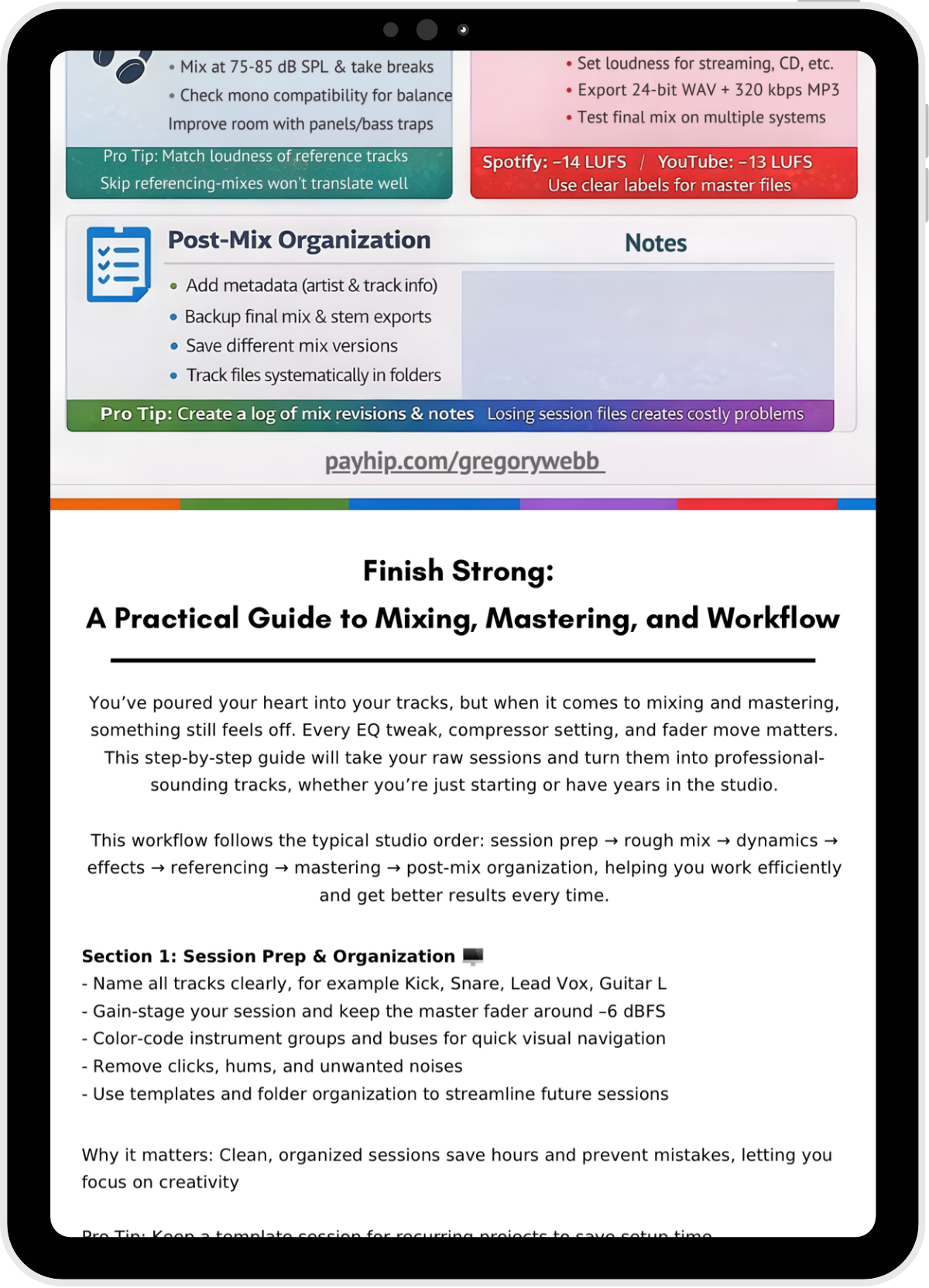
Stay organized, save time, and mix like a pro. Download the full free PDF guide now and keep it handy for every session!
Level Up Your Mixes, Protect Your Music, and Stay Organized
These additional and essential resources will help you work faster, stay organized, and ensure your music earns the royalties it deserves. Grab the guides that fit your workflow:
🎹 Logic Pro X Shortcuts Guide
-Master key commands and speed up your workflow
-Printable 5-page guide with space for your custom shortcuts
💰 Understanding PROs
- Understand performing rights and claim what’s yours
-20 page guide to ensure your music earns money
📗 Music Production Dictionary
-Master 500 essential terms in recording, mixing, and mastering
-33 page pocket guide to keep your studio workflow smooth

If you’re a filmmaker, game developer, content creator, or agency looking for original, licensable music or custom scoring tailored to your project, I’d be glad to connect.
Gregory Webb
Composer | Multi-Instrumentalist
Original music for film, TV, games, and digital media
All music available for sync and licensing