
A good gaming setup is about more than a powerful computer or high-resolution monitor. Audio can also have a significant impact on comfort, communication, and immersion. A suitable wireless headset gaming setup can provide freedom from cables while giving players access to game audio and voice communication through a single device.
Choosing the right headset requires more than simply looking at wireless connectivity. Sound quality, microphone performance, comfort, battery life, compatibility, and connection stability can all influence the overall experience.
Understand Your Gaming Requirements
Before choosing a wireless headset, consider how you normally use your gaming setup. A casual player may have different priorities from someone who spends several hours playing competitive multiplayer games.
If you primarily play single-player games, sound quality and comfort may be your main concerns. Multiplayer players may place greater importance on microphone performance and communication features.
Understanding your gaming habits can help you focus on the features that are actually useful to you.
Consider Sound Quality
Audio plays an important role in gaming. Sound effects, dialogue, environmental audio, music, and directional cues can contribute to the overall experience.
A good headset should provide clear and balanced sound across different frequencies. This allows players to hear different elements of a game without one type of sound becoming unnecessarily dominant.
The ideal sound profile is also influenced by personal preference. Some gamers prefer stronger bass, while others prefer a more balanced presentation that makes dialogue and environmental sounds easier to distinguish.
Look at Wireless Connectivity
Wireless connectivity is one of the main reasons gamers choose wireless headsets. Removing the cable can make a gaming area feel less cluttered and provide greater freedom of movement.
However, different wireless technologies can provide different experiences. Some gaming headsets use dedicated wireless transmitters, while others may use Bluetooth or multiple connection methods.
Before purchasing, check which connection type the headset uses and whether it is compatible with your gaming device.
Check Compatibility
Compatibility should be considered before choosing any wireless gaming equipment. Gamers may use PCs, laptops, consoles, handheld devices, or multiple platforms.
Not every headset supports every platform in the same way. Some features may also be limited depending on the device.
Check the manufacturer's compatibility information to determine whether the headset supports your preferred system and whether additional adapters or software are required.
Evaluate Microphone Quality
For multiplayer gaming, communication can be just as important as game audio. A clear microphone can help teammates understand instructions and respond quickly.
When evaluating a gaming headset, consider microphone clarity, positioning, mute controls, and any available noise-management features.
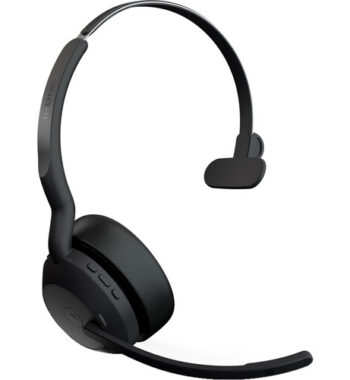
A microphone that can be positioned close to the user's mouth can help provide more consistent voice pickup. Some models also allow the microphone to be retracted, detached, or muted through a physical control.
Consider Battery Life
Unlike wired headsets, wireless models require a power source. Battery life should therefore be an important part of the purchasing decision.
Consider how long the headset can operate on a full charge and how frequently you normally play. A longer battery life can be useful for extended gaming sessions.
It is also worth checking how the headset behaves while charging. Some models can continue operating when connected to a charging cable, while others may have different limitations.
Prioritise Comfort
Comfort becomes increasingly important during longer gaming sessions. A headset that feels comfortable for thirty minutes may not feel the same after several hours.
Consider:
- Headset weight
- Ear-cup size
- Cushioning
- Headband design
- Adjustability
- Overall fit
Over-ear designs can provide a more enclosed listening experience, while lighter designs may appeal to gamers who prefer less pressure around their ears.
Personal fit is important, so trying a headset before purchasing it can be useful when possible.
Think About Latency
Audio latency refers to the delay between an action and the corresponding sound. Excessive delay can be distracting, especially in fast-paced games.
Gaming-focused wireless technologies are often designed to minimise latency, but performance varies between products and connection types.
For competitive gamers, checking latency-related specifications and independent reviews can be worthwhile before making a decision.
Manage Your Gaming Environment
The headset is only one part of the overall gaming setup. Room conditions can also affect the experience.
A quiet, organised gaming area can make it easier to concentrate. Good cable management for other devices can complement the cable-free nature of a wireless headset.
If you regularly play in a shared room, a headset can also allow you to enjoy game audio without using external speakers.
Use Audio Software When Available
Some wireless gaming headsets include companion software that allows users to adjust audio settings.
Depending on the model, software may provide options for equalisation, microphone settings, firmware updates, or custom audio profiles.
These features can allow users to fine-tune the headset according to their preferences. However, not every gamer needs advanced software, so this should be considered alongside the overall requirements of the setup.
Maintain Your Headset
Proper maintenance can help keep wireless gaming equipment working effectively.
Keep ear cushions and other surfaces clean according to the manufacturer's instructions. Store the headset safely when it is not being used and avoid exposing it to excessive moisture or physical impact.
For wireless models, following recommended charging practices can also help maintain the equipment.
Regularly checking for software or firmware updates may be useful if the manufacturer provides them.
Consider Value Rather Than Price Alone
Wireless gaming headsets are available across different price ranges. The most expensive model is not necessarily the best option for every player.
Instead of focusing only on price, compare the features that matter most to your gaming habits. A moderately priced headset with good comfort, reliable connectivity, and clear audio may be more useful than a premium model filled with features you do not need.
Reading product specifications and independent reviews can help you make a more informed choice
Conclusion
Improving a gaming setup with the right wireless headset gaming equipment involves considering several factors rather than focusing on wireless connectivity alone. Sound quality, microphone performance, comfort, battery life, compatibility, latency, and connection stability can all influence the overall experience.
Start by identifying how you play and which features matter most. Then compare suitable headsets based on their specifications, platform compatibility, and practical features. With the right combination of equipment and a well-organised gaming environment, a wireless headset can provide a comfortable, flexible, and immersive audio experience.