
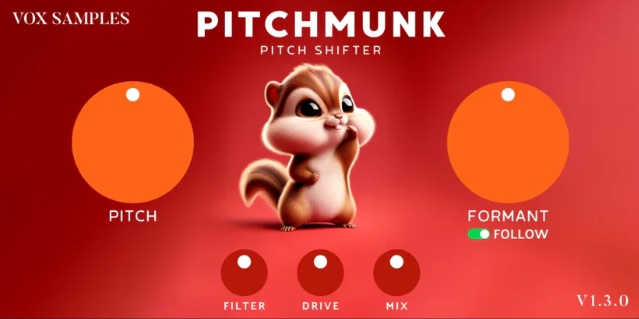
If you're looking for a powerful yet easy-to-use pitch-shifting plugin that gives you total control over your audio's sound, look no further than Pitchmunk. Whether you're producing electronic music, experimenting with sound design, or crafting unique vocal chops, this plugin is a game-changer. Best of all? It’s free!
Pitchmunk is designed to shift both the pitch and formant of your sounds without affecting their tempo or playback speed. This means you can create stunning pitch effects without distorting your original audio. Let's dive into why this plugin is so special and how it can enhance your next project.
- Seamless Pitch Shifting: Up to 2 Octaves in Either Direction
One of the standout features of Pitchmunk is its ability to shift your sound’s pitch by up to 2 octaves, either up or down. That’s a total of 48 semitones to play with! Whether you're raising the pitch for a more playful, chipmunk-like vocal or lowering it for a deeper, darker tone, Pitchmunk gives you the flexibility to explore a wide range of pitch variations.
What makes Pitchmunk even more appealing is that the pitch shifts aren't "stepped" like in some other pitch-shifting plugins. You can dial in any pitch value you want, allowing for smooth and continuous transitions. Whether you're going for a subtle adjustment or a dramatic change, Pitchmunk gives you the precision to achieve exactly the sound you're after.
- Control Formants for Natural or Creative Shifts
In addition to pitch, Pitchmunk also allows you to adjust the formants of your sound. Formants are the resonant frequencies that define the tonal quality or "color" of your voice or instrument. When you shift the pitch of a sound without adjusting its formants, the resulting shift can sometimes sound unnatural. But with Pitchmunk, you can maintain the natural character of your sound by adjusting both pitch and formant together.
The plugin features a Follow option, which links the formant control to the pitch. This results in a more natural-sounding pitch shift, with a "crisp" quality that’s perfect for vocals or instruments. However, for more creative freedom, you can turn off the Follow option and adjust the Pitch and Formant independently. This opens up endless possibilities for sound manipulation, from ultra-sharp, robotic shifts to ethereal, otherworldly tones.
- Additional Effects for More Creative Control
Pitchmunk doesn’t stop at pitch and formant control. To help you achieve even more unique and powerful effects, it includes a Filter, Drive, and Mix knob:
- Filter: Shape the tonal quality of your sound with low-pass, high-pass, or band-pass filtering.
- Drive: Add harmonic distortion or saturation for a richer, more textured sound.
- Mix knob: Blend the processed sound with the original signal, giving you full control over the wet/dry balance.
These additional features make it incredibly easy to get the sound you're looking for, whether you're after subtle pitch correction or something more experimental.
- Why Pitchmunk?
Pitchmunk is not only incredibly versatile, but it’s also easy to use. Its simple interface, with two large knobs for Pitch and Formant, makes it intuitive even for beginners. No more getting lost in complex menus or settings—just dial in your desired pitch and formant and start experimenting with creative effects right away.
Plus, with its smooth pitch shifting, you can easily achieve those vocal chop sounds you hear on platforms like Spotify, where vocals are often shifted in interesting ways to create catchy, melodic phrases. Whether you're working on a catchy hook or a sound design project, Pitchmunk helps you add that extra sparkle and creativity to your tracks.
- System Requirements
Pitchmunk is compatible with both Windows (64-bit only) and macOS (64-bit only), and it supports the following formats:
- Windows (64-bit): VST3
- macOS (64-bit): VST3, AU
So no matter what system you're working on, Pitchmunk can seamlessly integrate into your setup and start transforming your audio in no time.
- How to Download and Install Pitchmunk
- Click the Link to go to the download page. Pitchmunk
- Enter Your Email and click "Download Now".
- Check Your Email for the download link.
- Download and Install the plugin using the instructions in the email.
Done! Enjoy using Pitchmunk!
If you found our information helpful, consider supporting us with a donation HERE to help us continue providing valuable resources. Your support means a lot to us!
Comments ()