

Choosing the right software can be just as important as choosing the Photo Booth itself.
Your software controls much of the guest experience: how people start their session, how photos and videos are captured, which animations and overlays they see, how content is shared and, in many cases, how easily you can manage an event.
Three names that frequently appear when Photo Booth operators compare software are Snappic, LumaBooth and TouchPix.
But which one is actually the best?
The short answer is: there isn't one winner for everyone. Each platform has a slightly different focus, so the best choice depends on the type of booth you operate and the kind of events you want to offer.
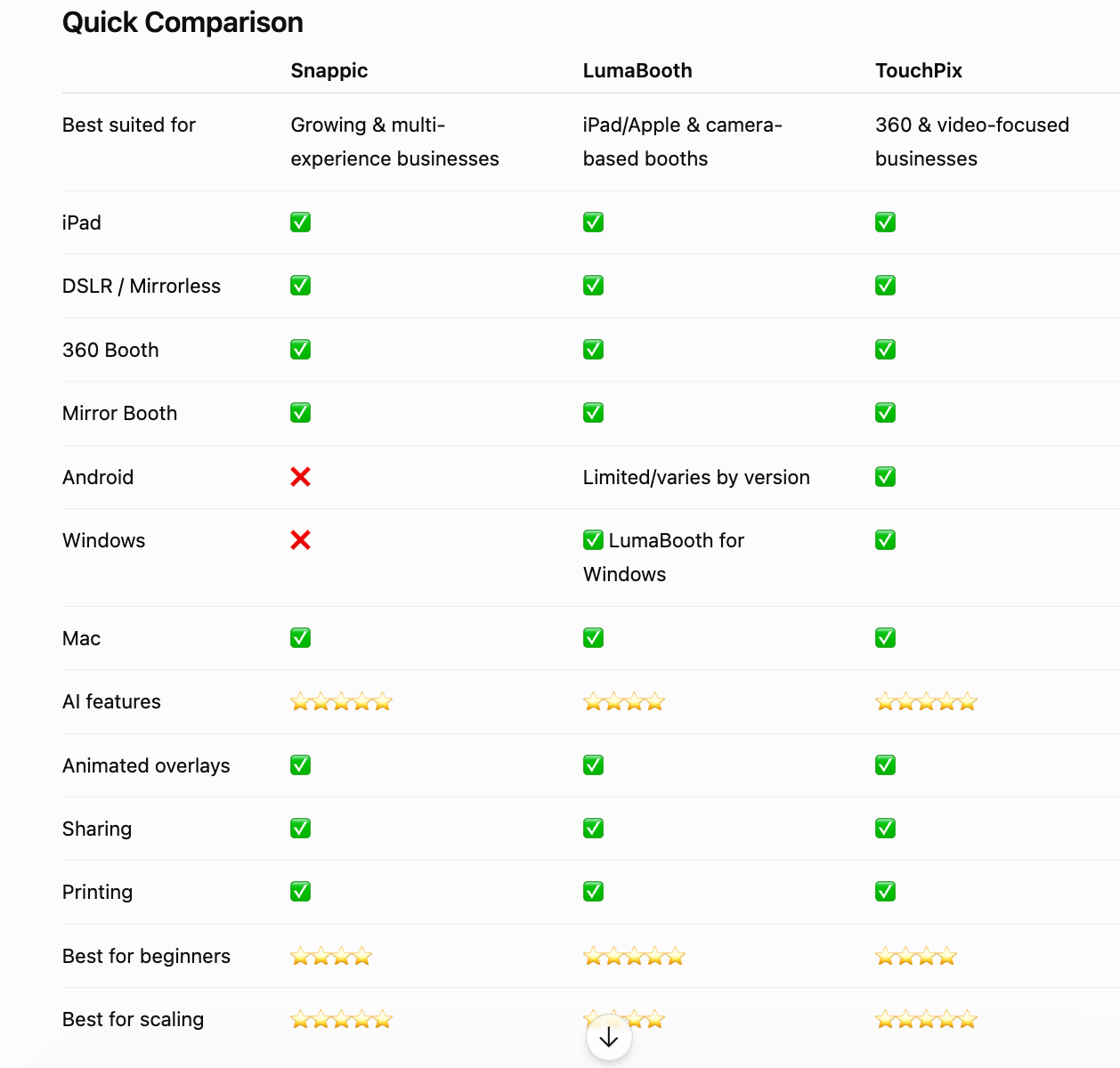
*The table is a simplified overview rather than a complete feature matrix. Each platform has different plans and hardware combinations, so compatibility should always be checked for your specific setup.
1. Snappic
Best for: Operators who want to offer multiple types of premium experiences
Snappic positions itself as an all-in-one platform for professional Photo Booth businesses.
One of its biggest strengths is the number of experiences it can support. Its current platform includes options such as iPad booths, 360 booths, mirror booths, roaming photography and other interactive experiences.
It also puts a strong emphasis on AI-powered experiences.
For example, its AI-FX features can transform guest photographs into different creative styles, while its platform also includes video effects and other interactive experiences.
What makes Snappic interesting?
AI & creative effects
If you want to offer something beyond a traditional photo, Snappic has a particularly strong focus on AI and creative effects.
Multiple booth experiences
This can be especially useful if your company offers different products rather than operating just one iPad Booth.
Business tools
Snappic also offers features such as microsites, sharing stations, analytics and print management, which can become useful as your operation grows.
Potential downside
The platform can make more sense for an operator who actually needs its broader feature set. If you're simply running a small iPad Booth for weddings and birthdays, you may not need every advanced feature.
2. LumaBooth
Best for: iPad/Apple users who want a straightforward professional setup
LumaBooth is particularly interesting if your business revolves around iPad, iPhone and Mac, although it also supports Canon, Nikon and Sony cameras. LumaBooth is also available for Windows through what was previously known as dslrBooth.
The software covers the essential Photo Booth workflow:
Capture → Customize → Share → Print
It supports photos, GIFs, videos, boomerangs and 360 experiences, as well as animated overlays and custom designs.
Another interesting feature is its Virtual Attendant, which can guide guests through the experience using video and audio prompts. This is particularly relevant if you're creating customized guest-facing animations and start screens.
What makes LumaBooth interesting?
Easy setup
If you already have an iPad or iPhone, getting started is relatively straightforward.
Camera flexibility
You can use the device's built-in camera or connect compatible Canon, Nikon or Sony cameras.
Design customization
You can customize start screens, backgrounds, fonts, colors, print layouts and add image or animated video overlays.
Strong ecosystem
LumaBooth also has companion tools such as LumaShare and cloud functionality for sharing and managing event content.
Recent development
LumaBooth has been expanding its capabilities considerably. In 2026, version 5 introduced a web dashboard and AI Portraits, while subsequent updates have continued improving event management, AI features and the guest experience.
Potential downside
If your business is heavily focused on a wide range of specialized experiences and cross-platform hardware, you may want to compare its capabilities carefully with alternatives such as Snappic and TouchPix.
https://dslrbooth.com/es/lumabooth-photo-booth-app
3. TouchPix
Best for: 360 Booth and video-focused operators
TouchPix has a particularly strong connection with the 360 Photo Booth market, but it has evolved into a broader Photo Booth and video platform.
One of its biggest advantages is cross-platform compatibility.
TouchPix currently supports iOS, Android, macOS, Windows and Linux, as well as cameras including GoPro, DSLR and mirrorless systems.
That's a significant advantage if your business doesn't want to be tied to a single hardware ecosystem.
What makes TouchPix interesting?
360 Booth capabilities
If 360 is an important part of your business, TouchPix deserves serious consideration.
Lots of creative effects
TouchPix currently advertises more than 60 filters and effects and more than 300 designs/overlays within its ecosystem.
AI features
The platform includes AI face replacement and background removal, among other creative tools.
Multiple capture modes
You can create still photos, AI photos, boomerangs, videos, animated GIFs and slow-motion video.
Offline sharing
TouchPix also offers offline sharing capabilities, which can be particularly useful at venues where internet connectivity isn't reliable.
Potential downside
If your business is primarily a traditional wedding Photo Booth and you don't need 360 or video-heavy features, some of TouchPix's broader capabilities may be more than you actually need.
So… Which One Should You Choose?
Rather than asking "Which software is the best?", I'd ask:
"Which software fits the business I want to build?"
Here's a simple way to think about it.
💍 If you mainly do weddings
LumaBooth can be an excellent option if you're looking for a straightforward, customizable setup, particularly around iPad/Apple hardware.
Snappic becomes more attractive if you want to offer more premium experiences and expand your services.
📱 If you mainly operate iPad Booths
I'd put LumaBooth and Snappic high on your shortlist.
LumaBooth has a strong Apple-focused workflow, while Snappic gives you a broader set of experiences and business-oriented tools.
🪞 If you operate Mirror Booths
Both Snappic and LumaBooth can be interesting options.
LumaBooth specifically supports mirror experiences with customizable guest prompts, while Snappic supports mirror booths alongside other experiences.
🔄 If 360 Booth is a major part of your business
TouchPix should definitely be on your shortlist.
Its focus on 360, video effects, GoPro connectivity and broad device compatibility makes it particularly interesting for operators working heavily in this category.
🚀 If you want to build a larger Photo Booth company
I'd look closely at Snappic and TouchPix, especially if you're planning to offer several types of experiences.
Snappic emphasizes multi-experience and business tools, while TouchPix offers broad hardware/platform flexibility.
What About Animations and Templates?
This is something Photo Booth operators sometimes overlook when choosing software.
The software is the engine, but your designs are part of the experience the guest actually sees.
Your start screen, countdown, animations, overlays, prompts and final screens can completely change how professional the booth feels.
For example, imagine two identical Mirror Booths.
One simply says:
"Touch to Start."
The other has:
✨ A branded animated welcome screen
🎉 Interactive prompts
📸 Animated countdown
💃 Pose challenges
❤️ Custom wedding graphics
🎬 Animated "Your photos are printing" screen
The hardware may be identical—but the experience feels completely different.
That's why choosing software that allows you to use custom animated overlays and branded content is important when building a premium Photo Booth service. LumaBooth, Snappic and TouchPix all provide customization capabilities, although the exact implementation and supported formats vary.
Our Final Verdict
There isn't a universal winner.
🏆 Snappic
Best for: Growing businesses, multiple booth experiences and premium/AI features.
🏆 LumaBooth
Best for: iPad/Apple-focused operators looking for a professional and relatively straightforward workflow.
🏆 TouchPix
Best for: 360 Booth, video-focused businesses and operators who value broad platform compatibility.
The best approach is to try the software with your actual equipment before committing. A feature list can tell you what a platform can do, but only a real event—or at least a realistic test—will tell you how comfortable you are using it under pressure.
And remember: your software is only one part of the equation.
Great hardware + reliable software + beautiful design + a memorable guest experience = a stronger Photo Booth business.
📸 Want to Make Your Photo Booth Experience Stand Out?
Whether you use Snappic, LumaBooth, TouchPix or another leading platform, professional animations, templates and start screens can help you create a more polished experience for your clients.
At Kybs Graphics, we create Photo Booth animations, templates and start screens for weddings, birthdays, corporate events, parties and other celebrations, including multilingual collections.
👉 Explore our latest Photo Booth designs and give your next event a fresh look.
https://payhip.com/kybsgraphics
*Software features, compatibility and pricing change regularly. Always verify the latest information with the software provider before purchasing.