

A successful Photo Booth event starts long before the first guest steps in front of the camera.
Imagine arriving at a wedding venue, setting up your booth, and discovering that you've forgotten an essential cable. Or starting a corporate event only to realize that the internet connection isn't working and guests can't access their photos.
These situations can happen to any Photo Booth operator. The good news? Most of them are preventable with a little preparation.
Whether you run a Mirror Booth, iPad Booth, 360 Booth, or traditional Photo Booth, having a reliable pre-event checklist can help you avoid last-minute stress, deliver a better guest experience, and protect your business reputation.
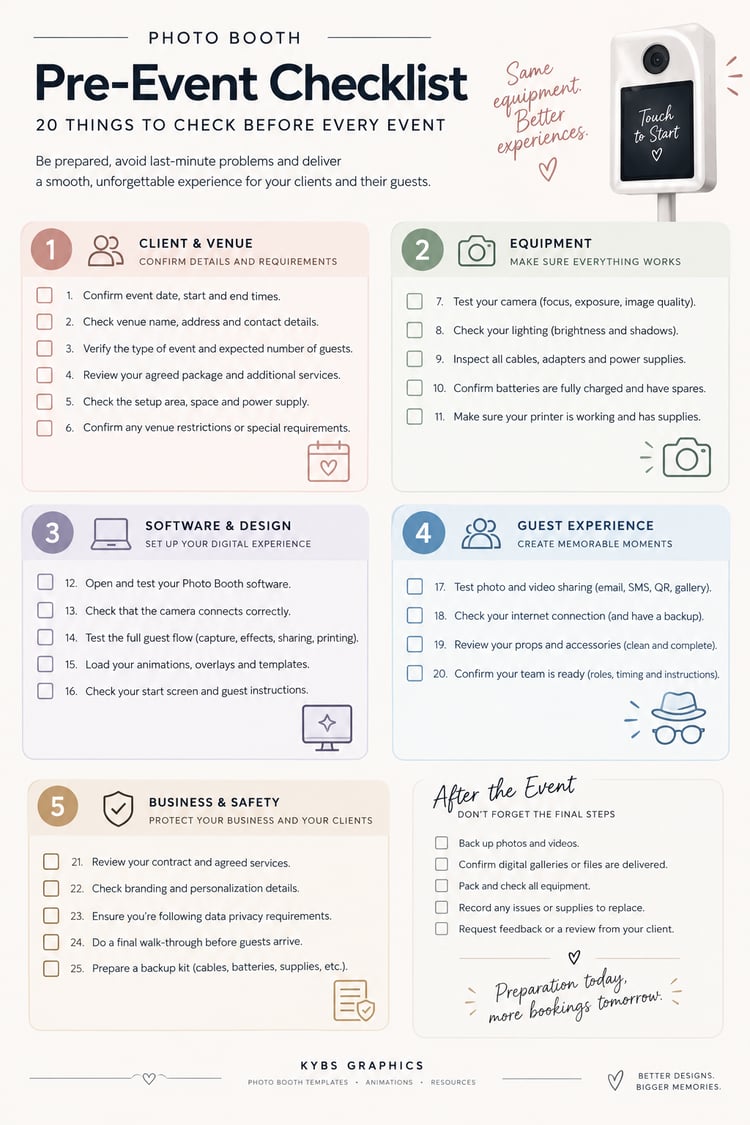
In this guide, we'll cover 20 essential things to check before every Photo Booth event, from equipment and software to client communication and the final setup.
Save this checklist, use it before your next booking, and make event preparation a little easier!
1. Confirm All Event Details With Your Client
Before packing your equipment, make sure you have the correct information.
Confirm the following details:
- Event date and start and end times.
- Venue name and full address.
- Contact person and phone number.
- Expected number of guests.
- Type of event: wedding, birthday, corporate party, or another celebration.
- Agreed Photo Booth package and additional services.
Pro tip: Send your client a confirmation message a few days before the event. This gives you time to clarify any last-minute changes and helps prevent misunderstandings.
For weddings and corporate events, also ask whether there is a specific schedule you need to follow.
2. Check the Venue and Setup Requirements
Not every venue offers the same conditions.
Before the event, confirm where the Photo Booth will be positioned and whether the space meets your requirements.
Check:
- Available floor space.
- Access to a suitable power outlet.
- Lighting conditions.
- Distance from the main event activities.
- Accessibility for guests.
- Whether the venue has restrictions on equipment, cables, or setup times.
If you're using a Mirror Booth or a large enclosed setup, make sure there is enough room for the equipment and for guests to move around comfortably.
Pro tip: Ask for a photo of the intended setup area if you haven't visited the venue before. It can help you identify potential problems before arrival.
3. Test Your Camera
Your camera is one of the most important parts of your business, so never assume it will work perfectly just because it worked at your last event.
Before leaving, check:
- Camera connectivity.
- Lens cleanliness.
- Focus and exposure.
- Image quality.
- Battery level or power supply.
- Compatibility with your Photo Booth software.
Take several test photos under lighting conditions similar to those you expect at the event.
If you use an iPad Booth, test the built-in camera and make sure the lens is clean and unobstructed.
Remember: A quick camera test can save you from discovering a problem when your first guests are already waiting.
4. Test Your Lighting
Lighting can make a huge difference to the quality of your photos.
A setup that looks perfect in your office might produce very different results in a dark wedding venue or a brightly lit corporate space.
Check your lighting equipment and test how it works with your camera.
Pay attention to:
- Brightness and consistency.
- Shadows on guests' faces.
- Reflections on mirrors or glossy surfaces.
- Skin tones.
- Background lighting.
If possible, test your setup at the venue before guests arrive.
For Mirror Booths, pay particular attention to reflections and the position of your lighting relative to the mirror.
5. Check All Cables, Batteries, and Power Supplies
Few things are more frustrating than arriving at an event with everything ready except the cable you need to connect your equipment.
Before every booking, check that you have:
- Power cables and adapters.
- USB or camera connection cables.
- Extension leads, where permitted.
- Fully charged batteries.
- Chargers.
- Power supplies for your printer and lighting.
- Any specialist cables required by your setup.
Inspect cables for visible damage and replace anything unreliable.
Pro tip: Keep your essential cables in a dedicated, labeled bag. You'll spend less time searching for them and reduce the chance of leaving something behind.
6. Test Your Photo Booth Software
Your software controls much of the guest experience, so make sure everything works before the event begins.
Open your Photo Booth application and test the complete process.
Check that:
- The software launches correctly.
- The camera connects successfully.
- The correct event settings are selected.
- The capture sequence works.
- Photos and videos save correctly.
- Animations and overlays display properly.
- Sharing and printing features work as expected.
If your software requires an internet connection for specific features, test those functions in advance.
Important: Avoid updating your software immediately before an important event unless the update is necessary. Test new versions with your equipment before using them at a live booking.
7. Prepare Your Photo Booth Animations and Templates
Your designs are more than decoration. They help create a personalized experience and make your service feel professional.
Before the event, check that your animations, overlays, and templates are ready to use.
For example:
- A wedding might need elegant frames and personalized names.
- A birthday party might benefit from colorful graphics and playful animations.
- A corporate event might require branded overlays and company colors.
- A school event might call for energetic designs that match the occasion.
Make sure all files are in the correct format, resolution, and orientation for your software and equipment.
Check that text is readable, names are spelled correctly, and important elements aren't hidden behind interface buttons or cropped by the final output.
Pro tip: Create a folder for each event containing the final approved designs. This helps you avoid loading the wrong template when managing several bookings.
If you're preparing designs for multiple events, organizing them in advance can save valuable time during setup.
8. Check Your Start Screen and Guest Instructions
The first screen guests see should make it obvious what they need to do.
Check your welcome screen and make sure the instructions are clear.
Depending on your setup, guests might need to:
- Touch the screen to start.
- Stand in a specific position.
- Look at the camera.
- Follow a countdown.
- Choose a photo or video experience.
- Collect their printed photos.
Keep instructions short and easy to understand.
For example, a simple sequence might be:
Touch to Start → Get Ready → Strike a Pose → Enjoy Your Photos!
For weddings and corporate events, consider matching your welcome screen to the event's branding or theme.
A clear interface makes the experience easier for guests and can reduce the need for constant assistance.
9. Test the Complete Guest Experience
Don't stop after testing the camera or opening the software.
Run a complete session from beginning to end, just as a guest would.
Start at the welcome screen and follow every step.
Check:
- The start button responds correctly.
- The countdown works.
- Animations play at the right time.
- Photos or videos capture successfully.
- The final images look correct.
- Printing or sharing works.
- The system returns to the start screen for the next guest.
This is particularly important if you've changed software settings or customized the experience for a specific event.
Pro tip: Ask someone else to test the booth without your help. If they can complete the experience easily, your instructions are probably clear enough.
10. Check Your Printer and Print Layouts
If your Photo Booth package includes physical prints, your printer deserves a separate check.
Before the event:
- Confirm that the printer connects correctly.
- Check the paper and media supply.
- Check ink or ribbon levels, depending on the printer.
- Print a test photo.
- Confirm the correct print size.
- Check the template alignment and margins.
- Verify that the colors and text look right.
Make sure your print layout matches the paper size you're using.
For example, a 2 × 6-inch strip and a 4 × 6-inch print require different layouts.
If your event includes a large number of guests, estimate the number of prints you'll need and bring sufficient supplies.
11. Test Photo and Video Sharing
Many guests expect to receive their photos digitally, whether through email, text messages, QR codes, or an online gallery.
Check the sharing methods included in your package.
Test the relevant features and confirm:
- The sharing interface works.
- QR codes open the correct destination.
- Email or text delivery works where supported.
- The event gallery is configured correctly.
- Guests can access their content as intended.
If your sharing system depends on internet access, don't assume the venue's Wi-Fi will be reliable.
Have a backup plan that matches your equipment and software capabilities.
Also, communicate clearly with your client about how photos will be delivered and how long galleries will remain available.
12. Check Your Internet Connection
Internet access can be essential for online galleries, cloud services, digital sharing, and certain software features.
Before the event, find out whether the venue offers Wi-Fi and whether you can use it.
If possible:
- Test the connection.
- Confirm any login requirements.
- Check mobile coverage.
- Prepare a suitable backup connection if needed.
- Identify which features can continue working without internet access.
Pro tip: Know exactly what will happen if the connection drops. Being able to continue capturing photos while troubleshooting online sharing can make a big difference during a busy event.
Never assume that every function of your software will work offline. Check the requirements of your specific setup.
13. Prepare Backup Equipment
Professional operators plan for problems before they happen.
You don't necessarily need to carry a second complete Photo Booth, but having a few essential backups can prevent a minor issue from ruining an event.
Consider bringing:
- Spare cables.
- Extra batteries.
- Additional chargers.
- A backup power adapter.
- A spare tablet or device, if practical.
- A backup method for saving photos.
- Extra printer supplies, if printing is included.
Your backup kit should reflect the equipment you use and the type of events you serve.
Prioritize items that are difficult to replace quickly at the venue.
14. Check Your Props and Accessories
Props can make the experience more entertaining, particularly at birthdays, school events, and parties.
Before leaving, check that your prop collection is clean, complete, and appropriate for the event.
Depending on your service, you might bring:
- Hats and glasses.
- Signs and speech bubbles.
- Themed props.
- Corporate branding accessories.
- Wedding-themed props.
- Props that match a particular decade or party theme.
Avoid bringing items that could be inappropriate for the audience or conflict with the client's event.
Keep props organized in a container that's easy to transport and access during the event.
15. Prepare Your Team
If you work with an assistant or event attendant, make sure everyone understands their responsibilities.
Before the event, confirm:
- Arrival time.
- Dress code.
- Setup responsibilities.
- Who will assist guests.
- Who will monitor printing and sharing.
- What to do if the equipment stops working.
- Who will communicate with the client.
If someone else will operate the booth, make sure they're familiar with the equipment and software.
A short briefing can prevent confusion and help your team deliver a consistent experience.
16. Confirm Setup and Arrival Times
Timing is especially important for weddings, conferences, and events with a strict schedule.
Confirm when you can access the venue and how long you'll have to set up.
Allow enough time to:
- Unload equipment.
- Assemble the booth.
- Connect cables and power.
- Configure the software.
- Test the camera and lighting.
- Run a complete session.
- Resolve unexpected problems.
Whenever possible, aim to be fully operational before guests are expected to use the booth.
Don't plan your setup around the assumption that everything will work perfectly the first time.
17. Review Your Contract and Agreed Services
Before the event, review the agreement with your client.
Confirm that you understand exactly what you've promised to provide.
Check:
- Booking duration.
- Included services.
- Additional hours, if agreed.
- Print quantities or printing arrangements.
- Personalized designs.
- Setup and removal requirements.
- Travel fees or other agreed charges.
- Payment status and any outstanding balance.
If the client has requested changes, make sure those changes have been confirmed in writing.
Having clear records helps prevent misunderstandings and protects the relationship with your client.
18. Check Branding and Personalization
Personalization can help make your Photo Booth service feel more valuable.
For weddings, this might include the couple's names, wedding date, or chosen design style.
For corporate events, it could include the company logo, brand colors, campaign slogan, or event hashtag.
Before the event, verify every personalized element.
Pay particular attention to:
- Spelling.
- Names and dates.
- Logo quality.
- Brand colors.
- Text placement.
- Print and screen dimensions.
- Client approval of the final design.
Whenever possible, obtain client approval before preparing the final files.
A small spelling mistake can be particularly noticeable when it appears on hundreds of prints.
19. Review Privacy and Data Handling
Photo Booth operators often handle personal photographs, contact details, and event galleries.
Make sure you understand how the information collected through your setup is handled.
Before the event, check:
- What information guests are asked to provide.
- Whether any consent or privacy notice is needed.
- Where photos and videos are stored.
- Who can access the files.
- How guests receive their images.
- How long the content will be retained.
- Whether the client has specific privacy requirements.
If you use email or text sharing, make sure your collection and use of guest information complies with applicable data protection laws.
For events involving children, be especially careful about photography permissions, image sharing, and the organizer's requirements.
Your exact obligations depend on the location, the type of event, and the way you process information. Don't assume that a client's permission automatically covers every possible use of guests' photographs.
20. Do a Final Walk-Through Before Guests Arrive
You've checked your equipment, tested your software, and prepared your designs. Now it's time to look at the complete setup from the guest's perspective.
Before opening the booth, ask yourself:
- Does the booth look clean and professional?
- Are cables secured and out of the way?
- Is the lighting working correctly?
- Can guests easily see the welcome screen?
- Are the instructions clear?
- Are props organized and accessible?
- Is there enough space for guests to pose comfortably?
- Have you tested a final photo or video?
- Is the printing or sharing process working?
- Is the setup consistent with what the client requested?
Take a final test photo and review it.
If everything looks good, you're ready to welcome your guests!
Bonus: What to Do After the Event
Your checklist shouldn't end when the last guest leaves.
A few simple post-event tasks can help you protect your equipment, improve your service, and prepare for the next booking.
After every event:
- Back up photos and videos according to your agreed data-handling procedures.
- Confirm that promised galleries or digital files have been delivered.
- Pack and check all equipment.
- Record any technical problems or supplies that need replacing.
- Review feedback from the client or event organizer.
- Request a review or testimonial when appropriate.
- Note any improvements for your next event.
If you regularly work at weddings, corporate events, and private parties, keeping a record of what worked well can help you improve your service over time.
Make Your Next Photo Booth Event Easier
Running a Photo Booth business involves much more than taking great pictures. You need to manage equipment, software, client expectations, event logistics, and the overall guest experience.
The good news is that you don't have to remember everything from scratch before every booking.
A repeatable checklist helps you stay organized, reduce avoidable problems, and deliver a more professional experience.
Start with these 20 checks, adapt the list to your equipment, and turn it into part of your regular pre-event routine.
Over time, preparation becomes faster, and you'll have more confidence when you arrive at a new venue.
Want to Take Your Photo Booth Business to the Next Level?
Preparation is only one part of running a successful Photo Booth business. Understanding your pricing, equipment, service packages, and client management can also make a difference.
Our Photo Booth Business Guide is designed to help aspiring and established operators navigate important aspects of running their business. It includes practical resources such as pricing guidance, equipment checklists, and an editable contract template.
Whether you're preparing for your first event or looking to improve your existing services, having the right resources can help you work more confidently.
Explore the Photo Booth Business Guide by Kybs Graphics and find more resources to support your business.
And if you're looking to refresh your booth's appearance, explore our collection of Photo Booth animations, templates, and start screens for weddings, birthdays, corporate events, and other celebrations.