
By María Rossiter · NextPermit.org · Permit Coordination · Electrical · EV Infrastructure
EV charger rollouts look simple on paper. You install a charger, pull a permit, done. But when you're managing ten, fifteen, or twenty locations simultaneously — each with its own AHJ, its own contractor, its own equipment specs, its own NOC requirements, and its own permit timeline — the complexity compounds fast.
I've coordinated EV charger installations across multiple dealerships in Florida, handling everything from permit applications and NOC recordings to equipment tracking and AHJ follow-ups. What I found is that most teams are managing these rollouts with email threads, scattered notes, and a lot of hoping nothing slips through.
There's a better way. And it doesn't require expensive software.
"The permit is only one piece. The real job is keeping every location moving at the same time — without letting any one of them stall the whole project."
Why EV Charger Permits Are More Complex Than They Look
A commercial EV charger installation — especially a Level 2 or DC fast charger — typically requires an electrical permit at minimum, and depending on the jurisdiction, may also require a building permit, a Notice of Commencement (NOC), and sometimes separate approvals for transformer upgrades or new panel installations.
Each jurisdiction has its own portal, its own forms, its own processing time. Some cities require the owner's signature on the permit application. Others require a licensed contractor of record before they'll even accept the submission. And when you're coordinating all of this across a multi-location rollout while also tracking equipment delivery dates and contractor schedules, you need one place where everything lives.
What makes multi-location EV rollouts complicated
- Each AHJ has different forms, portals, and review timelines
- Owner-signed permit apps must be collected from each dealer contact separately
- Equipment (Blink, ABB chargers) ships independently from permit approval
- NOC recording must happen before inspections in many FL jurisdictions
- Corrections at one location don't always match corrections at another
- Charger specs vary per location — different panel configs, transformer needs, conduit runs and load calculations.
What the Tracker Covers
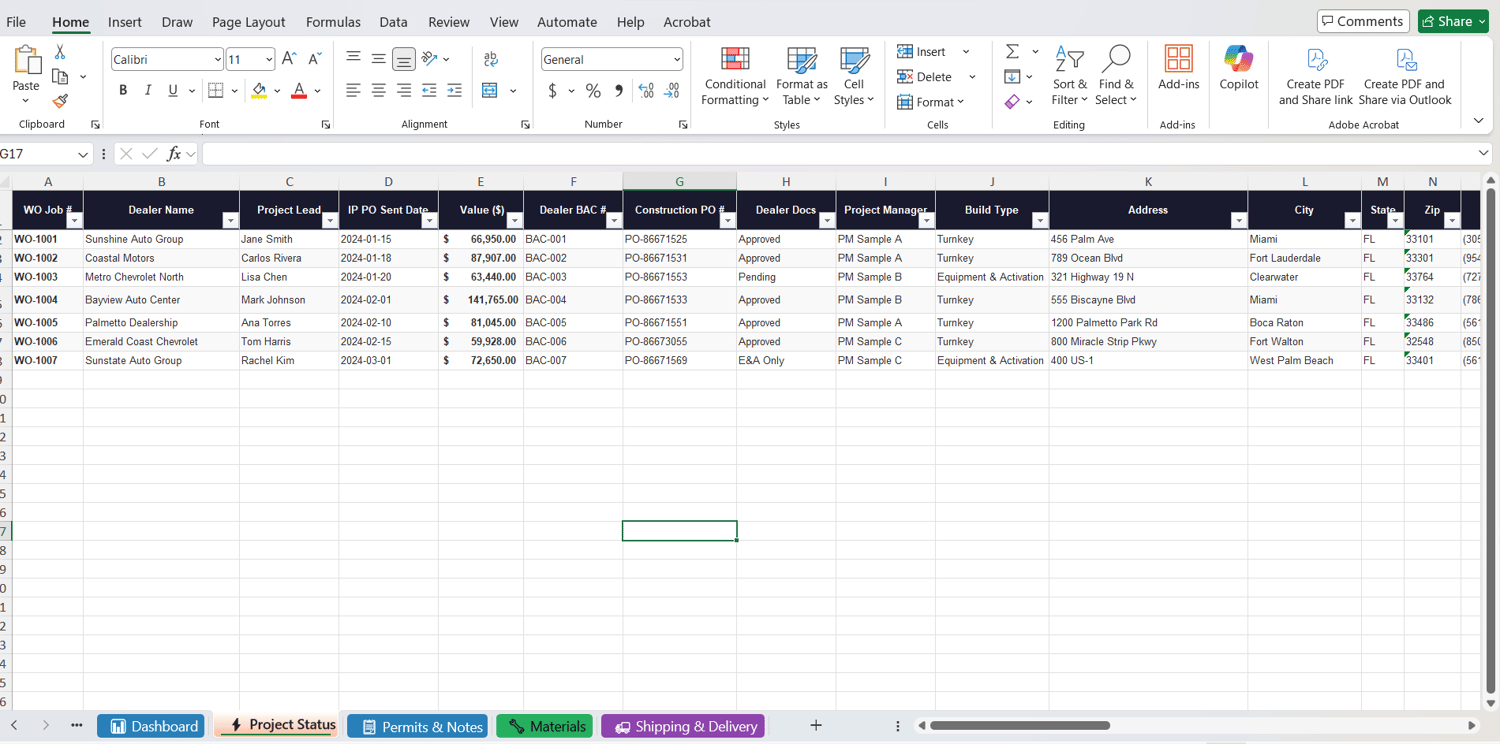
This spreadsheet was built specifically to manage multi-location EV charger installations. It's organized into six tabs, each handling a different piece of the project:
📊 Dashboard: Live summary of all locations — permit status breakdown, contract values, build type split, and dealer doc status at a glance.
⚡Project Status: Main working sheet. Every location, every PM, every piece of equipment, permit status, and up to 6 notes columns per row.
📋Permits & Notes: AHJ tracking numbers, building department contacts, and a full chronological log of every follow-up per location.
🔧Materials: Equipment specs per location — charger types, panels, breakers, transformers, disconnects, fuses, and bid form references.
🚚 Shipping & Delivery: Track Blink, ABB 50kW, ABB 120kW ship and delivery dates per location so you can align permit issuance with equipment arrival.
📋 Instructions:
Column-by-column guide explaining how to use every field. Open this first.
The Columns That Save the Most Time
Dealer Docs Status
One of the biggest bottlenecks in a multi-location rollout is chasing signed permit applications from dealer contacts. The tracker has a dedicated column with a dropdown — Approved, Pending, E&A Only, Not Started — so you can filter at any moment to see exactly which locations are still waiting on signatures and who needs a follow-up.
Build Type
Turnkey vs Equipment & Activation only. These two scopes require completely different workflows. Filtering by build type lets you separate the full-install locations from the activation-only ones instantly.
Notes Columns (1 through 6)
Every communication goes here with a date. When did you send the permit app? When did the dealer respond? When did you submit to the AHJ? When did the correction come back? This is your audit trail — and when someone asks for an update on Location X, your answer is already written.
Shipping vs Permit Timeline
The Shipping & Delivery tab exists for one reason: equipment arrives before permits are ready, or permits are ready before equipment arrives. Both situations cause project delays if you're not tracking them side by side. Having both in the same file lets you see conflicts before they become problems.
How to Adapt It for Your Projects
This tracker was built for EV charger rollouts — but the structure works for any multi-location electrical or construction project. Here's how to make it yours:
Customization ideas
- Rename "Dealer Name" to "Client" or "Location" to fit your industry
- Add a "Permit Expiration" column if your rollout spans more than 12 months
- Add a "NOC Recorded" checkbox column for Florida projects
- Create separate rows for electrical and building permits if both are required
- Add a "Final Inspection Date" column once construction begins
- Color-code the Project Manager column to see workload distribution instantly
Three Things That Will Save Your Rollout
Chase signatures before you need them. The moment a location is confirmed, send the permit app to the owner contact. Don't wait until you're ready to submit. Getting signatures takes longer than any other part of the process.
Log every follow-up with a date. "No response" is not a note. "2024-03-20: Follow-up sent to contact, no response" is a note. When a project manager asks why a location is delayed, you need dates and details — not a general memory.
Cross-reference shipping with permit status weekly. If the ABB charger is arriving in three weeks and the permit isn't issued yet, that's a conversation you need to have now — not when the equipment is sitting in a parking lot.
📥 Download the Tracker
EV Charger Installation Project Tracker
Six-tab Excel file covering project status, permits, materials, shipping, and a live dashboard. Built for multi-location rollouts. Fully editable — adapt it to your workflow.
If you're managing EV charger installations across multiple locations and you're still running on email threads and scattered spreadsheets — this is the system that keeps everything in one place.
And if you have questions, a feature request, or you want to share how you adapted it for your workflow — reach out. That's exactly what NextPermit is here for.
María Rossiter
Permit Consultant with 6+ years across South Florida — 58 jurisdictions, hundreds of Fire Alarm, BDA, and life safety permits. Founder of NextPermit.org. Author of How to Get a Construction Permit in Florida (Amazon).
Comments ()