

In this mini-guide, you’ll build a simple Python web app, upload your code to GitHub, and deploy it for free using Streamlit Community Cloud. By the end, you’ll have a live web app with a shareable URL.
Tools you’ll use
- Streamlit: Builds interactive web apps using Python.
- GitHub: Stores and manages your application code in a repository.
- Streamlit Community Cloud: Deploys your GitHub repository as a live web app.
1. Create a GitHub Repository
- Go to GitHub and sign in or create an account.
- Click the + icon in the top-right corner and select New repository.
- Name your repository hello-streamlit.
- Set the repository visibility to Public.
- Click Create repository.
2. Add Your App Code (app.py)
- On your repository page, click creating a new file (in the Quick setup section).
- Name the file app.py.
- Paste the following Python code:
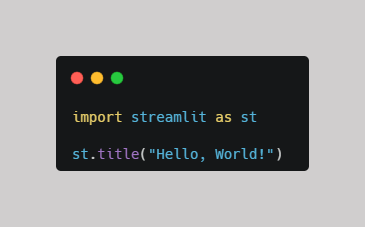
Click Commit changes to save the file to your repository.
Understanding the code
- import streamlit tells Python to load the Streamlit package.
- as st gives that package the shorter name st.
- st.title("Hello, World!") displays a title in your web app.
3. Add a Dependencies File (requirements.txt)
A requirements.txt file lists the Python packages your application needs. It helps Streamlit install the required dependencies during deployment.
- In your repository, click Add file → Create new file.
- Name the file requirements.txt
- Add the following line:
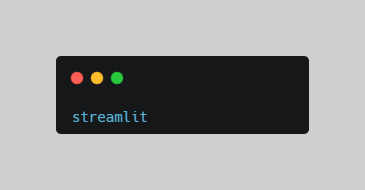
Click Commit changes.
Dependencies are the packages your application needs to work.
4. Deploy on Streamlit Community Cloud
- Go to Streamlit Community Cloud and sign in with your GitHub account.
- Click Create app.
- Select Deploy a public app from GitHub.
- Configure your deployment settings:
- Repository: Select your repository, such as your username/hello-streamlit.
- Branch: main (or the branch containing your files).
- Main file path: app.py.
Click Deploy.
Streamlit will build and launch your application. Once deployment is complete, you’ll receive a live URL that you can open in your browser and share with others.
Congratulations! You’ve built and deployed your first Streamlit web app using Python and GitHub.
Comments ()