

1. Understanding the code
The following Python code creates a report using a dictionary, which can later be converted into JSON format.
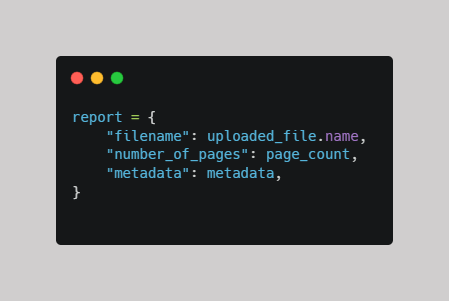
Please note that this code creates a Python dictionary, not a JSON file by itself. It can be used in a regular Python script or a Streamlit application, provided the required variables have been defined.
2. Breaking down each field
The report variable is a Python dictionary that organizes information into key-value pairs. Each key identifies a piece of information, and its corresponding value provides the data associated with it.
In this dictionary, the keys are "filename", "number_of_pages", and "metadata". The corresponding values are uploaded_file.name, page_count, and metadata.
- "filename": uploaded_file.name
- Key: "filename"
- Value: uploaded_file.name, which contains the name of the uploaded file. The uploaded_file object must support the .name attribute.
- "number_of_pages": page_count
- Key: "number_of_pages"
- Value: page_count, which contains the total number of pages in the document.
- "metadata": metadata
- Key: "metadata"
- Value: metadata, which contains additional document information, such as the author, title, or creation date.
The variables uploaded_file, page_count, and metadata must be defined before creating the report.
Example output:
The dictionary could contain the following information:
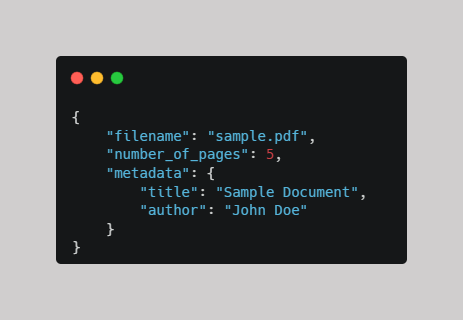
The values shown above are examples. Your actual output depends on the uploaded file and the metadata you extract.
Comments ()