

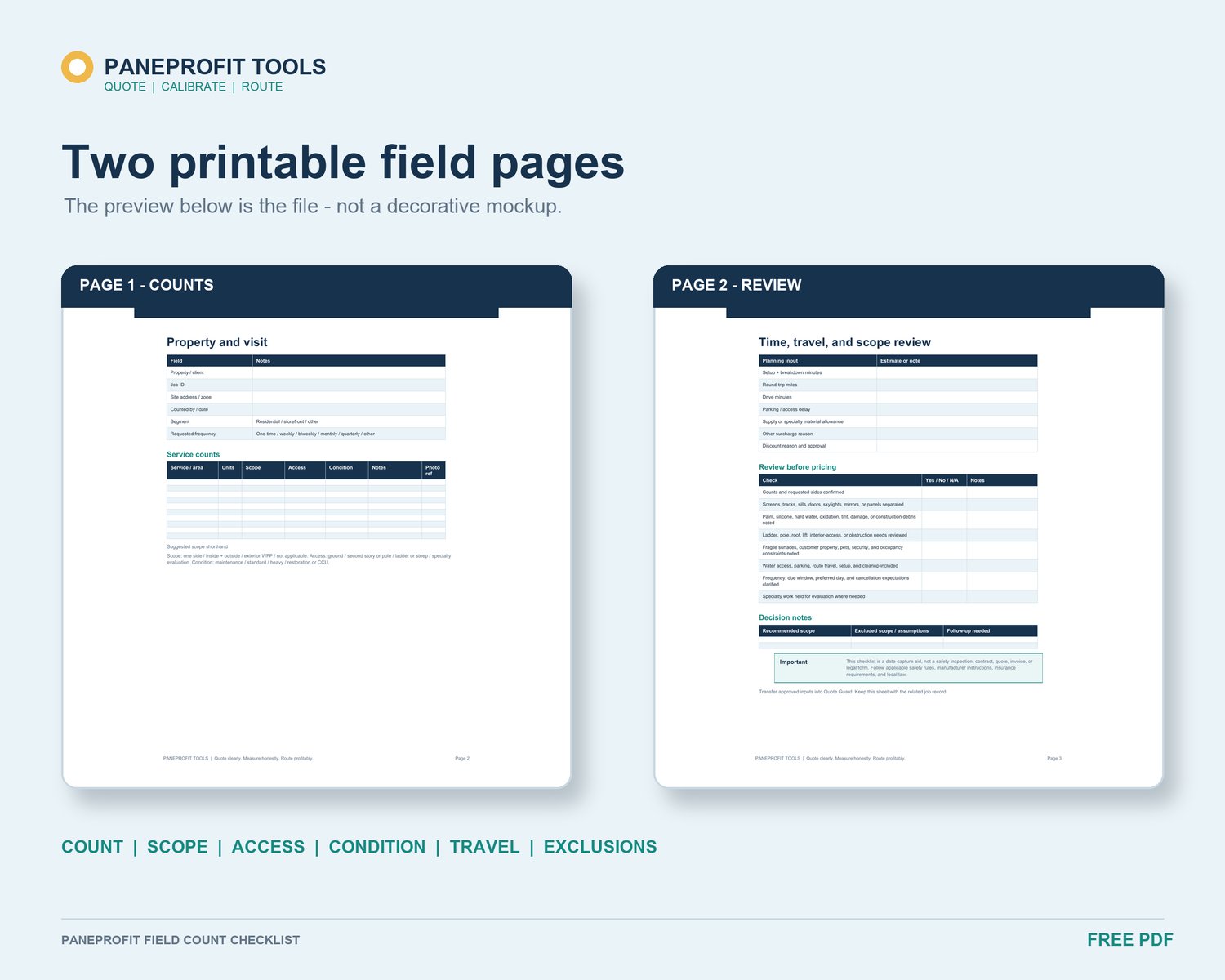
A window cleaning quote can look complete while still hiding small pieces of work. Screens may be included mentally. Tracks may be described as “light cleaning” without a count. Access may be reduced to a short note even when it changes setup, movement, or the equipment required.
The problem is not that every add-on needs a special charge. The problem is that work becomes difficult to review when quantity, condition, access, and time are blended into one number. A clearer method keeps each item visible long enough for the operator to decide how it belongs in the scope and in the quote.
Treat visibility as the first pricing step
Before choosing a rate, separate what you can count from what you need to evaluate. Screens and tracks are usually countable. Access, glass condition, obstructions, and special handling may require notes, time assumptions, or a separate site decision.
This separation matters because two properties with the same window count can have different workloads. One may have removable screens and clear ground access. Another may have fragile screens, heavy track buildup, furniture to work around, or second-story areas that require additional planning. A single pane total cannot preserve those differences.
Give screens and tracks their own quantities
Record screens and tracks on dedicated lines rather than folding them into the window count. If the service differs by type, use labels that match the actual scope: standard screen, difficult removal, track wipe, detailed track cleaning, or another definition you use consistently.
The label should describe the work without overstating what is included. “Tracks included” can mean different things to different people. A short definition helps the operator review the count and helps prevent the quote from silently expanding later.
Do not assume that a separate count requires a separate customer-facing line item. You may combine items in the final presentation if that fits your business. Keep the internal quantities visible so you can still review the labor and scope behind the total.
Record access as an operating condition
Access is not only a pricing label. It can affect setup time, movement between work areas, equipment choices, and whether the work should be quoted at all.
Note story level, obstructions, parking or loading constraints, interior access, water access, fragile areas, and any condition that requires a separate safety review. Then decide whether the condition belongs in estimated time, a defined add-on, an exclusion, or a request for more information.
Never use a spreadsheet to decide that a task is safe. Quote only work you are trained, equipped, insured, and legally permitted to perform. If access cannot be evaluated reliably during the walkthrough, mark it for follow-up instead of forcing a number into the quote.
Connect every add-on to a clear assumption
For each item, make the assumption reviewable. A useful internal record connects four things:
1. The quantity or condition observed.
2. The service definition or scope note.
3. The rate, time allowance, or other assumption you selected.
4. Any exclusion or follow-up required before approval.
This does not create a universal pricing formula. It creates a trail from the walkthrough to the quote. If the total looks unusual, you can inspect a specific count or assumption instead of rebuilding the estimate from memory.
Use sample workbook values only for orientation. Replace them with your own rates, time estimates, costs, and minimum-job assumptions before operational use.
Review add-ons in whole-route context
A small add-on can affect more than service minutes. Extra unloading, repeated setup, a long parking walk, or movement between interior and exterior areas can change the full route time even when the counted task looks minor.
Before sending the quote, review drive, setup, service, cleanup, and administrative time where they apply. Then compare the price-book result with the editable cost and time assumptions you use for planning. The goal is not to let a worksheet make the decision. It is to surface inputs that deserve a final check.
Use a short add-on review before sending
Ask these questions:
- Are screens and tracks counted separately from panes or assemblies?
- Does each add-on have a clear service definition?
- Are access and condition notes reflected in time, scope, or follow-up?
- Are exclusions written down rather than remembered?
- Did you include realistic setup and route time?
- Can you explain the total from the recorded inputs?
A quote does not need to show every internal calculation. Your internal record should still make the work traceable.
Keep the scope visible from walkthrough to quote
Start by capturing the work before choosing the price. Then carry only supported counts, notes, and assumptions into the quote review. This keeps screens, tracks, and access from disappearing inside a mental total while leaving the final decision with the operator.
Download the free PaneProfit Field Count Checklist to record panes, screens, tracks, access, add-ons, and notes during the walkthrough:
https://payhip.com/b/YdrmQ
Build and review the quote in PaneProfit Quote Guard using your own rates, time, and cost assumptions:
https://payhip.com/b/qu2Zp
Get the PaneProfit Complete Bundle for the field-count, quote-review, completed-job calibration, and recurring-route workflow:
https://payhip.com/b/pnuPh
PaneProfit tools are estimation, planning, and recordkeeping aids. They do not provide local market rates, determine whether work is safe, or replace an on-site inspection or professional tax, legal, accounting, insurance, or safety advice. Review every result and adapt all assumptions to your business.