
How to export an OpenCode session (and what is inside the file)
An OpenCode session contains everything a run did: every tool call, its input and output, timings, tokens, errors — and the moments where it repeated itself or lost context. The live data sits in OpenCode's local session store, which is not meant to be read by hand. The supported way to get one session out is opencode export.
This post shows the command, what the exported JSON actually contains, and what to check before you share it.
Export one session
opencode export ses_abc123 > session.json
Replace ses_abc123 with your session ID. The result is a single JSON file containing one session: its metadata and every message with its parts.
Tested with OpenCode 1.18.x. If you plan to share the file, OpenCode can redact it first:
opencode export --sanitize ses_abc123 > session.json
--sanitize redacts sensitive transcript and file data before writing. Use it for anything that leaves your machine.
A note for Windows users: in PowerShell 5.1 the > redirect writes UTF-16, not UTF-8. That is fine for tools that read BOMs — and worth knowing when a tool rejects the file as "not valid UTF-8" (0xff is the BOM's first byte).
What is inside an export
The file has two top-level keys:
- info — the session: id, title, agent, model and provider, version,
- working directory, timestamps, and the reported cost and token totals.
- messages[] — one entry per message, each with an info object (role,
- model, finish reason, tokens, cost, message-level errors) and a parts[] array.
The parts are where the run's mechanics live. Across current 1.18.x exports you will see these types:
| Part type | What it records | |---|---| | text | Assistant text output (and user prompts) | | reasoning | Model reasoning text, when the provider returns it | | tool | A tool call: name, inputs, status, output or error, start/end timestamps | | step-start / step-finish | Step boundaries; token and cost deltas per step | | file | A file attachment (name, MIME type, and a data: URL payload) | | patch | The files a patch touched, with a hash | | compaction | A context-compaction marker (automatic / overflow flags) |
A tool part is the most useful one for debugging: it carries the tool name, the canonical input, the status (completed, error, running), the output or the error text, and millisecond timings. That is the raw material for questions like "which call failed?", "how long did it take?" and "why did the same command run four times?"
Exports are not small. A long agentic session can easily reach several megabytes; our largest test export so far was 6.5 MB with 528 tool calls. That is normal — it is a complete transcript.
Before you share an export
An export is close to a complete record of your work:
- your prompts and the model's answers,
- every command and its output,
- file paths from your machine,
- and often the actual content of attached files, base64-encoded inside
- file parts.
Treat it like source code, or stricter. --sanitize removes the most sensitive data, but nothing replaces reading the file before it leaves your machine.
Making one readable
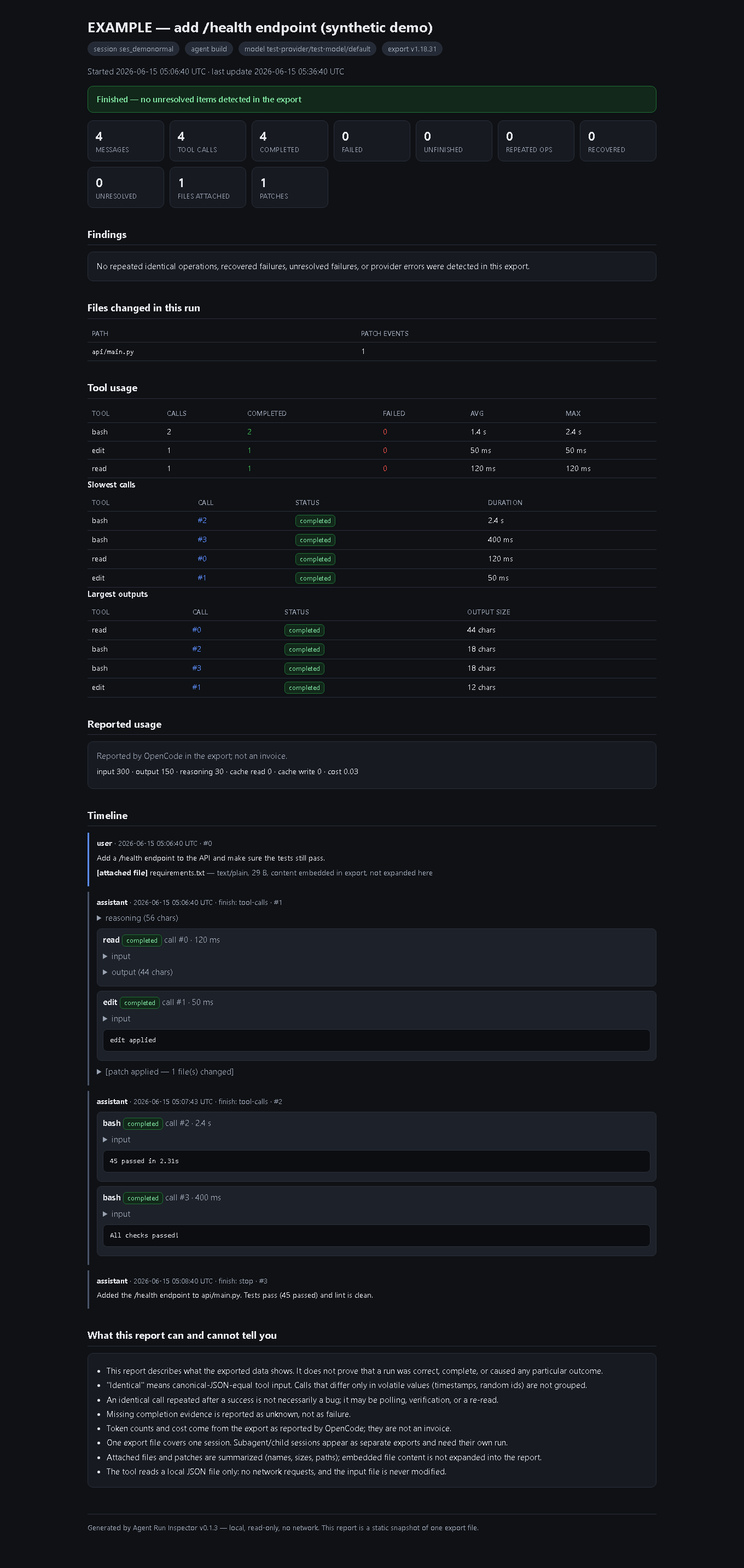
The JSON is precise but not friendly: finding "the same command failed four times" by scrolling a 6 MB file is not a good use of anyone's time. That is exactly the gap our tool covers — [Agent Run Inspector](https://payhip.com/Superkamoubot) turns one export into a single self-contained HTML report: the full timeline, every tool call with status and duration, repeated-call findings (classified), recovered vs unresolved failures, tool statistics, attached files, patches and compaction markers.
You can see the output before spending anything: the free sample pack contains four synthetic sessions and their generated reports, including a repeated-failure loop and a recovered-failure case:
There is also a walkthrough post that reads a report end to end: [How to inspect repeated OpenCode tool calls from a session export](https://payhip.com/Superkamoubot/blog/superkamoubot/how-to-inspect-repeated-opencode-tool-calls-from-a-session-export)
---
Disclosure: we publish Agent Run Inspector. The screenshots in this post come from the synthetic sample pack, not from a customer's session.