

Habit Tracker 2027
Made with AI: an AI assistant built this spreadsheet template and wrote this description, then it was reviewed before release.
Track up to 15 daily habits for every day of 2027. Mark a day, and the spreadsheet counts your done days, works out your percentages and streaks, and colors in a yearly heatmap.
This is a digital download. No physical item will be shipped. You get one ZIP file right after purchase with the tracker, a filled sample copy, and a short "How to open" note.
WHAT'S INCLUDED (17 tabs in one .xlsx file)
- Start Here: how to use each tab and a color key (yellow = you type, green = marked done, soft gray = automatic).
- Habits: type each habit once. Every other tab picks the names up. Also where you type today's date.
- January to December: 12 monthly grids with the right number of days in each month (February has 28 in 2027). Put any mark in a day cell (x, a check mark, 1, anything) and it turns green. Each month shows done days and % per habit, how many habits you did each day, and the month's completion.
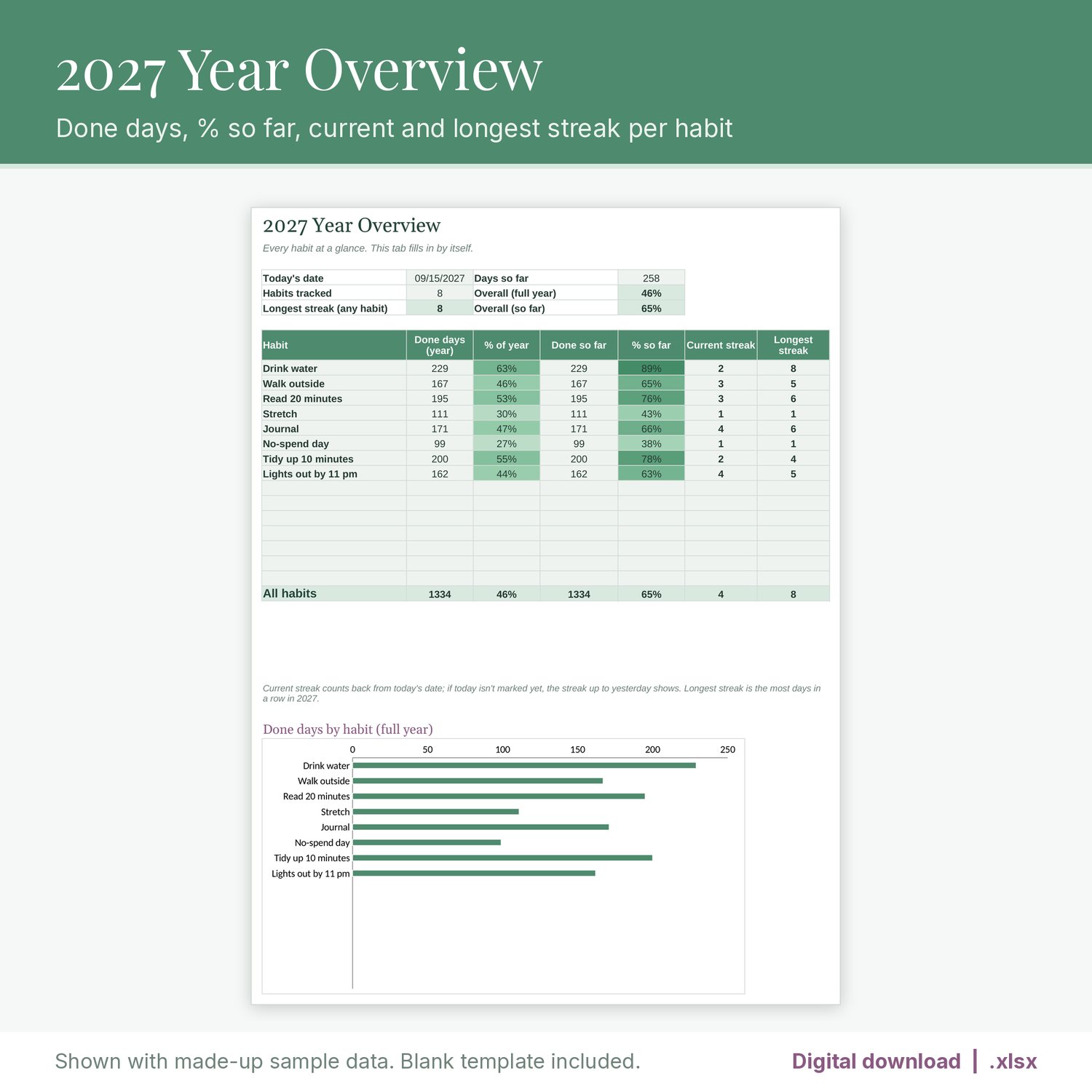
- Year Overview: done days and % per habit for the full year and so far, current streak, longest streak, and totals for all habits, plus a chart.
- Heatmap: completion by habit and month, and a day-by-day calendar for the whole year, colored from light to dark green.
- Streak Log: the running streak for every habit on every day of 2027, filled in automatically.
Streaks that make sense: streaks carry across months, including February 28 into March 1. Your current streak doesn't reset just because you haven't marked today yet; it counts up to yesterday until the day is over.
Nothing gets lost: you type each habit name once. Your marks belong to the row, not the name, so renaming a habit keeps its history. If a row has marks but no habit name, or two habits share a name, a red heads-up shows.
You also get a filled sample copy with made-up habits and marks, so you can see how everything works before you start your own.
FILE FORMAT
- One ZIP containing the .xlsx tracker, the .xlsx sample copy, and a "How to open" text note.
- Made for Excel and Google Sheets (.xlsx, no macros). Formulas tested by recalculation in LibreOffice.
- To open it in Google Sheets, upload the file to Google Drive and choose Open with > Google Sheets, or use File > Import in a blank sheet.
- Formula cells are locked so they don't get overwritten by accident. Tabs are protected with no password, so you can unprotect them to customize. Sheet protection may not carry over when you import into Google Sheets.
- Current streaks and "so far" numbers count from the date you type in the Today's date box on the Habits tab, so update it when you check in.
PLEASE NOTE
- This is a digital download. No physical item will be shipped.
- For personal use. Please don't resell or share the file.
The listing images are real screenshots (renders) of the spreadsheet with made-up sample data. No AI-generated images are used.