

SENCO digital folder structure checklist
SENCO Digital Folder Structure – One-Page Checklist & Template
Feeling overwhelmed by where to save everything as a SENCO? This practical one-page checklist gives you a clear, organised digital folder structure for managing your SEND files.
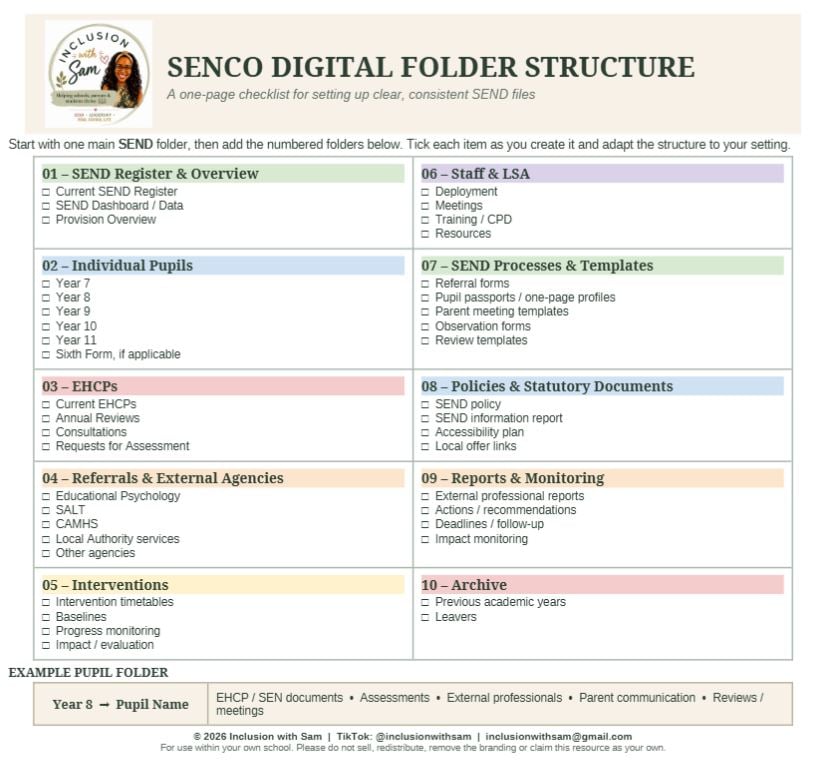
Designed with busy SENCOs in mind, the template covers key areas including:
- The SEND register and dashboard
- Individual pupil records
- EHCPs and annual reviews
- Referrals and external agencies
- Interventions and impact monitoring
- Staff and LSA information
- SEND processes and templates
- Policies and statutory documents
- Reports, monitoring and archived files
It also includes a suggested structure for individual pupil folders, helping you keep assessments, professional reports, parent communication and review documents together and easy to find.
This resource is especially useful for new SENCOs setting up their systems, but it can also help experienced SENCOs review and streamline their existing folder structure.
Your download includes:
- A ready-to-use one-page PDF checklist
- An editable Word version that you can adapt to suit your setting
Please note that this is a digital product. No physical item will be posted.
© Inclusion with Sam. For use within your own school. Please do not sell, redistribute, remove the branding or claim this resource as your own.