
Integrated_CSI_Estimating_System_User_Guide.docx
Concrete Takeoff &
CSI Estimating System
Imperial & Metric
User Guide & Instruction Manual
Built by a retired Construction Manager with 45+ years of hands-on experience
in high-rise concrete and formwork across British Columbia, Alberta, and Ontario.
1. Introduction
The Concrete Takeoff & CSI Estimating System is a Microsoft Excel-based estimating tool designed specifically for concrete and formwork contractors. It was built from nearly five decades of real jobsite experience — not from textbooks.
This program allows you to quickly perform quantity takeoffs in both Imperial and Metric measurements, organize costs using standard CSI (Construction Specifications Institute) divisions, and produce professional estimates ready for submission or internal use.
Who This Program Is For
• Concrete and formwork contractors
• Estimators pricing reinforced concrete work
• Project managers overseeing multi-storey concrete construction
• Anyone who needs a fast, reliable takeoff tool for slab, wall, column, and stair forming work
The Five Sheets
The workbook contains five sheets, each serving a specific purpose:
1. Title Page — Project information and setup
2. Imperial Takeoff — Quantity takeoff using feet and inches
3. Metric Takeoff — Quantity takeoff using metres and millimetres
4. Summary / Total Sheet — Combines and totals all takeoff quantities
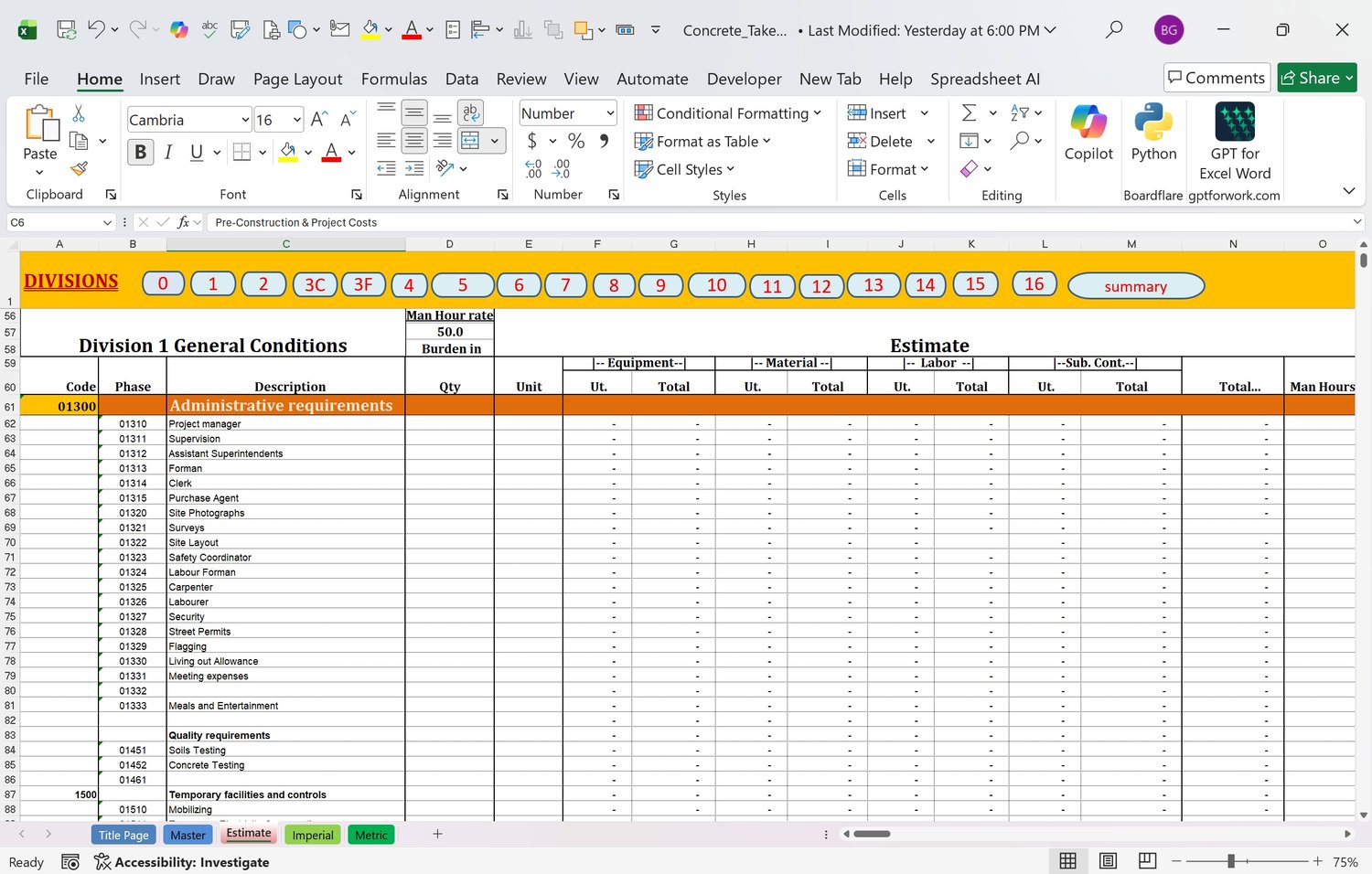
5. CSI Estimate Sheet — Full cost estimate organized by CSI division
2. Getting Started — Title Page Setup
When you open the workbook, begin on the Title Page sheet. This is where you enter your project information, which will automatically populate headers throughout the workbook.
Fields to Complete
6. Project Name — Enter the full project name or description
7. Client / General Contractor — Who the estimate is being prepared for
8. Estimator Name — Your name or your company name
9. Date — The date the estimate is prepared
10. Project Number — Optional reference number for your records
Tip: Once the Title Page is complete, navigate to the sheet you need using the tabs at the bottom of the workbook.
3. Using the Imperial Takeoff
The Imperial Takeoff sheet is used to measure and calculate concrete and formwork quantities in feet and inches. It is designed for projects where drawings are dimensioned in Imperial units.
How to Enter Quantities
11. Select the element type from the dropdown or category row (e.g., Slab, Wall, Column, Beam)
12. Enter the dimensions: Length, Width, and Depth/Thickness in feet and inches
13. Enter the quantity (number of identical elements)
14. The sheet automatically calculates cubic yards of concrete and square feet of formwork
15. Add a description or reference note in the Notes column for each line item
Formwork Calculations
The Imperial sheet calculates contact area (SFCA) automatically based on the element type. Walls are calculated on both faces; slabs on the soffit only. Columns calculate all four sides. Check your totals at the bottom of each section.
4. Using the Metric Takeoff
The Metric Takeoff sheet works the same way as the Imperial sheet but uses metres and millimetres. Concrete volumes are calculated in cubic metres (m³) and formwork in square metres (m²).
Metric Macros
The Metric sheet includes built-in macros that automate common calculations. These are activated using the macro buttons on the sheet.
• Slab Macro — Calculates slab volume and soffit formwork area from plan dimensions
• Wall Macro — Calculates wall volume and both-face formwork from height and length
• Column Macro — Calculates column volume and perimeter formwork area
• Beam Macro — Calculates beam volume and formed sides
• Stair Macro — Calculates stair concrete volume and forming area (see below)
Stair Calculator
The Stair Calculator is one of the most powerful features in the Metric sheet. Stairs are notoriously difficult to estimate accurately — this macro handles the geometry automatically.
To use the Stair Calculator:
16. Enter the number of risers
17. Enter the riser height (mm)
18. Enter the tread depth (mm)
19. Enter the stair width (m)
20. Enter the slab thickness (mm)
21. Click the Stair Macro button — the sheet calculates concrete volume and soffit/riser forming area automatically
5. Using the Total Button
The Total button consolidates all quantities from both the Imperial and Metric takeoff sheets into the Summary sheet. This gives you a single, combined view of all your takeoff quantities before transferring them to the CSI Estimate.
How to Use
22. Complete your takeoff entries on the Imperial and/or Metric sheets
23. Navigate to the Summary sheet
24. Click the Total button
25. All quantities are pulled together and displayed by element type
26. Review the totals for accuracy before proceeding to the CSI Estimate
Important: Always click the Total button after making any changes to your takeoff sheets to ensure the Summary reflects your latest entries.
6. Transferring Totals to the CSI Estimate
Once you are satisfied with your takeoff totals on the Summary sheet, you are ready to transfer them to the CSI Estimate sheet for pricing.
Transfer Process
27. Click the Transfer button on the Summary sheet (or navigate manually to the CSI Estimate sheet)
28. Quantities are automatically populated into the corresponding CSI line items
29. Review each line item to confirm quantities transferred correctly
30. Add your unit prices to each line item
31. The sheet calculates extended totals and the overall estimate total automatically
7. Using the CSI Estimate Sheet
The CSI Estimate sheet organizes your costs using standard Construction Specifications Institute (CSI) MasterFormat divisions. This makes your estimate easy to read, verify, and submit to general contractors or owners.
Key CSI Divisions Used
• Division 03 — Concrete (formwork, reinforcing, cast-in-place concrete, finishing)
• Division 01 — General Requirements (supervision, temporary facilities, equipment)
• Division 02 — Existing Conditions (as applicable)
Entering Unit Prices
For each line item on the CSI Estimate sheet, enter your unit price in the Unit Price column. The sheet multiplies quantity by unit price and sums all line items to produce your total estimate value.
Adding Markup
At the bottom of the CSI Estimate sheet, you will find rows for overhead and profit markup. Enter your markup percentage and the sheet calculates the marked-up total automatically.
8. Tips for Formwork Contractors
These tips come from 45+ years of estimating and managing high-rise concrete and formwork projects in BC, Alberta, and Ontario.
• Always measure twice — verify your plan dimensions before entering takeoff data. A 10% error in quantity becomes a 10% error in your bid.
• Use the Stair Calculator for every stair flight — manually calculating stair concrete and forming is where most estimators lose money.
• Track your re-use factor — formwork systems get reused. Enter the number of pours per form in the notes column so you can check your equipment and material quantities.
• Break your estimate into cycles — on repetitive floor work, estimate one typical floor, then multiply. Use the quantity column for this.
• Don't forget crane time — forming high-rise concrete is crane-intensive. Make sure Division 01 includes adequate crane and hoist allowances.
• Save a copy before sending — always save a locked copy of your estimate before submitting. Keep it as your record of what you bid.
• Use the Notes column — add drawing reference numbers and revision dates beside each takeoff entry. When the scope changes, you can find and update specific items quickly.
About the Author
I'm a retired Construction Manager with 45+ years of hands-on experience in high-rise concrete
and formwork across British Columbia, Alberta, and Ontario. I've managed and estimated
reinforced concrete projects from the ground up — multi-storey residential towers,
repetitive floor cycles, stair forming systems, and complex formwork programs
in some of Canada's largest construction markets.
These tools weren't built from textbooks. They were built from nearly five decades on real jobsites —
pricing the work, managing the crews, and learning what generic templates always get wrong.
If you're forming concrete for a living, these tools were built by someone who has done exactly what you do.