3D Printing Excel Toolkit — Cost Calculator, Filament Tracker, Print Job Log & VBA Scripts
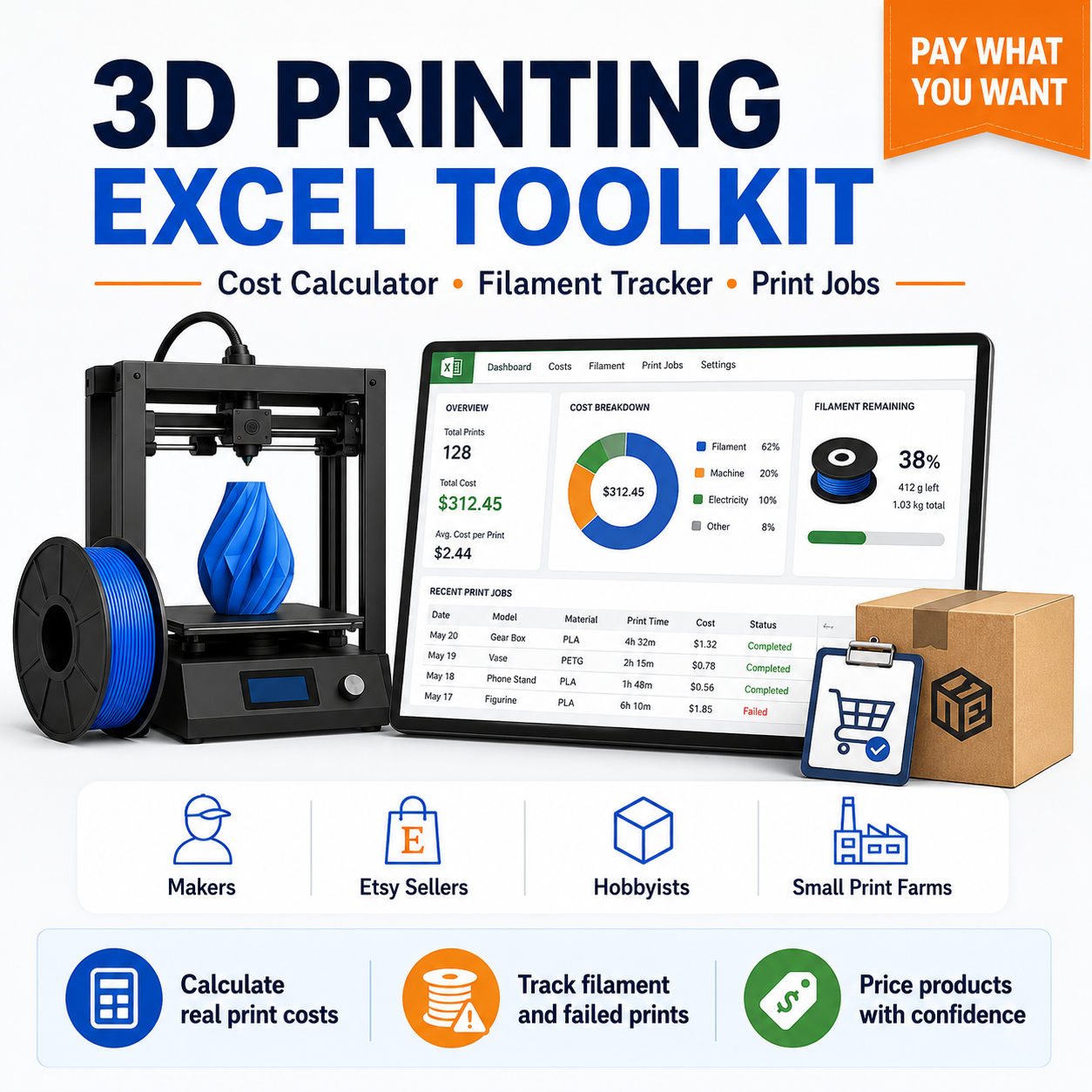
Calculate the real cost of your 3D prints, track filament inventory, manage print jobs and organise small-scale production with a practical collection of ready-to-use Excel tools.
The 3D Printing Excel Toolkit includes calculators, trackers, reusable Excel formulas, LAMBDA functions, Office Scripts and VBA macros created for 3D printing hobbyists, makers, Etsy sellers and small print farms.
You can use the complete master workbook immediately or copy individual formulas and scripts into your own Excel spreadsheets.
No Python installation is required.
What This Toolkit Helps You Do
Use the toolkit to:
- calculate filament cost for each model;
- estimate electricity cost based on power use and print time;
- include labour, machine time, packaging and failure allowance;
- calculate total 3D print production cost;
- estimate a profitable selling price;
- calculate marketplace fees and net profit;
- track filament spools and remaining material;
- record planned, completed and failed prints;
- monitor failed-print losses;
- manage customer orders and production deadlines;
- estimate portable power station runtime;
- review key production data in an Excel dashboard.
What Is Included
The download contains 50 files, including:
- one complete 3D printing master workbook;
- four focused Excel templates;
- twelve copy-and-paste Excel formulas;
- eight reusable LAMBDA functions;
- five Office Scripts;
- four VBA macros;
- worked calculation examples;
- setup and compatibility instructions;
- sample print jobs, filament and order data;
- guides for AI-assisted 3D model generation and backup power planning.
Main Excel Workbook
The included 3D Printing Master Toolkit contains the following worksheets:
- Settings;
- Cost Calculator;
- Print Jobs;
- Filament Inventory;
- Failed Prints;
- Orders;
- Dashboard;
- Formula Library.
Replace the sample settings with your own electricity price, labour rate, machine cost, target margin and marketplace fees. The connected worksheets then calculate and summarise your production data automatically.
3D Print Cost Calculator
Estimate the full cost of a print using:
- model weight;
- support material weight;
- filament spool price;
- spool weight;
- print duration;
- average printer power;
- electricity price;
- preparation time;
- post-processing time;
- labour rate;
- machine cost;
- packaging;
- other production expenses;
- expected failure rate;
- target profit margin;
- marketplace fees.
The calculator produces:
- filament cost;
- electricity cost;
- labour cost;
- machine cost;
- failure allowance;
- total production cost;
- recommended selling price;
- marketplace fee estimate;
- estimated net profit.
Filament Inventory Tracker
Keep a structured record of your filament spools, including:
- spool ID;
- material;
- brand;
- colour;
- starting weight;
- spool price;
- used filament;
- remaining filament;
- cost per gram;
- purchase date;
- low-stock warning;
- notes.
The master workbook links filament usage to recorded print jobs, helping you monitor remaining stock.
Print Job Tracker
Record and compare:
- planned and completed print jobs;
- model and printer;
- filament spool;
- model and support weight;
- estimated and actual print time;
- average power consumption;
- filament cost;
- electricity cost;
- machine cost;
- total cost;
- selling price;
- print status.
Completed and failed jobs can be highlighted automatically.
Failed Print Tracker
Track the real cost of failed 3D prints by recording:
- failure reason;
- failure stage;
- filament lost;
- hours lost;
- electricity cost;
- material cost;
- total estimated loss;
- corrective action.
This can help identify repeat problems such as poor bed adhesion, support failure, nozzle issues, dimensional mistakes or power outages.
Order and Production Tracker
Manage small customer orders with fields for:
- order date;
- order ID;
- customer;
- product;
- quantity;
- production status;
- deadline;
- unit price;
- order value;
- estimated production cost;
- estimated profit;
- assigned printer;
- notes.
Excel Formulas Included
The toolkit includes formulas for:
- filament cost;
- electricity cost;
- labour cost;
- machine cost;
- failure allowance;
- total print cost;
- recommended selling price;
- net profit;
- remaining filament;
- print-time variance;
- backup runtime;
- break-even quantity.
Each formula is supplied in a separate text file with a simple explanation of the required inputs.
Reusable LAMBDA Functions
Users with a compatible version of Excel can install custom functions such as:
- FILAMENTCOST;
- ENERGYCOST;
- LABOURCOST;
- MACHINECOST;
- TOTALPRINTCOST;
- SALEPRICE;
- NETPROFIT;
- BACKUPRUNTIME.
After installation through Excel Name Manager, these functions can be reused throughout the workbook like normal Excel functions.
Office Scripts and VBA Macros
Optional automation tools are included for users who want to:
- clean a print-job log;
- remove unnecessary spaces from imported data;
- highlight failed prints;
- add a new print-job row;
- archive completed orders;
- create a monthly summary.
The ready-made Excel templates do not require macros to perform their main calculations.
Excel Compatibility
The toolkit is designed for Microsoft Excel.
- Standard formulas are intended for Excel 2016 or later.
- LAMBDA functions require a version of Excel that supports LAMBDA.
- Office Scripts require Excel with the Automate tab.
- VBA macros require desktop Excel and a macro-enabled .xlsm workbook.
Some regional versions of Excel use semicolons instead of commas in formulas. A compatibility guide is included.
Who This Toolkit Is For
This product may be useful for:
- 3D printing beginners;
- hobbyists and makers;
- Etsy and marketplace sellers;
- small 3D print businesses;
- owners of several printers;
- print farm operators;
- designers selling physical printed products;
- anyone who wants a clearer view of real print costs.
Additional Resources
The toolkit also contains guides covering:
- AI-assisted generation of initial 3D models;
- checking AI-generated models before printing;
- estimating backup power requirements for long print jobs;
- choosing suitable portable power specifications.
Important Notes
The calculations are estimates based on the information entered by the user.
Actual costs may vary because of:
- changing power consumption;
- printer efficiency;
- failed prints;
- material waste;
- maintenance;
- local electricity prices;
- marketplace fees;
- taxes;
- shipping and packaging costs.
Always test the workbook using your own data before using the results for pricing, inventory purchasing or business decisions.
Download Format
You will receive one ZIP archive containing:
- Excel .xlsx workbooks;
- Excel formula text files;
- LAMBDA function files;
- Office Script files;
- VBA macro files;
- setup instructions;
- examples;
- additional resource guides.
This is a digital download. No physical product will be shipped.
Price: Pay What You Want
This toolkit is offered using a pay-what-you-want pricing model.
You can enter the amount you believe the product is worth, including a low test payment or a larger voluntary contribution if the files save you time or help improve your 3D printing workflow.
Your contribution supports the creation of:
- new Excel calculators and trackers;
- updated formulas and automation scripts;
- clearer setup instructions;
- additional templates for makers and small businesses;
- future digital tools for 3D printing and production planning.
The toolkit contains the same files regardless of the amount paid. A larger contribution does not unlock a different version.
Why Use a 3D Printing Cost Calculator in Excel?
The price of a 3D print is not determined by filament alone. A model that uses only a small amount of material may still require many hours of printer time, electricity, preparation and post-processing.
An Excel-based 3D printing cost calculator gives you a transparent way to review every cost separately. You can change one input, such as print time or spool price, and immediately see how it affects total production cost and the suggested selling price.
Because the calculations remain inside Excel, you can:
- inspect every formula;
- change assumptions;
- use your own currency;
- duplicate calculations for different models;
- compare printers or materials;
- keep production and pricing data in one place.
How to Calculate Filament Cost per Gram in Excel
To calculate filament cost accurately, start with the purchase price and usable weight of the spool.
For example, a 1,000 g spool costing 25.00 has a basic material cost of 0.025 per gram.
A 3D print using 120 g for the model and 15 g for supports consumes 135 g in total. Its estimated filament cost is therefore:
135 × 0.025 = 3.375
The toolkit automates this calculation and allows support material to be recorded separately. This is useful when comparing model orientations, support settings or alternative slicer profiles.
How to Estimate 3D Printer Electricity Cost
Electricity cost depends on:
- average printer power in watts;
- total print duration;
- local electricity price per kWh.
A printer rated at 350 W does not necessarily consume 350 W continuously. The heated bed, nozzle and motors cycle during operation, so measured average consumption is usually more useful than maximum rated power.
When possible, use data from a smart plug or electricity meter. Enter the measured average wattage into the calculator to produce a more realistic energy estimate.
This can be particularly useful for:
- long prints;
- heated enclosures;
- high-temperature materials;
- multiple-printer setups;
- monthly print farm electricity tracking.
How to Price 3D Prints for Etsy or Other Marketplaces
Marketplace pricing should cover more than material and electricity.
A practical selling price may need to include:
- production cost;
- listing or transaction fees;
- payment-processing fees;
- advertising costs;
- packaging;
- failed-print allowance;
- preparation and finishing time;
- replacement or refund risk;
- target profit margin.
The included pricing formulas help estimate a selling price after percentage-based marketplace fees. You can replace the example percentage with the current fee structure of the marketplace you use.
Marketplace terms and fees can change, so always verify them before publishing product prices.
3D Print Cost Calculator for Small Businesses
Small 3D printing businesses often need to price many different products with different materials, print times and finishing requirements.
The toolkit can help create a repeatable pricing process for:
- custom brackets and replacement parts;
- organisers and storage accessories;
- cosplay components;
- tabletop miniatures and scenery;
- personalised gifts;
- prototypes;
- small production batches;
- print-on-demand orders.
Instead of estimating prices from memory, you can record the same cost categories for every product and compare estimated profit across different jobs.
How to Track Failed 3D Prints and Material Waste
Failed prints can quietly increase the real cost of successful products.
A failed print may waste:
- filament;
- machine time;
- electricity;
- operator time;
- production capacity;
- part of an order deadline.
Recording the failure reason makes the data more useful. Over time, you may discover that most losses come from one recurring problem, such as bed adhesion, support failure, dimension errors or power interruptions.
The failed-print tracker is designed to help identify these patterns instead of recording only the amount of wasted filament.
How to Track Filament Inventory in Excel
A filament inventory spreadsheet can help answer practical questions such as:
- Which materials are currently available?
- How much filament remains on each spool?
- Which colours are running low?
- What is the value of the remaining stock?
- Which spool was used for a particular print job?
- Which materials are rarely used?
Each spool can be assigned a unique ID. Print jobs can then reference that ID, allowing filament usage to be connected to the correct inventory record.
This approach is more reliable than tracking only general totals for PLA, PETG or another material.
3D Print Job Tracking for Multiple Printers
When several printers are used, even a small workshop can become difficult to manage.
A structured print job log can record:
- which printer was assigned;
- the current job status;
- estimated print duration;
- actual completion time;
- material selection;
- filament usage;
- production cost;
- selling price.
This makes it easier to review printer workload, compare estimated and actual time, and identify machines that produce more failed prints or require more maintenance.
Estimating Backup Power Runtime for a 3D Printer
Long prints can be vulnerable to short power outages. A basic backup runtime estimate compares usable battery capacity with average printer load.
The toolkit includes a formula based on:
- power station capacity in Wh;
- estimated conversion efficiency;
- average printer consumption in watts.
Real runtime may be lower because of:
- inverter losses;
- battery management limits;
- changing printer power;
- bed and nozzle heating cycles;
- connected accessories;
- battery age and temperature.
Always check continuous output and peak output before connecting a printer to a portable power station.
Can This Toolkit Be Used for Resin 3D Printing?
The main templates were designed primarily around filament-based 3D printing, but several parts can also be adapted for resin printing.
For resin printing, you may replace filament-related fields with:
- resin used in millilitres;
- bottle size;
- bottle price;
- cleaning alcohol;
- gloves and consumables;
- curing time;
- support waste;
- failed-print resin loss.
The order tracker, failure tracker, labour calculations and selling-price formulas can still be useful after adjusting the material fields.
Can I Use the Formulas in My Existing Spreadsheet?
Yes. The formula files are provided separately so they can be copied into an existing Excel workbook.
Before copying a formula:
- identify the required input cells;
- replace the example cell references with your own;
- test the formula on a simple example;
- confirm that percentages and currencies are formatted correctly;
- keep a backup of the original workbook.
The supplied templates are ready-made examples, but you are not required to use their exact layout.
Does the Toolkit Require Excel Macros?
No. The main calculators and trackers use ordinary Excel formulas and work without VBA macros or Office Scripts.
Macros and scripts are optional tools for users who want additional automation. You can use the standard Excel templates without enabling macros.
Does the Toolkit Work in Google Sheets?
Some standard formulas may also work in Google Sheets after minor adjustments, but the toolkit was created and tested for Microsoft Excel.
The following components may not transfer directly:
- VBA macros;
- Office Scripts;
- Excel LAMBDA behaviour;
- workbook-specific formatting;
- some table references;
- Excel dashboard elements.
For the most consistent results, use Microsoft Excel.
Frequently Asked Questions
Is this a subscription?
No. This is a one-time digital download offered through a pay-what-you-want contribution.
Will I receive physical products or 3D models?
No. The product contains Excel files, formulas, scripts, instructions and examples. It does not include a physical item, printer, filament or a collection of printable STL files.
Do I need programming experience?
No programming experience is required for the ready-made Excel templates. Basic familiarity with Excel is helpful when copying formulas or changing spreadsheet layouts.
Can I change the currency?
Yes. The calculators use numerical values rather than a fixed currency. You can apply your preferred currency format in Excel and enter local electricity, labour and material prices.
Can I use it for client orders?
Yes. The toolkit includes an order and production tracker that can be adapted for custom printing, marketplace sales or local customer work.
Are taxes included automatically?
No. Tax rules differ by country and business type. Add taxes manually or extend the formulas with guidance from a qualified local adviser.
Are shipping costs included?
Shipping is not included automatically. You can enter it as an additional cost or add a dedicated shipping column to your pricing sheet.
Can I edit the templates?
Yes. You can modify the worksheets, formulas, headings and categories for your own personal or small-business workflow.