

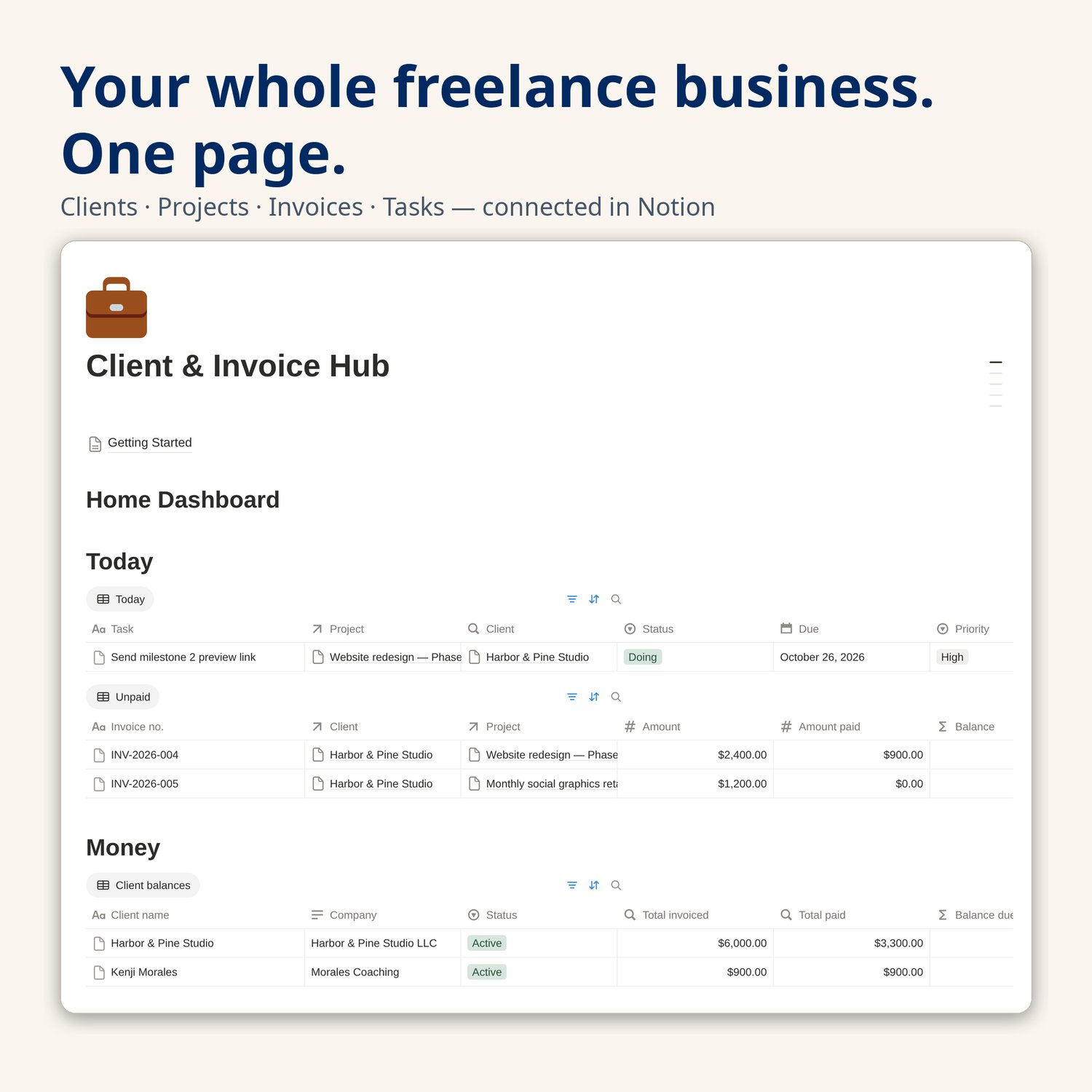
Notion Template for Freelancers | Client & Invoice Tracker, Project and Task Manager, CRM Dashboard for Solopreneurs and Freelancers
Stop running your freelance business out of your inbox.
The Client & Invoice Hub is a complete Notion system that connects your clients, projects, invoices, and tasks — so one glance tells you who owes you money, what is due today, and which project needs you next.
WHO THIS IS FOR
- Freelance designers, writers, developers, consultants, and coaches juggling more than two clients at a time
- Solopreneurs who invoice from a separate tool but track everything else in spreadsheets, sticky notes, or their head
- Anyone who has ever asked "wait, did they pay that invoice?" — and gone digging through email to find out
WHAT'S INSIDE
- Home dashboard — one page with today's tasks, unpaid invoices, and per-client balances. Built to be the only page you open each morning.
- Clients database (15 properties) — contact details, status, source, currency, and payment terms per client, with automatic Total invoiced, Total paid, and Balance due rollups.
- Projects database (13 properties) — status pipeline (Lead → Quoted → In progress → Delivered), quoted amounts, deadlines, and an automatic "invoiced so far" percentage for every project.
- Invoices database (13 properties) — amount, amount paid, and balance per invoice; Draft / Sent / Partially paid / Paid / Overdue statuses; due dates plus an automatic Days overdue counter so late payments surface themselves.
- Tasks database (9 properties) — tasks linked to projects, with the client name pulled in automatically, due dates, priorities, and a Today view plus a This week board.
- 12 ready-made views — Unpaid invoices, Invoices by month, Active projects board, Deadline timeline, Client balances, Today, This week, and more.
- Realistic sample data — 3 fictional clients, 4 projects, 5 invoices, and 6 tasks already wired together, so you can see exactly how the system behaves before you add your own work.
- Getting Started guide (inside the template) — a five-minute setup page: duplicate, explore, replace the samples, run your first project, invoice from the hub.
Everything is connected with relations and rollups: add an invoice once and the client's balance, the project's invoiced percentage, and your dashboard all update. No formulas to write, no setup project to survive.
HOW DELIVERY WORKS
1. Purchase and download the PDF from this listing.
2. Inside the PDF, click the template link. It opens the template in Notion.
3. Click "Duplicate" (top right in Notion) and the whole hub — databases, views, sample data, and guide — is copied into your own Notion workspace.
4. Follow the Getting Started page (about five minutes) and start adding your real clients.
Delivery is instant through Payhip's digital download. No physical item will be shipped.
REQUIREMENTS
- A Notion account. The free Notion plan is fully enough — this template uses only standard Notion features (databases, relations, rollups, formulas) and needs no paid plan and no add-ons.
- A device that can open Notion (desktop recommended for the initial setup; the dashboard works fine on mobile afterward).
PLEASE NOTE
- This hub tracks invoices and payments; it does not replace your invoicing or accounting software. Each invoice row stores the link to the actual invoice you issued (PDF, accounting tool, or payment platform), so everything stays one click apart.
- Sample data is fictional and included so you can learn the system quickly. Delete it whenever you are ready.
- You may use this template for your own business, including client work you deliver. Please do not resell, share, or redistribute the template itself or the duplicate link.
How this item was made: This template was designed with AI assistance (an AI generator) and then reviewed, structured, and tested by a human before listing. The system design, database structure, formulas, sample data, and guide text were checked by the seller for accuracy and usability.