
Project Quote Calculator (Excel 365)
Price a project from hours, rates and direct costs, so the quote still pays after delivery.
30-day money-back guarantee. No questions asked.
One-time purchase. No subscription. No macros.
What should we charge so this project still pays?
For small agencies, studios, consultancies and freelancers who quote projects or retainers from estimated hours.
Three questions, answered for every quote
• What does an hour of each person really cost us? A loaded cost rate for every role, from pay, on-costs, leave and the share of time spent on client work, or from a contractor's hourly or day rate.
• What should we charge to hit our margin, and what does a discount cost us? The fee at your target margin, rounded the way you choose, with quoted margin and markup side by side and the contribution every discount gives away.
• What goes in front of the client? A one-page quote with your details, scope, totals, terms and a validity date. Internal costs and margins never print.
Seven sheets, one job
• Start Here: setup steps, your business details, currency, tax line and pricing policy, and the workbook's overall status.
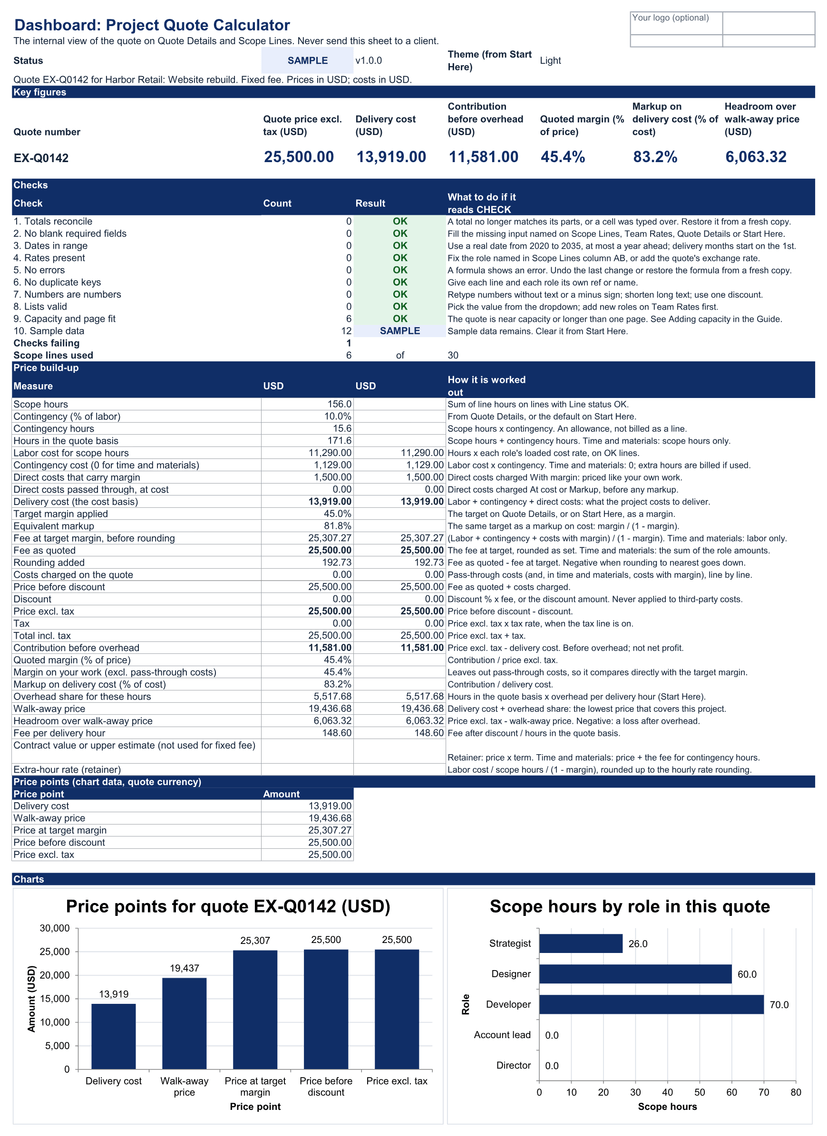
• Dashboard: the price built step by step (delivery cost, fee at target, rounding, discount, tax, contribution, quoted margin and markup) and the walk-away price, with ten checks.
• Quote Details: the client, project, quote number, date, quote type and terms for this quote.
• Scope Lines: one row per deliverable, with up to three roles and their hours, and any direct cost passed through at cost, with a markup, or priced with margin.
• Quote: the page you send, with your details, the scope, totals, terms and validity date, on one printed page.
• Team Rates: one row per role or person. Enter pay, on-costs, leave and delivery share, or a contractor's rate; the workbook works out what one delivery hour costs.
• Guide: every input, calculation and check explained, plus clearing the sample data and the changelog.
Built to be checked
Yellow cells: you type. Leave every other cell to the workbook.
Yellow: you type here · White: calculated, don't type here · Grey: lists and reference values
Ten named checks give one status on every sheet. While the status isn't OK, the printed quote shows DRAFT or SAMPLE under the title, so an unfinished quote can't pass for a final one.
Sheets are protected without a password, so formulas aren't overwritten by accident. No macros, no external links, no hidden sheets.
Setup
Save a master copy, fill in Setup, add your team rates, then quote: about 10 minutes, plus about 1 minute per role and per scope line. A first quote with 3 roles and 6 deliverables takes about 15 minutes.
The worked example is a fictional studio quoting a website rebuild: 156 hours and US$11,290 of labor, plus 10% contingency and US$1,500 of direct costs, priced at a 45% target margin and rounded up to US$25,500. Clear it in three steps to start your own master copy.
Margin is a share of the price; markup is a share of cost. The calculator shows both, so a 45% margin is never mistaken for a 45% markup.
Tested in Excel 365 for Windows desktop: 38 of 42 checks passed, 4 not yet run, workbook 1.0.1, Excel build 16.0.20527.20088 on Windows 11 Pro 10.0.26300, Oct 25, 2026. Excel for Mac, Excel for the web and Google Sheets are not yet tested.
What's in the download
One ZIP file:
• project-quote-calculator-v1.0.1-blank.xlsx: the workbook for your own quotes
• project-quote-calculator-v1.0.1-worked-example.xlsx: the same workbook with a demo team and quote
• START-HERE.html: open this first. It lists every file and where to begin.
• quick-start.md: setup steps, a first quote, reading the Dashboard and printing the quote
• metric-dictionary.md: every field and calculation defined
• support-and-compatibility.md: where it's tested, and how to get help
• license.md: the license terms
• release-notes-v1.0.1.md: what is in this version
• money-back-guarantee.md: the 30-day money-back guarantee
• MANIFEST-project-quote-calculator-v1.0.1.sha256: checksums, so you can check every file arrived intact
Not for you if
• You need proposals with images, e-signatures, invoicing or a CRM.
• You need to track actual hours against the quote while the project runs; the Client Profitability Tracker does that.
• You want to compare several quotes, options or versions in one file.
• You need tax worked out beyond one rate on the quote total, or tax advice.
Known limitations
• One quote per file. Save a copy of your master file for each quote.
• Up to 30 scope lines with up to three roles each, and 40 roles. The printed quote is one page.
• Costs are in one business currency. A quote can use a second currency at one exchange rate you type in. There is no live feed.
• Contribution is before overhead. It is not net profit or cash flow. Overhead is used only for the walk-away price and a suggested margin.
• The tax line is one label and one rate on the total. It is not tax advice.
• Tested in Excel 365 for Windows desktop. Excel for Mac, Excel for the web and Google Sheets are not yet tested.
• Excel mobile and the Google Sheets mobile apps are for viewing only, not data entry.
License
Single-business, US$29
For one business or sole trader, and everyone who works in it: staff and contractors.
Allowed: edit and extend the workbook, keep backups, share reports and results with your team, clients, advisers and board.
Not allowed: using it for a second business, giving an editable copy to a client or anyone outside the business, reselling it or posting it online.
Agency/Team is store-wide
If your business holds the Client Profitability Tracker's Agency/Team license (US$99), it covers this calculator too, with working copies for up to 5 client businesses you manage. This calculator has no Agency/Team price of its own. Agency/Team is bought with the tracker: https://payhip.com/b/jq87M
The full terms are in license.md in your download and at https://metricvalley.com/license/
30-day money-back guarantee
If the calculator isn't right for your business, email support@metricvalley.com within 30 days of purchase with your order number. You'll get a full refund to your original payment method. No questions asked and no forms to fill in. We reply within 1 business day and start the refund then. Downloading the files doesn't affect the guarantee. We only ask that you delete your copies.
This guarantee is in addition to your rights under the Australian Consumer Law and any other consumer law that applies to you.
Updates: free updates to the 1.x line, delivered through your Payhip download link.
Google Sheets edition: included free for every buyer when it ships. It isn't available yet.
Support: email support@metricvalley.com. We reply within 1 business day, Monday to Friday, Australian Eastern time. Included: help getting the workbook working as described, and fixes for anything that doesn't. Not included: custom setup, importing your data, redesigning formulas, or accounting and tax advice.
Prices are in US dollars. Any sales tax or VAT that applies is shown at checkout before you pay.
Metricvalley is independent of Microsoft and Google.