
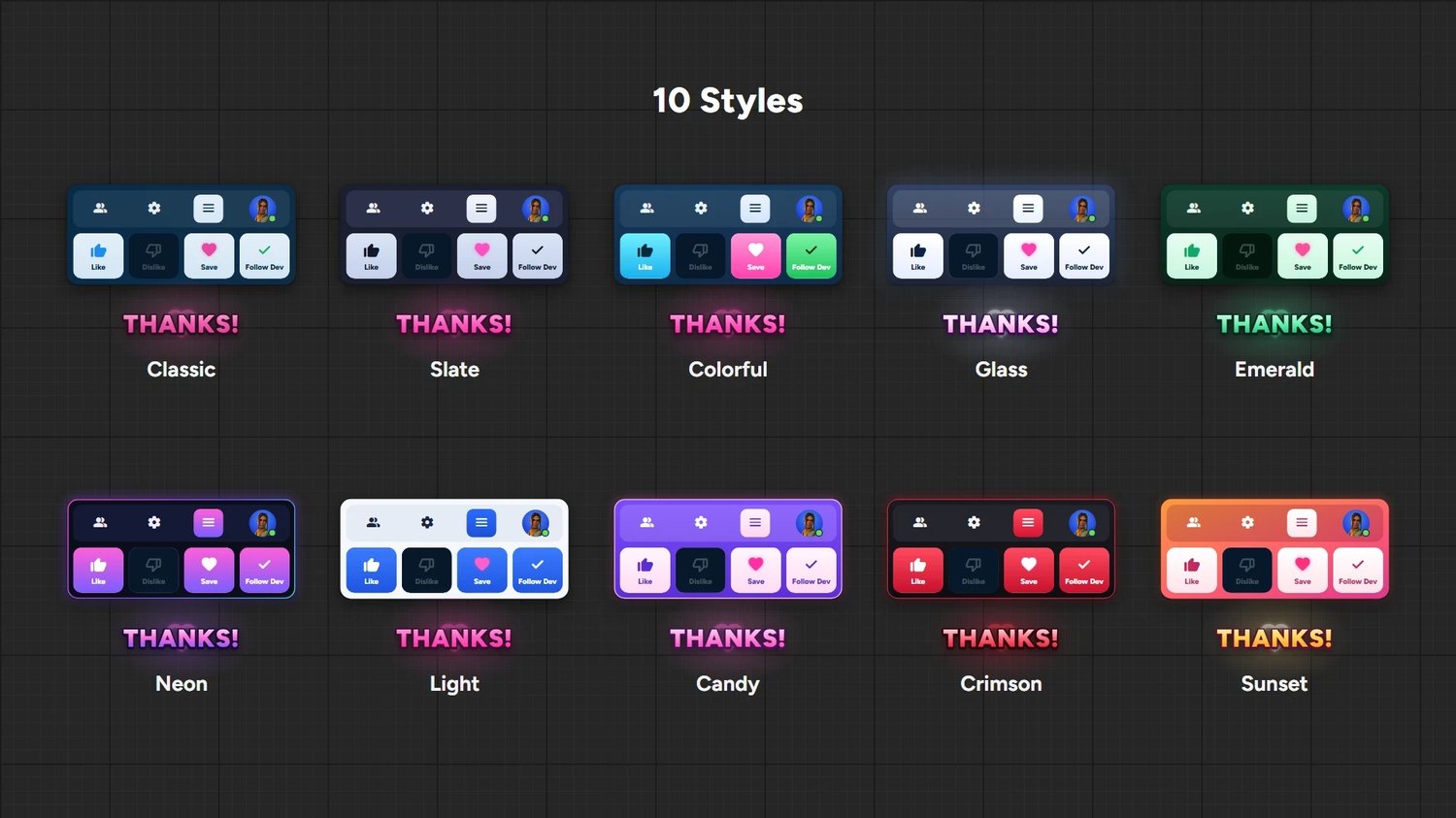
10 STYLES LIKE & FAVORITE POPUP UI ❤️
Like & Favorite Popup UI ❤️
The new Fortnite menu look, ready for your island.
A fully animated Like / Save / Follow Dev popup that reminds players to support your map, without ever blocking their gameplay. Drop one Verse device in your level, pick a style, done.
🎨 10 Ready-Made Styles
Classic, Slate, Colorful, Glass, Emerald, Neon, Light, Candy, Crimson and Sunset.
🖱️ Fully Animated
The cursor clicks Like, Save and Follow Dev, each button lights up with its own effect, then a big THANKS! pops out.
👤 Player Icon
Shows each player's own character icon, or any image you choose.
🔊 Fortnite UI Sounds
Clean click, like and favorite sounds. On or off with one checkbox.
📍 Full Placement Control
9 screen positions (corners, sides, center), X / Y offset and size.
⏱️ Show Duration
Choose exactly how many seconds it stays on screen before it slides away.
🔁 Show It Your Way
• When a player joins (with a delay)
• When a player is eliminated
• On a loop, for every player at the same time
• From any Button or Trigger device
• From your own Verse code with one line: Popup.Show(Player)
All triggers start off, so you turn on only what you need.
🎮 Never Blocks Input
Players keep moving, building and shooting while it's on screen.
⚡ Ready in Minutes
Plug & play. Every setting is in the device's Details panel. No Verse knowledge needed.
Perfect For
Any map that wants more likes, favorites and followers: lobbies, deathruns, tycoons, box fights, parkour, roleplay and more.
📦 Package Contents
• Verse device (ready to use)
• Animated Widget Blueprint
• All textures and the player icon material
• Step-by-step setup guide
⏳ FIRST-DAY DISCOUNT
Special launch price for the first 24 hours only.
⚠️ License
Single-user commercial license.
You MAY use this popup in all of your own UEFN projects, including published and monetized ones.
You MAY NOT resell, redistribute, share, upload or give away the files, in original or modified form, or include them in another asset pack or product.
Anyone else who wants to use it must purchase their own license.
By purchasing, you agree to these terms.
After you Buy
You will get 1 zip file
1st: close uefn
2nd: Extract the zip you want and then put it in your project file it will be in common in
C:/users/(yourpcname)/documents/fortnite projects/(your project)/content
Then paste the file
3rd: open uefn and compile verse then put the verse device and that's it you can control everything in the verse device its scale its position and the style and everything