


Day-Rate & Docket Reconciliation (Excel 365, Australian edition)
Check every rostered day and signed docket against your rate card and PO before you bill.
30-day money-back guarantee. No questions asked.
One-time purchase. No subscription. No macros.
Record only. Not a payment claim.
Did every rostered day get a signed docket, and did you bill it at the right rate?
For mining-services, plant hire, labour hire and civil contractors in Australia who bill a principal by the day or the hour against a purchase order, with people and machines on rosters and daily dockets. Built with Queensland and Western Australian sites in mind; the maths is the same in every state.
Four questions, answered every month
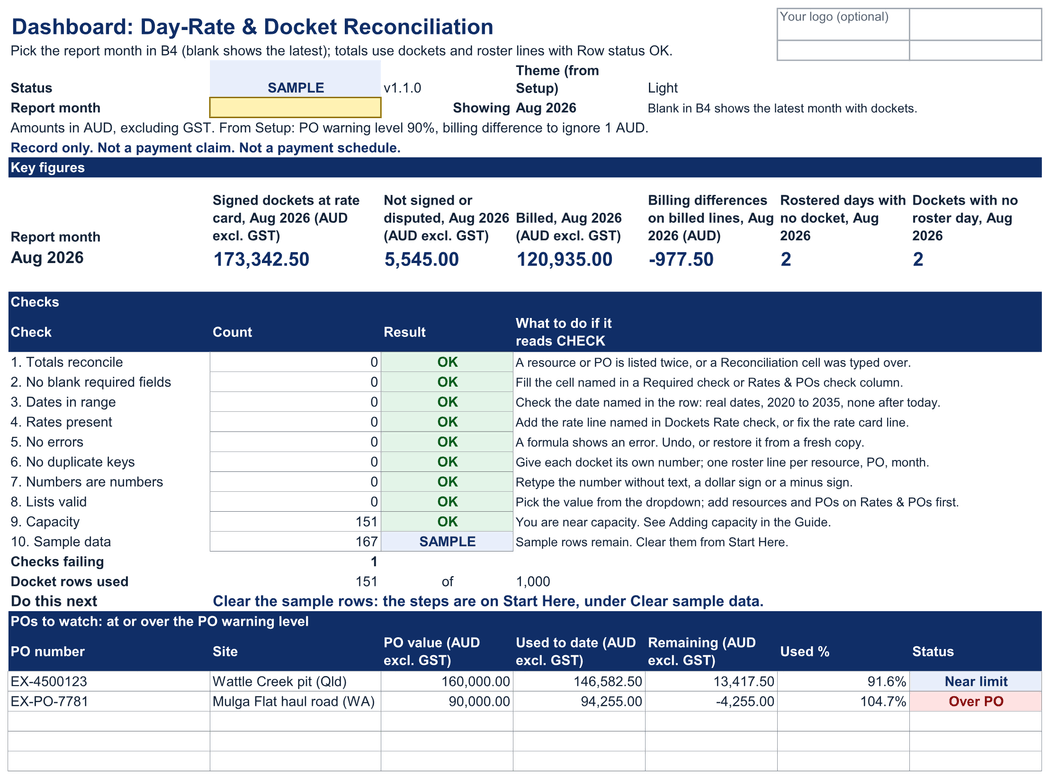
• Which rostered days have no signed docket? Each day of each roster line shows D, N or T when a docket matches, Gap when it doesn't, and Extra when a docket falls on a day nobody was rostered.
• What are the dockets worth at your rate card? Every docket is priced from a dated rate line: day or hourly basis, shift hours, extra hours, half days, standby, travel days, mob and demob. Signed dockets are ready to bill; unsigned and disputed ones are kept apart.
• Does what you billed match the signed dockets? Billed minus signed for every roster line, so a missed rate change or extra hours shows up before the principal finds it.
• Which POs are close to running out? Used to date against each PO's value, with a warning level you set.
Eight sheets, one job
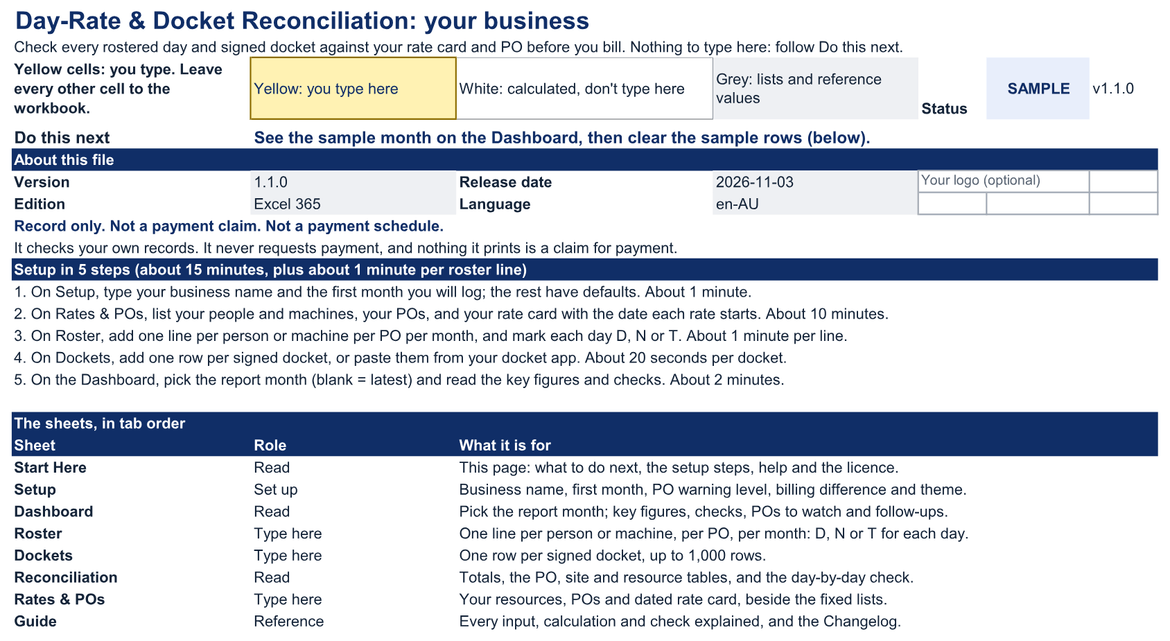
• Start Here: what to do next, five setup steps and a map of the sheets. Nothing to type there.
• Setup: your business name, the first month you log, the PO warning level, the billing difference to ignore and the theme, each with a working default.
• Dashboard: the report month you pick at the top, six key figures, the checks, a line that says what to do next, POs to watch, resources to follow up, and two charts: PO value against used to date, and signed dockets against billed by resource.
• Roster: one line per person or machine, per PO, per month, with D (day shift), N (night shift) or T (travel day) on each date, and what you billed.
• Dockets: one row per docket: number, date, resource, PO, type, hours and sign-off. The rest of the row finds the roster day and the rate line and prices it.
• Reconciliation: totals for the month and the file, every PO, every site, every resource, and the day check.
• Rates & POs: your people and machines, your POs, and your rate card with the date each rate starts.
• Guide: every input, calculation, rule and check explained, plus adding capacity, clearing the sample data and the changelog.
Built to be checked
Yellow cells: you type. Leave every other cell to the workbook.
Yellow: you type here · White: calculated, don't type here · Grey: lists and reference values
Rows with a missing detail, an unknown resource or PO, a missing rate line or a duplicate are marked Review, stay visible and are left out of the totals until you fix them. Ten named checks give one status on every sheet: OK, CHECK (n) or SAMPLE.
Sheets are protected without a password, so formulas aren't overwritten by accident. No macros, no external links, no hidden sheets.
Record only
Record only. Not a payment claim. Not a payment schedule. The workbook checks your own records and never requests payment; make each claim through your accounting software and the process your contract sets. There are no safety, inspection, defect or maintenance records in it, hours are billing quantities only, and every rate is one you type and date. No award tables, pay checks, fuel tax credit or GST calculations. Decision support, not legal, tax or financial advice.
Setup
Fill in your resources, POs and rate card, then add roster lines and dockets: about 15 minutes, plus about 1 minute per roster line. Dockets take about 20 seconds each to type, or paste them from your docket app.
The worked example is a fictional plant and labour hire business with three people and three machines on two POs, one in Queensland and one in Western Australia. In August 2026 it has 116 dockets, a mid-month rate change, two rostered days with no docket, a travel docket on a day off, a standby day over the monthly limit, and one PO over its value. Clear it in three steps and it matches the blank file.
Amounts in Australian dollars, excluding GST. A4 print setup, checked on Letter. Light or Dark theme for Start Here and the Dashboard.
Tested in Excel 365 for Windows desktop: 41 of 42 checks passed, 1 not yet run, workbook 1.1.0, Excel build 16.0.20527.20112 on Windows Server 2025 Standard 10.0.26100, 3 Nov 2026. Excel for Mac, Excel for the web and Google Sheets are not yet tested.
What's in the download
One ZIP file:
• day-rate-docket-reconciliation-v1.1.0-au-blank.xlsx: the workbook for your own roster, dockets, rate card and POs
• day-rate-docket-reconciliation-v1.1.0-au-worked-example.xlsx: the same workbook with a fictional month
• START-HERE.html: open this first. It lists every file and where to begin.
• quick-start.md: setup steps and how to read the results
• metric-dictionary.md: every field and calculation defined
• support-and-compatibility.md: where it's tested, and how to get help
• license.md: the licence terms
• release-notes-v1.1.0.md: what is in this version, and where the settings went since 1.0.0
• money-back-guarantee.md: the 30-day money-back guarantee
• MANIFEST-day-rate-docket-reconciliation-v1.1.0.sha256: checksums, so you can check every file arrived intact
Not for you if
• You need a payment claim or payment schedule. This workbook is a record for checking and never requests payment.
• You need payroll, award interpretation or labour hire pay checks. The rates here are your charge-out rates.
• You need safety records: pre-starts, inspections, defects or maintenance. Keep those in your site's own system.
• You want dockets or rosters to arrive automatically from a docket app or rostering software. You type or paste them.
• You need several people editing at once with permissions or change history.
Known limitations
• Amounts are in AUD, excluding GST. The workbook does not calculate GST, fuel tax credits or any other tax.
• Every rate is typed and dated by you. There are no award rates, and rates are not checked against your contract.
• Night shifts use the same rates as day shifts. If your rate card has night rates, set up a separate rate class.
• Travel, standby, half-day, extra-hour and PO-date rules follow the Guide. Contract terms that differ need your judgement.
• Tested in Excel 365 for Windows desktop. Excel for Mac, Excel for the web and Google Sheets are not yet tested.
• Excel mobile and the Google Sheets mobile apps are for viewing only, not data entry.
• Capacity is 1,000 dockets, 200 roster lines, 100 resources, 50 POs and 300 rate lines; the Guide shows how to add more.
Licence
Single-business, US$49
For one business or sole trader, and everyone who works in it: staff and contractors.
Allowed: edit and extend the workbook, keep backups, share reports and results with your team, principals, advisers and lenders.
Not allowed: using it for a second business, giving an editable copy to a principal or anyone outside the business, reselling it or posting it online.
Agency/Team is store-wide
If your business holds the Client Profitability Tracker's Agency/Team licence (US$99) or the Agency Operating Bundle's Agency/Team tier (US$129), it covers this workbook too, with working copies for up to 5 client businesses you manage. This workbook has no Agency/Team price of its own. Agency/Team comes with the tracker (https://payhip.com/b/jq87M) or with the bundle's Agency/Team tier (https://payhip.com/b/Vv6y2).
The full terms are in license.md in your download and at https://metricvalley.com/license/
30-day money-back guarantee
If the workbook isn't right for your business, email support@metricvalley.com within 30 days of purchase with your order number. You'll get a full refund to your original payment method. No questions asked and no forms to fill in. We reply within 1 business day and start the refund then. Downloading the files doesn't affect the guarantee. We only ask that you delete your copies.
This guarantee is in addition to your rights under the Australian Consumer Law and any other consumer law that applies to you.
Updates: free updates to the 1.x line, delivered through your Payhip download link.
Google Sheets edition: included free for every buyer when it ships. It isn't available yet.
Support: email support@metricvalley.com. We reply within 1 business day, Monday to Friday, Australian Eastern time. Included: help getting the workbook working as described, and fixes for anything that doesn't. Not included: custom setup, importing your data, redesigning formulas, or legal, tax, payroll or contract advice.
Prices are in US dollars: US$49 is about A$70 at the European Central Bank reference rate on 20 Oct 2026. Your card provider converts the payment. Any sales tax or VAT that applies is shown at checkout before you pay.
Metricvalley is independent of Microsoft and Google, and of every principal, mine operator and regulator.