

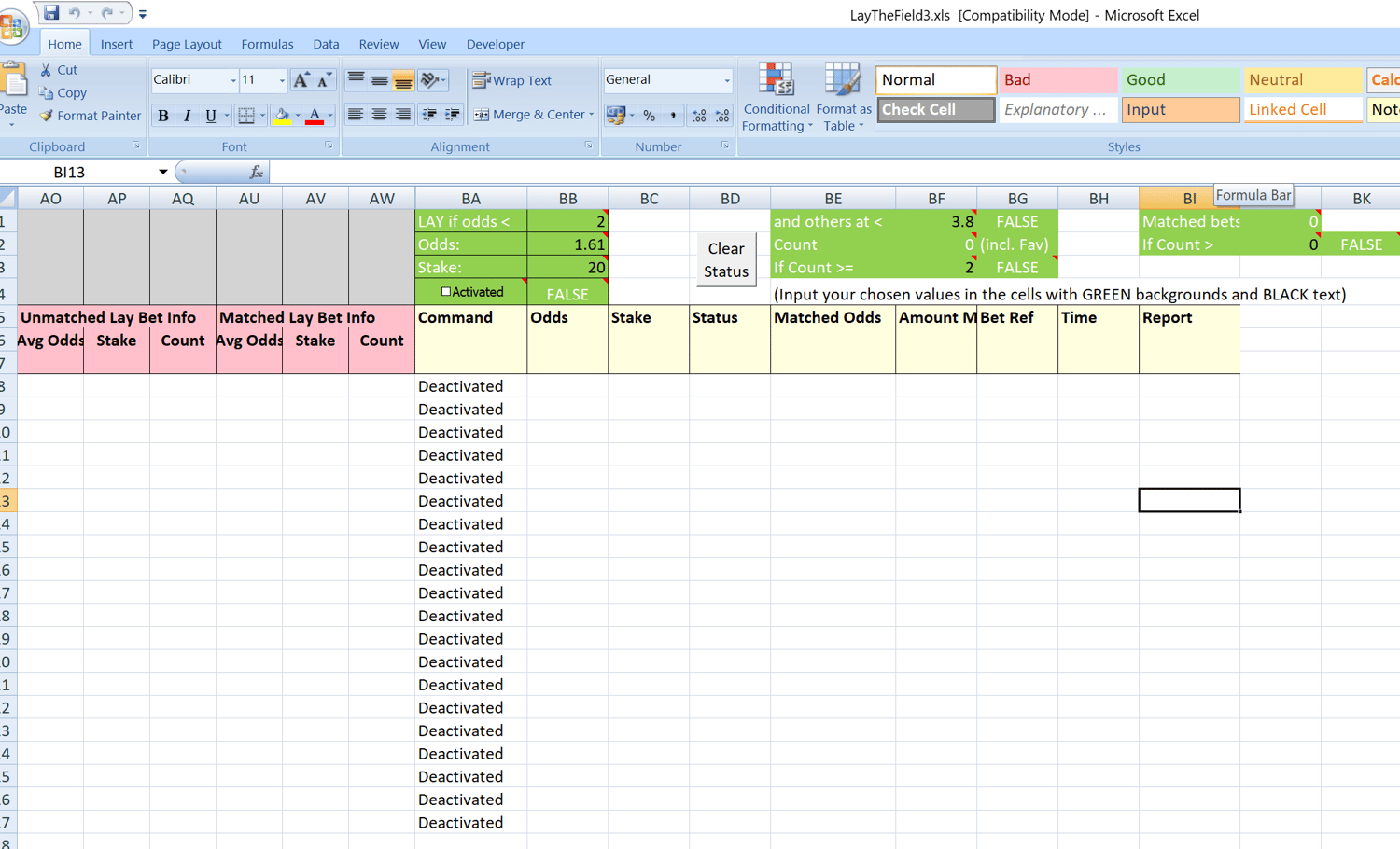
Lay The Field Spreadsheet
This Excel spreadsheet / workbook can be used for 'laying the field' on the Betfair exchange, when used in conjunction with Advanced Cymatic Trader Software.
You can see a video of the spreadsheet being used and how it works here:
https://www.youtube.com/watch?v=07cwdtPMKfQ
Requirements:
1) You must already have an account with Betfair (see Betfair.com)
2) You must already be a user of Advanced Cymatic Trader Software (requires a separate subscription from cymatic.co.uk). The Cymatic software connects you to Betfair and sends market data to the spreadsheet.
3) Microsoft Excel 2007 or later installed on your PC (not online versions).
LayTheField version 3. This version contains more conditions that version 1, but it's only compatible with Excel 2007 or later (because it uses the COUNTIFS statement). You can open it in Excel 2003 if you've loaded the compatibility pack for newer versions, then you'd see the formulae, but you'd still need Excel 2007 to actually run it.
Background:
This is the spreadsheet popularised in the Cymatic Trader community forum. It is well tested, as it was downloaded over 1700 times from the forum before it was moved to here. Here is the forum topic where you can read all the feedback on it:
Lay The Field Spreadsheet : Excel - Sample Spreadsheets
By paying a fee to access this spreadsheet, you will be supporting the ongoing success of the Advanced Cymatic Trader Software project and showing your appreciation. So, thank you very much! It means a lot to me. In return you'll get a spreadsheet that demonstrates how you can create strategies for automating your trading in Excel and Cymatic using best practise coding techniques that keep Excel running fast.
What the spreadsheet does:
This spreadsheet can be used to 'lay the field'. Note that I have only copied the formulae down to first 20 rows of selections, so any selections further down than that would never be layed. If you want to copy the formulae down further you can do.
'Laying the field' is a strategy in which you seek to lay more than one horse in-play at a low price (for example 1.6), so that you make a profit whatever the outcome. I'm not claiming that a simple 'Lay The Field' strategy is profitable, it might or might not be, but this spreadsheet is merely intended to demonstrate some of the techniques and principles involved in using Excel and Cymatic together.
The spreadsheet will lay only those selection that meet the criteria set, where the best available lay price is less than the price specified in cell BB1. So if you set this value to be bigger than the highest possible odds (1000), you would instantly lay all 20 selections. If you set this value to something like 2.0, you will only try to lay the selections when their prices fall below 2.0, so that way you would use less account funds because you won't send as many bets.
Cells BB2 specifies that actual price that you want to get matched at. So setting this to 1.61 would specify that the bets are sent with a requested price of 1.61. So settings BB1 to 2.0 and cell BB2 to 1.61, would result in sending triggered bets when the best price falls to 2.0, hoping to get matched at your requested price of 1.61 if the market price continues to fall from 2.0 down to 1.61. If the price doesn't reach 1.61, those submitted bets obviously won't get matched.
Hopefully this spreadsheet will demonstrates some techniques:
1. Using formulae to trigger bets. There are formulae in the Command, Odds and Stake columns.
2. A button to clear the contents of the Status column, to re-arm the triggers ready for sending new bets. Clicking the button runs some Visual Basic code. To see the code, choose the developer section in the Excel ribbon, then click on Visual Basic Editor (it's the button at the left end of the ribbon in Excel 2007). You'll find the code within Module1.
3. Some rules (conditions) have been typed in cells at the top of the Cymatic worksheet, just above the Command columns, although these could equally well be put anywhere in the columns to the right of the Report column, or even in a separate worksheet. The formulae in the command columns contain conditions that are based upon the values in those rules cells.
Hover your mouse over the rules cells to see my comments explaining what they do.
This worksheet could potentially be used to lay the field on all horse racing markets, all day, if used in conjunction with the auto-pilot to automatically change the market throughout the day. You would also need to select the option to 'Clear the contents of status cells when selecting a different market'. However please note that this could result in you instantly laying a strong favourite before the race starts if a market is selected that contains a strong favourite (with a price at or below 2.0 in the example given above). Lay-the-field strategies tend to involve laying horses in play once their odds fall below a certain level, not merely laying strong favourites before the race.
The spreadsheet was designed in Excel 2007, but it has been saved in the old 2003 format in case that helps some folks who only have the older version of Excel. It would work equally well if saved as a macro enabled Excel 2007 file (with the file extension xlsm). I have not used Excel 2003 with Cymatic, so I'd be glad to hear from anyone who does, just to confirm that everything works equally well in Excel 2003 (which I think it should).
Thank you for all your support. It is much appreciated.
Best wishes,
Gavin
Founder of Cymatic