
Chat Box — 20 Overlay Designs, Reads Twitch Chat by Itself (OBS)
A chat overlay for your stream, in 20 ready-made designs.
It reads Twitch chat by itself. There is no account to connect, no API key, no OAuth screen, and no bot to invite to your channel. Type your channel name, drop view.html into OBS as a Browser Source, and your chat is on screen.
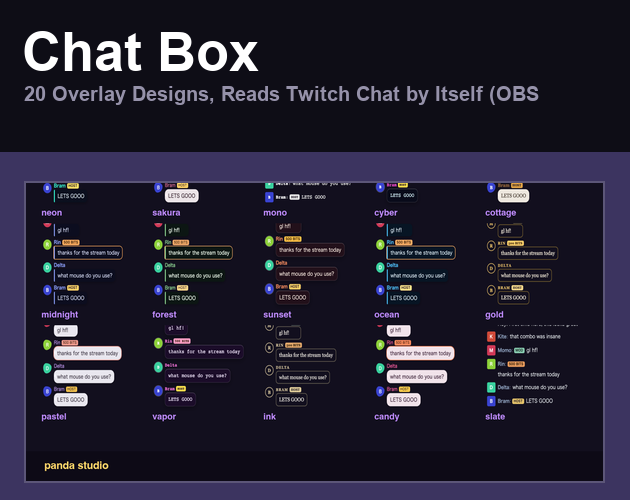
20 designs, not 20 colours
Each design pairs one of five shapes (card, speech bubble, frosted glass, outline, plain line) with its own palette and its own font, so they actually look different from each other:
neon, sakura, mono, cyber, cottage, midnight, forest, sunset, ocean, gold, pastel, vapor, ink, candy, slate, matcha, blossom, arcade, crimson, paper.
What it shows
- Twitch emotes as real images, not as text
- Each viewer's own name colour (viewers who never picked one get a stable colour of their own instead of grey)
- Host, moderator and subscriber badges
- Bits, tips and subscriptions highlighted so they do not scroll past unnoticed
What you can change, live
- Design and font
- Text size, avatar size, spacing
- How many messages stay on screen
- Hide each message after N seconds, or keep them
- Newest at the bottom or the top
- Hide bot commands (messages starting with ! or /)
Every change applies to OBS instantly. There is no save button and nothing to restart.
Details
- Transparent background, so it sits over anything
- Nothing about you or your stream is uploaded anywhere. No account, no server of ours, no analytics. The page talks only to Twitch's own chat server, and to Twitch's image server for emotes
- Try it before you set anything up: open view.html?demo
- Also works with OneComme, the Japanese comment tool, if you use it
- OBS 30.x or newer recommended, Windows / macOS
- Commercial use OK, modification OK, free updates