

Gig Driver Earnings, Mileage and Tax Tracker
Gig Driver Earnings, Mileage and Tax Tracker Excel for delivery and rideshare drivers — app earnings per hour, shift profit by platform, a mileage and deduction log, a monthly P and L dashboard, and a tax set-aside planning estimate. Know what every hour on the road actually earns — after fuel, wear, and insurance.
Built for DoorDash, Uber, Instacart, Lyft, Spark, Amazon Flex, and Grubhub drivers who run several apps and need to know, app by app and shift by shift, whether the earnings per hour cover fuel, vehicle wear, and the insurance bill — without accounting software. If a shift type is losing money, this workbook shows it the same day.
WHAT'S INCLUDED (6 sheets):
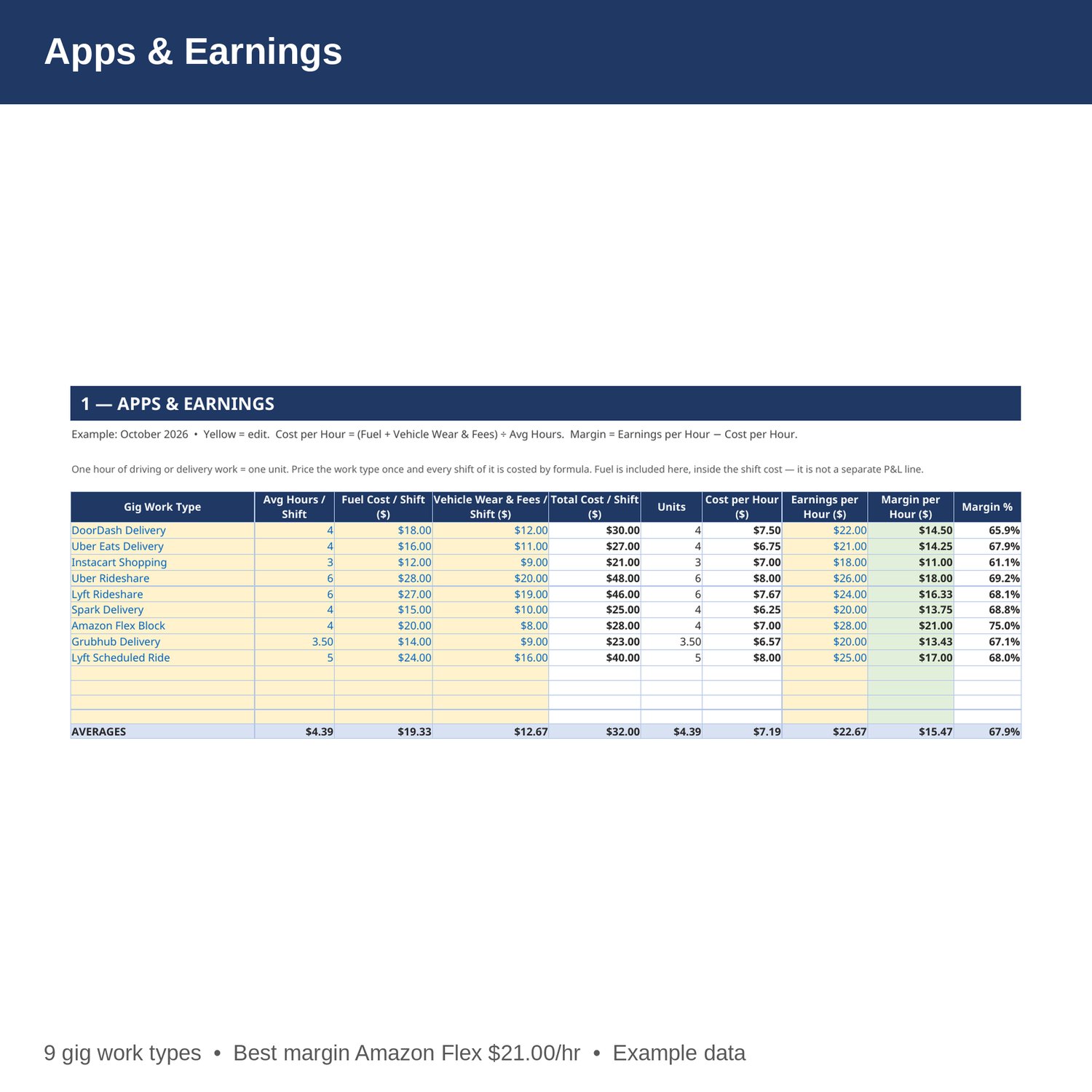
- Apps and Earnings — average hours per shift, fuel cost per shift, vehicle wear and fees per shift, cost per hour, earnings per hour, and margin in dollars and percent for every gig work type. Change a cost and every shift profit updates by formula. Fuel is costed here, inside the shift.
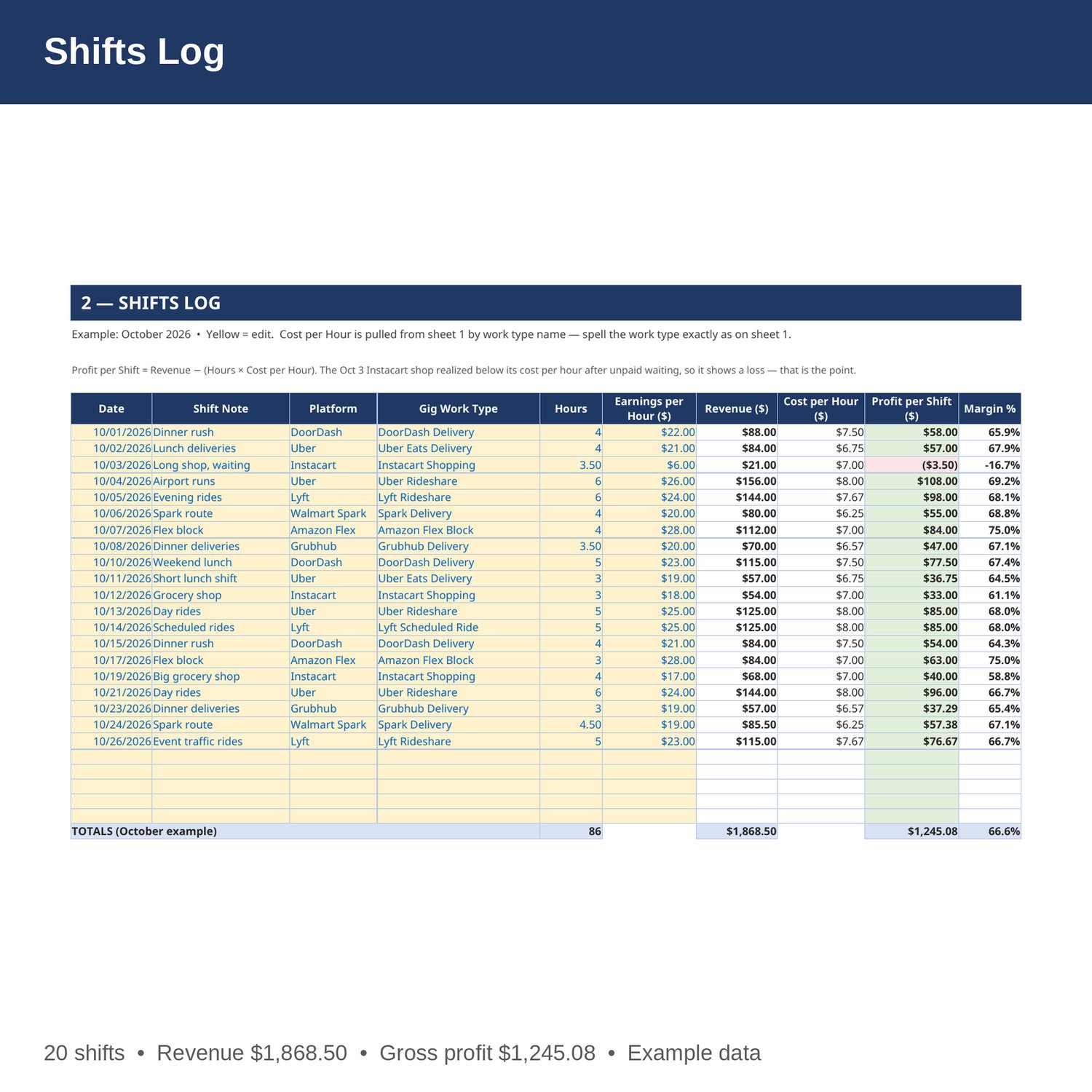
- Shifts Log — date, shift note, platform, gig work type, hours, realized earnings per hour, revenue, cost per hour pulled from the earnings sheet, profit per shift, and margin. Log delivery, shopping, rideshare, and block shifts in one place.
- Mileage and Tax Deduction — date, platform, miles, rate per mile, deduction by formula, and notes, with totals for total miles and total deduction. The rate per mile is a yellow planning input you set and update yourself — 0.70 in the example. It is not presented as an official rate and this sheet is not tax advice.
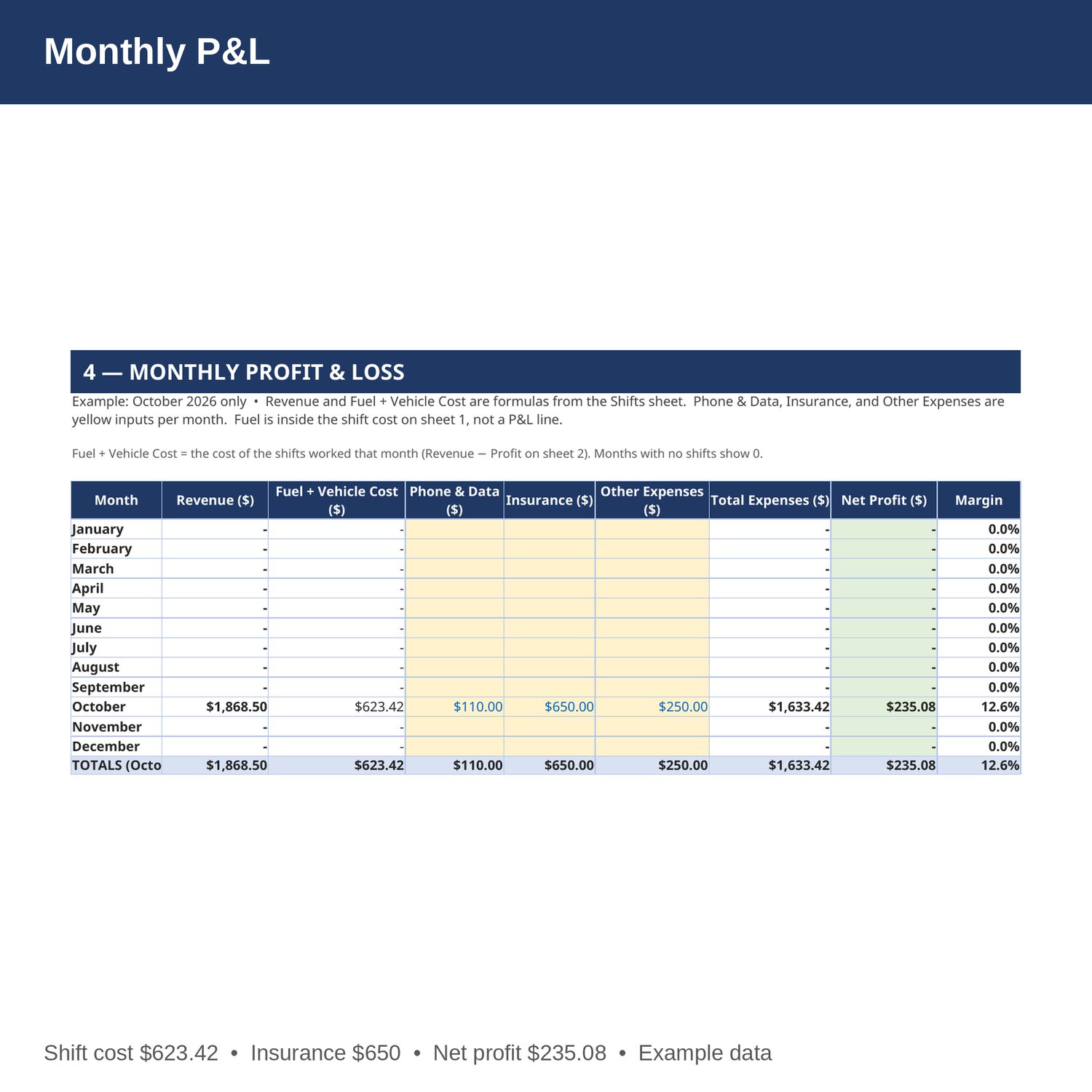
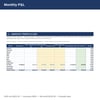
- Monthly P and L — revenue, fuel and vehicle cost, phone and data, insurance, and other expenses by month, Jan-Dec, with net profit and margin. Revenue and shift cost are formulas from the Shifts sheet. Fuel is inside the shift cost on sheet 1, so it is not a separate P and L line — do not enter it twice.
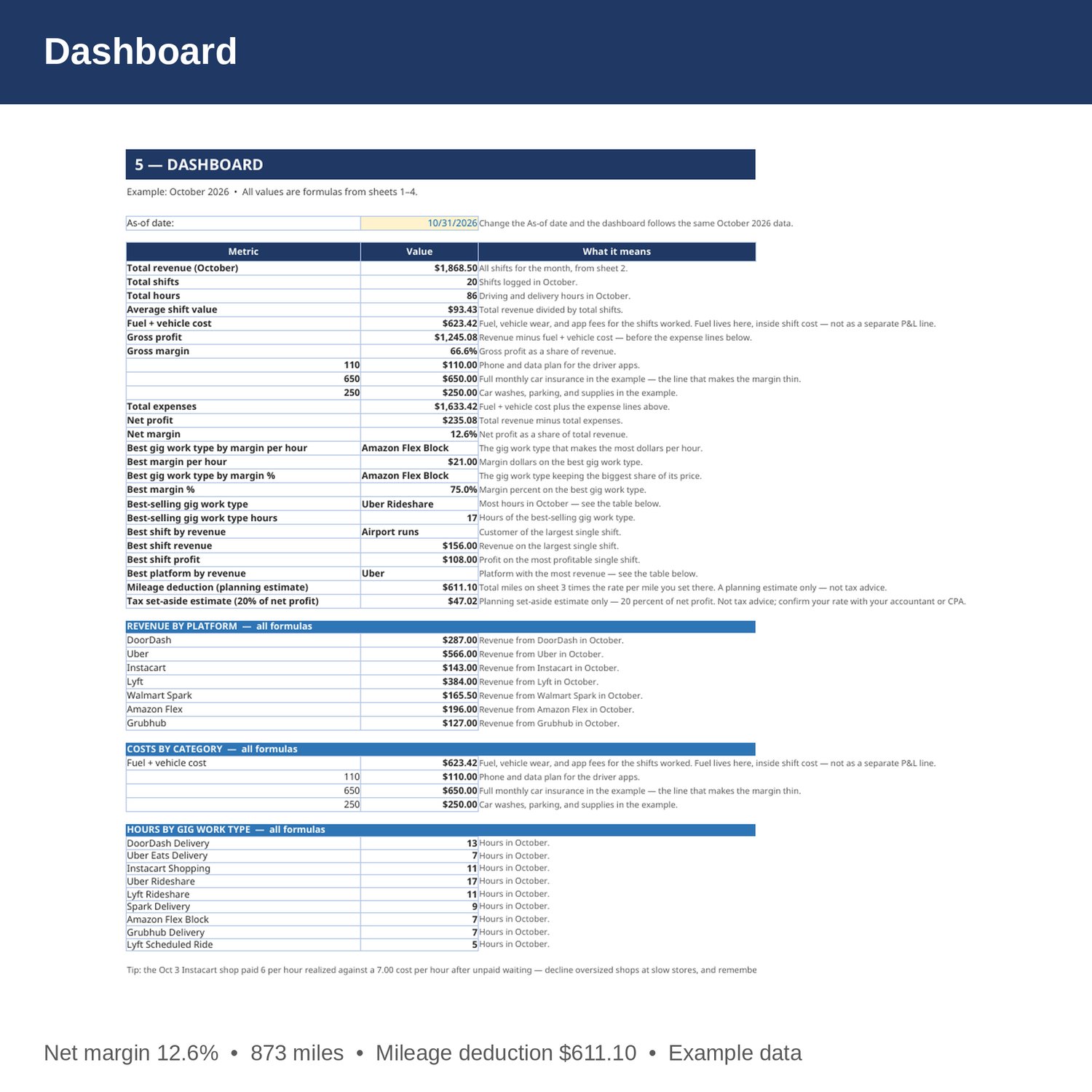
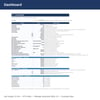
- Dashboard — total revenue, shifts, hours, average shift value, gross and net profit and margin, best gig work type by margin per hour and by margin percent, best-selling work type, best shift and best platform, costs by category, the mileage deduction total from sheet 3, and a tax set-aside planning estimate of 20 percent of net profit.
- Cover and How to Use — start here. Yellow cells are the only ones you edit.
EXAMPLE DATA (October 2026 — replace with your own numbers):
- Total revenue 1,868.50 from 20 shifts and 85.5 hours; average shift value 93.42.
- Fuel plus vehicle cost 623.42; gross profit 1,245.08; gross margin 66.6 percent.
- Phone and data 110, insurance 650, other expenses 250; total expenses 1,633.42; net profit 235.08; net margin 12.6 percent.
- Mileage example: 873 total miles and a mileage deduction of 611.10 at the 0.70 planning rate in the example — a planning estimate only, not tax advice.
- Tax set-aside planning estimate: 20 percent of net profit, 47.02 in the example. A planning estimate only, not tax advice.
- Revenue by platform: Uber 566 (best), Lyft 384, DoorDash 287, Amazon Flex 196, Walmart Spark 165.50, Instacart 143, Grubhub 127.
- Best gig work type by margin per hour and by margin percent: Amazon Flex Block, margin 21.00 per hour, 75.0 percent (cost 7.00 per hour, earnings 28 per hour).
- Best-selling gig work type: Uber Rideshare, 17 hours. Next: DoorDash Delivery 13, Lyft Rideshare 11.
- Best shift: Airport runs, October 4, Uber Rideshare x6 hours — revenue 156, profit 108.
HOW IT WORKS:
1. Download the Excel file instantly after purchase.
2. On sheet 1, enter each work type's average hours per shift, fuel cost per shift, vehicle wear and fees per shift, and earnings per hour. Cost per hour and margin fill in by formula.
3. On sheet 2, log every shift: date, note, platform, work type (spelled exactly as on sheet 1), hours, and realized earnings per hour. Revenue, cost per hour, and profit fill in by formula.
4. On sheet 3, log business miles the same day you drive them and keep the rate per mile current — it is a planning input you set. Deduction and totals fill in by formula.
5. On sheet 4, enter phone and data, insurance, and other expenses each month. Fuel is already inside the shift cost on sheet 1. Then check gross and net profit, the mileage deduction, and the tax set-aside estimate on the Dashboard.
HOW THE NUMBERS WORK:
Cost per hour is (fuel cost per shift plus vehicle wear and fees per shift) divided by average hours per shift. Margin per hour is earnings per hour minus cost per hour. Margin percent is margin per hour divided by earnings per hour. Gross profit is revenue minus fuel and vehicle cost; net profit is revenue minus fuel and vehicle cost, phone and data, insurance, and other expenses. One hour of driving or delivery work is one unit. The mileage deduction is total miles times the rate per mile you set on sheet 3, and the tax set-aside is 20 percent of net profit — both are planning estimates only.
WHO IT'S FOR:
Multi-app gig drivers — delivery, grocery shopping, rideshare, and block drivers — who want earnings by app, shift profit, a mileage log, and a monthly P and L in one workbook — without accounting software.
PLEASE NOTE:
- This is a digital download. No physical item will be shipped.
- Works in Microsoft Excel and Google Sheets (upload to Google Drive to open in Sheets).
- Example data for October 2026 is included (9 gig work types, 20 shifts, 85.5 hours, 14 mileage rows). Replace it with your own numbers.
- The example is honest about the weak spots: one long Instacart shop on October 3 realized at just 6 per hour, below its 7.00 cost per hour, because of unpaid waiting time at the store, and net margin is thin at 12.6 percent after the full monthly insurance bill lands on the P and L.
- The mileage rate in the example (0.70 per mile) is a planning input the buyer updates — it is not presented as an official rate. This is a bookkeeping and planning tool only, not tax, legal, or CPA advice.
- Due to the nature of digital downloads, refunds are not available. Message me before buying if you have a question.
Built by an accountant: B.S. Accountancy, ASU W. P. Carey, with revenue-reconciliation experience at Marriott and audit work at PwC.