










AliveAI - Live Stream Compliance Guard 24-Hour Pass (License Key)
"AliveAI" PRIVACY, USER MANUAL & HARDWARE REQUIREMENTS
Newest online manual is here: (pictures + videos)
https://docs.qq.com/doc/DRGRJdmN5VUJUcUJO
【购买前必读】
[MUST-READ BEFORE PURCHASE]
1. 授权码支持在不同设备间切换,但出于安全校验需要,更换设备登录会有 10分钟的环境同步期,在此期间无法验证授权码。
1. License Key Transferability: License keys support switching between different devices. However, due to security verification protocols, changing devices will trigger a 10-minute environment synchronization period, during which the license key cannot be validated.
2. 授权保管: 授权码是您的唯一使用凭证,请务必妥善保管。请勿将其泄露或展示给他人,以免因授权冲突导致您的账号被系统安全锁定。
2. License Key Safeguarding: The license key is your sole credential for product utilization; please handle it with absolute confidentiality. Do NOT leak or expose it to others, as authorization conflicts will result in an automatic account security lock by the system.
🚀 软件下载地址:
🚀 Software Download Channels:
国内用户:使用123云盘
https://1859314071.share.123pan.cn/123pan/rsnevd-GjLvd
下载提示: 如遇到下载限速,请先登录 123 云盘账号(手机验证码登录即可),即可享受极速下载
For Overseas Users: Via MediaFire
Download Tip: This channel is highly recommended for international users. No registration required—simply click the large blue "DOWNLOAD" button on the webpage to fetch the latest official, pristine APK in one click.
🛡️ 文件安全校验 (Verification)
🛡️ File Security Verification
🛡️ 安全下载保证 本应用经过官方签名加密,确保无毒、无广告。
🛡️ Secure Download Guarantee: This application is cryptographically signed and encrypted by the official development team, ensuring it is 100% malware-free and ad-free.
【普通用户】:请放心下载安装。如手机提示“来源不明”,属于安卓系统的常规提醒,点击“允许”或“继续安装”即可。
[Standard Users]: Please download and install with complete peace of mind. If your device prompts a "Unknown Sources" warning, this is a standard stock Android security routine. Simply tap "Allow" or "Continue to Install" to proceed.
【技术极客】:如需验证文件完整性,可核对 SHA-1 指纹:
97a8ad05d048119aec0cb14589418c105bc23023
[Tech Geeks]: To verify file integrity and authenticity, you can cross-reference the SHA-1 cryptographic fingerprint:
97a8ad05d048119aec0cb14589418c105bc23023
(注:指纹一致即为官方原版,确保您的使用安全。)
(Note: An identical fingerprint matches the official genuine build, guaranteeing your operational security.)
🔒 隐私与数据安全专项说明
🔒 SPECIAL NOTICE ON PRIVACY & DATA SECURITY
1. 关于系统权限调用的声明 在启动监测时,若系统提示“授权录屏”或“开始投射”:
1. Statement on System Permission Access When initiating detection, if the system prompts for "Screen Recording Authorization" or "Start Projection":
● 功能原理: 这是为了开启 AI 助手的 “视觉识别权限”。AI 需要获取实时的视觉反馈才能为您提供监测服务。
● Functional Principle: This is required to enable the AI Assistant's "Visual Recognition Permission." The AI requires real-time visual feedback to provide detection and monitoring services.
● 核心承诺: 该权限仅用于 实时画面对比,程序内部不包含任何编码、录制或导出模块。我们仅通过该接口进行 “瞬时视觉采样”,绝不产生任何形式的视频文件。
● Core Commitment: This permission is strictly used for real-time visual comparison. The software contains zero encoding, recording, or exporting modules. We only perform "instantaneous visual sampling" through this interface and will never generate any form of video files.
2. “无痕化”数据处理技术
2. "Zero-Trace" Data Processing Technology
● 非存储化分析: 本程序采用 “逻辑层实时计算” 方案。所有的识别过程都在AI计算单元内部完成,不经过文件系统。
● Non-Storage Analysis: This software utilizes a "logic-layer real-time computing" architecture. All recognition processes are executed entirely within the AI processing unit and bypass the file system completely.
● 即刻抹除: 每一个像素采样点在处理完毕后(耗秒级)即被销毁,无法还原。
● Instant Erasure: Every single pixel sample point is immediately destroyed upon processing completion (within milliseconds) and cannot be reconstructed.
3. 物理级隐私防护
3. Physical-Level Privacy Protection
● 零空间占用: 无论您连续运行多长时间,本 App 都不会在您的手机中产生任何视频或录像文件(运行 10 小时依旧是 0 文件储存占用)。
● Zero Storage Footprint: No matter how long the application runs continuously, it will never generate any video or recording files on your device (even after 10 hours of operation, local storage usage remains at exactly 0 bytes).
🚀 《号还在AliveAI》AI 实时检测系统使用手册
🚀 "AliveAI" REAL-TIME DETECTION SYSTEM USER MANUAL
欢迎使用 AI 实时检测系统。为了确保检测准确,请按照以下四个核心步骤进行操作。 Welcome to the AI Real-Time Detection System. To guarantee precise detection accuracy, please follow the four core operational steps below.
第一步:选择屏幕模式 STEP
1: SELECT DISPLAY MODE
在启动检测前,必须确保 App 的设置与你想要分析的图像,视频或应用画面方向一致。 Prior to initiating detection, ensure that the application configuration matches the orientation of the target image, video, or app screen you intend to analyze.
● 操作: 在控制面板中部,点击 [竖屏] 或 [横屏] 按钮。
● Operation: In the center of the control panel, click the [Portrait] or [Landscape] button.
● 注意: 如果你要分析竖屏内容,请选竖屏;如果要分析横屏内容,请选横屏。
● Note: Select Portrait if you are analyzing vertical content; select Landscape if you are analyzing horizontal content.
第二步:启动 AI 检测
STEP 2: INITIATE AI DETECTION
配置好方向后,点击主界面的蓝色大按钮。
Once the orientation is configured, tap the large blue button on the main interface.
● 操作: 点击 [启动 AI 检测]。
● Operation: Tap [Start AI Detection].
● 系统反馈:
● System Feedback:
1. 手机会弹出系统权限申请(如“开始录制或投影”),请点击 [立即开始]。
1. A system permission request (e.g., "Start recording or casting") will pop up on your phone. Please tap [Start Now].
2. 安卓14系统还可选择检测某一APP,或者检测所有APP(全屏)。
2. On Android 14 and above, you can choose to detect a specific App or monitor all Apps (Full Screen).
3. 按钮变为红色并显示 [停止 AI 检测],下方出现红色指示灯,提示:“AI 正在实时分析屏幕内容”。
3. The button will turn red and display [Stop AI Detection], accompanied by a red status indicator blinking below with the prompt: "AI is analyzing screen content in real time."
第三步:连接预览终端(多设备同步)
STEP 3: CONNECT TO PREVIEW TERMINAL (MULTI-DEVICE SYNCHRONIZATION)
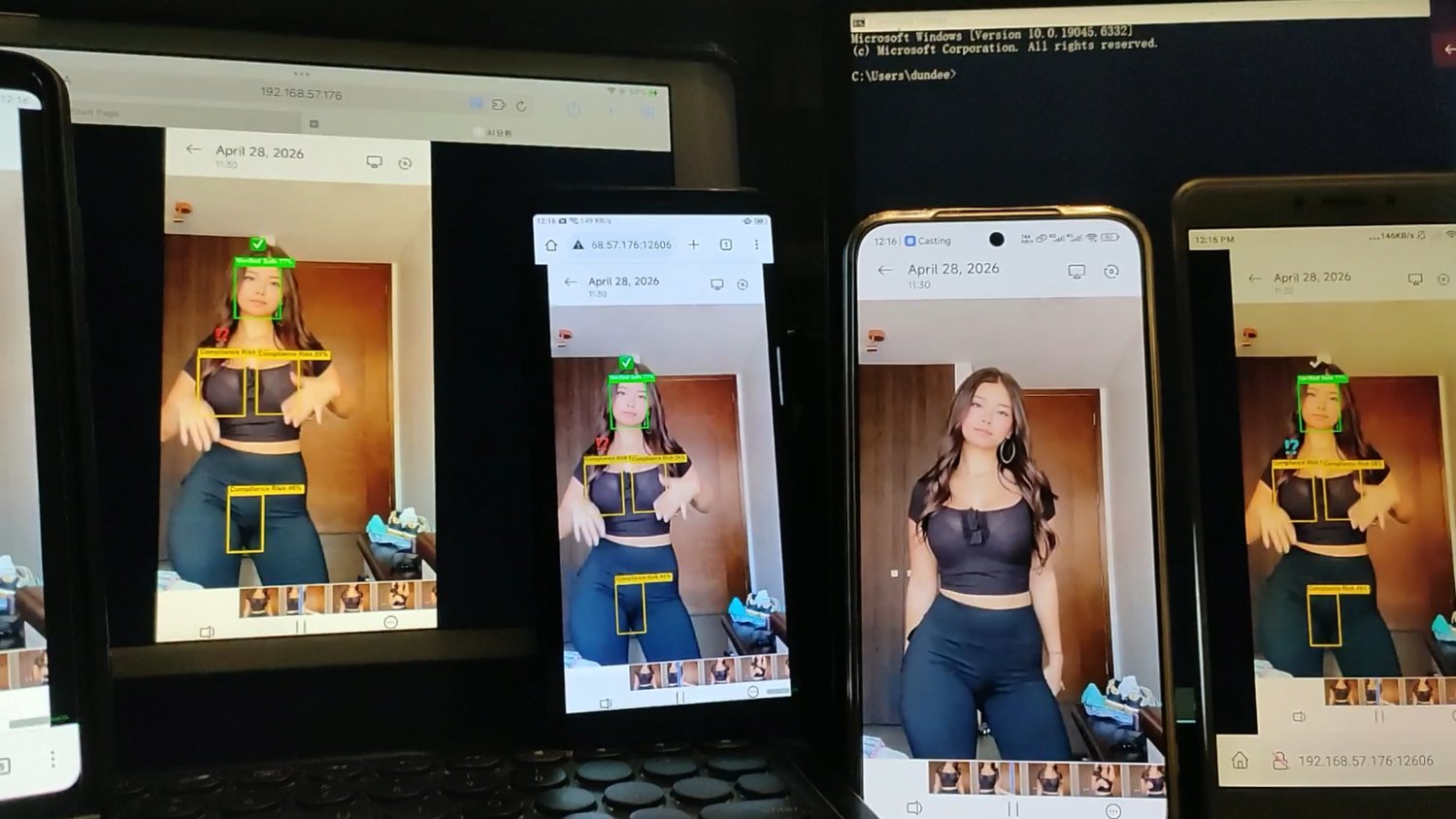
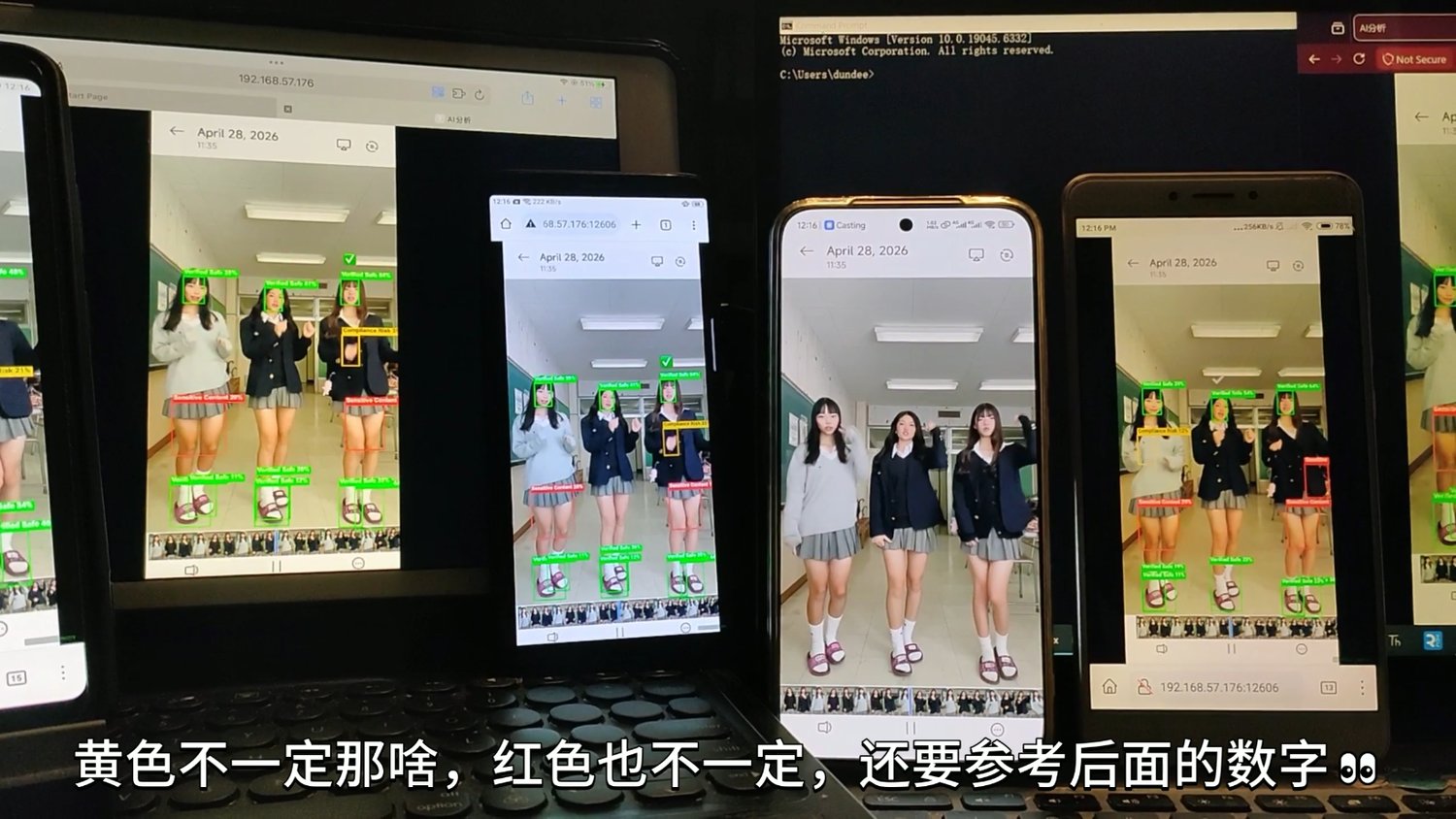
你可以通过电脑、平板或另一部手机实时查看 AI 的分析过程。
You can monitor the AI analysis process in real time via a PC, tablet, or another mobile device.
● 操作: 使用微信、某音、手机浏览器等扫一扫功能扫描界面中心的 二维码,或者在浏览器手动输入显示的 IP 地址。
● Operation: Use the scan function of WeChat, Douyin, or a mobile browser to scan the QR Code in the center of the interface, or manually enter the displayed IP Address into a web browser.
● 多网址说明:
● Multi-URL Description:
● 优先使用: 界面主显示的 http://192.168.x.x:12606。
● Primary URL: The primary address displayed on the main interface: http://192.168.x.x:12606.
● 备用网址: 若主地址无法打开(通常是因为虚拟网卡),请尝试下方橙色文字提示中的备用地址(如 http://10.76.x.x...)。
● Backup URL: If the primary address fails to load (typically caused by a virtual network adapter interference), please try the backup address indicated in the orange text below (e.g., http://10.76.x.x...).
● 连接前提: 确保查看设备(电脑/平板)与运行 App 的手机连接在同一个 Wi-Fi 下。 ● Connection Prerequisite: Ensure that the viewing device (PC/tablet) and the phone running the App are connected to the same Wi-Fi network.
第四步:切换至目标画面
STEP 4: SWITCH TO TARGET SCREEN
● 这是最关键的一步,App 启动后会在后台持续运行。
● This is the most critical step. Once initialized, the App will continuously execute in the background.
● 操作: 保持 App 在后台运行,直接按手机 Home 键或滑动手势返回桌面,打开你需要检测的目标应用(如直播间、视频播放器或游戏)。
● Operation: Keep the App running in the background, use the Home button or swipe gesture to return to the home screen, and launch the target application you wish to detect (e.g., live stream room, video player, or game).
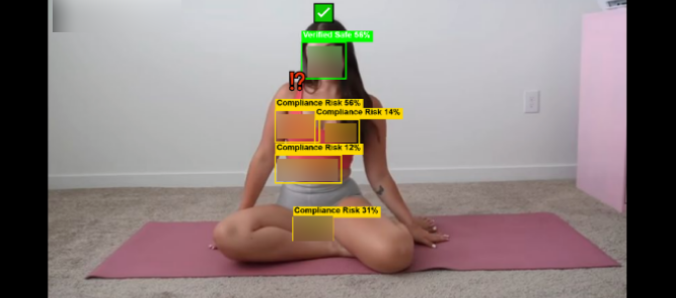
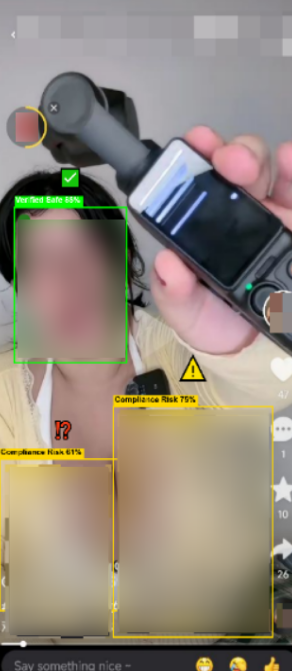
● 分析中: 此时,你在第三步中打开的浏览器页面将开始实时流式传输并显示 AI 标记的分析框。
● Analysis in Progress: At this moment, the browser page opened in Step 3 will begin real-time streaming and render the analysis bounding boxes labeled by the AI.
● 视频演示:
● VIDEO DEMO
【为什么你经常被抬走?让这个AI告诉你“底层真相”】 https://www.bilibili.com/video/BV1uV9rBPELL/?share_source=copy_web&vd_source=5862c36faea75b6adea32c7c639d8756
● 视频演示:
● VIDEO DEMO
【女主播不违规穿搭,避免违规,被抬走 有些女主播穿搭可能会被AI识别为“穿着不当”,“擦边”等。要避免只能在平台AI下判断之前,自己先纠正行为和穿搭。#穿搭技巧】https://www.bilibili.com/video/BV16TRGBBE39/?share_source=copy_web&vd_source=5862c36faea75b6adea32c7c639d8756
● 视频演示:
● VIDEO DEMO
【直播间莫名封号限流?揭秘平台AI审核逻辑:有一种违规叫‘你以为遮住了’!号还在?】
https://www.bilibili.com/video/BV1cVdwBmEDx/?share_source=copy_web&vd_source=5862c36faea75b6adea32c7c639d8756
🛠️ 常见问题排查
🛠️ TROUBLESHOOTING & FAQ
1. 无法打开网页?
1. Unable to open the web page?
a. 检查设备是否连接到了不同网段。
a. Check if the devices are connected to different subnets (network segments).
b. 确认2个设备在同一个 Wi-Fi 路由下。
b. Confirm that both devices are under the same Wi-Fi router.
2. 画面偏离模糊或识别不准?
2. Misaligned, blurry screen, or inaccurate recognition?
a. 确保被检测画面以及本APP处于相同模式(横屏,竖屏)。
a. Ensure that the target screen being detected and this App are in the same orientation mode (Landscape or Portrait).
3. 授权失败?
3. Authorization failed?
a. 请确保手机已给予 App 存储和屏幕投影权限。
a. Please ensure that the phone has granted the App both Storage and Screen Projection/Casting permissions.
📢【重要】App 运行环境与硬件要求
📢 [IMPORTANT] App Runtime Environment & Hardware Requirements
亲爱的用户:
Dear User:
为了确保 AI 实时监测功能的精准与高效,本应用采用了高强度的神经网络推理引擎。经过对多款机型的深度实测,我们制定了以下硬性准入标准。请在运行前确认您的设备配置,以避免出现闪退或运行缓慢的情况。
To guarantee the precision and efficiency of the real-time AI monitoring functionality, this application deploys a high-intensity neural network inference engine. Following extensive real-world stress testing across a wide range of devices, we have established the following strict compliance standards. Please verify your device configuration prior to execution to prevent application crashes (force closes) or performance degradation.
🚀 准入标准:实测性能基准线
🚀 Compliance Standard: Benchmark Performance Baseline
【最低运行要求】
[Minimum Operational Requirements]
● 代表机型:以 realme Q (2019/2020款) 为性能底线。
● Baseline Device: The performance floor is defined by realme Q (2019/2020 models).
● 运行内存 (RAM):必须为 8GB 或以上(实测 4GB/6GB 极易因内存抖动导致闪退)。 ● System Memory (RAM): Must be 8GB or higher. (Empirical testing shows that 4GB/6GB configurations are highly susceptible to crashes induced by memory churning/thrashing).
● 系统版本:Android 11.0 或更高版本。
● OS Version: Android 11.0 or higher.
● 处理器要求:具备现代 AI 指令集的处理器(如骁龙 7 系列、8 系列及同级别芯片)。 ● Processor Requirements: Processors equipped with modern AI instruction sets (e.g., Snapdragon 7-series, 8-series, or equivalent chipsets).
⚠️ 风险机型:无法运行警告 (如2019年以前的机型)
⚠️ Risk Devices: Non-Operational Warning (e.g., Pre-2019 Models)
经过对 小米 Max 2、荣耀 Note10、OPPO R11s 等经典机型的实测,以下配置已被列为“不建议运行”范围:
Following empirical testing on legacy devices such as Xiaomi Max 2, Honor Note10, and OPPO R11s, configurations failing to meet the following criteria have been classified under the "Not Recommended for Execution" scope:
1. 运行内存不足:所有 4GB / 6GB RAM 的设备。AI 引擎在初始化时会产生瞬时高吞吐量,老旧设备的内存带宽无法承载,系统将强制终止进程(SIGABRT)。
1. Insufficient System Memory: All 4GB / 6GB RAM devices. The AI engine generates an instantaneous high-throughput spike during initialization. Legacy device memory bandwidth cannot sustain this load, forcing the OS to terminate the process via a SIGABRT signal.
2. 系统版本过低:Android 10.0 及以下系统(含基于 Android 9/10系统)。这些系统的底层驱动无法完美适配现代AI模型架构。
2. Outdated OS Version: Android 10.0 and below (including custom ROMs based on Android 9/10). The low-level drivers of these operating systems cannot properly interface with modern AI model architectures.
3. 硬件代差:2019 年以前发布的旧款芯片(如骁龙 600 系列)。这些芯片缺乏必要的 AI 算子加速,无法完成计算分析。
3. Architectural Generational Gap: Legacy chipsets released prior to 2019 (e.g., Snapdragon 600 series). These chipsets lack the essential hardware-level AI operator acceleration required to execute computational analysis.
❓ 为什么我的手机无法运行?
❓ Why is My Device Unable to Run the Application?
● 复合逻辑运算:本应用在启动后会激活一套高度复杂的视觉安全审计逻辑。这涉及海量的数据特征比对与高频次逻辑校验,对处理器的底层指令集(Instruction Set)以及数据吞吐带宽有着极高的要求,早期硬件的架构设计难以承载此类高并发任务。
● Composite Logical Operations: Upon initialization, this application activates a highly complex visual security auditing logic. This involves massive data feature cross-referencing and high-frequency logical validation, imposing extreme demands on the processor’s low-level Instruction Set and data throughput bandwidth. Legacy hardware architectures were not engineered to sustain such high-concurrency workloads.
● 系统级安全红线:当设备硬件的实时算力分配无法匹配审计引擎的最低负载要求时,手机底层内核可能判定当前任务为“过载运行”,从而触发系统的自我保护机制(主动中止进程),以确保设备整体运行的稳定性。
● System-Level Safety Thresholds: When the real-time computational allocation of the device hardware fails to satisfy the minimum payload requirements of the auditing engine, the low-level operating system kernel may classify the task as a "system overload." This triggers the OS self-protection mechanism (proactively terminating the process) to guarantee the overall operational stability of the device.
💡 建议
💡 Recommendations
● 硬件性能封锁:若您的设备处于“风险机型”列表(如 4GB/6GB 早期机型),此类中断源于硬件底层的运算带宽饱和。这是由于早期芯片的逻辑架构无法解析现代复杂的复合审计指令集导致的,此类限制无法通过清理后台或重启手机解除。
● Hardware Performance Barriers: If your device falls under the "Risk Devices" category (such as early 4GB/6GB models), these interruptions stem directly from computational bandwidth saturation at the hardware level. This occurs because the logical architecture of legacy microchips cannot decode modern, complex composite auditing instruction sets. Consequently, this constraint cannot be resolved by clearing background tasks or rebooting the device.
● 建议方案:为了保证安全审计的实时性与稳定性,我们建议您在具备 更强运算吞吐能力(8GB RAM 及以上) 的现代移动终端上运行本程序。
● Recommended Solution: To ensure the real-time responsiveness and stability of the security audit, we strongly recommend executing this program on a modern mobile terminal equipped with superior computational throughput capacity (8GB RAM or higher).