



Paperwork & Deadlines Tracker (Weeksheet, Excel)
Every document and deadline that expires or repeats, with the date to start on each one.
30-day money-back guarantee. No questions asked.
One-time purchase. No subscription. No macros.
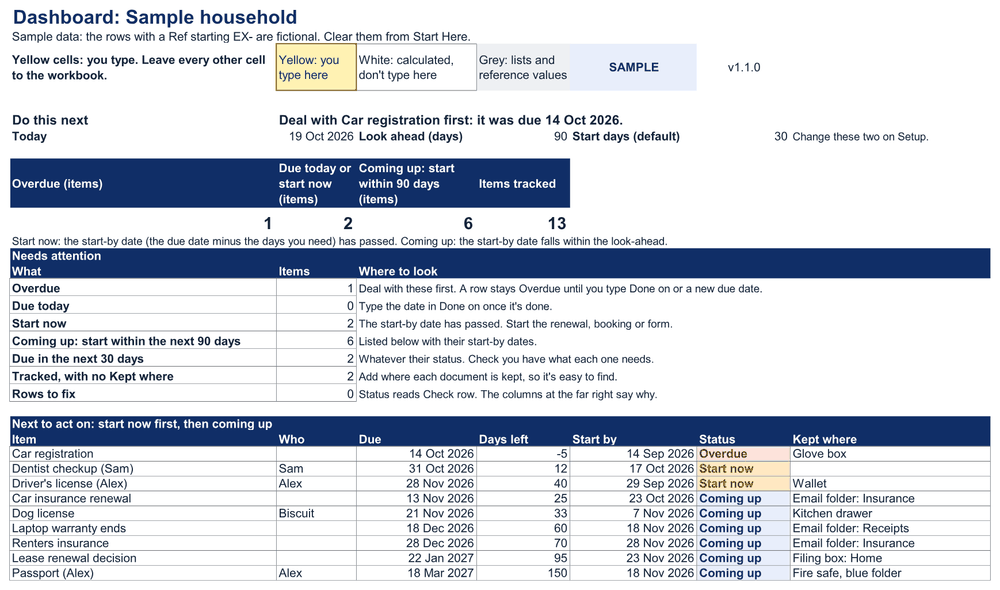
A spreadsheet for the paperwork in your household: IDs and passports, licenses and registrations, insurance renewals, warranties, tax forms and appointments to book. You type each item once, with its next due or expiry date. The tracker works out the next due date and the date to start, and flags what is overdue, what to start now and what is coming up.
Each week, type the date you dealt with anything, then read one screen.
Built for a short weekly check
• One place to start: Start Here says what to do next. The settings on Setup already have working defaults.
• Two columns are needed for each item: what it is and its due date. How often it repeats and how far ahead to start are optional.
• Start by: the due date minus the days you need, such as 120 days for a passport. From that date the row reads Start now.
• Do this next: one line on the Dashboard with the single most useful next step.
• Kept where: a column for where each document is, and a count of items with nowhere noted.
• Every status is a word (Overdue, Due today, Start now, Coming up), never color alone.
• Skipped a week? Nothing resets. An item stays Overdue until you mark it done or type its new date.
Seven sheets, one job
• Start Here: what to do next, four setup steps and a map of the sheets. Nothing to type there.
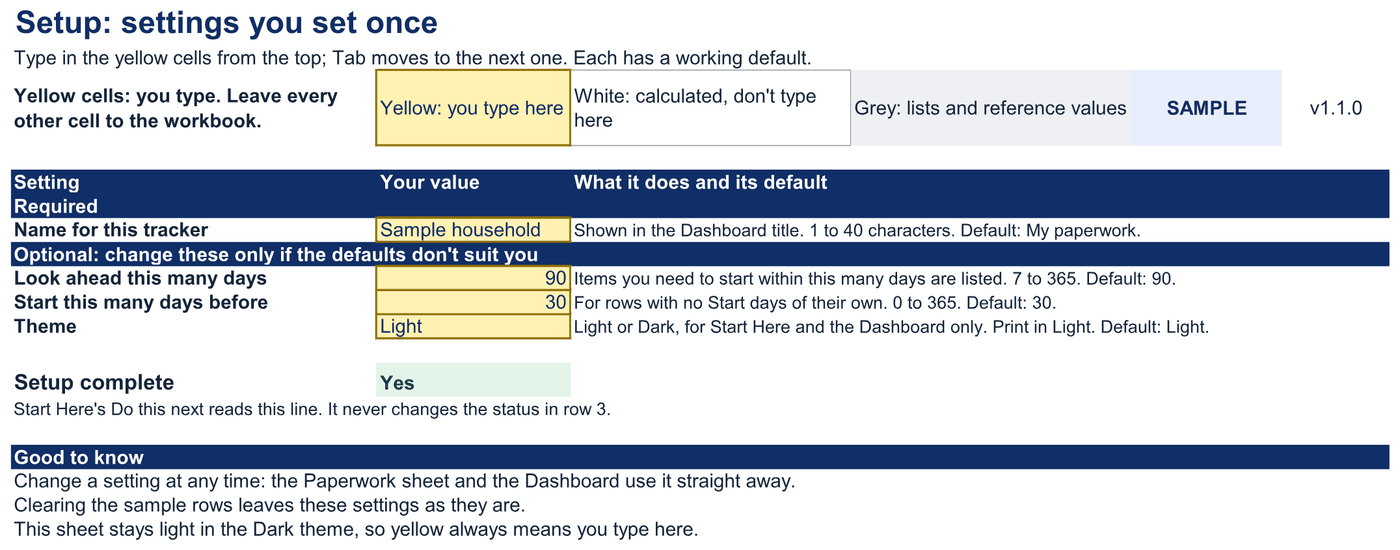
• Setup: four settings with working defaults: name, how far to look ahead, default start days, theme.
• Dashboard: Do this next, four key figures, Needs attention, the next 10 items to act on, the checks and a by-category table.
• Paperwork: one row per document or deadline, up to 200 rows.
• Lists: the dropdown values; you can change the categories.
• Guide: every column, calculation and check explained.
• Changelog.
Yellow cells: you type. Leave every other cell to the workbook.
Yellow: you type here · White: calculated, don't type here · Grey: lists and reference values
Ten named checks give one status on every sheet: OK, CHECK (n) or SAMPLE. A row with a problem is marked Check row and left out of the counts until it's fixed.
Sheets are protected without a password, so formulas aren't overwritten by accident. No macros, no scripts, no connections. The file sends nothing anywhere, and it needs no ID numbers: a note of where each document is kept is enough.
One ZIP:
• paperwork-deadlines-tracker-v1.1.0-blank.xlsx: the workbook for your own documents and deadlines
• paperwork-deadlines-tracker-v1.1.0-worked-example.xlsx: the same workbook with a sample household's items
• START-HERE.html: which file to open first and every file with its checksum
• quick-start.md, metric-dictionary.md, support-and-compatibility.md, license.md, release notes, money-back-guarantee.md and a checksum file
Tested in Excel 365 for Windows desktop: 38 of 39 checks passed, 0 failed (3 were checked by hand in the Excel window; 1 needs a person at the screen and was not run; 3 don't apply). Workbook 1.1.0, Excel 16.0.20527.20112 on Windows Server 2025 Standard 10.0.26100.
Excel for Mac, Excel for the web and the Google Sheets edition are not yet tested.
Not for
• You want reminders sent to your phone or email. This file can't send anything; it shows what's due when you open it.
• You want to store scans or copies of documents. It records where each one is kept, not the document itself.
• You need to track bills and payments. Each row is a date to act on, with no amounts.
• You manage deadlines for a business or for clients. It is for one household.
• You want to add items on a phone. Use a computer; phone apps are for viewing only.
Known limitations
• It remembers the last time you dealt with each item only. When a renewal gives you a new expiry date, type that date in Due date.
• Repeats are counted in whole months from the due date. A deadline on a set weekday, such as the second Monday, needs its date typed each time.
• Dates and statuses move when the file recalculates. Open the file to see today's list.
• Tested in Excel 365 for Windows desktop. Excel for Mac, Excel for the web and the Google Sheets edition are not yet tested.
• Capacity is 200 rows. The Guide shows how to add rows.
Personal use: you and the people you live with, for your own household's paperwork. You may edit the workbook and keep copies; you may not resell it, share an editable copy outside your household or use it to run a business. The full license is in the download.
1.x updates are free and are delivered through Payhip.
The Google Sheets edition is free for every buyer when it ships, delivered through Payhip.
30-day money-back guarantee: if the tracker isn't right for you, email support@metricvalley.com within 30 days of purchase with your order number for a full refund to your original payment method. No questions asked.
Questions: support@metricvalley.com. We reply within 1 business day, Monday to Friday, Australian Eastern time.
The tracker lists the documents and dates you type and works out the next ones. It is an organizer, not legal, tax or immigration advice, and it doesn't check any official deadline for you. Check each deadline with the office that sets it.

