
2019 Microsoft Word 7-8 Advanced Lessons
You don't have to convince your administration to buy another expensive program. You don't have to write any new assignments or figure out how to grade it. Whether you just want to teach basics or you are preparing students for the MOS certification, these lessons will get your students there--whether they are in your classroom or at home, provided they have access to Office or 365. Lessons are all inclusive, self-directed and include step by step videos--perfect for teaching live, blended, or strictly online. For a fraction of the price.
Welcome to the final installment of my new Excel 2019 Video Tutorial Lessons! This bundle contains lessons 7-8 in my 8 part series, with expert features that go beyond the MOS test. These lessons are designed to challenge your most advanced and focused students, giving them an opportunity to go deeper into the program, even while some of their classmates are still catching up. These lessons include many of the features that are seen on the MOS Excel Expert test, and though not exhaustive, will prepare students to take and pass that test.
These lessons are designed to be used in a blended learning format, where students learn at the own pace. The teacher acts as more of a guide to help students who get stuck or need additional one-on-one help, but students are responsible for their own learning and pacing.
These lessons are a great way to teach Microsoft in a home format as well, provided students have access to Excel or Office 365. I used lessons in this format during the second half of the 2019-2020 school year and still had a high passing rate on the MOS test.
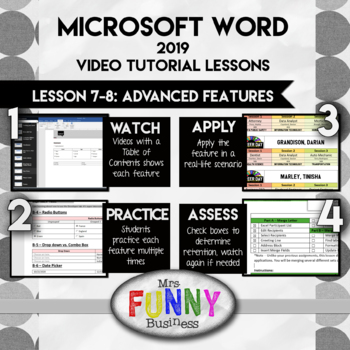
Step 1: WATCH - Students begin by opening the lesson video, which has a table of contents and allows them to learn about each feature and skip to where they need to be. Some students may be able to skip entire sections if they already know that features, while others can watch sections multiple times if they are having difficulty or need to go back. The video does not show them their assignment step by step, but shows them how to do each feature. They must then use that knowledge to figure out how to use it themselves in their own assignment.
Step 2: PRACTICE - Students then open the Lesson Excel sheet and go to the practice section, usually comprising 4-5 different mini-lessons labeled by letter. Following the step by step directions, students practice the feature several times until they are confident using it. The results of their efforts will either be calculated automatically or with a screenshot. This provides the student with immediate feedback if they did it right, and allows the teacher to grade with ease.
Step 3: APPLY - After practicing, students can apply their knowledge in a real-world application where they use the skills they have just learned to create something in Excel.
Step 4: ASSESS - At the end of each lesson, students go to the cover page and check the boxes of each feature if they can remember how to use it and feel confident with it. They print the coversheet, which has their scores, and also the application.
This bundle includes Lessons 7-8, which are designed to teach features beyond the MOS test. Lessons 1-3 are available as well, and teaches the more common, every-day uses of the program. Lesson 4-6 teach advanced features commonly seen on the MOS certification.
I have tried to write these lessons like an accordion--with room to expand and contract as the student needs require. Gifted students can go as quickly as they like and will have advanced lessons to keep them challenge. Slower students can go at their own pace as well, with a teacher more free to spend time with them as needed. The solution videos included are another way of making the lessons simpler for slower students who need more scaffolding.
Lesson 7 - Teaches advanced function like VLookup and HLookup, also in conjunction with If functions. Teachers Data Validation, including drop down menus attached to VLookup tables. Teachs Indes match and two way lookup. Finally, it includes macros, and creative ways to combine all these features together.
Lesson 8 - Teaches Data Analysis function including What-If Analysis, using Goal Seek and the Scenario Manager. Pivot tables and pivot charts are covered in detail, as well as advanced graphs, including funnel, waterfall, sunburst, box & whisker, and maps. Finally, students learn how to lock and unlock cells, restrict editing, and password protect both cells and entire workbooks.