




QLAB STING PLAYBACK MANAGEMENT
I managed to set up a RESET ALL button that (in a rather clunky way) resets all the buttons that are on the same page – this works for me as I generally never need more than 1 page of awards cues.
In essence, the flow is as follows:
· QLab has 24 x Audio Files – These are numbered 1 – 24 (important)
· Companion has a GO button for each numbered cue
· This button:
o Goes to the CUE number
o Loads it
o And on RELEASE
§ Plays the CUE
§ DISARMS the cue in QLab
· The FEEDBACK then changes the BUTTON to be a RED CROSS to give visual feedback that this cue has been played
· This is repeated across all 24 x numbered buttons
· There is a normal QLab PANIC/STOP button to end the cue
· If you PRESS the numbered cue button again, this resets the button and REARMS the cue within QLab
· There is then a RESET ALL BUTTON
· This basically uses internal COMPANION LOGIC and EXPRESSIONS to reset all the buttons rather than one at a time
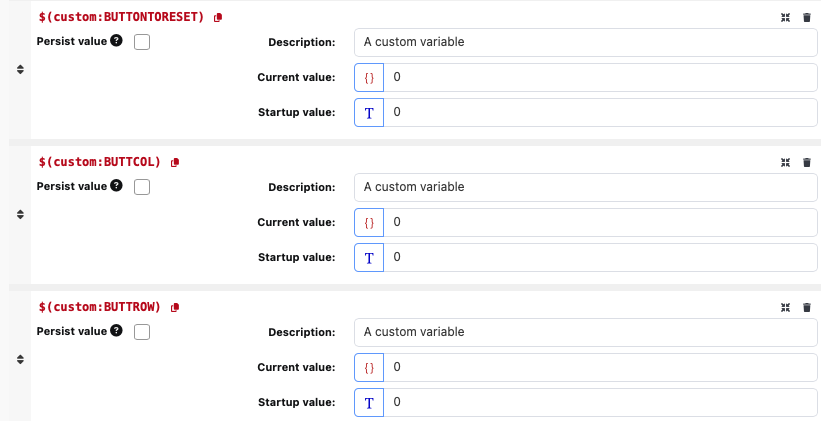
· It uses 3 x VARIABLES that you must create within COMPANION
o ‘BUTTONTORESET’ – this is a sequential variable that starts at 0 and then works it ways up as you keep the RESET ALL button held down. This is used to then work out a corresponding COLUMN and ROW within COMPANION using the internal logic and expressions.
o ‘BUTTCOL’ – this is the worked out using the expression
§ ($(custom:BUTTONTORESET) % 8)
o This basically takes the remainder from dividing the main number by 8
o ‘BUTTROW’ – this is worked out using the expression
§ floor(($(custom:BUTTONTORESET))/8)
o This basically ‘rounds down’ the main number divided by 8
· I have put these 3 x CUSTOM VARIABLES onto the COMPANION page just to show what their current values are – these buttons do not need to be shown in COMPANION at all – just there for initial reference.
· As you hold down the RESET ALL button, the calculations work their way up through all the buttons form 0 and increasing and for this numbered button (with adjustments worked out for column/row) the corresponding QLab cue is REARMED and the COMPANION button is reset to its original numbered state.
· As you hold down you will see the button at the bottom left named ‘NUMB’ increasing.
· This continues for as long as you hold and resets the buttons up until the value you have set within the 7th line of the press
o min(24,$(custom:BUTTONTORESET)+1)
· This stops the counting up at 24 so you can adjust this number to fit your show
· When you release – this is reset back to ZERO
o This whole process is the ‘CLUNKY’ bit which I can live with but should certainly be looked at especially if you are using custom page layouts or have other buttons on your page that might function incorrectly should their STEP be reset to STEP1. Especially if your button layout is not as per mine.
o There must be a better way than this, but I just haven’t got around to worrying about it too much as my needs are always quite minimal – but just that note of caution.
All files are attached below, so hopefully will be enough to have a look and hopefully there’s some nuggets of info that you can take away and use.
Best regards