


Diorama: Isometric Templates for Supernote
Combine the satisfying, tactile precision of a physical sticker book with the clutter-free, edge-to-edge workspace of your Supernote.
Diorama provides a structured 3D canvas designed specifically for your device. Whether you are sketching room layouts, exploring interior design ideas, or building a room piece by piece, this framework gives you a perfectly scaled 3D stage.
Engineered for Snap-to-Grid
Diorama's templates are explicitly engineered to make use of the Supernote’s native snap-to-grid feature.

Instead of drawing blindly on a white page, the specialised "border" and "corner" templates provide a pure white canvas to lock your pen strokes to the grid, while using strategically placed toned strips to show you exactly how your ink will look against the final room surfaces. You get perfectly straight, snapped lines without sacrificing tone reference.
A Smarter Grid System
Draft with absolute precision. The Diorama grid features a triangular lattice of dots allowing you to draw along the three room axes (vertical, and two floor diagonals).
To prevent visual clutter, the standard minor dots are kept faint, while every 4th dot in each direction is a larger, heavier major dot. This creates a built-in visual ruler, making it easy to count grid units and draw to a consistent scale without losing your place.
What’s Included in the Starter Kit
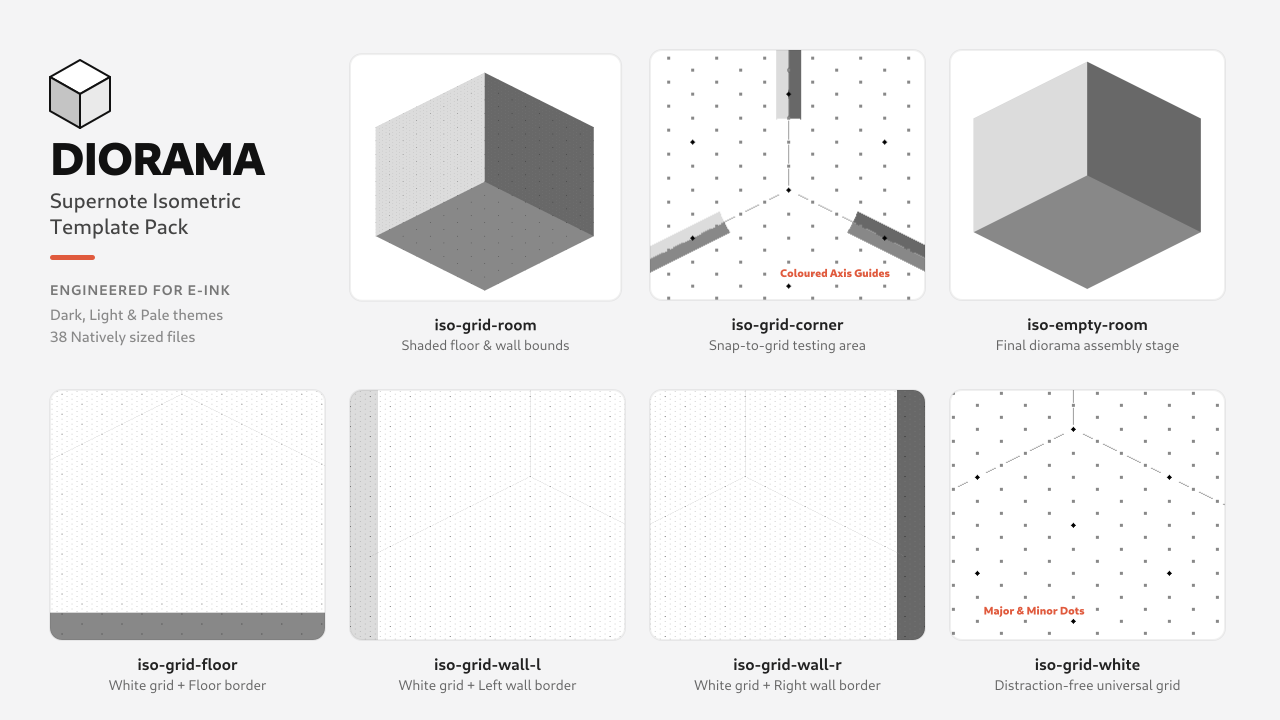
A complete set of 38 custom-generated PNG templates (19 natively sized files for both the Supernote Nomad A6 X2 and the Supernote Manta A5 X2).
Six structural templates are provided in Dark, Light, and Pale tonal themes:
- iso-empty-room: The pure room outline with no grid. Perfect as a starting point for freehand sketching, or as the clean final stage for assembling your finished sticker diorama.
- iso-grid-room: The grid is visible strictly inside the shaded floor and walls to help you measure and plan layouts (Note: Snap-to-grid is disabled here due to the coloured background).
- iso-grid-corner: A close-up of the room corner with the full edge-to-edge grid. Thin coloured strips along the axes show the surface tones so you can pick the right pen. (Snap-to-grid enabled).
- iso-grid-floor / wall-l / wall-r: Designed for drafting individual items like a bookshelf, rug, or picture frame. These feature a pure white grid surrounded by a thick border matching your target wall or floor, allowing you to use snap-to-grid while checking your ink contrast.
Plus, a universal drafting canvas:
- iso-grid-white: A distraction-free white grid that still includes the central Y-shaped axes to anchor the room's corner and boundaries.