
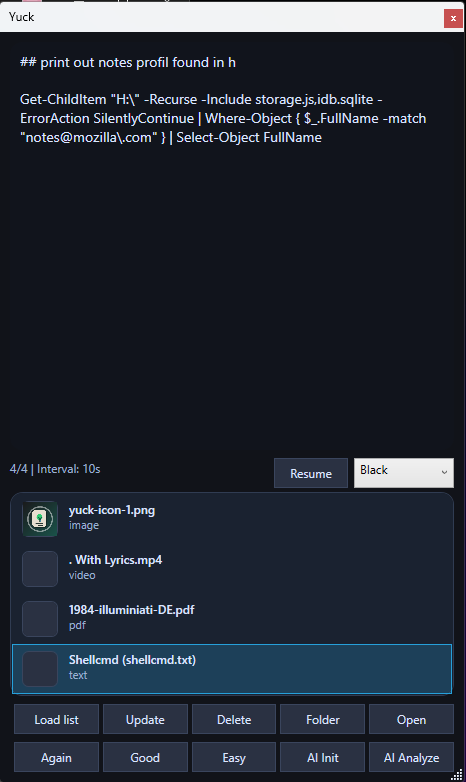
Yuck.exe for windows a mix of a player and anki
**# 🧠 Yuck**
**A lightweight background learning tool that shows images randomly while you work.**
**## ✨ Features**
**- 🖼️ Image-based learning (like Anki, but passive)**
**- 📌 Always-on-top popup cards**
**- 🔁 Spaced repetition system (Again / Good / Easy)**
**- 🧲 Drag \& Drop images**
**- 🖱️ Right-click "Add to Yuck" (Explorer integration)**
**- 🧠 Runs in system tray (no distraction)**
**## 🚀 Why I built this**
**I wanted a \*\*zero-friction learning tool\*\* that works in the background without interrupting focus.**
**Instead of opening Anki and doing sessions, this app lets you:**
**> "learn passively while doing other things"**
**## 🛠️ Tech Stack**
**- C# / .NET 10**
**- WPF (UI)**
**- intern storage**
**- Windows Tray API**
**## 📦 Installation**
**1. Download `Yuck.exe`**
**2. Run installer**
**3. App starts in system tray**
**## 🎮 Usage**
**how to add yuck into context menu**
//////Win+R regedit
Windows Registry Editor Version 5.00
[HKEY_CLASSES_ROOT\SystemFileAssociations\image\shell\AddToYuck]
@="Add to Yuck"
[HKEY_CLASSES_ROOT\SystemFileAssociations\image\shell\AddToYuck\command]
@="\"C:\\Yuck\\Yuck.exe\" \"%1\""
**add ai**
setx YUCK_OPENAI_API_KEY "your_key_here" (then restart app/terminal)
**- Add images:**
  **- Drag \& drop folder**
**- During popup:**
  **- `A` → Again**
  **- `S` → Good**
  **- `D` → Easy**
**## ⚠️ Status**
**Work in progress — built as a personal tool and learning project.**
**## 📸 Preview**


**---**