
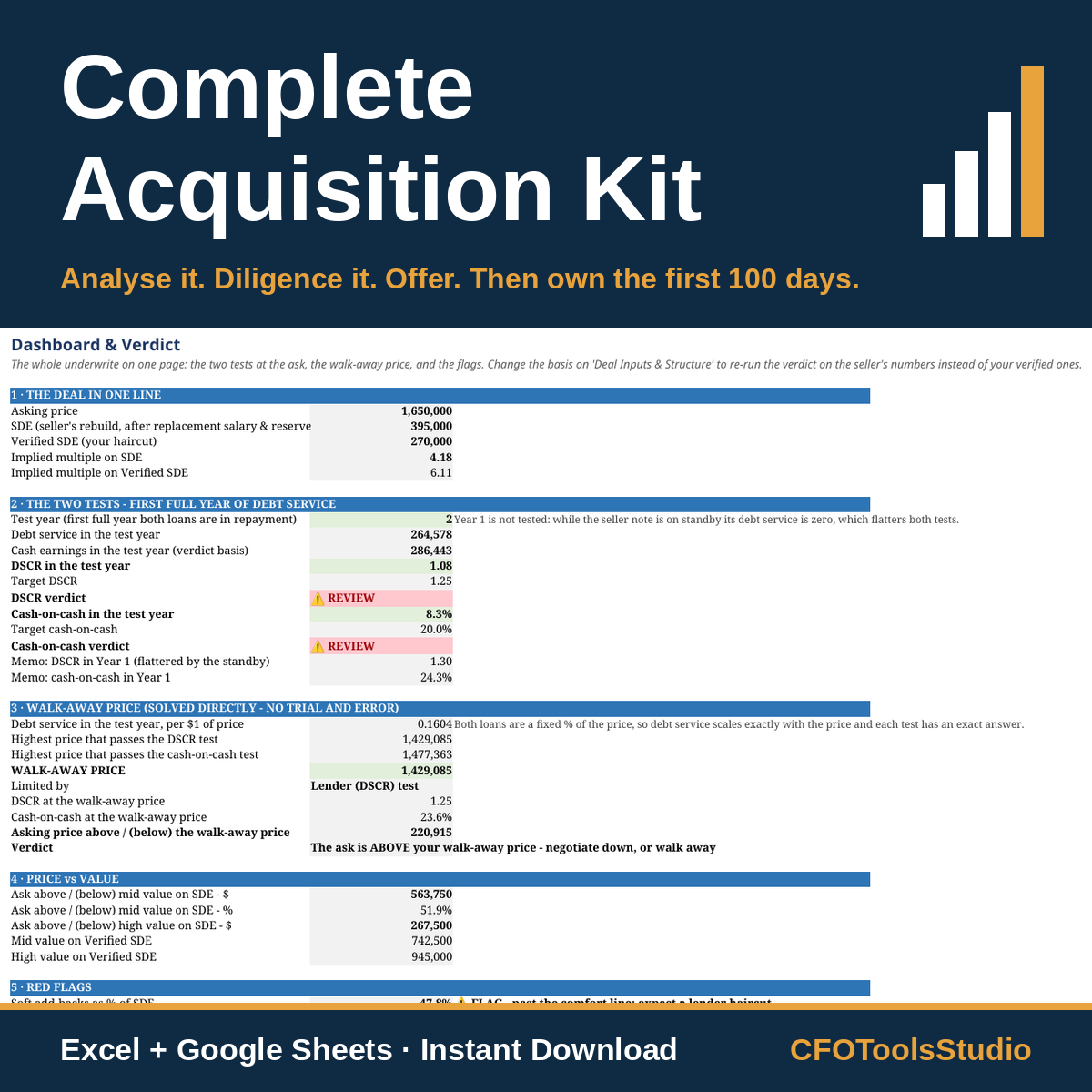
Complete Acquisition Kit — Analyse, Diligence, Offer, First 100 Days
Most acquisition "vaults" are a pile of disconnected files. This kit is a workflow. The numbers in the model are the numbers the diligence list interrogates; the findings set the Verified SDE; the LOI is written at the model's walk-away price; and the 100-day plan starts from the exact red flags diligence found. One fictional business — Copperline Air Services, a 14-person HVAC company — runs through all four modules, so you see the whole deal close, end to end, before you run your own.
Module A — Acquisition Analysis Model (Excel, 8 sheets). The underwriting engine: rebuild the seller's profit into SDE and Adjusted EBITDA, haircut it to a Verified SDE, value the business on multiples, test the SBA loan and seller note (with standby) against the lender's DSCR line, project five years of buyer cash flow — and solve your walk-away price directly from your two tests. (This is the shop's Small Business Acquisition Analysis Model, included in full.)
Module B — Due Diligence Checklist & Request List (Excel, 11 sheets). 180 finance-grade items across 8 sections — financials & tax (30), customers & revenue quality (24), operations (22), staff & owner dependence (22), legal & contracts (24), assets & capex (20), insurance & compliance (18), seller & deal (20). Every item states the document to request, why it matters, and what a red-flag answer looks like. The Findings Log turns what you find into priced adjustments that feed straight back into Module A's Verified SDE — in the worked example, seven findings take SDE from $395,000 to a verified $270,000. Includes a copy-ready Week-1 request list for your first email to the seller or broker.
Module C — IOI + LOI Templates (Word, 4 documents + annotation guide). A blank IOI and a full LOI with bracketed fields — plus a worked-example copy of each, filled in for the Copperline deal at the walk-away price of $1,429,085 (80% bank loan / 10% seller note on a 12-month standby / 10% equity, working-capital peg, 10% holdback, 45-day exclusivity). The annotation guide walks every clause — price structure, exclusivity, diligence period, working-capital peg, seller-note standby, non-compete/non-solicit, holdback, transition, closing conditions — what it does, why it matters, what sellers push back on, and your fallback.
Module D — First 100 Days Plan (Excel, 5 sheets). 60 tasks in four phases — Pre-close & Day 1, Days 1–30 Stabilise, Days 31–60 Take Control, Days 61–100 Grow — each with an owner, a gate (Day 1 / Week 1 / Day 30 / 60 / 100) and the risk it answers. An owner dashboard tracks weekly cash, receivables days, bookings and churn signals for Weeks 1–13; communication checklists cover the Day-1 staff announcement, top-20 customer contact and lender/supplier introductions; and a "Do Not Change Yet" list protects the first 30 days from expensive enthusiasm. Copperline's plan opens with its own diligence findings: the top customer at 22% of revenue, the lead technician who holds the certifications, and six ageing vans.
The worked example — Copperline Air Services (fictional):
Revenue $2,400,000; seller's SDE $395,000 — but soft add-backs are 47.8% of SDE, and diligence finds more: the "one-off" legal cost recurs, perks survive only at half, a real GM costs $120,000 not $95,000, the van fleet needs a $45,000-a-year reserve. Seven findings, $125,000 of adjustments → Verified SDE $270,000. At the $1,650,000 ask (4.18× SDE) the deal fails the lender test in the first full year of debt service (DSCR 1.08× vs the 1.25× line). The walk-away price solves to $1,429,085 — and that is the price on the worked-example LOI, with the structure, peg and holdback the findings argue for. The 100-day plan then opens with the retention visit to the 22% customer in Week 1. Same business, same numbers, four modules — the price, and the plan, are the deal.
Start Here guide (PDF). The roadmap through the kit: analyse → diligence → offer → close → first 100 days, how the modules connect, the Copperline story in one table, and the licence and limits in plain English.
Built by a CFO who has sat on the buy side. The creator led the finance work behind two US supermarket acquisitions (~US$5M) as CFO of a Nasdaq-listed company, and has priced deals from both sides of the table for 20+ years. The conventions in this kit — replacement salary before SDE, a capex reserve, a haircut you defend line by line, a lender-style DSCR test, a peg and a holdback sized from findings — are how professionals run small deals, translated into files a first-time buyer can work through in evenings.
Requirements: Microsoft Excel (2016 or later / Microsoft 365) or Google Sheets for the workbooks; Microsoft Word or Google Docs for the templates. Standard functions only — the workbooks calculate identically in Excel, Google Sheets and LibreOffice. No macros, no add-ins, no external links.
Licence: Single-business licence — use this kit inside one buyer's search (including with your accountant, lender or lawyer working for that search). Please don't resell, redistribute or share the files publicly. (c) 2026.
Refund / support: If a formula is broken, message me through the shop with your Excel/Sheets version and a screenshot — I will fix it or refund you. Questions about the kit are welcome the same way. This is an underwriting and organisation toolkit, not financial, legal, tax or lending advice; your lender, lawyer and accountant make the final call, and every seller number should be verified in due diligence before you rely on it.
About the creator: Alfred Ying is a senior finance executive with 20+ years across the US, Hong Kong, China and Taiwan: twice CFO of Jyong Biotech (later Nasdaq-listed), CFO of Nasdaq-listed iFresh Inc. — where he led the analysis and financing work behind two US supermarket acquisitions — Chief Strategy Officer of BlueCity Holdings, and earlier VP roles in investment banking and corporate finance, including work on a ~US$80M strategic investment by TPG. MBA (UNSW), CPA Australia (ASA). He builds the models he wished buyers had before they signed.
FAQ
Q: I already own the Acquisition Analysis Model (Product 8). Do I pay twice for it?
A: No. On Gumroad, use the owner upgrade code at checkout for $69 off the kit — the amount you paid for the model — so you only pay for the three new modules. (The code is issued with this listing; if it isn't working, message the shop before you check out.) Etsy's platform can't run owner codes, so the upgrade path is Gumroad-only; the Etsy kit price is set lower for the same reason.
Q: Is this an instant download?
A: Yes — one zip with 9 files: the Start Here guide (PDF), the analysis model (Excel), the diligence workbook (Excel), the IOI and LOI templates plus their worked examples (Word), the clause annotation guide (PDF), and the First 100 Days plan (Excel).
Q: Do the workbooks work in Google Sheets?
A: Yes. Every formula uses standard functions only and calculates identically in Excel, Google Sheets and LibreOffice. In Google Sheets, use File → Import → Upload. One cosmetic difference: flag shading may need one refresh (edit any input cell) to appear.
Q: How do the modules connect in practice?
A: Run your deal through Module A's bridge first. Work Module B's checklist during diligence and log every problem in the Findings Log — its total is the haircut you enter on Module A's Bridge, section 5, which re-prices the deal and re-solves your walk-away price. Module C's LOI is written at that price. After closing, Module D's plan is sequenced around the findings you logged. The Copperline example shows the full loop with real numbers at every step.
Q: Is the example a real business?
A: No. Copperline Air Services is fictional, built so every module can show complete, consistent numbers. The figures are realistic for a business of its size, and every total in the kit ties to the audited model.
Q: Does this replace my lawyer, accountant or lender?
A: No. The IOI/LOI documents are buyer-side templates with annotations, not legal advice — have your own lawyer review before you sign anything, and your lender and accountant make the final call on structure and tax. The kit makes those conversations shorter and cheaper; it doesn't replace them.
Q: I'm not in the US — does the SBA part still work for me?
A: Yes. "SBA loan" is just the label on the bank loan in the example. Every loan field is generic — amount (as % of price), rate, term, and a standby period for the seller note — so the same files underwrite a bank term loan plus a vendor note in any country. The LOI clauses are written in plain, jurisdiction-neutral language for your lawyer to adapt.
Free bonus — check your real business, not just the model:
SENALO (by the same author) turns your actual monthly figures into a financial health score, break-even buffer and cash runway. The basic check is free: https://senalo-business-financial-health-check-448107437531.australia-southeast1.run.app