
SML Earnings Check
Understand what changed in the quarter, and keep the evidence behind your view.
Put eight quarters of company results in one place. Compare a selected quarter with the same quarter a year earlier and with a prior forecast you enter yourself. Keep source details and revision notes beside the numbers, then record which DCF assumptions deserve a closer look.
USD 9
One-time digital download · Version 1.0.0 · Applicable taxes added at checkout.
A starting point for your earnings review
If you are learning to read company reports, a repeatable checklist can help you separate the reported figures from your interpretation. This workbook gives you a place to enter the data, review the changes and write down the questions you still need to answer.
Start with the free 10-K reading checklist and free cash flow introduction to understand the source figures before entering them.
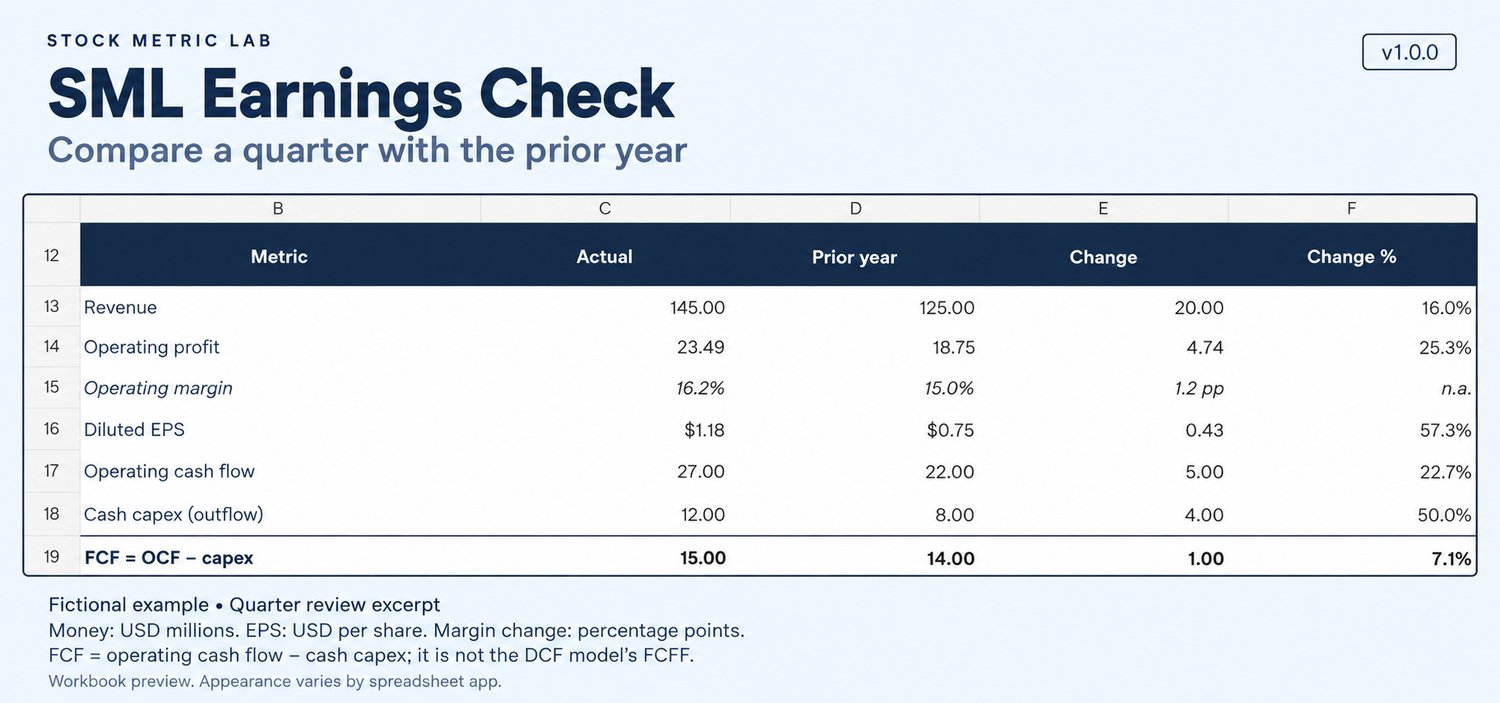
• Review the main figures. Compare revenue, operating profit and margin, reported diluted EPS, operating cash flow, capital expenditure and the workbook's free-cash-flow measure.
• Keep the periods straight. Record eight consecutive fiscal quarters, their dates, sources, accounting basis and units.
• Check cash-flow timing. Use quarter figures or enter the current and preceding year-to-date figures to calculate the quarter's operating cash flow and capex.
• Preserve the context. Record an optional prior forecast with its date and source. Use the Reason log for revised figures, explanations and open questions.
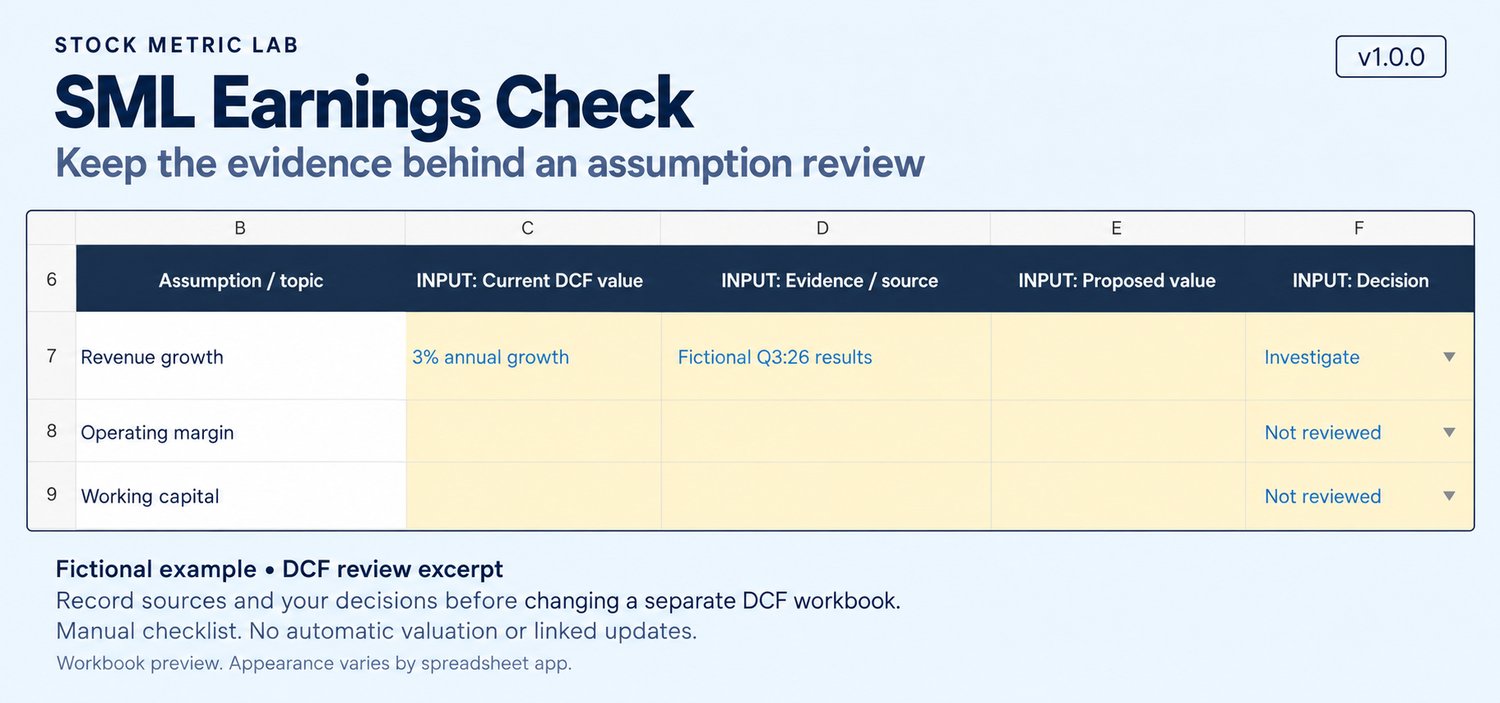
• Revisit your assumptions. Use DCF review to decide which assumptions to examine in your separate valuation workbook.
What is included
• An editable blank .xlsx workbook for your company research
• A separate .xlsx worked example with wholly fictional company figures, sources, forecasts and comments
• Five sheets in each workbook: Quarter review, History, DCF review, Reason log and How to use
• An English getting-started guide with input conventions and model limits
The example shows the workflow. It is not research on a real company.
How you use it
• Save a working copy and collect the relevant company reports.
• Enter the eight-quarter history, source details and units. Leave unavailable figures blank rather than entering zero.
• Select a quarter from the latest four slots, review the comparisons and explain what changed.
• Record any assumption review in the DCF review sheet, then make any chosen changes in your separate DCF workbook manually.
Read this before using a result
Free cash flow here means operating cash flow minus cash capital expenditure. It is not automatically the unlevered free cash flow to the firm, or FCFF, used in a DCF model. Do not paste this quarterly figure into the DCF starting-FCFF input or automatically turn one quarter's growth into a long-term forecast.
DCF review is a manual checklist. This workbook does not calculate a valuation, link to another workbook or update DCF assumptions automatically.
The free guide to FCF, FCFF and FCFE explains the definitions and adjustments to review before moving from reported cash flow to valuation.
Inputs, software and limits
All data is entered manually. Money outputs use USD millions and EPS uses USD per share. Currency labels do not convert currencies. There is no filing import, live data or price feed, FX conversion, trading connection or automatic recommendation.
You must check sources, period comparability, accounting definitions, units and revisions. Workbook checks cannot detect every mislabeled figure, restatement, acquisition or unusual fiscal calendar.
The v1.0.0 files have labeled, colored input cells and editable, unprotected formulas. Keep an unchanged backup and avoid overwriting calculation cells. No macros are included.
The calculation models in Earnings Check and Position Size Planner were tested in Windows Microsoft 365 Excel 16.0.20430.20146 and Windows LibreOffice Calc 7.4.2.3. A 14-case suite passed in each application, including recalculation and save/reopen checks. Version 1.0.0 preserves those formulas and calculation results. The publisher also confirmed use in Excel and Calc.
These checks cover the tested applications and cases. Excel for Mac, Excel for the web, Google Sheets, mobile apps and other versions have not been verified for this release.
Using it with the DCF workbook
The SML DCF Comparison Workbook is a separate product, available for USD 9. Earnings Check helps you organize the evidence you may use when reviewing its assumptions. The two workbooks do not exchange data automatically.
If you also follow the price response to a release, the free post-earnings chart review explains how to keep a separate, dated event record alongside your business research.
Educational research only
You choose the data, assumptions and decisions. This workbook provides no personalized investment advice, buy or sell rating, or guarantee of investment returns.
Use, refunds and support
This is a one-time digital-download purchase. Applicable taxes are added, and the total is shown before payment. No physical product is shipped.
For the purchaser's own learning and investment analysis. Personal backup copies are allowed. Sharing, redistribution and resale are prohibited.
A full refund of the purchase price is available on request within 14 days of purchase, for any reason, including after downloading.
Basic-operation email support is available at research@stockmetriclab.com for 30 days from purchase. Replies may take several business days. Support does not include researching or valuing individual companies for you or personalized investment advice.
Withdraw from contract / request a refund
For refund or support requests, email with your order reference, if available, and a description of your request. Statutory rights relating to defects or non-delivery are not limited by the 14-day refund period or the 30-day support period.