
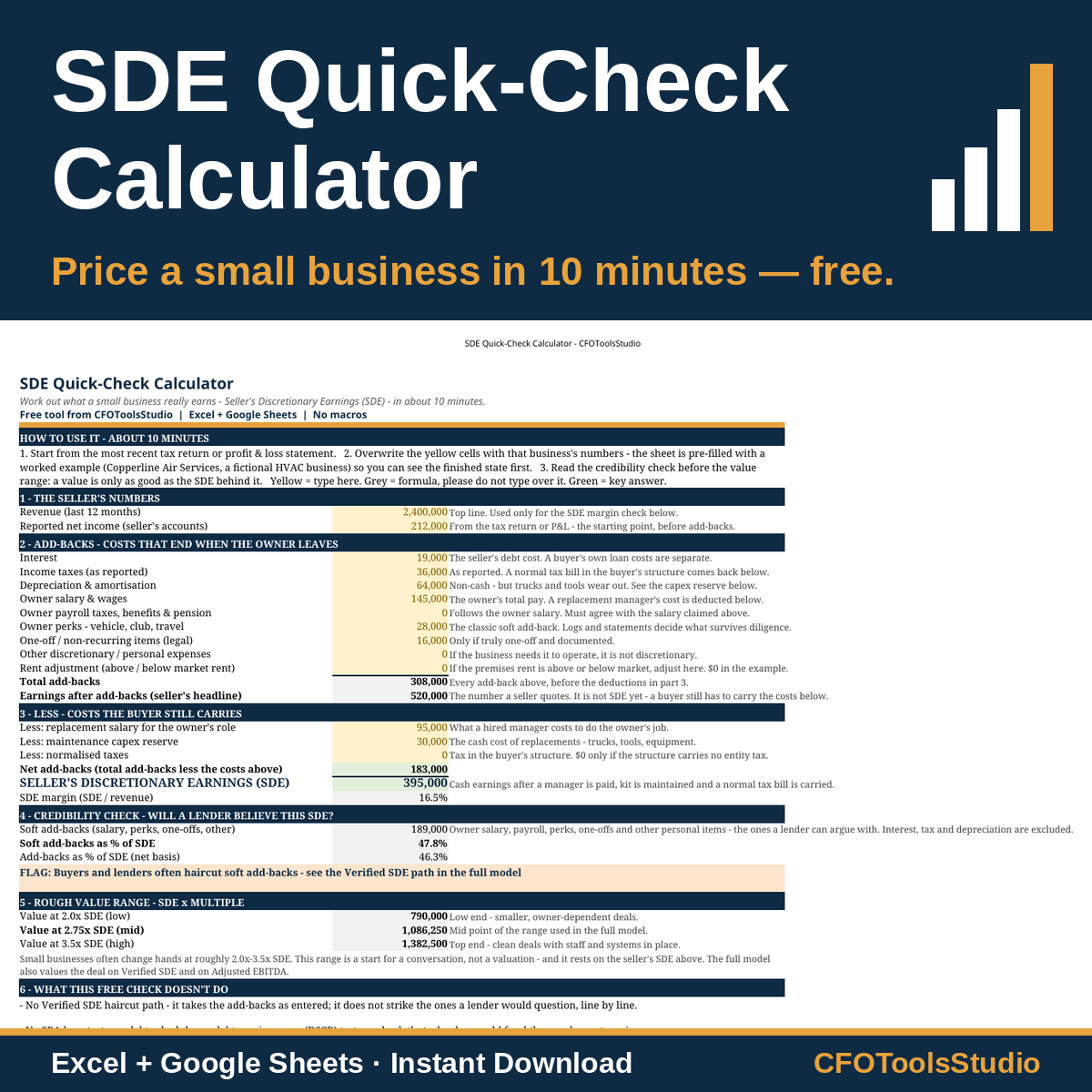
SDE Quick-Check Calculator
A free one-sheet calculator that rebuilds a seller's profit into Seller's Discretionary Earnings (SDE) the lender's way - every add-back on show, a credibility check on the soft ones, and a rough value range at 2.0x / 2.75x / 3.5x SDE. Pre-filled with a complete worked example; overwrite the yellow cells with a real deal and you have an SDE you can defend in about 10 minutes. The seller's profit number is a claim, not a fact. Before you can price a small business, you have to rebuild that claim into SDE - the cash the business actually throws off for one owner-operator - and decide which add-backs you believe. This free one-sheet calculator walks you through exactly that rebuild, in the order a lender reads it: 1. The seller's numbers - revenue and reported net income, straight from the tax return or P&L. 2. The add-backs - interest, taxes, depreciation, owner salary and payroll, perks, one-offs, other personal expenses and a rent adjustment, each with a one-line note on how lenders treat it. 3. The deductions sellers skip - a market-rate replacement salary for the owner's job, a maintenance capex reserve, and normalised taxes. SDE is shown after these, the conservative way. 4. The credibility check - soft add-backs as a % of SDE, flagged when they pass 40%: the point where buyers and lenders start cutting the number back. 5. A rough value range - your SDE at 2.0x / 2.75x / 3.5x, the multiples small businesses commonly change hands at. The worked example - Copperline Air Services (fictional): A 14-person HVAC services business, owner retiring. Revenue $2,400,000; seller-reported net income $212,000. Gross add-backs of $308,000 (owner salary $145k, depreciation $64k, taxes $36k, perks $28k, interest $19k, one-off legal $16k) rebuild that to a $520,000 headline - then the $95,000 replacement salary and $30,000 capex reserve bring it back to SDE of $395,000 (net add-backs $183,000). Soft add-backs are 47.8% of SDE, so the credibility flag fires - exactly as it should. Value range on that SDE: $790,000 - $1,382,500. Overwrite the yellow cells and the same sheet runs your deal. What you get: one Excel sheet. Yellow cells are the only ones you type in; everything else is a formula. No macros, no add-ins, no external links. Requirements: Microsoft Excel (2016 or later / Microsoft 365) or Google Sheets (free - File > Import). The formulas use standard functions only and calculate identically in Excel, Google Sheets and LibreOffice. Licence: Free for use inside one buyer's search (including with your accountant, lender or advisor working for that search). Please don't resell or redistribute the file publicly. (c) 2026 CFOToolsStudio. Support: If a formula looks broken, message me through the shop with your Excel/Sheets version and a screenshot. This is a screening tool, not financial, legal, tax or lending advice - verify every seller number in due diligence before you rely on it. Want the full analysis? The Quick-Check stops at SDE and a rough range - deliberately. It does not haircut the seller's add-backs into a Verified SDE you set line by line, does not test an SBA loan and seller note against the lender's 1.25x DSCR line, does not solve your walk-away price, and does not project five years of buyer returns (cash-on-cash, equity multiple, IRR). The full model does all of that, on the same Copperline example: Small Business Acquisition Analysis Model.
Free bonus — check your real business, not just the model:
SENALO (by the same author) turns your actual monthly figures into a financial health score, break-even buffer and cash runway. The basic check is free: https://senalo-business-financial-health-check-448107437531.australia-southeast1.run.app