

Wedding Planner Spreadsheet | Excel & Google Sheets | Budget, Guest List, Seating Chart, Checklist, Vendor Tracker | Instant Download
Plan the whole wedding in one spreadsheet — no apps to learn, no subscriptions, no scattered notes.
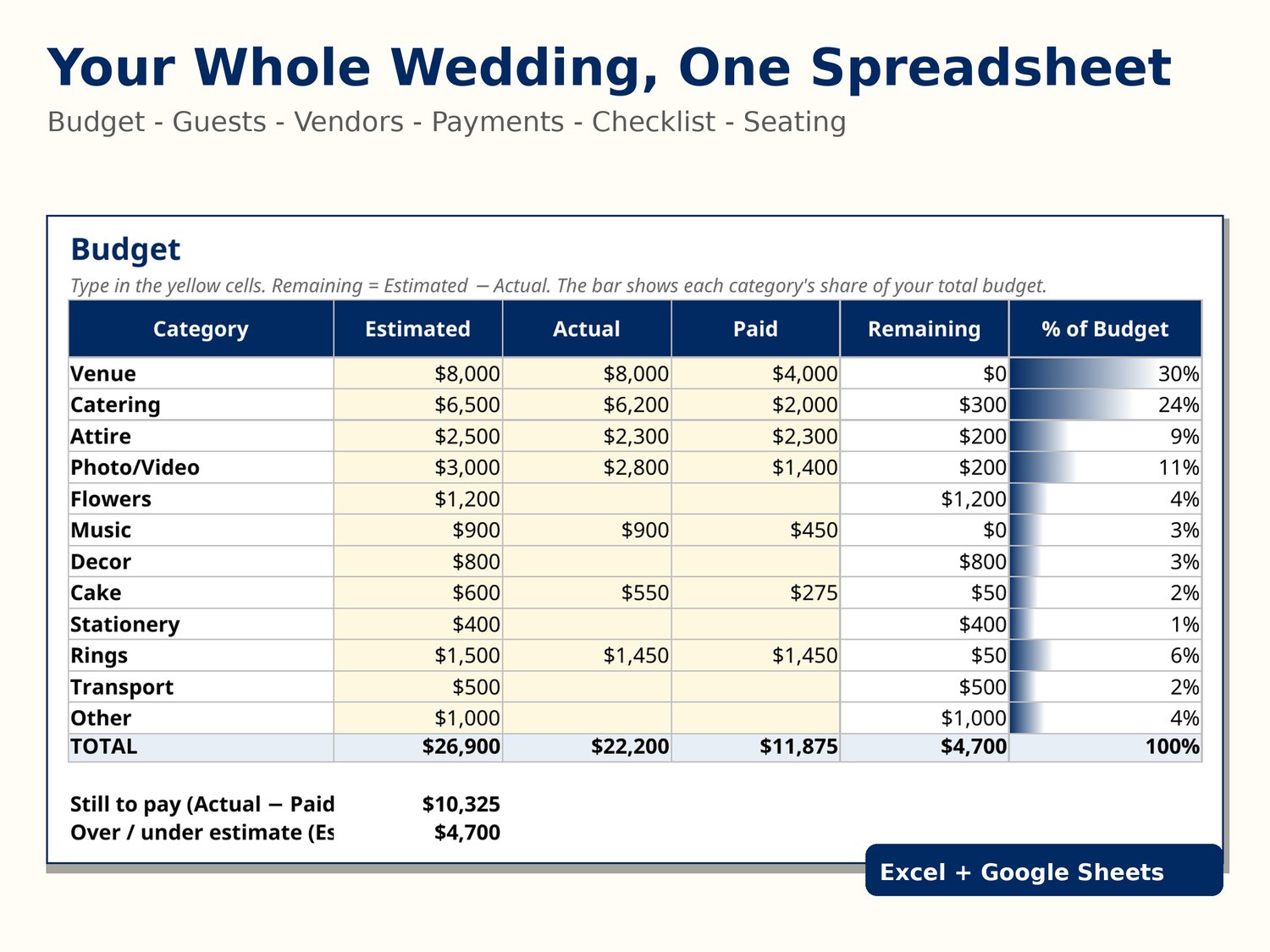
This Wedding Planner Spreadsheet gives you 7 sheets in one workbook, with the formulas already built in. Type your numbers in the pale yellow cells and everything else updates itself.
WHAT'S INSIDE
- Start Here — a quick guide to every sheet, plus simple tips for getting the most out of the file.
- Budget — 12 categories (Venue, Catering, Attire, Photo/Video, Flowers, Music, Decor, Cake, Stationery, Rings, Transport, Other) with Estimated / Actual / Paid / Remaining columns. Remaining is calculated for you (Estimated minus Actual), with grand totals, a "still to pay" figure, and a % of budget bar so you can see where the money is going at a glance.
- Guest List — 100 rows ready for names, side, group, invited, RSVP, plus-one, meal choice, table number and thank-you tracking. The summary counts invitations and replies only for named guests marked Invited = Y; plus-ones and seating counts reflect confirmed Yes responses.
- Vendors — contact details, cost, deposit, outstanding balance (calculated), due date, paid status and notes. Mark Paid = Y after the final payment to display $0 outstanding for that vendor. Vendor and Payments entries are not automatically linked.
- Payments — your payment schedule with a smart Status column that flags each payment Paid, Overdue or Upcoming based on today's date, colour-coded so nothing slips through.
- Checklist — 34 tasks from 12+ months out to the wedding day, grouped by timeline and category, with a Done column and a live progress percentage.
- Seating — a clean 10 tables x 10 seats grid. Fill in the names, then copy the table numbers back to the Guest List so your counts always match.
SAMPLE DATA INCLUDED
Sample figures and fictional examples (marked with a *) show how the formulas work. Clear or replace the sample input values only. Keep category labels, worksheet rows and formula cells in place; do not delete entire rows.
COMPATIBILITY
- Microsoft Excel (desktop or Office 365)
- Google Sheets (upload the .xlsx file to Drive and open with Google Sheets; standard formulas are intended to work, but formatting and conditional bars may look different)
- No macros, no add-ons, nothing to install
This is an instant-download digital product. You will receive a ZIP file, not a physical item. After purchase, download the ZIP, extract it, then open the .xlsx workbook. A START-HERE.txt guide is included.
FAQ
Q: How do I receive the spreadsheet? A: After your payment clears, download wedding-planner.zip from your purchase page. Extract it to get the Excel workbook and START-HERE.txt instructions.
Q: Will anything be posted to me? A: No. This is a digital instant download only — no physical item is made or shipped. You download the file and can print any sheet yourself if you want a paper copy.
Q: Does it work in Google Sheets, or do I need Excel? A: It uses standard Excel formulas designed to work in Excel and Google Sheets. Extract the ZIP first. In Google Sheets, upload the .xlsx file to Google Drive and open it with Google Sheets. Some visual formatting (such as data bars) may differ. We have not certified every feature on every device.
Q: I am not good with spreadsheets. Will I manage? A: The pale yellow cells are for input, while totals and status columns calculate automatically. Read START-HERE.txt and the Start Here worksheet; replace sample values rather than deleting rows or formulas.
Q: Can I customise it — add categories, guests or tables? A: Absolutely. Add budget categories, extend the guest list beyond the 100 ready rows, rename meal choices, or add your own checklist tasks. The summary formulas cover the pre-built ranges; if you extend a sheet, just extend the range in the formula (or message us and we will walk you through it).
Q: Can I get a refund on a digital download? A: Digital downloads generally cannot be returned or cancelled. If the workbook does not open, differs from the listing, or something is broken, please message us so we can help.
This spreadsheet was designed with AI assistance and reviewed, tested and finished by a human seller. It uses only standard spreadsheet formulas (no macros), and its totals were recalculated and checked against hand-computed figures before listing.