


The GPT Vault: Track, Train, & Tune Your Custom GPTs Like a Pro
The GPT Vault: Track, Train, & Tune Your Custom GPTs Like a Pro
PRESALE is now over! You will receive an email that links to your new vault on Tuesday, August 12.
Built from the system I use every day to manage and update my own AI fleet
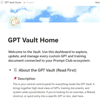
The GPT Vault is more than a template. It’s the system I created to organize, update, and track all of my custom GPTs: from early experiments to public-facing personas. Whether you’re a creator, coach, entrepreneur, or just getting started with GPT building, this Vault gives you a simple, powerful way to stay organized and never lose a custom build again.
🔍 What It Helps You Do
• Store and categorize every custom GPT you create
• Track which training documents each GPT uses
• Instantly see which GPTs need link updates
• Filter by doc name (ex: “security doc 02282025”) to find all connected builds
• Track persona style, tone, avatar references, and instructions
• Keep separate versions (private, group-facing, client-facing)
• Organize by purpose, workflow role, and function
• Use synced blocks for consistency across all views
• See related document “families” so you can reuse or remix smarter
✨ What Makes This Different
• Built for real use, not just theory. This is the actual system I use.
• Created for Notion beginners: includes guided walkthrough and labeled sections
• Includes visual identity support for your AI personas
• Designed for control, so if you’re using it for a team or membership, you can add/remove access easily
• Expandable + modular; grow it as you grow your GPT ecosystem
💡 Who It’s For
• Creators with more than one GPT (or planning to!)
• Prompt engineers, business owners, niche builders, and AI educators
• Anyone tired of searching for “that one GPT” you made weeks ago
• People who’ve ever said: “I can’t find the link” or “I forgot what doc I used”
• Users who want to future-proof their GPT collection without learning new tools
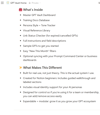
🧰 What’s Inside
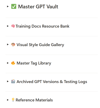
• Master GPT Vault Dashboard
• Training Docs Database
• Persona Style + Tone Tracker
• Visual Reference Library
• Link Status Checker (for expired/cancelled GPTs)
• Full instructions and field descriptions
• Sample GPTs to get you started
• Easy “New This Month” filters
• Optional syncing with your Prompt Command Center or business dashboards
🛑 Important Notes
• Not affiliated with or dependent on ChatGPT Pro: works with any GPT link
• This is a Notion-based system. If you’ve never used Notion, don’t worry; setup support is included
• Prompt Club members: Access this via Payhip using your exclusive member code (check the Vault). Do not purchase directly
• This license is for your personal use or within your business only; redistribution to clients or public sharing is not permitted
✅ FAQ
Q: What’s the difference between this and the Freelancer Dashboard?
A: That one includes a CRM and command center. This is focused purely on organizing and tracking GPTs, including document usage, style, and versioning.
Q: What if I cancel my Notion access?
A: You can duplicate the board into your own Notion workspace. The copy is yours to keep.
Q: Can I use this with my team or clients?
A: You can use this system internally to organize and manage the GPTs you build for your business, including those used to support client work. However, this is not a reseller or white-label license, and it may not be distributed directly to clients or included in client-facing deliverables.
Q: Can I customize it for my own GPT categories?
A: Absolutely. It includes flexible tags and templates so you can build a system that fits your world.
Q: What if I’m overwhelmed by tech?
A: That’s exactly why this was made. It’s structured, labeled, and beginner-friendly; plus you’ll get video guidance and a clear front-page manual.