
My Editor FREE Embroidery Software | Illusions of Tu
Please be aware that this download requires registration.
Following the registration procedure, you will receive an email with a link to download my editor.
Important: In order to obtain the link to download the my editorTM program, please make sure you provide the proper email address.
My EditorTM is a free, basic viewing and editing program that offers some unique features and capabilities. Its primary purpose was to enable the viewing and editing of compatible embroidery files, followed by a resave in any of the supported embroidery file formats. Any user who wishes to make minor adjustments to his embroidery patterns might find it to be of great assistance. It will enable you to edit, add information, and see your designs with the real thread colors. Along with improved production and material management features, it also offers more browsing and saving options.
Features:
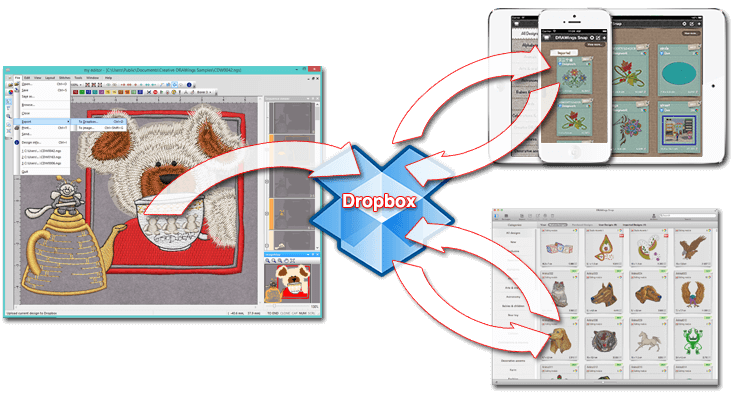
- Dropbox connection and communication with DRAWings Snap embroidery up for iPad/iPhone and MAC.
- Open and edit the Wings' XP 6 .NGS files
- Open and Save to many different embroidery machine file formats easily
- Complete advanced stitch editor
- Move single or multiple stitches
- Insert stitches
- Replace stitches
- Delete stitches
- 3D preview of the embroidery design with twisted threads for visualizing the final result.
- Preview the designs with different fabrics that are included in the software
- Embroidery process simulation with extra ability to simulate the frame movement
- Resize and rotate designs
- Create beautiful designs with the Array tool
- Apply special functions to objects(thread trim, stop, sequin, applique, needle up etc.)
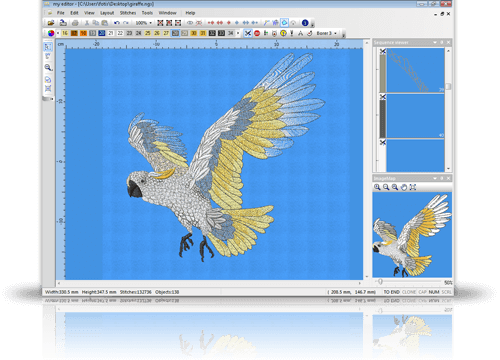
- Apply any special function you wish in any stitch of the design no matter if it is a stitch object (only stitch information) or outline object (the stitches are re-calculated in every operation). Also you can select multiple stitches and apply the special function you wish.
- Add sequins on specific stitches of the design and change their shape and size.
- Email embroidery files automatically
- Keep useful embroidery information/hints for each design
- Produce detailed printout of the design
- Export the embroidery image of the design (to .jpg, .png, .tiff or .bmp image file )
- Merge open designs by using Copy and Paste functions
- Embroidery Design database tool with advanced search.
- View the embroidery sequence of the design
- Automatically adjusts the density of stitch files(e.g. .dst, pes, .hus...) when resizing.
- Ability to select the design's objects by color and special function.
- Fully customizable workspace according your preferences. You can reposition the toolbars and dockable rollups by click and dragging them. Also at the end of each toolbar you have some options that allow you to select which tools you want to view.
- Customize the color and the thickness of all inserted outlines.
- View your designs easier by using the Auto Pan functionality of the middle mouse click. While you are working in the design area you can use the middle click (click the roller in) and switch to mouse pan mode. Left click to end panning.
- Apply Vertical, Horizontal, Diagonal and Circular guidelines.
- Editing tools like Group, Ungroup, Cut, Copy and Paste.
- Includes numerous Thread color palettes that you can apply on the designs.
- Create custom Thread color palettes based on your needs.
- Use Image map toolbar to change the view port and navigate to different areas of the design.
- Change the design's Start and End point.
- Ability to remove stitches from the design by specifying length range. (remove zero length stitches automatically)
- Include complete manual in PDF file format, and online manual that is accessible through Help>Contents dialog.