




Symdeslow Compare Tool (free trial available, 40% off now for first 15 adopters!)
Product Overview
Without external software required, Symdeslow Compare Tool is a Google Sheets-based comparison tool that allows you to quickly and accurately identify differences between datasets. It highlights changes in four colors and generates detailed reports, including:
- Difference Report
- Duplicate Keys Report (if applicable)
- Header Discrepancy Report (if header names or order are accidentally not consistent between 2 sheets)
This tool offers 2 comparison modes and is ideal for analysts, finance teams, operations managers, IT/quality control, supply chain, sales, warehouse, procurement, production planning team and anyone who needs fast, reliable comparison results of datasets.
A Google sheet with built-in apps script, user manual and instructional video will be available after purchase.
Regional Availability Notice
This tool is currently available exclusively for customers located in the European Union (EU) and the United Kingdom (UK). Purchases from other regions are not supported at this time due to tax policy restrictions.
Price shown excludes VAT. Applicable VAT will be added at checkout based on your location.
Sign up for free trial→ https://symdeslow-compare-tool.pages.dev/signup (available worldwide)
Paid version is currently available for EU/UK purchasers and will be available worldwide after Merchant of Record integration.
Early Bird: Use code KJ6IZ2J97D at checkout to get 40% off! Full Version after discount: USD 89.4/year (original USD 149). Discount applies to the first year only.
Global access will be available soon after Merchant of Record integration, with the same discount for early adopters!
User Authorization
- Each license is verified via a license key.
- Upon the first use, the license key will be bound to the Gmail account you use to run this tool, and the Gmail cannot be changed afterward. Please choose the Gmail account carefully before activation.
- Each purchase includes one year of authorized access, starting from the purchase date. To continue using the tool after your license expires, simply purchase a renewal for another year of access.
Platform: Google Sheets
Version: 1.0 – November 2025
License Verification Notice
After purchase, the system will automatically verify your license and record it in the authorization database. In most cases, the license will be activated immediately. However, there may be occasional delays due to processing on the payment platform’s side. Activation could take a few minutes or, in rare cases, longer. If your license does not appear immediately, please wait a short while and reopen the tool to check the status.
Network & License Verification
1. This tool requires an active internet connection to access certain online services(API) for license key verification, database validation, and error logging.
2. The tool runs within your Google account using Google Apps Script and does not require external network access for core script execution.
3. If your network, firewall, VPN, other security settings, or organization policy blocks access to the above services, the tool may not function properly or may be unable to activate your license.
4. For best results, use a personal or unrestricted Google account and a network environment that allows access to
these services.
5. To improve reliability and detect recurring issues, this tool may record error messages or execution results associated with your license key and Gmail account. No personal content from your spreadsheet is collected or stored. Only limited metadata (such as execution timestamp, error type, and bound Gmail address) may be logged for debugging and maintenance purposes.
Comparison Modes
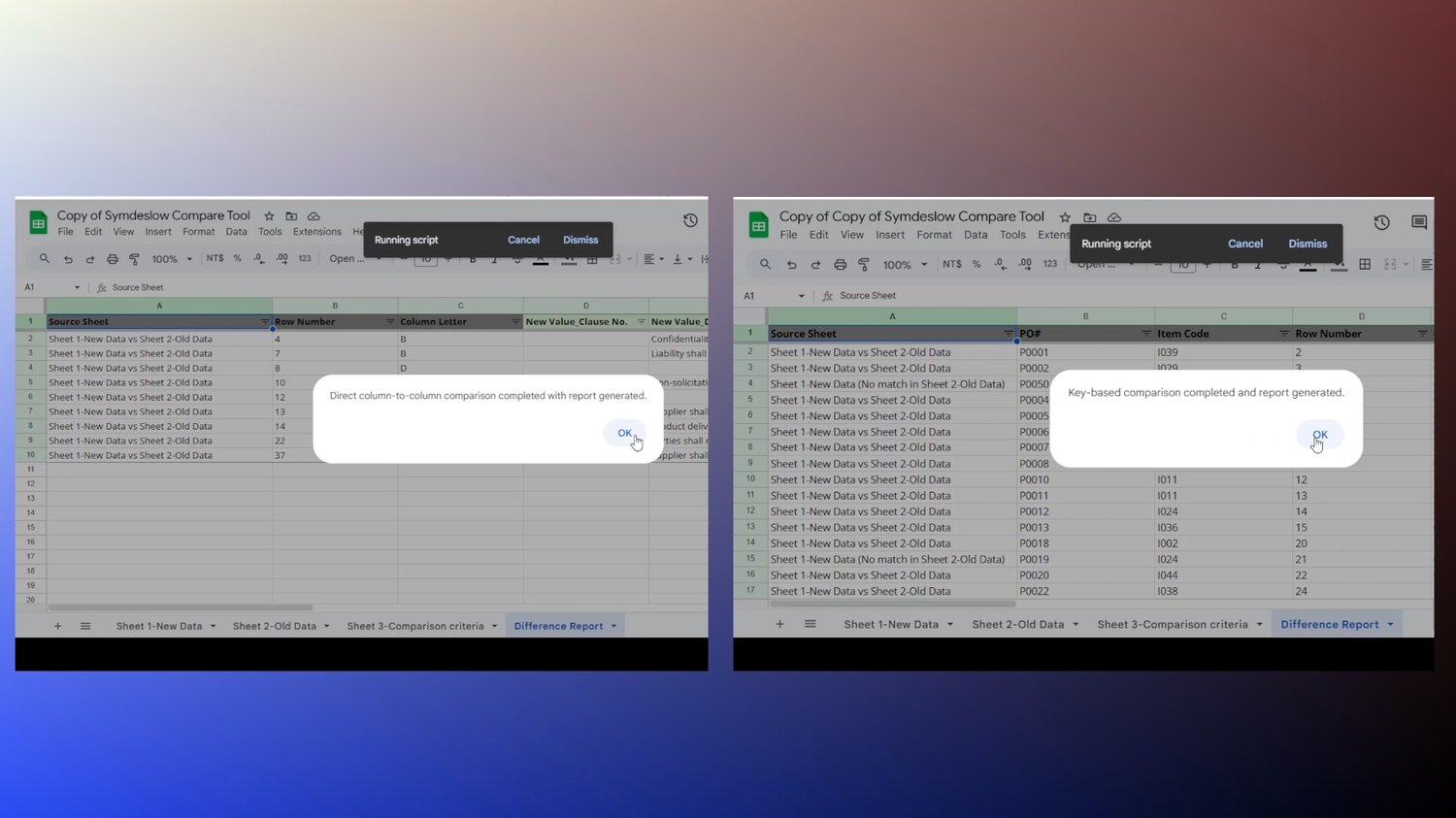
1. Direct Column-to-Column Comparison
- Compares the same columns with identical structure between Sheet 1 (New Data) and Sheet 2 (Old Data).
- Ideal for routine data or standardized reports with identical structures.
- Automatically highlights differences column by column in both sheets and generates a difference report for further analysis.
2. Key-Based Comparison
- Allows you to set a comparison key (one or more columns) in Sheet 3-Comparison criteria to uniquely identify each row and compare the data range you select between Sheet 1 (New Data) and Sheet 2 (Old Data).
- Perfect for larger or more complex datasets, where column order or extra rows may vary.
- Detects duplicate comparison keys and generates a duplicate keys report for further analysis, ensuring reliable comparison. Under the situation where there are duplicate comparison keys, to avoid meaningless comparisons, only the data of the first-matched key between Sheet 1 and Sheet 2 is compared for difference reports. For the first-matched key between Sheet 1 and Sheet 2, if any data differences are found within the data range you specify, the difference report will include remarks indicating the row numbers of the duplicate comparison keys for you to do further analysis.
- Automatically highlights differences in both sheets and generates a difference report according to the comparison key and data range you select.
- Note: If a duplicate keys report is generated, click "OK" to continue to generate a difference report between Sheet 1 and Sheet 2.
Key Features
1. Color-coded differences in Sheet 1 and Sheet 2
- Red (Sheet 1) & Orange (Sheet 2): Different values
- Yellow (Sheet 1) & Purple (Sheet 2): Not-Matched comparison Key(either of the situation below)
- Exist in Sheet 1, not in Sheet 2
- Exist in Sheet 2, not in Sheet 1
2. Generates multiple reports (difference report, if applicable, duplicate keys and header discrepancy report)
3. Automatically normalizes some common Chinese and Western date formats to YYYY-MM-DD to compare. This
can avoid mismatches due to format differences without changing the original format of users' data.
4. Supports larger datasets (recommend splitting tens of thousands of rows into batches for better performance).
5. Easy to use:
- Paste your datasets with values only
- Set comparison key and range (skips this step for direct column-to-column comparison)
- Click Compare Now.
6. Works entirely within Google Sheets with apps script and certain online services for license and error log verification; no external software required.
Usage Notes
- Paste values only (no formulas) into Sheet 1-New Data and Sheet 2-Old Data.
- For both comparison modes, ensure header order and names of Sheet 1 and Sheet 2 need to match for accurate comparison.
- For direct column-to-column comparison, column order must be the same to compare the same columns.
- Avoid merged columns or rows.
- Keep Sheet names unchanged.
- Don't change the format of Sheet 3-Comparison criteria.
- The comparison button works on desktop/laptop only. Mobile devices (phones or tablets) cannot trigger the button.
- Each time you run the comparison, the previous reports will be deleted and new difference reports, duplicate keys reports and header discrepancy reports(if applicable) will be generated in the same sheet. If you wish to keep older reports, please make a copy before running a new comparison.
- This tool is powered by Google Apps Script, which runs within your own Google account. Please note that Apps Script has daily execution quotas and runtime limits set by Google (not by this tool).
- Free Google accounts: ~6 minutes per execution, 90 minutes total script runtime per day.
- Google Workspace accounts: ~6 minutes per execution, 6 hours total script runtime per day.
- For more details, please refer to Google’s official documentation:-> Google Apps Script Quotas
- Large datasets (tens of thousands of rows) may need to be split into smaller batches to stay within these limits.
- For most small-to-medium datasets, these quotas are more than sufficient. If you are working with very large files on a daily basis, a Google Workspace account is recommended to extend the total time this tool can run per day.
Support & Response Time
- This tool is maintained by a solo developer. Support replies are primarily handled on weekends (Saturday – Sunday, GMT+8 Taiwan Time). Most inquiries are answered within 72 hours, often earlier depending on workload. The manual and the included instructional video provided with your purchase are available for immediate assistance.
- When contacting support, please include your purchase email and a brief description or screenshot of the issue — this helps me resolve your request more efficiently. Thank you for your understanding and patience — it allows me to provide focused, high-quality responses to every question.
Delivery and Files Included
- User Manual (PDF)
- Ready-to-use spreadsheet with all built-in comparison scripts (copyable via link)
- Instructions for both comparison modes.
- Detailed explanation of supported date formats and performance tips.
- An instructional video
Refund Policy
As this is a digital product with instant access and license activation, refunds are not available once the license is issued. Please watch the demo and read the description before buying to ensure it fits your needs. If you experience technical issues within 7 days of purchase, please contact me for assistance. I’ll still do my best to help after that period, but priority is given to recent purchases.
Terms of Use (Summary)
1. By purchasing and using this product, you agree to the following terms:
- Each license is valid for one Gmail account and one year from the purchase date.
- Redistribution, reselling, or sharing of the tool is strictly prohibited.
- Refunds are not available once the license is issued, as this is a digital product with instant access.
- The tool operates under Google Apps Script quotas defined by Google, which may affect execution time for very large datasets.
- Misuse, modification of the tool, or attempts to bypass license verification may result in license termination without refund.
- Use of this tool is subject to license verification and internal-use restrictions. Redistribution, resale, or reverse engineering are strictly prohibited. Full legal notice and usage restrictions are included in user manual with purchase.
- License Expiration Reminder: Please note the expiration date of your license key. Once it expires, access to the tool will be disabled until you activate it with a renewed license key.
2. For full details, please refer to the User Manual included in your download package.