
LeadFlow AI V1
LeadFlow AI V1 — AI Lead Qualification & Human-Approved Follow-Up for n8n
Turn incoming leads into organized, qualified opportunities with a ready-to-use n8n automation workflow.
LeadFlow AI V1 automatically validates incoming leads, uses AI to score and classify them, generates personalized follow-up emails, and keeps a human approval step before any email is sent.
🚀 What LeadFlow AI V1 Does
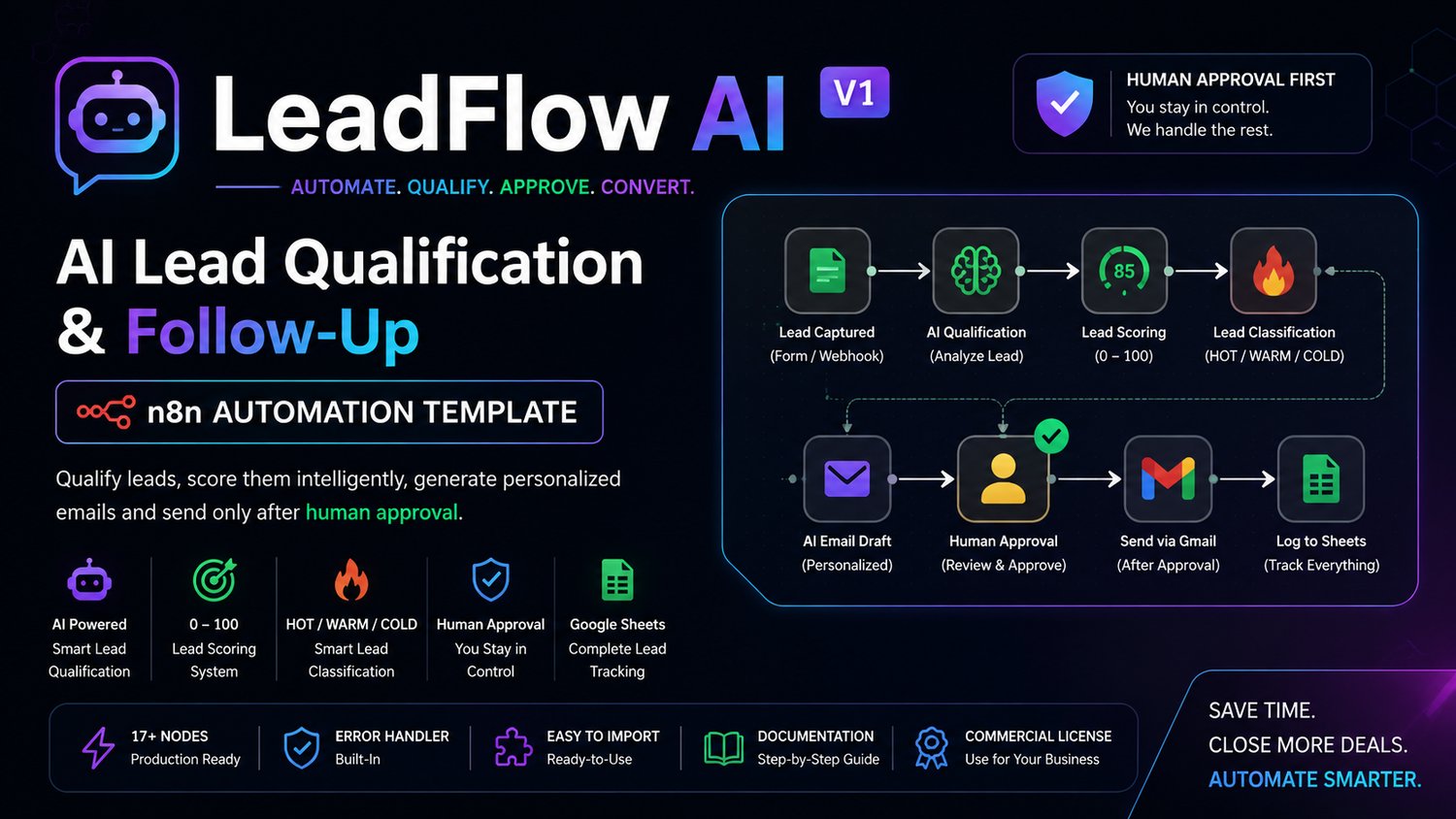
Instead of manually reviewing every incoming inquiry, LeadFlow AI V1 creates a structured lead-processing pipeline:
Lead → Validation → Duplicate Check → AI Qualification → Score → HOT/WARM/COLD → Email Draft → Human Approval → Gmail → Tracking
AI Lead Qualification
Each valid lead is analyzed and assigned:
- Lead Score: 0–100
- HOT: 80–100
- WARM: 50–79
- COLD: 0–49
- Qualification reasoning
- Recommended next action
✉️ Personalized Email Drafting
The workflow generates a personalized follow-up email based on the available lead information.
You can review and modify the generated message before sending.
🛡️ Human Approval Protection
Your workflow does not blindly send AI-generated emails.
The email remains:
PENDING → APPROVAL → SENT
Gmail dispatch requires:
approval_status = APPROVED
and
email_status = PENDING
This keeps the final communication under human control.
📊 Google Sheets Lead Tracking
Google Sheets acts as the simple lead database and approval interface.
Track information such as:
- Lead details
- Lead score
- HOT/WARM/COLD classification
- Qualification reasoning
- Email subject
- Email message
- Approval status
- Email status
- Last contacted timestamp
- Follow-up count
- Error information
⚡ Duplicate Protection
Incoming email addresses are normalized and checked against existing leads before processing, helping prevent duplicate lead processing.
🔧 Built-In Error Handling
The package includes a dedicated global error-handler workflow designed to capture workflow errors and record useful error information without exposing or requiring your credentials.
📦 What's Included
Your purchase includes the complete LeadFlow AI V1 commercial package:
Workflows
- Main LeadFlow AI V1 workflow
- Global Error Handler workflow
Documentation
- Quick Start Guide
- Setup Guide
- Configuration Guide
- Testing Guide
- Troubleshooting Guide
- Google Sheets Template Reference
AI Prompts
- Lead Qualification System Prompt
- AI Email Drafting Prompt
Testing
- Synthetic sample lead data
- Webhook testing instructions
- Example test payloads
Documentation & Licensing
- README
- Changelog
- Commercial License
- Version information
🎯 Who Is It For?
LeadFlow AI V1 is suitable for:
- Marketing agencies
- Freelancers
- Consultants
- Real estate businesses
- Coaches
- Small B2B businesses
- Sales teams
- n8n automation builders
- Businesses receiving leads through forms or webhooks
🔌 What You Need
You will need:
- n8n 2.35.7 or newer
- Google Sheets
- Gmail
- An OpenAI API account
- Your own API/OAuth credentials
Your credentials are never included with the product.
You connect your own accounts after importing the workflows.
🔐 Your Credentials Stay Yours
This product contains no personal API keys, OAuth tokens, passwords, or customer credentials.
After purchase, you configure your own:
- Google Sheets credentials
- Gmail credentials
- OpenAI credentials
You remain in control of your accounts and API usage.
⚙️ How It Works
1. Capture
A lead enters through the workflow webhook.
2. Validate
Required lead information is checked.
3. Check Duplicates
Existing leads are checked before continuing.
4. AI Qualification
The lead is analyzed and scored from 0–100.
5. Classify
The lead is categorized as:
HOT / WARM / COLD
6. Draft
AI generates a personalized follow-up email.
7. Save
The lead and generated information are stored in Google Sheets with:
approval_status = PENDING
8. Review
You review the lead and email.
9. Approve
Change the approval status to:
APPROVED
10. Send
The workflow sends the approved email through Gmail.
11. Track
The lead's email status and follow-up information are updated automatically.
💼 Why Use LeadFlow AI V1?
Instead of building the entire automation from scratch, you receive a structured starting point containing the workflow architecture, AI prompts, validation logic, approval protection, error handling, documentation, and testing resources.
Customize the workflow for your own business or client projects.
⚠️ Important
This is an n8n workflow template, not a hosted SaaS application.
You are purchasing the workflow files and supporting documentation.
You are responsible for:
- Your n8n installation
- Your Google account
- Your Gmail account
- Your OpenAI API usage
- Your API/OAuth credentials
- Any third-party service costs
No third-party subscription fees are included with this product.
🚀 Get Started
Import the included workflows into your n8n instance, connect your own credentials, configure your Google Sheet, and follow the included Quick Start Guide.