



Viewport Text Scale Studio
Get the printed text height you want without resizing notes one at a time.
Viewport Text Scale Studio adjusts model-space TEXT and MTEXT for a chosen viewport scale. Pick a common architectural scale or enter a custom factor, then apply it to selected notes or all eligible model-space text.
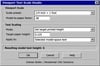
Two ways to scale your text
Choose Multiply existing heights to scale text while keeping the relative size difference between headings and notes. Choose Set target printed height to give eligible text a consistent height on paper. At ¼″ = 1′-0″, a target of ⅛″ sets the model-space text height to 6″ in an inch-based drawing. Apply the same target again and the height stays the same.
What’s included
The ZIP includes the AutoLISP routine, a classic gray DCL dialog with built-in Help, and a quick-start guide. Load the .lsp with APPLOAD, then run VIEWPORTTEXTSCALE or VTS.
Designed for desktop AutoCAD 2002 and newer with AutoLISP and DCL support. Live compatibility testing is pending.
Eshean Butler | Residential CAD Solutions