


STR Payout Reconciler Lite: Airbnb + Vrbo Payout Reconciliation Spreadsheet
Airbnb Vrbo payout reconciliation spreadsheet for hosts with one short-term rental property who only need the payouts explained. Paste your Airbnb payout export and your Vrbo payout export into separate import tabs, and this Google Sheets and Excel workbook builds one normalized ledger, groups your payouts the way they were actually paid, and ties each group out against the real bank deposit, flagging mismatches and late adjustments. It keeps platform fees, refunds, and platform-remitted taxes separate from your income, and includes a 1099-K tie-out sheet that explains, line by line, why the gross figure on the form is not the amount that reached your bank.
What's inside, tab by tab
Import — Airbnb — paste the Airbnb payout export as-is.
Import — Vrbo — paste the Vrbo payment export as-is, in its own tab, because its format is different.
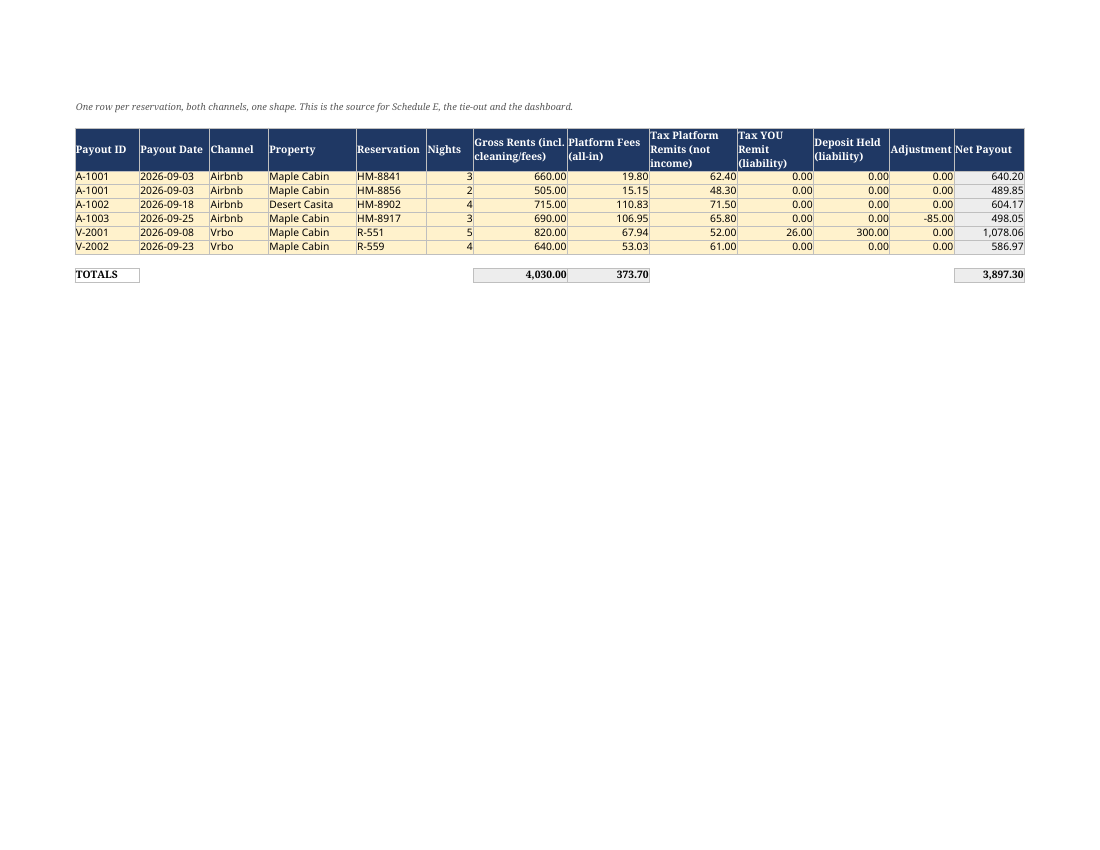
Normalized Ledger — both platforms in one ledger, with gross, fees, taxes, refunds, and adjustments separated.
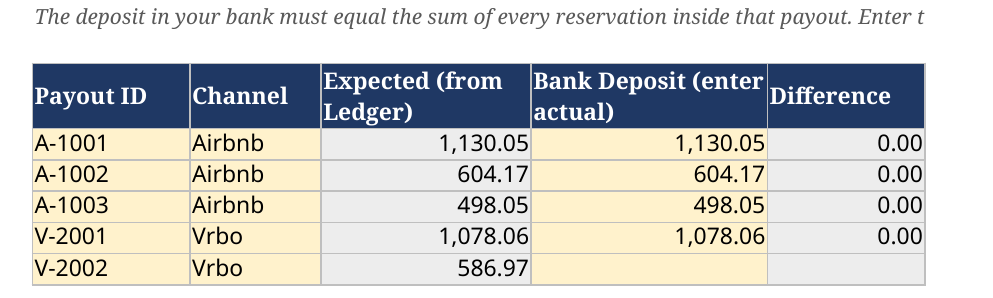
Payout Tie-Out — payout groups checked against the bank deposit you enter; mismatches and late-settling adjustments flagged.
1099-K Tie-Out — ledger totals set against the 1099-K gross, with the difference itemised.
Repricing_Calculator — work backwards from the net you want to keep to the gross price you need to charge under each fee regime: Airbnb's legacy 3% split fee, Airbnb's 15.5% host-only fee, Vrbo's legacy 5% plus 3%, and Vrbo's flat 12% from October 29, 2026. (This tab IS included in the Lite file you receive.)
For: one-property hosts on Airbnb, Vrbo, or both, who reconcile by hand and want the deposit explained; hosts who will not link a bank account and do not want a subscription.
NOT for: hosts with more than one property (use Core); hosts who need an expense tracker, a per-property Schedule E summary, or hosts who need turnover checklists, linen/inventory tracking, or an hours log (all in Core); anyone wanting automatic bank feeds or live sync — Lite, like Core, works by pasting in the platform exports; anyone wanting tax advice.
How it works, in 4 steps
1. Open the .xlsx in Google Sheets or Excel and add your property.
2. Paste the Airbnb export into its tab and the Vrbo export into its tab.
3. Enter your bank deposit on the tie-out tab and clear the flags.
4. At year-end, run the 1099-K tie-out so the difference is documented.
Editions and updates
Includes the 2026 and 2027 editions. Editions after 2027 are sold separately.
FAQ
What's the difference between Lite and Core?
Lite is reconciliation only, for one property: imports, ledger, payout tie-out, 1099-K tie-out. Core adds up to 5 units, the expense tracker, the per-property Schedule E summary, the Repricing Calculator, the turnover checklist, the linen and inventory tracker, and the hour log.
Can I upgrade to Core later?
Message the shop if you want to move up — but if you already know you need the Schedule E summary or you have more than one property, Core is the cheaper route from the start.
Does it link to my bank or my Airbnb account?
No. You paste in the exports. Nothing is connected to anything.
Does it handle the Airbnb 15.5% fee and the old 3% fee?
Yes. Fees are read per booking from the statement rather than hardcoded, so bookings under both structures reconcile in the same file. Vrbo's legacy 5% plus 3% and the new flat 12% from October 29, 2026 are handled the same way.
Refunds?
Digital download — refunds are not offered for a change of mind once the file is delivered. If the file will not open in Google Sheets or Excel, or is not as described, message the shop and it will be fixed or made right.
Is this tax advice?
No. It is a record-keeping and reconciliation tool, not tax, accounting, or legal advice, and not a substitute for a CPA or other qualified tax professional.
Disclaimer
This workbook is a bookkeeping, reconciliation, and record-keeping tool. It is not tax advice, accounting advice, or legal advice, and it is not a substitute for a qualified CPA, enrolled agent, or tax attorney who knows your situation. Tax treatment — including whether an amount belongs on Schedule E or Schedule C, how platform fees should be categorised, and whether you meet any hours test — depends on your facts. Use this file to keep clean records, and take those records to a professional.
License: the workbook file is licensed for use in your own hosting business, including properties you co-host. Please don't redistribute or resell the file.
License: the workbook file is licensed for use in your own hosting business, including properties you co-host. Please don't redistribute or resell the file.