

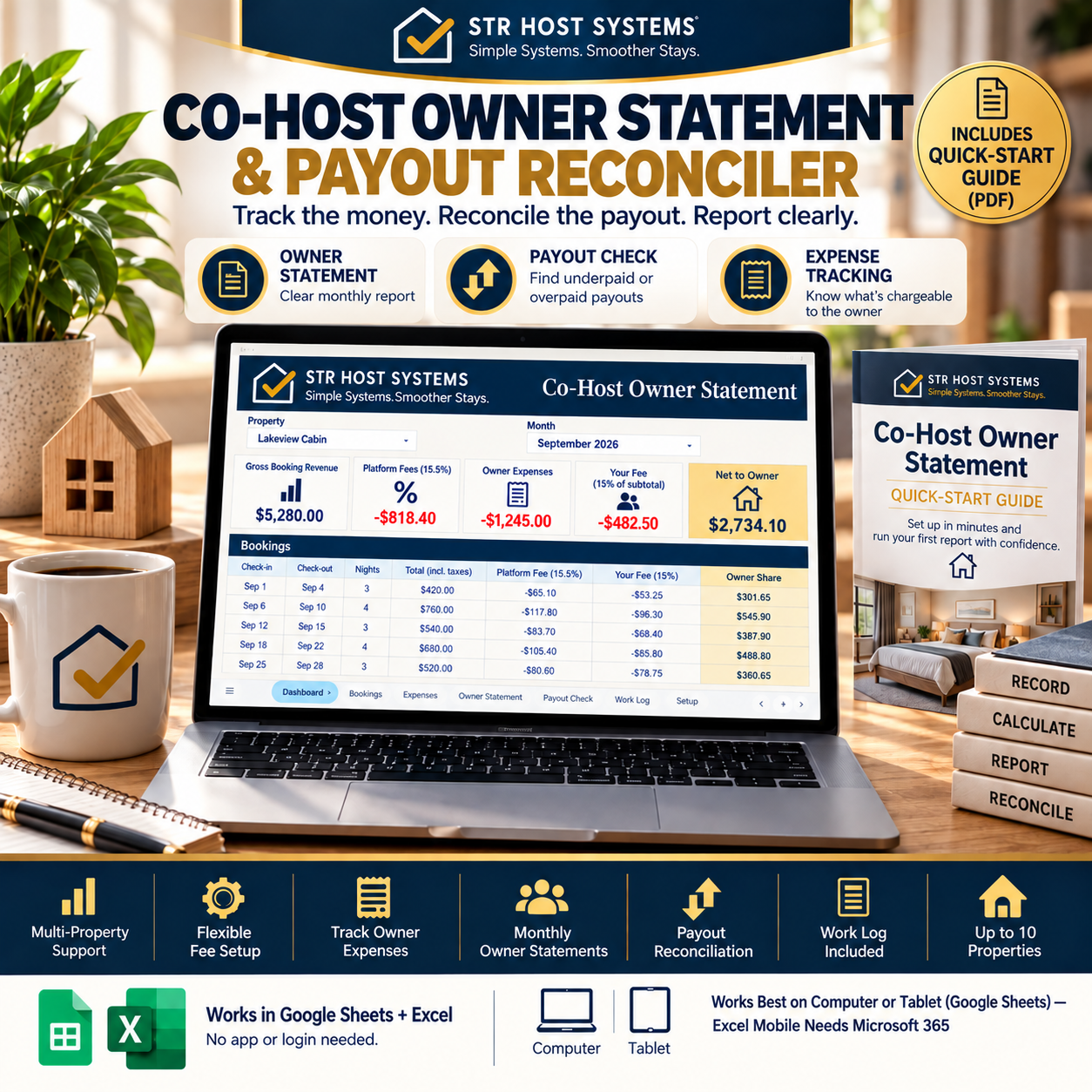
Co-Host Owner Statement & Payout Reconciler
Track the money. Reconcile the payout. Report clearly.
STOP GUESSING WHAT THE OWNER IS ACTUALLY OWED.
If you're co-hosting short-term rentals, the hard part isn't just tracking bookings.
It's keeping the numbers aligned:
Booking revenue.
Platform fees.
Owner expenses.
Your co-host fee.
Owner share.
Actual payout.
When those numbers live in different places, month-end reporting becomes a manual calculation — and payout discrepancies become difficult to explain.
The Co-Host Owner Statement & Payout Reconciler gives you one structured system to record, calculate, report, and reconcile the numbers.
BUILT FOR CO-HOSTS & SMALL PROPERTY MANAGERS
Designed for operators managing multiple owners/properties who want a practical record-keeping system without adding complicated property-management software.
ONE WORKFLOW
SETUP → BOOKINGS → EXPENSES → OWNER STATEMENT → PAYOUT CHECK
WHAT YOU CAN DO
✓ Track booking income
✓ Record platform fees
✓ Track owner-chargeable expenses
✓ Configure your fee arrangement
✓ Create monthly owner statements
✓ Calculate the amount due to the owner
✓ Compare expected vs actual payouts
✓ Identify MATCH / UNDERPAID / OVERPAID situations
✓ Keep a work log
✓ Manage up to 10 properties
YOUR MONTHLY OWNER STATEMENT
Bring the important numbers together in one report:
- Gross Booking Revenue
- Platform Fees
- Owner Expenses
- Your Co-Host Fee
- Net to Owner
No more rebuilding the same calculation from scattered records.
PAYOUT CHECK
The system helps you compare what should have been paid against what was actually received.
MATCH
The numbers align.
UNDERPAID
The actual payout is lower than expected.
OVERPAID
The actual payout is higher than expected.
That gives you a clear reconciliation point when something doesn't match.
WHAT'S INCLUDED
01 — START HERE
Quick-start orientation and workflow.
02 — SETUP
Configure your property, owner, fee arrangement, and reporting inputs.
03 — BOOKINGS
Record booking-level income and payout information.
04 — EXPENSES
Track expenses and identify items marked "Charge to owner."
05 — WORK LOG
Record work performed for each property.
06 — OWNER STATEMENT
Create the monthly owner-facing financial summary.
07 — PAYOUT CHECK
Compare expected vs actual payout.
08 — TAX NOTES
Record-keeping reference area.
GOOGLE SHEETS + EXCEL
Use the system in Google Sheets or Microsoft Excel.
The system is designed for practical computer/tablet use. Excel mobile functionality may require Microsoft 365.
QUICK-START GUIDE INCLUDED
You don't just receive a spreadsheet.
You also receive a Quick-Start Guide that walks you through the system and the monthly workflow so you can get started without figuring everything out yourself.
WHO THIS IS FOR
→ Solo co-hosts
→ Small property managers
→ Short-term-rental operators managing multiple owners
→ Operators who need clearer owner reporting
→ Co-hosts who want a repeatable payout-reconciliation process
THIS IS NOT A PMS REPLACEMENT
This is a focused operational record-keeping and reconciliation system.
It helps you organize the numbers behind your co-hosting operation — without pretending to replace full property-management software.
THE GOAL
Know:
What came in.
What was deducted.
What belongs to the owner.
What belongs to you.
What should have been paid.
Whether the actual payout matches.
TRACK.
CALCULATE.
REPORT.
RECONCILE.
Get your Co-Host Owner Statement & Payout Reconciler and build a cleaner month-end process.
IMPORTANT
This is a record-keeping and operational tool. It is not tax, legal, or accounting advice. Consult an appropriately qualified professional for advice specific to your situation.
FAQ
Does this work in Excel or only Google Sheets?
Both. You get the file in Google Sheets format (make a copy and it's yours) and a Microsoft Excel version. Formulas work in both.
What happens if I manage more than 10 properties?
The system is built for up to 10. If you manage more, duplicate the property tabs — the structure supports it, it's just not pre-built past 10.
Do I need any spreadsheet experience to use this?
No. The Quick-Start Guide walks you through setup step by step. If you can type numbers into a cell, you can run this.
Is this a property management system (PMS)?
No. This is a record-keeping and reconciliation tool, not a PMS. It won't sync bookings automatically — you or your team enter the numbers, and it calculates, reports, and reconciles them.
Does this give tax or legal advice?
No. It includes a record-keeping reference area for your own documentation, but you should consult a tax or accounting professional for anything filing-related.
Can I get support if I get stuck?
Yes — message through Payhip and you'll get a response.
Refund Policy
This is an instant-download digital product. Because the file is delivered immediately, all sales are final — no refunds once the download link has been accessed. If something is broken or not as described, message me first and I'll fix it or make it right.
Simple Systems. Smoother Stays.
— STR Host Systems