

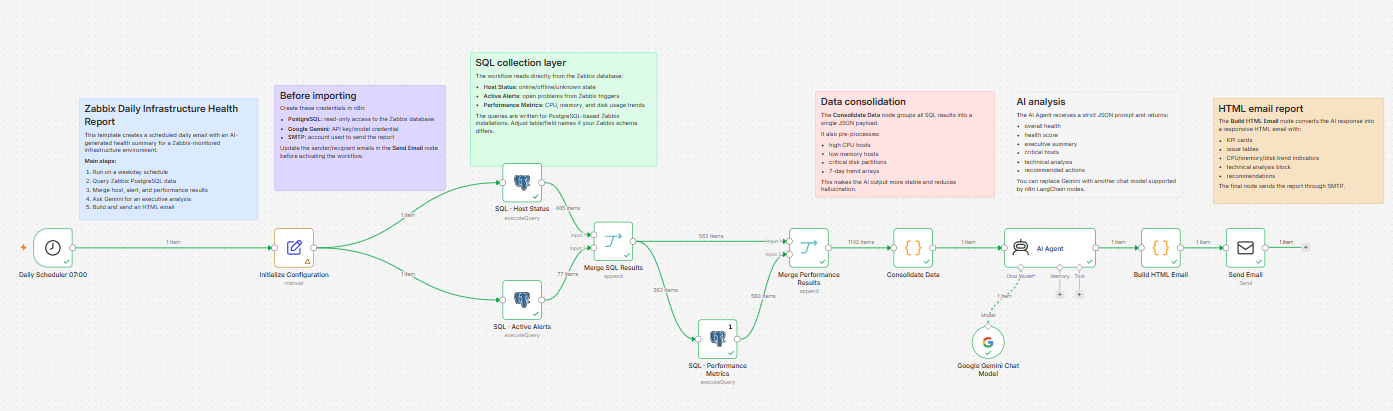
N8N - Daily Zabbix Infrastructure Health Report with Gemini AI and Email
🚀 Daily Zabbix Infrastructure Health Report with Gemini AI and Email
Automatically generate a daily infrastructure health report from Zabbix using PostgreSQL, Gemini AI, and a responsive HTML email report.
📋 Overview
This workflow connects directly to a Zabbix PostgreSQL database and collects:
- 🖥️ Host availability
- 🚨 Active alerts
- 📈 CPU utilization trends
- 🧠 Memory usage
- 💾 Disk consumption and growth
- 📊 Historical performance metrics
The collected data is analyzed by Gemini AI, which generates an executive summary and technical recommendations.
Finally, the workflow sends a beautifully formatted HTML email to your operations team.
✨ Features
✅ Daily scheduled execution
✅ Host availability monitoring
✅ Active Zabbix problem analysis
✅ CPU trend analysis (7-day and 14-day)
✅ Memory availability monitoring
✅ Disk growth forecasting
✅ Environment health score (0–100)
✅ AI-generated executive summary
✅ Technical recommendations
✅ Responsive HTML email report
🏗️ Workflow Steps
1️⃣ Schedule Trigger
Runs automatically every weekday at 07:00 AM.
2️⃣ Host Status Query
Retrieves host availability directly from the Zabbix database.
3️⃣ Active Alerts Query
Collects currently open problems from Zabbix.
4️⃣ Performance Metrics Query
Retrieves:
- CPU metrics
- Memory metrics
- Disk metrics
- Historical trends
5️⃣ Consolidate Data
Builds a structured dataset and prepares the AI prompt.
6️⃣ Gemini AI Analysis
Generates:
- Executive summary
- Health score
- Technical analysis
- Recommendations
7️⃣ Build HTML Report
Creates a responsive email with:
- 📊 Health score
- 🚨 Active issues
- 🔥 High CPU hosts
- 🧠 Low memory hosts
- 💾 Critical disks
- 📈 Trends
- 💡 Recommendations
8️⃣ Send Email
Delivers the final report to the configured recipients.
⚙️ Requirements
🗄️ PostgreSQL
A read-only PostgreSQL user with access to the Zabbix database.
🤖 Gemini API
Google Gemini credentials configured in n8n.
📧 SMTP
SMTP credentials for email delivery.
📡 Zabbix
A Zabbix environment using PostgreSQL.
🔧 Setup Instructions
Step 1
Configure the PostgreSQL credential.
Step 2
Configure your Gemini credential.
Step 3
Configure your SMTP credential.
Step 4
Open the Initialize Configuration node and update:
- Sender email
- Recipient email
- Timezone
- Environment settings
Step 5
Review the SQL queries and adjust:
- Disk partitions
- Item keys
- Host groups
Step 6
Run the workflow manually.
Step 7
Enable the workflow.
👥 Ideal For
- 🖥️ Infrastructure Teams
- 🔧 DevOps Engineers
- 🚨 NOC Teams
- 📈 SRE Teams
- 🏥 Enterprise IT Operations
🏷️ Tags
zabbix
monitoring
postgresql
gemini
ai
reporting
sre
infrastructure
devops
⚠️ Before Publishing
Remove any:
- Internal email addresses
- Company names
- Hostnames
- Private domains
- Internal credential names
The template should be completely generic before submission.