
WP Ez Strummer and Arpeggiator ADV [Kontakt MIDI Tool]
[Before Using]
To check that the product is working properly, please trial "WP Ez Strummer and Arpeggiator"(https://payhip.com/b/ji2Dd) before purchasing.
Open Kontakt's options and go to the Engine tab and turn on "Script generated CCs" and "Script generated notes" in the "Send MIDI to outside world" section. If you don't turn this on, Kontakt will not send MIDI to external tracks.
The location of the options varies depending on the version of Kontakt. Please check the manual for each version.
Due to a Kontakt specification problem, notes played on strumming are turned off at the same time as the keyswitch note off. Therefore, it is not possible to connect strumming notes without gaps between them. Please understand this in advance.
================================================
[Additional features of ADV version]
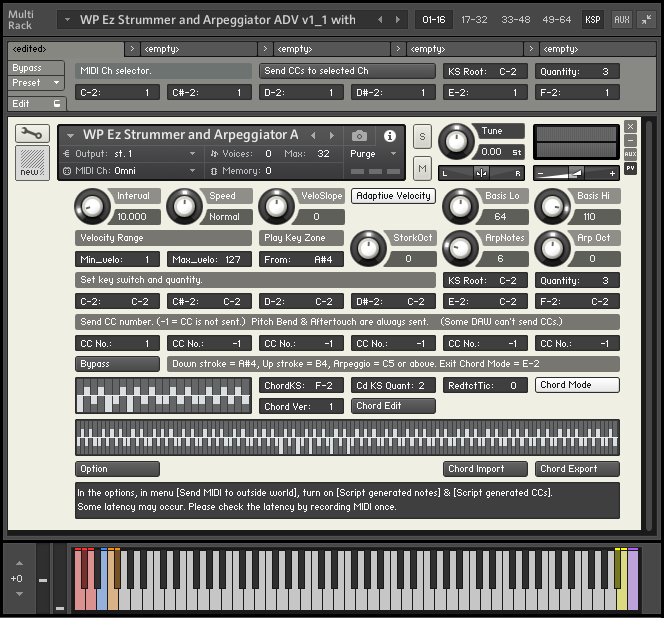
The "ADV" version features "Chord Mode", which automatically analyzes input chords and records free chord forms on them.
Up to 10 different versions of a single code can be recorded. It can be played as strumming or arpeggio.
================================================
[Basic Explanation]
This is a tool for strumming and arpeggiating other track's instruments using Kontakt's MIDI external output function.
The keyboard area of this tool is roughly divided into a zone for specifying the notes to be played (Notes select zone) and a zone for sending the signals that actually play each note (Play key zone).
"Play key zone" is always placed above "Notes select zone", but the starting position can be changed as you like.
Up to six keyswitches for controlling external instruments can be placed.
Keyswitches are placed in the Notes select zone, but can be moved to any location.
If a multi-instrument combined with the "MIDI ch selector" is loaded, the destination MIDI channel can also be changed using the keyswitches while playing.
English and Japanese instructions are included.