

Simple Task 1.2 - Windows
SIMPLE TASK — Illustrator to After Effects, made EASY (af).
Select. Click. Animate.
Send vector paths and editable point text from Adobe Illustrator straight into your active After Effects composition with one click. Spend less time rebuilding artwork and more time bringing it to life.
What you can transfer
- Editable vector paths with Bézier curves, basic solid fills and strokes.
- Compound paths with holes.
- Editable point text with its available font, size, color, alignment and position.
- Stretched or compressed point-text proportions.
- Simple clipping paths as editable masks.
A simple workflow
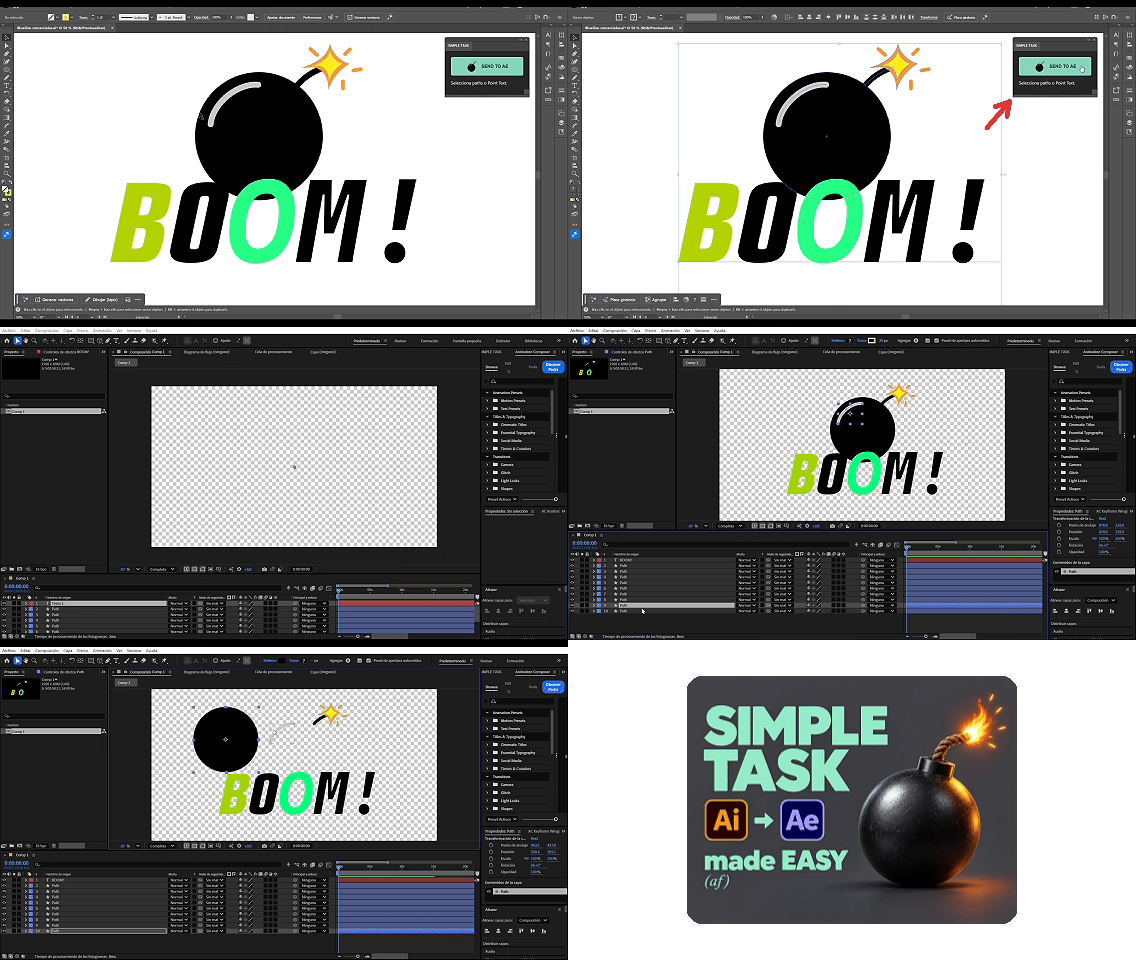
Select your artwork in Illustrator, keep the SIMPLE TASK receiver open in After Effects with your destination composition active, and click SEND TO AE.
Included in your download
Windows installer, installation guide, example artwork, diagnostic tool and version recovery.
Before you buy
Windows only. Requires Adobe Illustrator and After Effects with CEP support. Adobe applications are sold separately, and matching fonts must be available in After Effects.
Some complex fills and clipping groups import as transparent PNGs. Simple two-color gradients may use Gradient Ramp; native editable Gradient Fill color stops are not supported. Point text uses the first character’s style. Mixed text styles, area text, text on a path, opacity masks and text warp are not supported. Compatibility across additional Adobe builds is still being tested.
No activation key required. Software is distributed under the included MIT license. Support is available from DanielBardo through your purchase channel.
SIMPLE TASK is an independent product and is not endorsed by Adobe.